OPEN-SOURCE SCRIPT
SQVIGU BEARISH--Encyclopedia of Chart Patterns
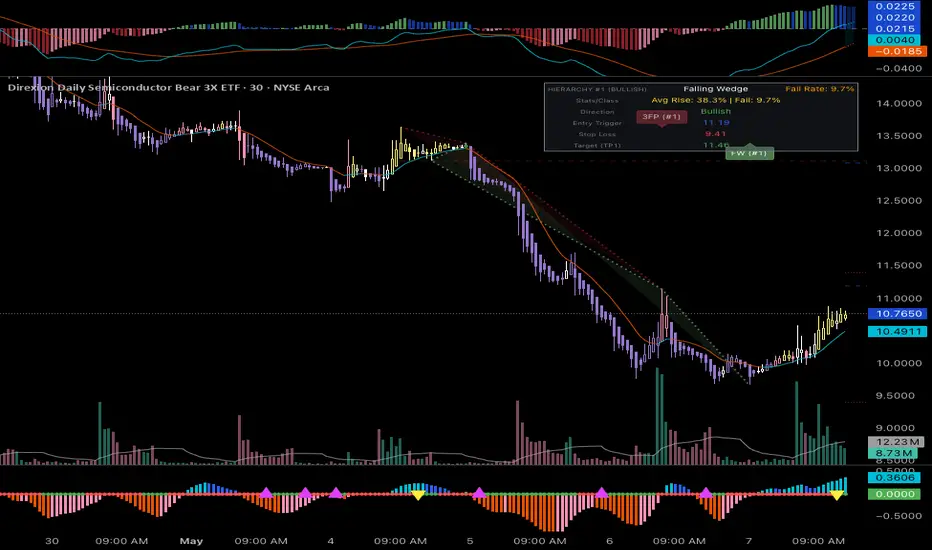
What Does Part 2 Do?
Part 2 is the confirmation engine of the strategy. It sits exactly where you need it [specify location, e.g., as an oscillator at the bottom of your screen OR as a secondary overlay] to filter out market noise and pinpoint exact entry and exit triggers based on [underlying metric, e.g., momentum and volume dynamics].
How to Use Part 2:
• Signal Filtering: Use the [feature, e.g., momentum histogram/oscillator line] to gauge the actual strength behind a price move.
• Precision Entries: Your exact entry trigger occurs when [Specific condition, e.g., the oscillator crosses above the zero line / flashes a green dot].
• Taking Profit: Look for [Specific condition, e.g., overbought/oversold extremes or bearish divergence] to identify optimal areas to scale out of your position.
The Golden Rule (System Integration)
Part 2 gives you the trigger, but you need Part 1 to validate the direction. Only take a Buy trigger on Part 2 if Part 1 is currently in a confirmed Bullish state. Only take a Sell trigger if Part 1 is in a confirmed Bearish state.
Settings & Alerts
• Modify the [Specific setting, e.g., smoothing length] to match your preferred trading timeframe.
• Built-in alerts for [List alert types, e.g., exact entry triggers or divergences].
Part 2 is the confirmation engine of the strategy. It sits exactly where you need it [specify location, e.g., as an oscillator at the bottom of your screen OR as a secondary overlay] to filter out market noise and pinpoint exact entry and exit triggers based on [underlying metric, e.g., momentum and volume dynamics].
How to Use Part 2:
• Signal Filtering: Use the [feature, e.g., momentum histogram/oscillator line] to gauge the actual strength behind a price move.
• Precision Entries: Your exact entry trigger occurs when [Specific condition, e.g., the oscillator crosses above the zero line / flashes a green dot].
• Taking Profit: Look for [Specific condition, e.g., overbought/oversold extremes or bearish divergence] to identify optimal areas to scale out of your position.
The Golden Rule (System Integration)
Part 2 gives you the trigger, but you need Part 1 to validate the direction. Only take a Buy trigger on Part 2 if Part 1 is currently in a confirmed Bullish state. Only take a Sell trigger if Part 1 is in a confirmed Bearish state.
Settings & Alerts
• Modify the [Specific setting, e.g., smoothing length] to match your preferred trading timeframe.
• Built-in alerts for [List alert types, e.g., exact entry triggers or divergences].
نص برمجي مفتوح المصدر
بروح TradingView الحقيقية، قام مبتكر هذا النص البرمجي بجعله مفتوح المصدر، بحيث يمكن للمتداولين مراجعة وظائفه والتحقق منها. شكرا للمؤلف! بينما يمكنك استخدامه مجانًا، تذكر أن إعادة نشر الكود يخضع لقواعد الموقع الخاصة بنا.

إخلاء المسؤولية
لا يُقصد بالمعلومات والمنشورات أن تكون، أو تشكل، أي نصيحة مالية أو استثمارية أو تجارية أو أنواع أخرى من النصائح أو التوصيات المقدمة أو المعتمدة من TradingView. اقرأ المزيد في شروط الاستخدام.
نص برمجي مفتوح المصدر
بروح TradingView الحقيقية، قام مبتكر هذا النص البرمجي بجعله مفتوح المصدر، بحيث يمكن للمتداولين مراجعة وظائفه والتحقق منها. شكرا للمؤلف! بينما يمكنك استخدامه مجانًا، تذكر أن إعادة نشر الكود يخضع لقواعد الموقع الخاصة بنا.
إخلاء المسؤولية
لا يُقصد بالمعلومات والمنشورات أن تكون، أو تشكل، أي نصيحة مالية أو استثمارية أو تجارية أو أنواع أخرى من النصائح أو التوصيات المقدمة أو المعتمدة من TradingView. اقرأ المزيد في شروط الاستخدام.