OPEN-SOURCE SCRIPT
تم تحديثه Custom Candle Highlighter (NY Time)
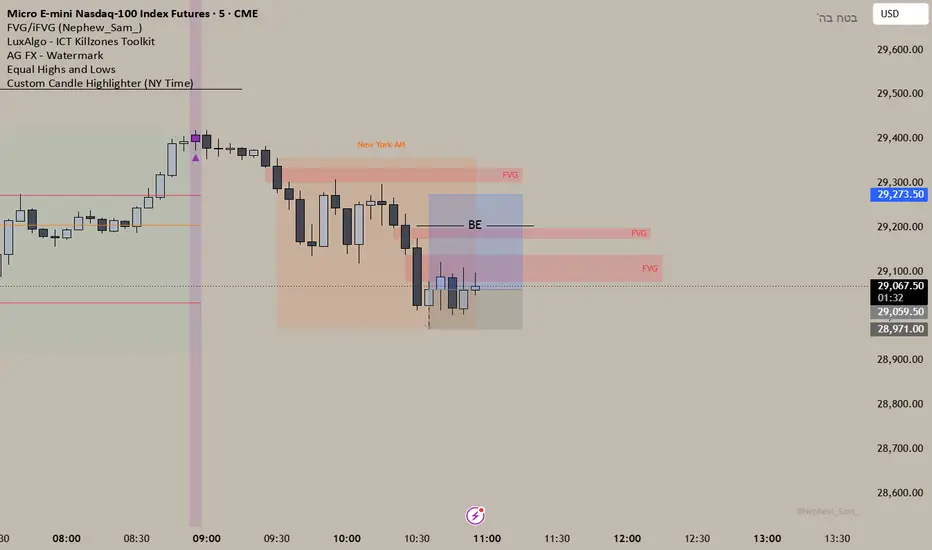
### Overview
This lightweight utility script highlights exactly two specific candles during the trading day based on your custom time inputs. It is designed for traders who track specific key economic releases, market opens, or daily institutional windows.
### Features
* **Precise NY Time Tracking:** The script converts candle times to the New York timezone (`America/New_York`), meaning it automatically adjusts for U.S. Daylight Saving Time (DST). It will remain accurate regardless of your local chart timezone display.
* **Dual Time Inputs:** Easily set two independent times (Hour and Minute) directly from the indicator settings panel without changing the code.
* **Highly Visible Triggers:** When a candle matches your set time, the script highlights it using three visual anchors:
1. Changes the candle body color to Yellow.
2. Applies a soft Yellow background slot behind the candle.
3. Places a tiny green triangle underneath the candle for absolute clarity.
### Important Usage Notes (Best Settings)
* **Timeframe Requirement:** To capture exact minutes (e.g., 08:55 AM), you **must** use this indicator on lower-interval timeframes like the **1-minute (1m)** chart. If you are on a 1-hour chart, individual minute triggers will not paint.
* **Inputs:** Access the settings gear icon to adjust the hours (0-23 format) and minutes (0-59 format) for both the morning and afternoon session targets.
Feel free to leave a comment or drop a like if you find this script useful for your daily routine!
This lightweight utility script highlights exactly two specific candles during the trading day based on your custom time inputs. It is designed for traders who track specific key economic releases, market opens, or daily institutional windows.
### Features
* **Precise NY Time Tracking:** The script converts candle times to the New York timezone (`America/New_York`), meaning it automatically adjusts for U.S. Daylight Saving Time (DST). It will remain accurate regardless of your local chart timezone display.
* **Dual Time Inputs:** Easily set two independent times (Hour and Minute) directly from the indicator settings panel without changing the code.
* **Highly Visible Triggers:** When a candle matches your set time, the script highlights it using three visual anchors:
1. Changes the candle body color to Yellow.
2. Applies a soft Yellow background slot behind the candle.
3. Places a tiny green triangle underneath the candle for absolute clarity.
### Important Usage Notes (Best Settings)
* **Timeframe Requirement:** To capture exact minutes (e.g., 08:55 AM), you **must** use this indicator on lower-interval timeframes like the **1-minute (1m)** chart. If you are on a 1-hour chart, individual minute triggers will not paint.
* **Inputs:** Access the settings gear icon to adjust the hours (0-23 format) and minutes (0-59 format) for both the morning and afternoon session targets.
Feel free to leave a comment or drop a like if you find this script useful for your daily routine!
ملاحظات الأخبار
Changed the colors to purple, I like it more نص برمجي مفتوح المصدر
بروح TradingView الحقيقية، قام مبتكر هذا النص البرمجي بجعله مفتوح المصدر، بحيث يمكن للمتداولين مراجعة وظائفه والتحقق منها. شكرا للمؤلف! بينما يمكنك استخدامه مجانًا، تذكر أن إعادة نشر الكود يخضع لقواعد الموقع الخاصة بنا.

إخلاء المسؤولية
لا يُقصد بالمعلومات والمنشورات أن تكون، أو تشكل، أي نصيحة مالية أو استثمارية أو تجارية أو أنواع أخرى من النصائح أو التوصيات المقدمة أو المعتمدة من TradingView. اقرأ المزيد في شروط الاستخدام.
نص برمجي مفتوح المصدر
بروح TradingView الحقيقية، قام مبتكر هذا النص البرمجي بجعله مفتوح المصدر، بحيث يمكن للمتداولين مراجعة وظائفه والتحقق منها. شكرا للمؤلف! بينما يمكنك استخدامه مجانًا، تذكر أن إعادة نشر الكود يخضع لقواعد الموقع الخاصة بنا.
إخلاء المسؤولية
لا يُقصد بالمعلومات والمنشورات أن تكون، أو تشكل، أي نصيحة مالية أو استثمارية أو تجارية أو أنواع أخرى من النصائح أو التوصيات المقدمة أو المعتمدة من TradingView. اقرأ المزيد في شروط الاستخدام.