تم تحديثه
BK AK-Reaper Drone
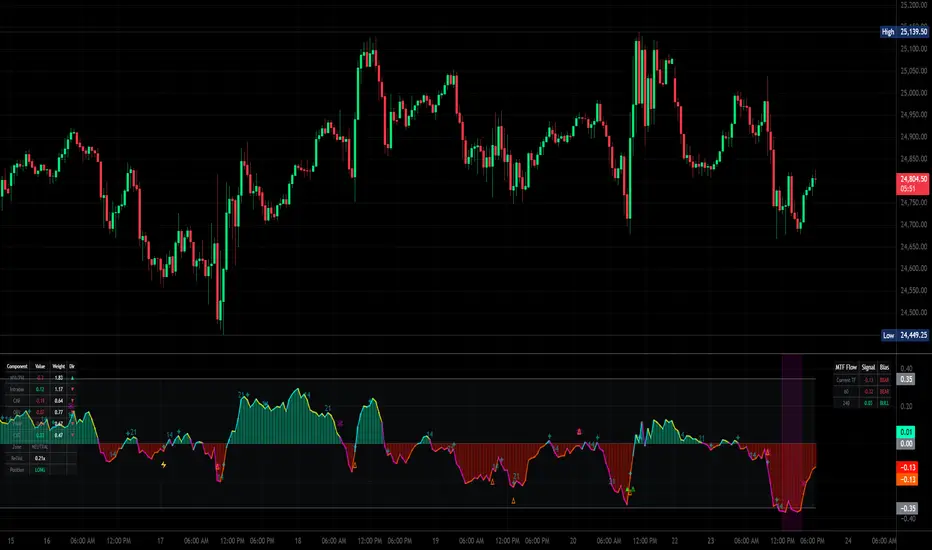
🕹️ BK AK-REAPER-Drone — Multi-Source Flow Composite Engine 🕹️
All glory to G-d — wisdom, restraint, endurance.
Respect to AK — honor, discipline, patience, clean execution.
BK AK-REAPER-Drone is a non-overlay oscillator that builds a single net “flow” signal by fusing multiple volume/participation measurements (and optional external proxies). It is designed to help you distinguish:
SPRING: a quick push into an extreme flow zone that snaps back fast (potential exhaustion / reversal)
TRAP: a prolonged stay in an extreme flow zone (often real pressure / continuation)
It also includes optional exits, MTF confluence, conviction scoring, adaptive weights, divergences, and time-window markers.
Important: This indicator measures flow/participation conditions, not guaranteed price direction. Use risk management. Not financial advice.
1) What You See
Core plots
Net histogram (green/red) and/or Net line (neon 4-quadrant coloring).
Zero line.
Threshold lines/bands (manual or auto).
Markers / events
▲ Long Spring (valley spring)
▼ Short Spring (peak spring)
✕ Exit (if exit engine enabled)
Trap markers + shading (prolonged extremes)
Divergence icons (flow vs price + optional CVD divergence)
Gann time windows (bar-count cycles from an anchor)
Dashboards (optional)
MTF panel (higher timeframe net readings)
Component dashboard (live component values + weights + direction)
ML stats panel (outcome tracking)
2) What The Net Signal Is
The indicator creates normalized component signals, each squashed into a stable range using:
z-score normalization (normLen)
soft cap using tanh (zSoftCap)
hard ratio cap on certain ratios (ratioCap)
Then it computes a weighted composite:
Default “core 5-pack”
NVI/PVI Core (smart vs public participation)
Compares NVI vs PVI deviations from a long EMA, then RSI and ratio logic to estimate “quiet” vs “loud” participation.
1m Intrabar Flow Engine (optional)
If enabled and the selected LTF is truly lower, it reads micro-direction on the 1-minute stream using:
Tick, Candle, or CLV direction method.
If lower-TF data isn’t available/usable, it falls back to a chart-TF approximation.
CMF (Chaikin Money Flow style pressure)
OBV Impulse
EMA of signed volume changes to detect “participation shocks”.
VWAP Deviation
Distance from VWAP (or SMA fallback) scaled by ATR.
Optional add-ons
CVD component (Cumulative Volume Delta approximation) + optional CVD divergence
Decorrelated components (optional): breadth (UVOL/DVOL), IV proxy (VIX), spread proxy (HL range vs ATR)
Auto-decorrelation: reduces weights when CMF/OBV/LTF become too correlated
Finally, the composite becomes:
netRaw → smoothed into netSig via EMA (netSmoothL)
3) Thresholds: How Extremes Are Defined
The engine uses a symmetric threshold ±thrUse:
Manual (thrManual)
Auto (useAutoThr): dynamic threshold from the rolling distribution of |netSig|
thrDyn = mean(|netSig|) + autoK * stdev(|netSig|)
clamped between thrMin and thrMax
Interpretation
netSig > +thrUse = bullish extreme zone
netSig < -thrUse = bearish extreme zone
Between = neutral / non-extreme
4) The SPRING vs TRAP Logic (Key Concept)
This script’s signature feature is time-in-extreme:
Spring (reversal candidate)
A Spring happens when net flow:
enters an extreme zone, then
exits quickly within maxLinger bars, and
the net slope flips in the reversal direction.
Valley Spring (Long) = quick dip into bearish extreme → snaps back out
Peak Spring (Short) = quick spike into bullish extreme → snaps back out
Trap (continuation risk)
A Trap happens when net flow:
stays in the extreme zone longer than maxLinger
Optional trap behavior:
show markers / shade background
block entries for trapBlockBars after a trap (if enabled)
This is what prevents “fading a freight train”: prolonged extremes are treated as pressure, not “overbought/oversold guarantees”.
5) When An Entry Prints (▲ / ▼)
A Spring signal is only printed if these gates pass:
Mandatory (core spring rules)
Spring condition (wasSpringValley or wasSpringPeak)
Slope confirms reversal (slope > 0 for long, < 0 for short)
Component agreement:
At least minCompAgree of the original 5 components confirm
CVD counts as a bonus, not required
Optional gates
Confirm on bar close (confirmBar) to avoid intrabar flicker
Trend filter (trendMode):
Off / Gate / Extremes (allows countertrend only if very deep spring)
Reclaim filter (reclaimFilter):
EMA fast and/or VWAP reclaim requirement
MTF confluence (enableMTF):
Gate mode blocks countertrend
Grade mode allows but tags ✓ / ⚠
Trap blocking (if enabled): blocks entries after trap events
Cooldown (cooldown): minimum bars between signals
6) Conviction Scoring (0–100)
If enabled, every entry gets a score based on:
Component agreement
Penetration depth past the threshold
Reversal speed (how fast it snapped back)
Recent divergence presence
By default it does not hide signals — it just grades them.
If you want fewer signals: raise convMinScore (ex: 30–50).
Arrow color/size can reflect score using:
Gradient
Tier grading (A/B/C/D)
Original colors
7) Exit Signal Engine (Completes the Loop)
If enabled, the script can print explicit exit markers:
Flow reversal
Zero cross
Opposite extreme (profit-target style)
ATR trail stop
Time stop
Composite (any enabled condition)
Exit labels include tooltips with the reason and live component state.
8) Divergences + CVD Divergences
Flow divergence: price makes HH/LL but netSig fails to confirm
Optional CVD divergence: price makes HH/LL but CVD cumulative fails to confirm
These are treated as context, not automatic entries.
9) MTF Confluence + Dashboards
MTF uses a simplified HTF net (core + CMF) on selectable TFs (1H/4H/D).
You can:
block countertrend signals (Gate)
or keep signals but grade alignment (Grade)
Dashboards can display:
MTF values + bias
component values/weights + zone state
ML stats (if enabled)
10) “ML Engine” (What It Really Is)
This module is outcome tracking, not a predictive ML model:
It measures how signals performed after mlOutcomeBars
Tracks win rate and average R (ATR-based proxy)
Optional auto-threshold adjustment and weight adaptation (if enabled)
Use it as feedback / calibration, not as “prediction”.
11) Practical Use
Springs are best treated as reversal opportunities (mean-reversion / exhaustion), not trend continuation.
Traps tell you “this extreme is holding” → avoid fading.
Use MTF to decide whether to scalp small (countertrend) or press (aligned).
If signals feel noisy: increase cooldown, increase minCompAgree, enable confirmBar, and/or raise convMinScore.
12) Limitations / Notes
Lower-TF intrabar and CVD are approximations based on the available volume feed and chosen direction method.
Breadth / VIX symbols may require the right data access and may not exist for all markets.
In thin markets or off-hours, flow tools can behave differently due to liquidity/volume structure.
All glory to G-d — wisdom, restraint, endurance.
Respect to AK — honor, discipline, patience, clean execution.
BK AK-REAPER-Drone is a non-overlay oscillator that builds a single net “flow” signal by fusing multiple volume/participation measurements (and optional external proxies). It is designed to help you distinguish:
SPRING: a quick push into an extreme flow zone that snaps back fast (potential exhaustion / reversal)
TRAP: a prolonged stay in an extreme flow zone (often real pressure / continuation)
It also includes optional exits, MTF confluence, conviction scoring, adaptive weights, divergences, and time-window markers.
Important: This indicator measures flow/participation conditions, not guaranteed price direction. Use risk management. Not financial advice.
1) What You See
Core plots
Net histogram (green/red) and/or Net line (neon 4-quadrant coloring).
Zero line.
Threshold lines/bands (manual or auto).
Markers / events
▲ Long Spring (valley spring)
▼ Short Spring (peak spring)
✕ Exit (if exit engine enabled)
Trap markers + shading (prolonged extremes)
Divergence icons (flow vs price + optional CVD divergence)
Gann time windows (bar-count cycles from an anchor)
Dashboards (optional)
MTF panel (higher timeframe net readings)
Component dashboard (live component values + weights + direction)
ML stats panel (outcome tracking)
2) What The Net Signal Is
The indicator creates normalized component signals, each squashed into a stable range using:
z-score normalization (normLen)
soft cap using tanh (zSoftCap)
hard ratio cap on certain ratios (ratioCap)
Then it computes a weighted composite:
Default “core 5-pack”
NVI/PVI Core (smart vs public participation)
Compares NVI vs PVI deviations from a long EMA, then RSI and ratio logic to estimate “quiet” vs “loud” participation.
1m Intrabar Flow Engine (optional)
If enabled and the selected LTF is truly lower, it reads micro-direction on the 1-minute stream using:
Tick, Candle, or CLV direction method.
If lower-TF data isn’t available/usable, it falls back to a chart-TF approximation.
CMF (Chaikin Money Flow style pressure)
OBV Impulse
EMA of signed volume changes to detect “participation shocks”.
VWAP Deviation
Distance from VWAP (or SMA fallback) scaled by ATR.
Optional add-ons
CVD component (Cumulative Volume Delta approximation) + optional CVD divergence
Decorrelated components (optional): breadth (UVOL/DVOL), IV proxy (VIX), spread proxy (HL range vs ATR)
Auto-decorrelation: reduces weights when CMF/OBV/LTF become too correlated
Finally, the composite becomes:
netRaw → smoothed into netSig via EMA (netSmoothL)
3) Thresholds: How Extremes Are Defined
The engine uses a symmetric threshold ±thrUse:
Manual (thrManual)
Auto (useAutoThr): dynamic threshold from the rolling distribution of |netSig|
thrDyn = mean(|netSig|) + autoK * stdev(|netSig|)
clamped between thrMin and thrMax
Interpretation
netSig > +thrUse = bullish extreme zone
netSig < -thrUse = bearish extreme zone
Between = neutral / non-extreme
4) The SPRING vs TRAP Logic (Key Concept)
This script’s signature feature is time-in-extreme:
Spring (reversal candidate)
A Spring happens when net flow:
enters an extreme zone, then
exits quickly within maxLinger bars, and
the net slope flips in the reversal direction.
Valley Spring (Long) = quick dip into bearish extreme → snaps back out
Peak Spring (Short) = quick spike into bullish extreme → snaps back out
Trap (continuation risk)
A Trap happens when net flow:
stays in the extreme zone longer than maxLinger
Optional trap behavior:
show markers / shade background
block entries for trapBlockBars after a trap (if enabled)
This is what prevents “fading a freight train”: prolonged extremes are treated as pressure, not “overbought/oversold guarantees”.
5) When An Entry Prints (▲ / ▼)
A Spring signal is only printed if these gates pass:
Mandatory (core spring rules)
Spring condition (wasSpringValley or wasSpringPeak)
Slope confirms reversal (slope > 0 for long, < 0 for short)
Component agreement:
At least minCompAgree of the original 5 components confirm
CVD counts as a bonus, not required
Optional gates
Confirm on bar close (confirmBar) to avoid intrabar flicker
Trend filter (trendMode):
Off / Gate / Extremes (allows countertrend only if very deep spring)
Reclaim filter (reclaimFilter):
EMA fast and/or VWAP reclaim requirement
MTF confluence (enableMTF):
Gate mode blocks countertrend
Grade mode allows but tags ✓ / ⚠
Trap blocking (if enabled): blocks entries after trap events
Cooldown (cooldown): minimum bars between signals
6) Conviction Scoring (0–100)
If enabled, every entry gets a score based on:
Component agreement
Penetration depth past the threshold
Reversal speed (how fast it snapped back)
Recent divergence presence
By default it does not hide signals — it just grades them.
If you want fewer signals: raise convMinScore (ex: 30–50).
Arrow color/size can reflect score using:
Gradient
Tier grading (A/B/C/D)
Original colors
7) Exit Signal Engine (Completes the Loop)
If enabled, the script can print explicit exit markers:
Flow reversal
Zero cross
Opposite extreme (profit-target style)
ATR trail stop
Time stop
Composite (any enabled condition)
Exit labels include tooltips with the reason and live component state.
8) Divergences + CVD Divergences
Flow divergence: price makes HH/LL but netSig fails to confirm
Optional CVD divergence: price makes HH/LL but CVD cumulative fails to confirm
These are treated as context, not automatic entries.
9) MTF Confluence + Dashboards
MTF uses a simplified HTF net (core + CMF) on selectable TFs (1H/4H/D).
You can:
block countertrend signals (Gate)
or keep signals but grade alignment (Grade)
Dashboards can display:
MTF values + bias
component values/weights + zone state
ML stats (if enabled)
10) “ML Engine” (What It Really Is)
This module is outcome tracking, not a predictive ML model:
It measures how signals performed after mlOutcomeBars
Tracks win rate and average R (ATR-based proxy)
Optional auto-threshold adjustment and weight adaptation (if enabled)
Use it as feedback / calibration, not as “prediction”.
11) Practical Use
Springs are best treated as reversal opportunities (mean-reversion / exhaustion), not trend continuation.
Traps tell you “this extreme is holding” → avoid fading.
Use MTF to decide whether to scalp small (countertrend) or press (aligned).
If signals feel noisy: increase cooldown, increase minCompAgree, enable confirmBar, and/or raise convMinScore.
12) Limitations / Notes
Lower-TF intrabar and CVD are approximations based on the available volume feed and chosen direction method.
Breadth / VIX symbols may require the right data access and may not exist for all markets.
In thin markets or off-hours, flow tools can behave differently due to liquidity/volume structure.
ملاحظات الأخبار
FP
إخلاء المسؤولية
لا يُقصد بالمعلومات والمنشورات أن تكون، أو تشكل، أي نصيحة مالية أو استثمارية أو تجارية أو أنواع أخرى من النصائح أو التوصيات المقدمة أو المعتمدة من TradingView. اقرأ المزيد في شروط الاستخدام.
إخلاء المسؤولية
لا يُقصد بالمعلومات والمنشورات أن تكون، أو تشكل، أي نصيحة مالية أو استثمارية أو تجارية أو أنواع أخرى من النصائح أو التوصيات المقدمة أو المعتمدة من TradingView. اقرأ المزيد في شروط الاستخدام.