More exclusive indicators from SimpleCryptoLife
Subscribe to Beyond Market Structure Pro Suite for $18.00/month to get exclusive indicators by this author. You pay right on TradingView and can use them on your charts straight away.
Explore Beyond Market Structure Pro SuitePlay real, full games of Chess against the computer, live on your chart. The first playable chess on TradingView.
🟩 HIGHLIGHTS
⭐ Genuine independent gameplay - infinite different games possible.
⭐ The computer ranked over 1200 at Blitz across 100+ rated games on a popular online chess website.
⭐ Optional trash talk from the computer.
⭐ Play as White or Black, with the board flipped so your pieces sit at the bottom.
⭐ The computer thinks and responds fast.
⭐ Only legal moves are allowed.
⭐ The computer knows all the rules of chess including en passant, castling, check, checkmate, and the threefold repetition draw.
⭐ The to and from squares of the most recent move from both sides are highlighted on the board.
⭐ Captured pieces are displayed; just-captured pieces are highlighted.
⭐ The colour scheme adjusts to light or dark chart backgrounds.
⭐ The computer sometimes resigns if it's about to lose, and sometimes lets you complete the win 🎉
🟩 SET UP THE FIRST GAME
Add the script to a chart with some history (it warns you if there's not enough); any timeframe, doesn't matter if the market is open or not.
The script opens on a separate pane below the main chart, appearing cut-off.
1. Don't panic.
2. Double-click the chart background to maximise the Chess pane and hide your chart (double-click again to get your chart back).
3. As an alternative, you can click the three dots next to the Chess script name and choose Move to > Existing pane above and then Hide the chart symbol.
4. The default settings should be good to get you started playing, although you might need to adjust the square height and width so that the chess board looks nicely square on your particular chart.
🟩 PLAY THE GAME
Let's play.
1. Open the indicator Settings dialog and move it to the side so you can see the board.
2. Type your move into the Moves text field. Use coordinate notation: `e2e4`, `g1f3`, `e7e8q`, etc.
3. Don't click OK, 'cos then you'll have to re-open the Settings. Instead, hit Enter. This makes the script pick up the changed text input.
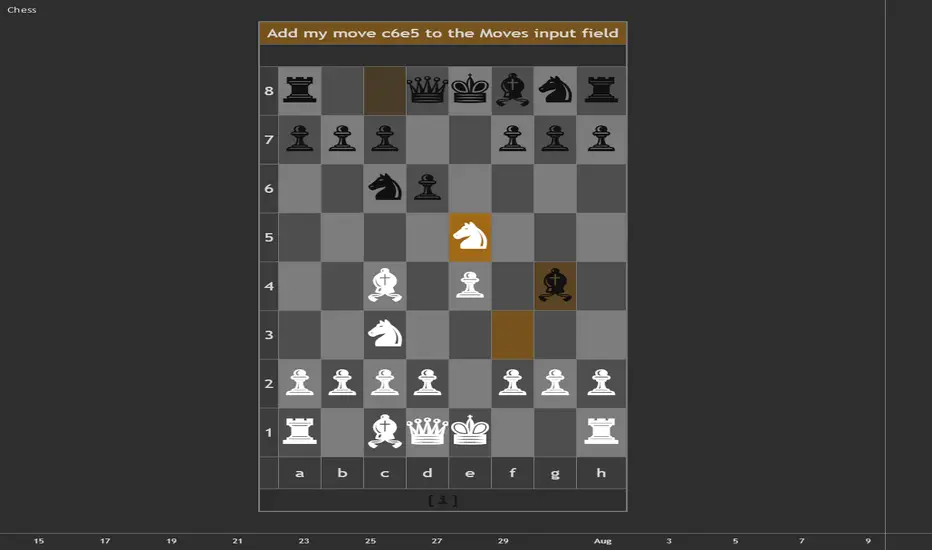
4. The computer thinks a little (on my system, almost instantly) and then announces its move. It will say something like `Add my move d7d5 to the Moves input field`. The table cell goes orange.
5. Type that move into the Moves input field and hit Enter. The cell's orange colour disappears, and it tells you that it's your move. If you have trash talk on, it might comment about your move or its move.
If you enter an illegal move, the computer will tell you. It will try to help you if it recognises what you might have meant.
If you enter a move wrong, you can just delete it and press Enter and the game resumes from that point.
To save a game or show it to someone else with the same Chess script loaded, just copy the text out of the Moves input field (you'll need Replies: Deterministic set to ensure it makes the same next move).
Have fun! The computer will joke around with you even as it beats you (or you beat it).
🟩 RELOAD THE CHART TO PLAY THE NEXT GAME
To ensure that the computer can (if it wants) play different moves against the same position next game, leave Replies set on Random, and save and reload the board in between games.
Note that moves that are already entered are not changed. Only a pending move - one that the computer announced but you haven't yet typed in - can change if you reload the chart or change input values, and only if Replies: Random is selected in the settings.
🟩 ALL THE SETTINGS
Here are all the settings and what they do.
🟩 CREDITS
Thanks to The_Peaceful_Lizard for discussions all that time ago about whether gameplay is possible in Pine.
Thanks to my beta testers for valuable usability feedback.
🟩 HOW TO CODE GAMEPLAY IN PINE
Turn-based gameplay as we know it is almost impossible. To play a game you need to make a move. So you need to tell the script something. All the possible ways to interact with a script are:
- Changing an input value (including interactive `input.time()` and `input.price()` lines).
- A value output from another script changing, if the consuming script reads it using `input.source()`.
- Scrolling or zooming the chart, if the script uses `chart.left_visible_bar_time()` or `chart.right_visible_bar_time()`.
- Changing the chart symbol or timeframe.
The latter two are not informative enough to build a game move from. And in any case, any change from this list reloads the script.
What happens when the script reloads? It forgets everything. This is actually a good thing, and by design, because a chart indicator needs to read from bar zero again if any of its inputs change, so that it can do all its calculations again and make sure they are accurate with the new settings. However, it means that there is nowhere to keep the game state:
- All variables reset, even `var` and `varip` ones.
- All drawings, plots, shapes, etc disappear.
- Pine cannot write to any external data source.
- Logs start from zero.
The only thing that persists is the most recent input values.
This means that the entire game state must be deterministically derivable from the values of inputs. Practically speaking, you must enter both your move and the computer's reply into inputs. That's the trick: the board is not stored between edits, it is re-derived from the move record (the computer checks ALL moves again, every move, that they are legal).
This pattern is actually already demonstrated in the only example of true gameplay in Pine that I was able to find: "Tic Tac Toe (For Fun)" by the Wizard LonesomeTheBlue
🟩 HOW TO MAKE CHESS POSSIBLE IN PINE
The problem with chess is that there are so many possible moves that trying to foresee the responses to your move and the responses to that move and so on quickly becomes computationally impossible. Especially in a lightweight scripting language like Pine, which has limits on how long a script can take to run a loop or perform all its calculations.
The main thing you need to do is narrow it all down. So in building this thing from scratch, I started with some heuristics. What are some patterns when you play chess? If you're in check, you have to get out. If you're attacked, you defend. If you still have minor pieces on the back rank, you should probly get them out. And so on.
I quickly realised that not only did these rules hugely narrow down the number of things you need to calculate, but they stack in order of importance. The number one rule, for example, is: if you can win the game this move, you should. Nothing else can go before that. Developing your pieces, by contrast, comes somewhere at the back of the queue. And the others fall in line in between.
Another thing that comes fairly cheap is knowing the openings. I was always too lazy to memorise chess openings, but that's not a problem for a computer. I also figured that nailing the opening would put my engine in a good place for the midgame, and maybe cover up some weaknesses. Many of the rules are pitched slightly aggressive for the same reason 😆
🟩 MY LADDER
When you put a bunch of rules in priority order, you get a ladder.
SPOILER: If you want to enjoy a fresh game against the script, stop reading and play. Going further will give you insight into how it thinks (or avoids thinking) and allow you to beat it more easily.
Here's my chess ladder:
1. Mate in one.
2. Opening book.
3. Avoid checkmate.
4. Defence.
5. Win material.
6. Safe check.
7. Exchange when ahead.
8. Endgame.
9. Develop.
10. Any other safe move.
When you follow this ladder in order, it turns out, it looks quite a lot like you're playing chess. After I'd finished the script I found out that some very early chess engines did something similar (they likely had far weaker performance than mine), but modern ones function mainly by crunching predictions and even the most handicapped Stockfish engine is still stronger than this script.
On top of the ladder, you do need to layer in a little bit of actual looking ahead, or the engine makes terrible blunders. And you need to constrain that lookahead in turn with its own heuristics, so that you only map out a few moves and not an exponential number.
And there is a lot, lot more after that, like how we value pieces (we will deliberately lose material in an exchange when we're up big, because it hurts our opponent more), how we avoid forks, how we avoid repeating the same moves, and so on.
Still this is all smoke and mirrors - the engine doesn't really understand what makes a good position, or a good attack, or an elegant defence. It just does stuff.
🟩 HOW THIS SCRIPT WORKS END TO END
Here's what happens when you type a move and hit Enter:
Then you add its move to yours, hit Enter, and the entire thing runs again from bar zero: approves every past move, rebuilds the whole board, and chooses the next reply.
🟩 ARCHITECTURAL LESSONS
There are some things we did here that apply also to non-chess Pine scripts.
✨ "Library-first" design
Every large chunk was designed from the beginning to be its own library:
- Chess is the user-facing script that imports all the libraries.
- ChessAI decides the next move.
- ChessBook holds the openings.
- ChessCore does rules, the board, and what's legal.
- ChessTalk stores the trash talk.
Some libraries only hold data, and this split of calculations and data allows us to, for example, add more talk lines without republishing other libraries.
The main script and libraries together total ~5,000 lines, far too much to be manageable for a single script. Using libraries keeps everything organised and makes such a complex script possible.
Library-first design keeps you in control, as opposed to being forced to refactor functions into libraries when a script gets too big.
✨ Split work across bars
We do the work across historical bars, one small step per bar, so the live bar only has to draw the finished board. This prevents any one bar exceeding any timeouts. The ladder architecture makes this quite natural. For robustness, each stage declares its own completion, rather than using a hardcoded number of bars. We predict how many bars we'll need and warn if there's not enough. This pattern can help scripts with heavy calculations stay within budget.
✨ Draw once
We do all the calculations during historical bars and draw the board only on the last bar. In general, separating calculations from drawing is a good idea.
✨ Seeded randomness
If you want a random result (technically, pseudorandom) in Pine you can use `math.random()`. This returns a different number each time. We use random numbers to choose between equally promising options for the computer's moves.
However, sometimes you want a reproducible random result. You want the same random number each time the script runs. Fortunately, `math.random()` can take a `seed` parameter, and if this seed is the same, then the sequence of random numbers is the same.
For chess, the computer's choice of move must remain stable and not change to something else on the next tick of a realtime bar (seeing this happen in testing was quite a surprise). So we derive a seed from the move record. This means that for any given game, the computer's move is both random and repeatable. This helps a lot with testing.
For real games though, we want the user to be able to play the same moves next game and get a different reply from the computer (potentially; remember the computer can't remember what it did in any previous game). So for this reason, if Replies is set to Random, we also mix the script's loading time into the random seed (and each new move loads the script again). Reloading the chart now gives a new stable random sequence even for the same moves.
Understanding seeded randomness can be necessary for some scripts to use variety properly.
✨ Objects and library hierarchy
Libraries can import each other, but not in a circular way. Our lowest-level library declares object types, for example, for moves, but doesn't put data in them; the higher libraries do that.
When a more foundational library needs data that a higher-level library creates, a good pattern is for the lower library to create an object with fields that the higher library fills in. This avoids having to maintain parallel arrays so they don't get out of synch.
🟩 HIGHLIGHTS
⭐ Genuine independent gameplay - infinite different games possible.
⭐ The computer ranked over 1200 at Blitz across 100+ rated games on a popular online chess website.
⭐ Optional trash talk from the computer.
⭐ Play as White or Black, with the board flipped so your pieces sit at the bottom.
⭐ The computer thinks and responds fast.
⭐ Only legal moves are allowed.
⭐ The computer knows all the rules of chess including en passant, castling, check, checkmate, and the threefold repetition draw.
⭐ The to and from squares of the most recent move from both sides are highlighted on the board.
⭐ Captured pieces are displayed; just-captured pieces are highlighted.
⭐ The colour scheme adjusts to light or dark chart backgrounds.
⭐ The computer sometimes resigns if it's about to lose, and sometimes lets you complete the win 🎉
🟩 SET UP THE FIRST GAME
Add the script to a chart with some history (it warns you if there's not enough); any timeframe, doesn't matter if the market is open or not.
The script opens on a separate pane below the main chart, appearing cut-off.
1. Don't panic.
2. Double-click the chart background to maximise the Chess pane and hide your chart (double-click again to get your chart back).
3. As an alternative, you can click the three dots next to the Chess script name and choose Move to > Existing pane above and then Hide the chart symbol.
4. The default settings should be good to get you started playing, although you might need to adjust the square height and width so that the chess board looks nicely square on your particular chart.
🟩 PLAY THE GAME
Let's play.
1. Open the indicator Settings dialog and move it to the side so you can see the board.
2. Type your move into the Moves text field. Use coordinate notation: `e2e4`, `g1f3`, `e7e8q`, etc.
3. Don't click OK, 'cos then you'll have to re-open the Settings. Instead, hit Enter. This makes the script pick up the changed text input.
4. The computer thinks a little (on my system, almost instantly) and then announces its move. It will say something like `Add my move d7d5 to the Moves input field`. The table cell goes orange.
5. Type that move into the Moves input field and hit Enter. The cell's orange colour disappears, and it tells you that it's your move. If you have trash talk on, it might comment about your move or its move.
If you enter an illegal move, the computer will tell you. It will try to help you if it recognises what you might have meant.
If you enter a move wrong, you can just delete it and press Enter and the game resumes from that point.
To save a game or show it to someone else with the same Chess script loaded, just copy the text out of the Moves input field (you'll need Replies: Deterministic set to ensure it makes the same next move).
Have fun! The computer will joke around with you even as it beats you (or you beat it).
🟩 RELOAD THE CHART TO PLAY THE NEXT GAME
To ensure that the computer can (if it wants) play different moves against the same position next game, leave Replies set on Random, and save and reload the board in between games.
Note that moves that are already entered are not changed. Only a pending move - one that the computer announced but you haven't yet typed in - can change if you reload the chart or change input values, and only if Replies: Random is selected in the settings.
🟩 ALL THE SETTINGS
Here are all the settings and what they do.
- Moves: Holds your moves and the computer's moves. You can separate moves with a comma or a space or a new line. Only a new line, or some other change to the settings, triggers a script refresh and another move.
- Play as: Choose who you want to play as. The board flips so that your pieces are always closest to you.
- Thinking: Choose Deep so that the computer uses all of its tiny brain against you. Or Quick if you feel that it's responding too slowly or you run into timeout errors.
- Replies: Choose Random so that the computer can play different moves against the same position next game (requires a chart reload to clear cache). It often still plays its favourite move but if it has two favourites, it can also choose between them. Choose Deterministic so that the computer always plays the same move given the same position (move sequence), even on a different chart, tab, or after a reload. This is useful for saving games or playing through saved games. For casual play, choose Random. Note: If you change any inputs to a new combination, the computer might choose a different reply if Random is selected.
- Trash Talk: Enable this setting so the computer can misquote pop culture references at you.
- Board: Move the board to the left, right, or centre.
- Piece size: Make the pieces more bigger or smallerer.
- Square width, height: Adjust the percentage sizes so that the squares look, well, square. The right ratio depends on your monitor.
- Calculated Bars: This setting is precautionary to prevent any slowdown on long charts. Leave this at the default.
🟩 CREDITS
Thanks to The_Peaceful_Lizard for discussions all that time ago about whether gameplay is possible in Pine.
Thanks to my beta testers for valuable usability feedback.
🟩 HOW TO CODE GAMEPLAY IN PINE
Turn-based gameplay as we know it is almost impossible. To play a game you need to make a move. So you need to tell the script something. All the possible ways to interact with a script are:
- Changing an input value (including interactive `input.time()` and `input.price()` lines).
- A value output from another script changing, if the consuming script reads it using `input.source()`.
- Scrolling or zooming the chart, if the script uses `chart.left_visible_bar_time()` or `chart.right_visible_bar_time()`.
- Changing the chart symbol or timeframe.
The latter two are not informative enough to build a game move from. And in any case, any change from this list reloads the script.
What happens when the script reloads? It forgets everything. This is actually a good thing, and by design, because a chart indicator needs to read from bar zero again if any of its inputs change, so that it can do all its calculations again and make sure they are accurate with the new settings. However, it means that there is nowhere to keep the game state:
- All variables reset, even `var` and `varip` ones.
- All drawings, plots, shapes, etc disappear.
- Pine cannot write to any external data source.
- Logs start from zero.
The only thing that persists is the most recent input values.
This means that the entire game state must be deterministically derivable from the values of inputs. Practically speaking, you must enter both your move and the computer's reply into inputs. That's the trick: the board is not stored between edits, it is re-derived from the move record (the computer checks ALL moves again, every move, that they are legal).
This pattern is actually already demonstrated in the only example of true gameplay in Pine that I was able to find: "Tic Tac Toe (For Fun)" by the Wizard LonesomeTheBlue
🟩 HOW TO MAKE CHESS POSSIBLE IN PINE
The problem with chess is that there are so many possible moves that trying to foresee the responses to your move and the responses to that move and so on quickly becomes computationally impossible. Especially in a lightweight scripting language like Pine, which has limits on how long a script can take to run a loop or perform all its calculations.
The main thing you need to do is narrow it all down. So in building this thing from scratch, I started with some heuristics. What are some patterns when you play chess? If you're in check, you have to get out. If you're attacked, you defend. If you still have minor pieces on the back rank, you should probly get them out. And so on.
I quickly realised that not only did these rules hugely narrow down the number of things you need to calculate, but they stack in order of importance. The number one rule, for example, is: if you can win the game this move, you should. Nothing else can go before that. Developing your pieces, by contrast, comes somewhere at the back of the queue. And the others fall in line in between.
Another thing that comes fairly cheap is knowing the openings. I was always too lazy to memorise chess openings, but that's not a problem for a computer. I also figured that nailing the opening would put my engine in a good place for the midgame, and maybe cover up some weaknesses. Many of the rules are pitched slightly aggressive for the same reason 😆
🟩 MY LADDER
When you put a bunch of rules in priority order, you get a ladder.
SPOILER: If you want to enjoy a fresh game against the script, stop reading and play. Going further will give you insight into how it thinks (or avoids thinking) and allow you to beat it more easily.
Here's my chess ladder:
1. Mate in one.
2. Opening book.
3. Avoid checkmate.
4. Defence.
5. Win material.
6. Safe check.
7. Exchange when ahead.
8. Endgame.
9. Develop.
10. Any other safe move.
When you follow this ladder in order, it turns out, it looks quite a lot like you're playing chess. After I'd finished the script I found out that some very early chess engines did something similar (they likely had far weaker performance than mine), but modern ones function mainly by crunching predictions and even the most handicapped Stockfish engine is still stronger than this script.
On top of the ladder, you do need to layer in a little bit of actual looking ahead, or the engine makes terrible blunders. And you need to constrain that lookahead in turn with its own heuristics, so that you only map out a few moves and not an exponential number.
And there is a lot, lot more after that, like how we value pieces (we will deliberately lose material in an exchange when we're up big, because it hurts our opponent more), how we avoid forks, how we avoid repeating the same moves, and so on.
Still this is all smoke and mirrors - the engine doesn't really understand what makes a good position, or a good attack, or an elegant defence. It just does stuff.
🟩 HOW THIS SCRIPT WORKS END TO END
Here's what happens when you type a move and hit Enter:
- Parse (bar zero). The input move text becomes board coordinates (via the ChessCore library). The tidied-up record also produces the random seed (via ChessAI), and the opening book (ChessBook) and the trash-talk banks (ChessTalk) get built.
- Replay (one bar per move). For each move in the record, in order: generate every legal move in the current position, check that the next typed move is one of them, and if so apply it to the board. Along the way it collects captured pieces, watches for Game Over, and takes a fingerprint of each position so it can spot a threefold repetition. All ChessCore.
- Prepare (one bar). If it's now the computer's turn: generate ALL its legal moves (ChessCore), note how well defended each move's landing square is, and flag moves that weaken the king's cover or just undo the previous move (ChessAI).
- Foresee (up to three bars per candidate move). Score every potential move by how its story ends, in material: the opponent's best captures played all the way down the exchange, his checks, his quiet threats. The ChessAI library plays the stories out on ChessCore scratch boards.
- The ladder (one rule per bar). Try the ten rules top down. The first that fires chooses the move. The scores from the foresee veto the doomed candidates in every rule, and break ties in some. ChessAI does all this, and rule 2 reads the ChessBook openings.
- Done. The live bar draws the board and the status row announces the computer's move for you to type in. The live bar computes nothing - it only reads what the historical bars decided. The main Chess script draws, and any one-liners came from ChessTalk's banks.
Then you add its move to yours, hit Enter, and the entire thing runs again from bar zero: approves every past move, rebuilds the whole board, and chooses the next reply.
🟩 ARCHITECTURAL LESSONS
There are some things we did here that apply also to non-chess Pine scripts.
✨ "Library-first" design
Every large chunk was designed from the beginning to be its own library:
- Chess is the user-facing script that imports all the libraries.
- ChessAI decides the next move.
- ChessBook holds the openings.
- ChessCore does rules, the board, and what's legal.
- ChessTalk stores the trash talk.
Some libraries only hold data, and this split of calculations and data allows us to, for example, add more talk lines without republishing other libraries.
The main script and libraries together total ~5,000 lines, far too much to be manageable for a single script. Using libraries keeps everything organised and makes such a complex script possible.
Library-first design keeps you in control, as opposed to being forced to refactor functions into libraries when a script gets too big.
✨ Split work across bars
We do the work across historical bars, one small step per bar, so the live bar only has to draw the finished board. This prevents any one bar exceeding any timeouts. The ladder architecture makes this quite natural. For robustness, each stage declares its own completion, rather than using a hardcoded number of bars. We predict how many bars we'll need and warn if there's not enough. This pattern can help scripts with heavy calculations stay within budget.
✨ Draw once
We do all the calculations during historical bars and draw the board only on the last bar. In general, separating calculations from drawing is a good idea.
✨ Seeded randomness
If you want a random result (technically, pseudorandom) in Pine you can use `math.random()`. This returns a different number each time. We use random numbers to choose between equally promising options for the computer's moves.
However, sometimes you want a reproducible random result. You want the same random number each time the script runs. Fortunately, `math.random()` can take a `seed` parameter, and if this seed is the same, then the sequence of random numbers is the same.
For chess, the computer's choice of move must remain stable and not change to something else on the next tick of a realtime bar (seeing this happen in testing was quite a surprise). So we derive a seed from the move record. This means that for any given game, the computer's move is both random and repeatable. This helps a lot with testing.
For real games though, we want the user to be able to play the same moves next game and get a different reply from the computer (potentially; remember the computer can't remember what it did in any previous game). So for this reason, if Replies is set to Random, we also mix the script's loading time into the random seed (and each new move loads the script again). Reloading the chart now gives a new stable random sequence even for the same moves.
Understanding seeded randomness can be necessary for some scripts to use variety properly.
✨ Objects and library hierarchy
Libraries can import each other, but not in a circular way. Our lowest-level library declares object types, for example, for moves, but doesn't put data in them; the higher libraries do that.
When a more foundational library needs data that a higher-level library creates, a good pattern is for the lower library to create an object with fields that the higher library fills in. This avoids having to maintain parallel arrays so they don't get out of synch.
ملاحظات الأخبار
Minor display changes.
🔥 Beyond Market Structure Paid Space is now live! is.gd/beyondMS
🆓 All my free scripts: is.gd/simplefree
🆓 All my free scripts: is.gd/simplefree
إخلاء المسؤولية
لا يُقصد بالمعلومات والمنشورات أن تكون، أو تشكل، أي نصيحة مالية أو استثمارية أو تجارية أو أنواع أخرى من النصائح أو التوصيات المقدمة أو المعتمدة من TradingView. اقرأ المزيد في شروط الاستخدام.
🔥 Beyond Market Structure Paid Space is now live! is.gd/beyondMS
🆓 All my free scripts: is.gd/simplefree
🆓 All my free scripts: is.gd/simplefree
إخلاء المسؤولية
لا يُقصد بالمعلومات والمنشورات أن تكون، أو تشكل، أي نصيحة مالية أو استثمارية أو تجارية أو أنواع أخرى من النصائح أو التوصيات المقدمة أو المعتمدة من TradingView. اقرأ المزيد في شروط الاستخدام.