CONTINO - FVG & iFVG Premium
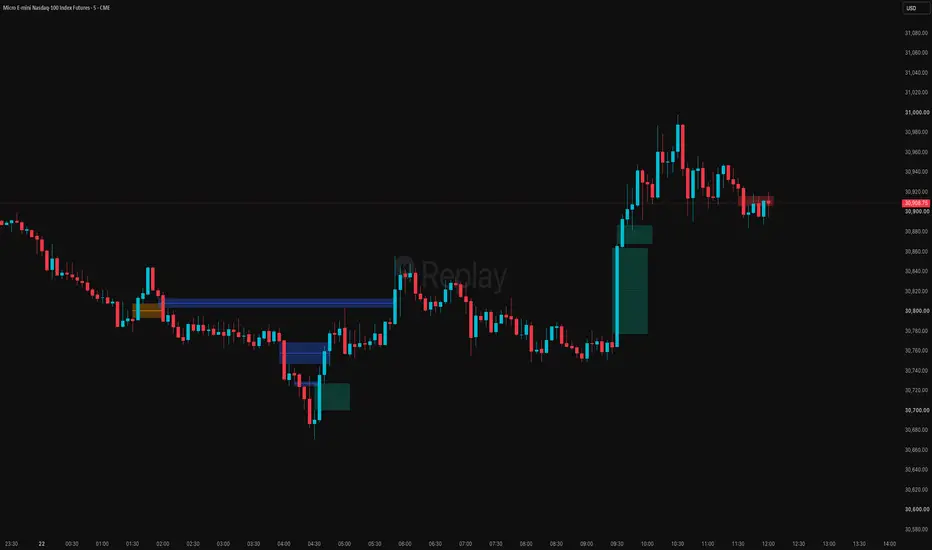
CONTINO – FVG & iFVG Premium (v3.0).
CONTINO – FVG & iFVG Premium is a focused overlay indicator for trading Fair Value Gaps the way they are meant to be traded: only the imbalances that carry real displacement, and with the market's own reaction to a filled gap turned into a fresh opportunity — the Inversion Fair Value Gap (iFVG).
It works on any market and timeframe: indices and futures (MNQ, ES, NQ…), forex, crypto and equities.
1. FVG detection with a real quality filter
Detects three-candle Fair Value Gaps, bullish and bearish, anchored to the first candle of the formation.
Displacement requirement: the middle candle must close in the direction of the move (close[1] > open[1] for bullish gaps, close[1] < open[1] for bearish ones). Gaps with no impulse behind them are skipped.
Volatility threshold: the gap must be at least ATR(14) × threshold in size (default 0.2, set to 0 to disable). This is the single most effective control for keeping the chart readable — raise it to isolate only significant imbalances, lower it to see more.
2. FVG → iFVG inversion
When a gap is mitigated, it does not simply vanish: the script inverts it. The zone flips colour and label to iFVG and becomes a new point of interest in the opposite direction — the classic inversion setup, where failed demand becomes supply and failed supply becomes demand.
Mitigation definition is yours: Filled FVG Type = Wick treats a mere wick touch as a fill; Close (default) requires a candle body to close through the gap — the more conservative, higher-quality option.
Delete Boxes after fill? removes a filled gap immediately instead of inverting it. Note that this option takes priority and only applies while Show iFVG is disabled — if inversions are enabled, the zone always converts rather than being deleted.
3. Consequent Encroachment (centre line)
Each zone carries its 50% midpoint line — the Consequent Encroachment level used by ICT traders as the refined entry point inside a gap.
Optional, with its own colour, width and style (solid / dashed / dotted) for FVG and iFVG separately, so the midpoint reads clearly against the zone fill.
4. Chart control
Max FVGs to Display (15 by default) caps the number of zones on screen: the oldest is removed automatically as new ones form, so historical noise never buries current price action.
Extend Boxes? projects every zone to the current bar, or uses a fixed length (5 candles by default) for a minimal look.
Optional labels with fully customisable text for FVG and iFVG.
Complete styling control: separate background, border and midpoint colours for bullish FVG, bearish FVG, bullish iFVG and bearish iFVG, plus border style and width.
How to use it
Trade FVGs in the direction of structure. Look for price returning to an unmitigated gap that lines up with your market-structure read — that is where the highest-probability continuation entries sit.
Use the centre line for precision. Rather than entering at the edge of a gap, many traders wait for price to reach the Consequent Encroachment (the 50% line), which offers a tighter stop and a better reward-to-risk.
Watch for the inversion. When a gap fails and flips to an iFVG, that zone now acts as a level in the other direction — a failed bullish gap becomes supply, and vice versa. These are among the cleanest reaction points on a chart after a liquidity sweep.
Tune the volatility threshold to your instrument. Higher-volatility instruments and lower timeframes generate more gaps; a slightly higher threshold keeps only the ones worth trading.
Notes
Overlay indicator (Pine v6). Drawing limits: 500 boxes, 500 lines and 500 labels.
FVG detection is evaluated on the current bar's formation and does not repaint on closed bars.
With Delete Boxes after fill? enabled and Show iFVG disabled, filled zones disappear — invert them instead by enabling Show iFVG.
This script plots and manages zones only; it does not include alert conditions.
Educational content, not financial advice. Test the settings on your own market and timeframe before trading.
CONTINO – FVG & iFVG Premium is a focused overlay indicator for trading Fair Value Gaps the way they are meant to be traded: only the imbalances that carry real displacement, and with the market's own reaction to a filled gap turned into a fresh opportunity — the Inversion Fair Value Gap (iFVG).
It works on any market and timeframe: indices and futures (MNQ, ES, NQ…), forex, crypto and equities.
1. FVG detection with a real quality filter
Detects three-candle Fair Value Gaps, bullish and bearish, anchored to the first candle of the formation.
Displacement requirement: the middle candle must close in the direction of the move (close[1] > open[1] for bullish gaps, close[1] < open[1] for bearish ones). Gaps with no impulse behind them are skipped.
Volatility threshold: the gap must be at least ATR(14) × threshold in size (default 0.2, set to 0 to disable). This is the single most effective control for keeping the chart readable — raise it to isolate only significant imbalances, lower it to see more.
2. FVG → iFVG inversion
When a gap is mitigated, it does not simply vanish: the script inverts it. The zone flips colour and label to iFVG and becomes a new point of interest in the opposite direction — the classic inversion setup, where failed demand becomes supply and failed supply becomes demand.
Mitigation definition is yours: Filled FVG Type = Wick treats a mere wick touch as a fill; Close (default) requires a candle body to close through the gap — the more conservative, higher-quality option.
Delete Boxes after fill? removes a filled gap immediately instead of inverting it. Note that this option takes priority and only applies while Show iFVG is disabled — if inversions are enabled, the zone always converts rather than being deleted.
3. Consequent Encroachment (centre line)
Each zone carries its 50% midpoint line — the Consequent Encroachment level used by ICT traders as the refined entry point inside a gap.
Optional, with its own colour, width and style (solid / dashed / dotted) for FVG and iFVG separately, so the midpoint reads clearly against the zone fill.
4. Chart control
Max FVGs to Display (15 by default) caps the number of zones on screen: the oldest is removed automatically as new ones form, so historical noise never buries current price action.
Extend Boxes? projects every zone to the current bar, or uses a fixed length (5 candles by default) for a minimal look.
Optional labels with fully customisable text for FVG and iFVG.
Complete styling control: separate background, border and midpoint colours for bullish FVG, bearish FVG, bullish iFVG and bearish iFVG, plus border style and width.
How to use it
Trade FVGs in the direction of structure. Look for price returning to an unmitigated gap that lines up with your market-structure read — that is where the highest-probability continuation entries sit.
Use the centre line for precision. Rather than entering at the edge of a gap, many traders wait for price to reach the Consequent Encroachment (the 50% line), which offers a tighter stop and a better reward-to-risk.
Watch for the inversion. When a gap fails and flips to an iFVG, that zone now acts as a level in the other direction — a failed bullish gap becomes supply, and vice versa. These are among the cleanest reaction points on a chart after a liquidity sweep.
Tune the volatility threshold to your instrument. Higher-volatility instruments and lower timeframes generate more gaps; a slightly higher threshold keeps only the ones worth trading.
Notes
Overlay indicator (Pine v6). Drawing limits: 500 boxes, 500 lines and 500 labels.
FVG detection is evaluated on the current bar's formation and does not repaint on closed bars.
With Delete Boxes after fill? enabled and Show iFVG disabled, filled zones disappear — invert them instead by enabling Show iFVG.
This script plots and manages zones only; it does not include alert conditions.
Educational content, not financial advice. Test the settings on your own market and timeframe before trading.

إخلاء المسؤولية
لا يُقصد بالمعلومات والمنشورات أن تكون، أو تشكل، أي نصيحة مالية أو استثمارية أو تجارية أو أنواع أخرى من النصائح أو التوصيات المقدمة أو المعتمدة من TradingView. اقرأ المزيد في شروط الاستخدام.
إخلاء المسؤولية
لا يُقصد بالمعلومات والمنشورات أن تكون، أو تشكل، أي نصيحة مالية أو استثمارية أو تجارية أو أنواع أخرى من النصائح أو التوصيات المقدمة أو المعتمدة من TradingView. اقرأ المزيد في شروط الاستخدام.