Order Block Finder
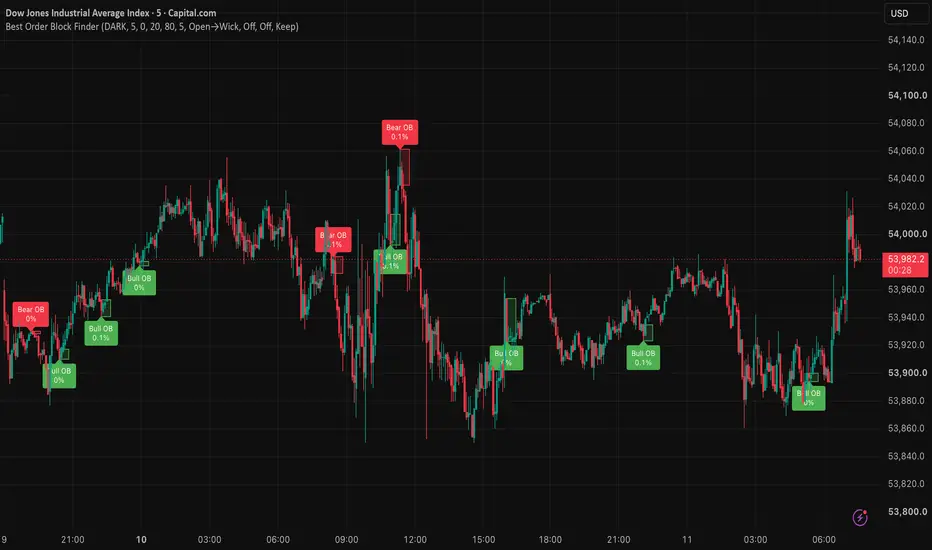
Order Block Finder
OVERVIEW
Order Block Finder is a rules-based Order Block tool that highlights bullish and bearish OB zones using a classic “OB candle + consecutive candles” confirmation model.
It is designed for traders who want simple, consistent OB marking without repaint-style guesswork.
Built by the Xcelerate Trade team.
━━━━━━━━━━━━━━━━━━━━━━━━━━━━━━━━━━━━━━━━
BEST USED WITH
━━━━━━━━━━━━━━━━━━━━━━━━━━━━━━━━━━━━━━━━
Works much better together with:
→ “Fluid Liquidity Zones - CHoCH + Mitigation + HTF | Xcelerate Trade”
(or “Fluid Liquidity Zones - CHoCH | Xcelerate Trade”)
→ Market Structure (HH / HL / LH / LL) + session context
Use structure / liquidity context first, then Order Blocks as zones of interest — not as a standalone entry system.
CONCEPT
An Order Block marks the last opposing candle before a strong directional move.
Bullish OB: a bearish candle followed by N consecutive bullish candles (Relevant Periods), with an optional minimum % move filter.
Bearish OB: a bullish candle followed by N consecutive bearish candles, with the same optional filter.
Zones are drawn as boxes and labeled once confirmation is met.
HOW IT WORKS
1) Set Relevant Periods (default 5) — how many confirming candles after the OB candle
2) Optionally raise Min. Percent move to filter weak moves
3) Choose Order Block Zone mode:
• Open→Wick (default) — bullish: open→low · bearish: high→open
• Body — open↔close
• Full Wick — high↔low
4) Optionally enable Mitigation / Invalidation and After mitigation (Keep / Fade / Delete)
5) Optionally Extend zone right until mitigated
FEATURES
• Bullish and bearish OB boxes + labels (move % on label)
• Color scheme: DARK (green/red) or BRIGHT (blue/orange)
• Max OB boxes (total) to keep charts clean
• Fixed box length or extend-right until mitigated
• Optional mitigation and invalidation modes
• Alerts: new Bullish OB · new Bearish OB · optional mitigation alerts
HOW TO USE
1) Prefer higher timeframes (30m–4H+) for stronger / “major” OB zones
2) Mark OB zones, then refine entries on a lower timeframe
3) Look for reactions (rejection / reclaim) when price retests an OB
4) Combine with structure (HH/HL/LH/LL), liquidity zones, and session context
5) Use alerts if you want notification on new OB formation
SKIP / AVOID
• Trading every OB as an automatic entry
• Weak moves with threshold at 0 on noisy low timeframes
• Ignoring mitigation / invalidation when you need cleaner charts
• Acting without structure or higher-timeframe bias
LIMITATIONS
• This is a visualization and alert tool. It does not place trades and does not guarantee results.
• Order Blocks are a model of price action, not true institutional order-book data.
• On very low timeframes, more OBs appear and noise increases.
• Always confirm with your own risk management and market context.
OVERVIEW
Order Block Finder is a rules-based Order Block tool that highlights bullish and bearish OB zones using a classic “OB candle + consecutive candles” confirmation model.
It is designed for traders who want simple, consistent OB marking without repaint-style guesswork.
Built by the Xcelerate Trade team.
━━━━━━━━━━━━━━━━━━━━━━━━━━━━━━━━━━━━━━━━
BEST USED WITH
━━━━━━━━━━━━━━━━━━━━━━━━━━━━━━━━━━━━━━━━
Works much better together with:
→ “Fluid Liquidity Zones - CHoCH + Mitigation + HTF | Xcelerate Trade”
(or “Fluid Liquidity Zones - CHoCH | Xcelerate Trade”)
→ Market Structure (HH / HL / LH / LL) + session context
Use structure / liquidity context first, then Order Blocks as zones of interest — not as a standalone entry system.
CONCEPT
An Order Block marks the last opposing candle before a strong directional move.
Bullish OB: a bearish candle followed by N consecutive bullish candles (Relevant Periods), with an optional minimum % move filter.
Bearish OB: a bullish candle followed by N consecutive bearish candles, with the same optional filter.
Zones are drawn as boxes and labeled once confirmation is met.
HOW IT WORKS
1) Set Relevant Periods (default 5) — how many confirming candles after the OB candle
2) Optionally raise Min. Percent move to filter weak moves
3) Choose Order Block Zone mode:
• Open→Wick (default) — bullish: open→low · bearish: high→open
• Body — open↔close
• Full Wick — high↔low
4) Optionally enable Mitigation / Invalidation and After mitigation (Keep / Fade / Delete)
5) Optionally Extend zone right until mitigated
FEATURES
• Bullish and bearish OB boxes + labels (move % on label)
• Color scheme: DARK (green/red) or BRIGHT (blue/orange)
• Max OB boxes (total) to keep charts clean
• Fixed box length or extend-right until mitigated
• Optional mitigation and invalidation modes
• Alerts: new Bullish OB · new Bearish OB · optional mitigation alerts
HOW TO USE
1) Prefer higher timeframes (30m–4H+) for stronger / “major” OB zones
2) Mark OB zones, then refine entries on a lower timeframe
3) Look for reactions (rejection / reclaim) when price retests an OB
4) Combine with structure (HH/HL/LH/LL), liquidity zones, and session context
5) Use alerts if you want notification on new OB formation
SKIP / AVOID
• Trading every OB as an automatic entry
• Weak moves with threshold at 0 on noisy low timeframes
• Ignoring mitigation / invalidation when you need cleaner charts
• Acting without structure or higher-timeframe bias
LIMITATIONS
• This is a visualization and alert tool. It does not place trades and does not guarantee results.
• Order Blocks are a model of price action, not true institutional order-book data.
• On very low timeframes, more OBs appear and noise increases.
• Always confirm with your own risk management and market context.

إخلاء المسؤولية
لا يُقصد بالمعلومات والمنشورات أن تكون، أو تشكل، أي نصيحة مالية أو استثمارية أو تجارية أو أنواع أخرى من النصائح أو التوصيات المقدمة أو المعتمدة من TradingView. اقرأ المزيد في شروط الاستخدام.
إخلاء المسؤولية
لا يُقصد بالمعلومات والمنشورات أن تكون، أو تشكل، أي نصيحة مالية أو استثمارية أو تجارية أو أنواع أخرى من النصائح أو التوصيات المقدمة أو المعتمدة من TradingView. اقرأ المزيد في شروط الاستخدام.