Multi-Timeframe Volumized Order Blocks
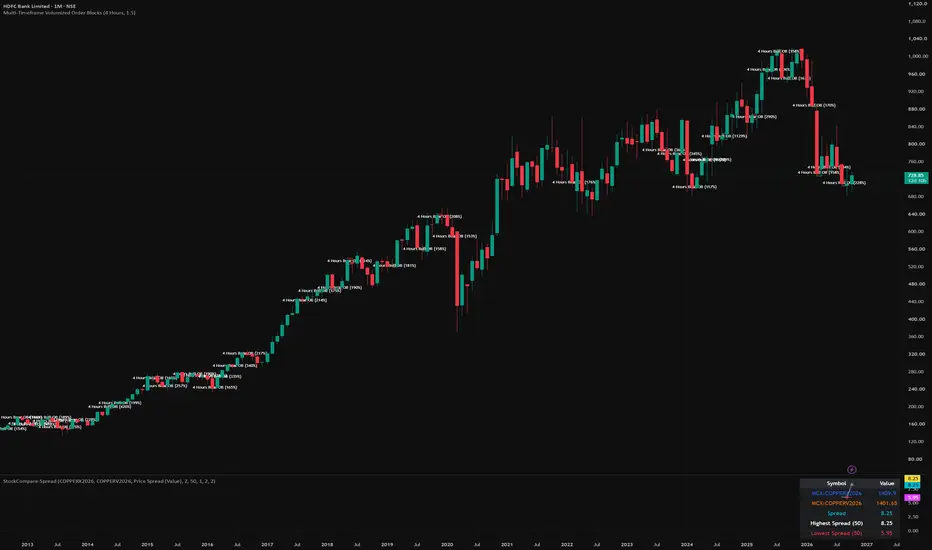
Input Parameters for Timeframe Selection:
We will add user inputs so you can easily choose which higher timeframe you want to pull the order blocks from (e.g., D for Daily, 240 for 4-Hour, 60 for 1-Hour) directly from the indicator settings menu.
Higher Timeframe Data Fetching (request.security):
We will use TradingView’s request.security function to look at the higher timeframe's Open, High, Low, Close, and Volume data safely without repainting errors (using lookahead or barmerge options appropriately).
Order Block Identification Logic:
Bullish Order Block: The last down-candle (where Close < Open) right before a strong impulsive upward move that breaks a local structure.
Bearish Order Block: The last up-candle (where Close > Open) right before a strong downward impulsive move.
Volume Weighting & Filtering:
Much like professional indicators, we will calculate the volume transacted during that specific candle block relative to recent average volume, and only display or highlight blocks that meet a minimum volume threshold.
Box/Zone Plotting:
Instead of just plotting lines, we will use TradingView's box.new() drawing functions to extend the order block zones forward across your current lower-timeframe chart until price mitigates or breaks through them.
We will add user inputs so you can easily choose which higher timeframe you want to pull the order blocks from (e.g., D for Daily, 240 for 4-Hour, 60 for 1-Hour) directly from the indicator settings menu.
Higher Timeframe Data Fetching (request.security):
We will use TradingView’s request.security function to look at the higher timeframe's Open, High, Low, Close, and Volume data safely without repainting errors (using lookahead or barmerge options appropriately).
Order Block Identification Logic:
Bullish Order Block: The last down-candle (where Close < Open) right before a strong impulsive upward move that breaks a local structure.
Bearish Order Block: The last up-candle (where Close > Open) right before a strong downward impulsive move.
Volume Weighting & Filtering:
Much like professional indicators, we will calculate the volume transacted during that specific candle block relative to recent average volume, and only display or highlight blocks that meet a minimum volume threshold.
Box/Zone Plotting:
Instead of just plotting lines, we will use TradingView's box.new() drawing functions to extend the order block zones forward across your current lower-timeframe chart until price mitigates or breaks through them.

إخلاء المسؤولية
لا يُقصد بالمعلومات والمنشورات أن تكون، أو تشكل، أي نصيحة مالية أو استثمارية أو تجارية أو أنواع أخرى من النصائح أو التوصيات المقدمة أو المعتمدة من TradingView. اقرأ المزيد في شروط الاستخدام.
إخلاء المسؤولية
لا يُقصد بالمعلومات والمنشورات أن تكون، أو تشكل، أي نصيحة مالية أو استثمارية أو تجارية أو أنواع أخرى من النصائح أو التوصيات المقدمة أو المعتمدة من TradingView. اقرأ المزيد في شروط الاستخدام.