تم تحديثه
Levels - PDH/PDL, Naked POCs
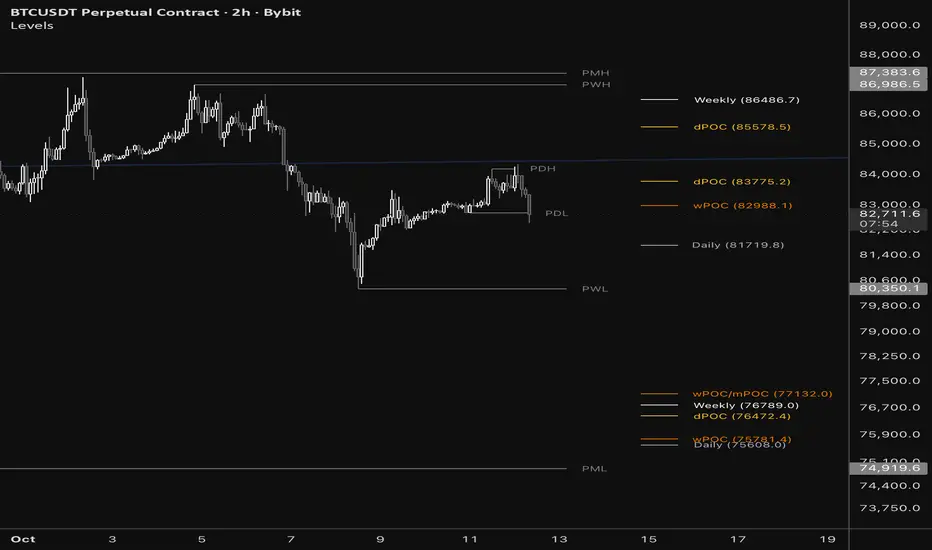
Levels
One indicator for the levels traders actually watch: previous day/week/month highs and lows, Daily/Weekly/Monthly flip levels, and naked POCs. It loads clean and is built for confluence.
WHAT IT SHOWS
- Previous Period Levels: PDH / PDL, PWH / PWL, PMH / PML, with optional mids.
- Daily / Weekly / Monthly Levels: the open of the candle that follows a color flip (bearish to bullish or the reverse). They work on any chart timeframe.
- Naked POCs: unmitigated daily, weekly and monthly points of control, newest first.
- Monday Range (optional, off by default): high, low and mid from the Asia open. Turn it on with one click.
- Optional Pending levels and Developing POC for the period still forming.
A CLEAN CHART FROM THE FIRST LOAD
- The previous highs and lows are the map. They draw as full lines with price-scale tags.
- Daily / Weekly / Monthly levels and Naked POCs sit in a tidy column to the right, tucked behind the price scale. Each label shows its price (for example "Weekly (86486.7)"), and mitigated levels drop off automatically.
- Everything is quick to read, with no clutter.
PLACEMENT, PER GROUP
Every group has its own Placement setting:
- Standard: lines run from where they began, with labels at the right end.
- Right: lines are hidden and labels sit in a column at the current bar.
- Right Far: the same column, pushed out so the labels tuck behind the price scale. Adjust the offset to taste.
Mix and match. For example, keep the highs and lows as lines and put the rest in the column, or put everything in Right Far for a minimal look.
PRICE DISPLAY, PER GROUP
- Labels on Price Scale: switch each group's price-scale tags on or off.
- Show Price in Label: print the price inside each label.
Use either one, both, or neither.
FULLY CUSTOMIZABLE LABELS
Every label's text can be changed. Look for the text box next to each color swatch in the settings (for example, rename PDH to YDAY-H, or dPOC to Daily POC). Colors, line styles and which levels appear are all yours to set.
OVERLAP HANDLING
When levels sit at nearly the same price their labels combine into one (for example PDH/PWH), so the chart stays readable. The threshold is adjustable, and lines are never affected.
MITIGATION
Choose what happens when price trades through a level: keep extending, freeze the line where it was hit, or remove it. Daily / Weekly / Monthly levels and POCs are removed by default to keep the chart clean. You can keep them if you prefer. Right placements always show only live levels.
USING IT FOR CONFLUENCE
Daily, Weekly and Monthly levels, previous period highs/lows and naked POCs all act as reference points. When two or more cluster at one price, that area is worth attention. Combined labels make those clusters easy to spot.
NOTES ON ACCURACY (PLEASE READ)
- Naked POCs are most exact on 1D and higher charts, where the script uses real volume-at-price footprint data. On lower timeframes they are estimated from lower-timeframe volume and can differ slightly. For the exact read, switch to 1D.
- Footprint data may depend on your TradingView plan. If a plan does not support it on a given chart, the script falls back to the estimate.
- POC accuracy is a work in progress. It has been tuned against other volume profile tools and will keep improving with updates.
- Levels are drawn from available history and can differ slightly between data feeds.
This is a tool for chart reference, not financial advice.
One indicator for the levels traders actually watch: previous day/week/month highs and lows, Daily/Weekly/Monthly flip levels, and naked POCs. It loads clean and is built for confluence.
WHAT IT SHOWS
- Previous Period Levels: PDH / PDL, PWH / PWL, PMH / PML, with optional mids.
- Daily / Weekly / Monthly Levels: the open of the candle that follows a color flip (bearish to bullish or the reverse). They work on any chart timeframe.
- Naked POCs: unmitigated daily, weekly and monthly points of control, newest first.
- Monday Range (optional, off by default): high, low and mid from the Asia open. Turn it on with one click.
- Optional Pending levels and Developing POC for the period still forming.
A CLEAN CHART FROM THE FIRST LOAD
- The previous highs and lows are the map. They draw as full lines with price-scale tags.
- Daily / Weekly / Monthly levels and Naked POCs sit in a tidy column to the right, tucked behind the price scale. Each label shows its price (for example "Weekly (86486.7)"), and mitigated levels drop off automatically.
- Everything is quick to read, with no clutter.
PLACEMENT, PER GROUP
Every group has its own Placement setting:
- Standard: lines run from where they began, with labels at the right end.
- Right: lines are hidden and labels sit in a column at the current bar.
- Right Far: the same column, pushed out so the labels tuck behind the price scale. Adjust the offset to taste.
Mix and match. For example, keep the highs and lows as lines and put the rest in the column, or put everything in Right Far for a minimal look.
PRICE DISPLAY, PER GROUP
- Labels on Price Scale: switch each group's price-scale tags on or off.
- Show Price in Label: print the price inside each label.
Use either one, both, or neither.
FULLY CUSTOMIZABLE LABELS
Every label's text can be changed. Look for the text box next to each color swatch in the settings (for example, rename PDH to YDAY-H, or dPOC to Daily POC). Colors, line styles and which levels appear are all yours to set.
OVERLAP HANDLING
When levels sit at nearly the same price their labels combine into one (for example PDH/PWH), so the chart stays readable. The threshold is adjustable, and lines are never affected.
MITIGATION
Choose what happens when price trades through a level: keep extending, freeze the line where it was hit, or remove it. Daily / Weekly / Monthly levels and POCs are removed by default to keep the chart clean. You can keep them if you prefer. Right placements always show only live levels.
USING IT FOR CONFLUENCE
Daily, Weekly and Monthly levels, previous period highs/lows and naked POCs all act as reference points. When two or more cluster at one price, that area is worth attention. Combined labels make those clusters easy to spot.
NOTES ON ACCURACY (PLEASE READ)
- Naked POCs are most exact on 1D and higher charts, where the script uses real volume-at-price footprint data. On lower timeframes they are estimated from lower-timeframe volume and can differ slightly. For the exact read, switch to 1D.
- Footprint data may depend on your TradingView plan. If a plan does not support it on a given chart, the script falls back to the estimate.
- POC accuracy is a work in progress. It has been tuned against other volume profile tools and will keep improving with updates.
- Levels are drawn from available history and can differ slightly between data feeds.
This is a tool for chart reference, not financial advice.
ملاحظات الأخبار
Levels - UpdateNew: Quick Setup
A new Quick Setup group sits at the top of the settings so you can style everything in one place:
- Label Layout: All Standard, All Right, or All Right Far for every group at once
- Price Scale Tags: turn every price-scale tag on or off
- Price in Labels: add or remove the price in every label
- Show % From Price, Show Line Labels and Label Size
- Right Far Offset, Standard / Right Offset and Line Offset together, so label positioning is in one spot
Set any of the first three to Custom to use each group's own Placement, price scale and price-in-label settings as before.
Previous Period Levels
- New master switch to show or hide every previous day, week and month level at once. Individual settings are kept.
Monday Range
- Lines now run from the Asia open (Sunday 8:00 PM New York) to Friday 5:00 PM New York. Weekends are skipped.
- New option: Show Historical Ranges keeps the high, low and mid of past weeks. Choose how many weeks to keep.
Naked POCs
- A POC is now the center of the highest-volume row at your chosen tick size. This removes the extra regrouping step and places POCs much closer to a standard volume profile.
- Footprint Ticks Per Row now defaults to 100. Smaller values place POCs more precisely.
- The Profile Rows setting is removed.
- A POC is mitigated on the first touch, including by the candle that is still forming.
- POCs use real footprint volume on 1D and higher. Below 1D they use a lower-timeframe estimate, so they are less exact there.
Cleanup
- Frozen (mitigated) lines now end exactly at their label.
- "Frozen Level Transparency" is now "Mitigated Level Transparency" and sits in Style.
- Gap and Right Far settings are simplified into the offsets above.
- Removed the per-level Hide Line toggles.

إخلاء المسؤولية
لا يُقصد بالمعلومات والمنشورات أن تكون، أو تشكل، أي نصيحة مالية أو استثمارية أو تجارية أو أنواع أخرى من النصائح أو التوصيات المقدمة أو المعتمدة من TradingView. اقرأ المزيد في شروط الاستخدام.
إخلاء المسؤولية
لا يُقصد بالمعلومات والمنشورات أن تكون، أو تشكل، أي نصيحة مالية أو استثمارية أو تجارية أو أنواع أخرى من النصائح أو التوصيات المقدمة أو المعتمدة من TradingView. اقرأ المزيد في شروط الاستخدام.