تم تحديثه
RCV Risk Manager
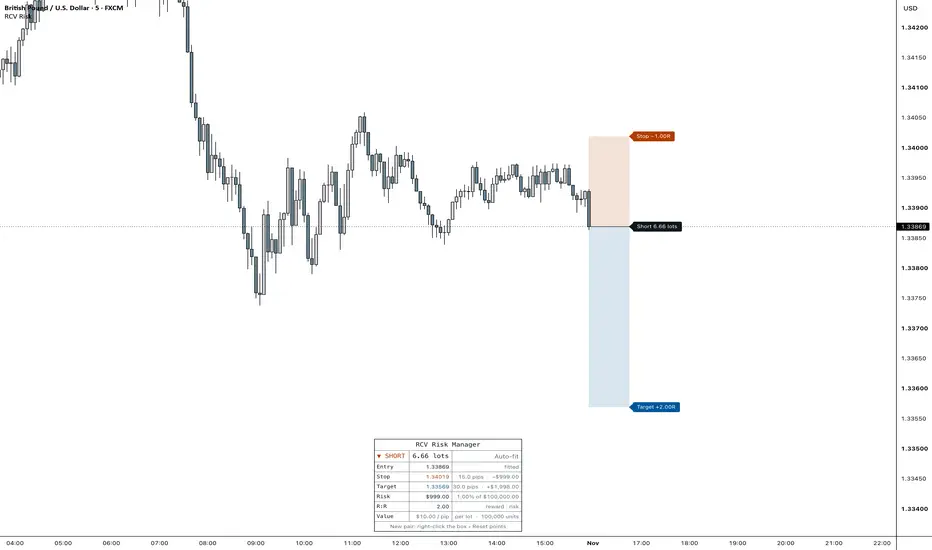
RCV Risk Manager sizes a trade from your balance and risk, then draws the plan on the chart: entry, stop, target, take profits and an optional breakeven level. It plans the trade. It does not track fills or open positions.
How to use
1. Add it to the chart and click three prices: your entry, your stop and your target. A stop below the entry makes the plan a long, above it a short.
2. To adjust, click the box to select the script, then drag the entry, stop or target line. You can grab a line anywhere along its length.
3. Set your balance, account currency and risk (a percent of the balance or a cash amount) under Account.
When you switch pairs, the clicked points keep the old pair's prices, so they sit off the new chart. The script then sets a temporary plan at the current price and the panel shows "New pair: right-click the box › Reset points". Right-click the box, choose Reset points and click three new prices.
Where each level comes from
- Entry: Clicked, or Live (follows the current price).
- Stop: Clicked, Fixed (a distance in pips or points from the entry) or Swing (the lowest low for a long, or the highest high for a short, of the last N bars).
- Target: Clicked, or R Multiple (a set number of stop distances from the entry).
Position size
Size = risk amount ÷ (stop distance × value per point of one lot), rounded down to the size step, so the real risk never goes over your setting. If even the smallest size risks more than planned, the Risk row turns orange and its tooltip says so.
Contract sizes start at the usual standard: FX 100,000 units per lot, gold 100, silver 5,000, oil 100, everything else 1. Index CFD contract sizes differ between brokers (US30 is 1 at some and 10 at others), so set Contract Size from your broker's specs when yours is different. Size In switches between lots and contracts, and Step sets the size increment.
Cash values convert from the chart's quote currency to your account currency through the USD pairs, using the live price, with the prior day's rate as a fallback.
Take profits
One to four targets, spaced evenly up to the final one. Equal closes the same share at each. Custom sets TP1 to TP3 as percentages and the last target closes the rest. With two or more targets, the Plan row shows the average result if every target fills. Breakeven can move the stop to the entry after TP1 or at a chosen R level.
Chart and panel
The box starts at the latest bar and runs 10 bars to the right, so it never covers candles. Tags at its right edge show the side and size on the entry, and R on the stop and target. Price and cash can be added. The panel lists the side and size, entry, stop, target(s), risk, R:R, the plan result and the value of one pip or point. Any row can be hidden, and so can the details column. Light, Dark and Custom themes, and four text sizes, including Mobile for phone screenshots. Hide Account shows cash as a percent of the balance, for screenshots you share.
Alerts
Price reached the entry, the stop, a partial target, the breakeven level or the final target.
Before you trade
Check the contract size, point value and currency rate against your broker. Hover the Value row to see the numbers the script used. This is a planning tool, not financial advice.
How to use
1. Add it to the chart and click three prices: your entry, your stop and your target. A stop below the entry makes the plan a long, above it a short.
2. To adjust, click the box to select the script, then drag the entry, stop or target line. You can grab a line anywhere along its length.
3. Set your balance, account currency and risk (a percent of the balance or a cash amount) under Account.
When you switch pairs, the clicked points keep the old pair's prices, so they sit off the new chart. The script then sets a temporary plan at the current price and the panel shows "New pair: right-click the box › Reset points". Right-click the box, choose Reset points and click three new prices.
Where each level comes from
- Entry: Clicked, or Live (follows the current price).
- Stop: Clicked, Fixed (a distance in pips or points from the entry) or Swing (the lowest low for a long, or the highest high for a short, of the last N bars).
- Target: Clicked, or R Multiple (a set number of stop distances from the entry).
Position size
Size = risk amount ÷ (stop distance × value per point of one lot), rounded down to the size step, so the real risk never goes over your setting. If even the smallest size risks more than planned, the Risk row turns orange and its tooltip says so.
Contract sizes start at the usual standard: FX 100,000 units per lot, gold 100, silver 5,000, oil 100, everything else 1. Index CFD contract sizes differ between brokers (US30 is 1 at some and 10 at others), so set Contract Size from your broker's specs when yours is different. Size In switches between lots and contracts, and Step sets the size increment.
Cash values convert from the chart's quote currency to your account currency through the USD pairs, using the live price, with the prior day's rate as a fallback.
Take profits
One to four targets, spaced evenly up to the final one. Equal closes the same share at each. Custom sets TP1 to TP3 as percentages and the last target closes the rest. With two or more targets, the Plan row shows the average result if every target fills. Breakeven can move the stop to the entry after TP1 or at a chosen R level.
Chart and panel
The box starts at the latest bar and runs 10 bars to the right, so it never covers candles. Tags at its right edge show the side and size on the entry, and R on the stop and target. Price and cash can be added. The panel lists the side and size, entry, stop, target(s), risk, R:R, the plan result and the value of one pip or point. Any row can be hidden, and so can the details column. Light, Dark and Custom themes, and four text sizes, including Mobile for phone screenshots. Hide Account shows cash as a percent of the balance, for screenshots you share.
Alerts
Price reached the entry, the stop, a partial target, the breakeven level or the final target.
Before you trade
Check the contract size, point value and currency rate against your broker. Hover the Value row to see the numbers the script used. This is a planning tool, not financial advice.
ملاحظات الأخبار
Removed two Data Window values (Risk % and R:R) that only fed an older version of RCV Daily Checklist. Nothing changes on the chart, the panel or the alerts.
إخلاء المسؤولية
لا يُقصد بالمعلومات والمنشورات أن تكون، أو تشكل، أي نصيحة مالية أو استثمارية أو تجارية أو أنواع أخرى من النصائح أو التوصيات المقدمة أو المعتمدة من TradingView. اقرأ المزيد في شروط الاستخدام.
إخلاء المسؤولية
لا يُقصد بالمعلومات والمنشورات أن تكون، أو تشكل، أي نصيحة مالية أو استثمارية أو تجارية أو أنواع أخرى من النصائح أو التوصيات المقدمة أو المعتمدة من TradingView. اقرأ المزيد في شروط الاستخدام.