Clock_Live and Replay Aware
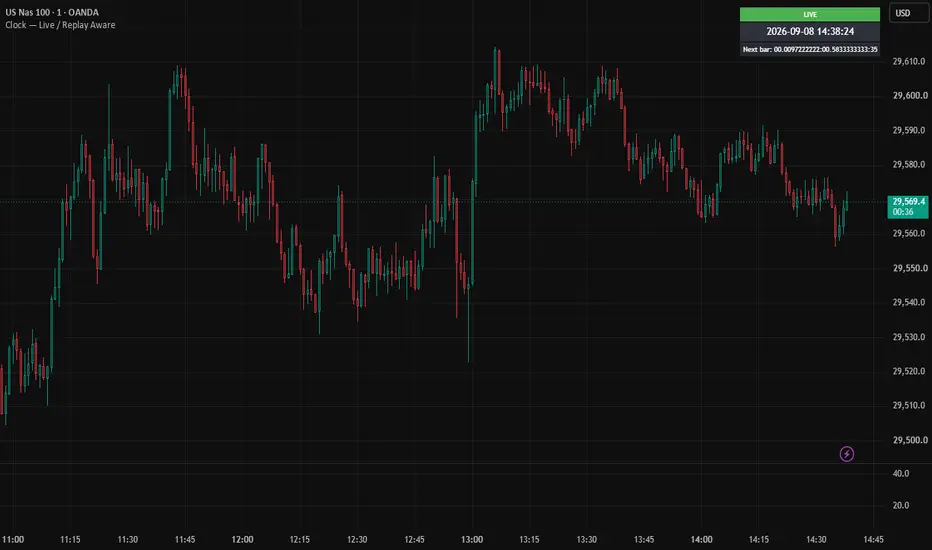
Clock — Live / Replay Aware
A simple on-chart clock that always tells you the truth about what time it's showing — whether you're trading live or running Bar Replay.
Why this exists
Most clock indicators only show your real-world time, which becomes misleading (or useless) the moment you activate TradingView's Bar Replay feature — you end up staring at a clock that has nothing to do with the price action on screen. This indicator detects which mode you're in and adapts automatically.
Features
LIVE mode (green): Displays your actual real-time clock, synced to live incoming ticks.
REPLAY mode (orange): Displays the timestamp of the bar currently being replayed, so the clock always matches what you're watching, not your wall clock.
CHART mode (gray): Shown when you're simply scrolled through history with no live feed active.
Countdown timer: Shows time remaining until the next bar closes — exact in live mode, and estimated in replay mode using a rolling average of how long recent replayed bars have taken to form (adapts automatically if you change replay speed).
Configurable timezone, 12h/24h format, date display, table position, and colors.
How replay detection works
Pine Script has no official flag for "is Bar Replay active." This script uses a reliable heuristic instead: on a genuine live (still-forming) bar, its scheduled close time is always in the future relative to the current time. During replay, the bar being replayed is historical, so its close time has already passed. Comparing the two lets the script tell live and replay bars apart with no false positives in normal use.
Notes
The replay countdown is an estimate, not exact — replay speed isn't exposed to Pine Script, so it's inferred from recent bar timing and may lag by a bar or two after you change speeds.
Clock updates are tick-driven (a Pine Script constraint), so on very quiet symbols the seconds display may not tick with perfect real-time smoothness.
A simple on-chart clock that always tells you the truth about what time it's showing — whether you're trading live or running Bar Replay.
Why this exists
Most clock indicators only show your real-world time, which becomes misleading (or useless) the moment you activate TradingView's Bar Replay feature — you end up staring at a clock that has nothing to do with the price action on screen. This indicator detects which mode you're in and adapts automatically.
Features
LIVE mode (green): Displays your actual real-time clock, synced to live incoming ticks.
REPLAY mode (orange): Displays the timestamp of the bar currently being replayed, so the clock always matches what you're watching, not your wall clock.
CHART mode (gray): Shown when you're simply scrolled through history with no live feed active.
Countdown timer: Shows time remaining until the next bar closes — exact in live mode, and estimated in replay mode using a rolling average of how long recent replayed bars have taken to form (adapts automatically if you change replay speed).
Configurable timezone, 12h/24h format, date display, table position, and colors.
How replay detection works
Pine Script has no official flag for "is Bar Replay active." This script uses a reliable heuristic instead: on a genuine live (still-forming) bar, its scheduled close time is always in the future relative to the current time. During replay, the bar being replayed is historical, so its close time has already passed. Comparing the two lets the script tell live and replay bars apart with no false positives in normal use.
Notes
The replay countdown is an estimate, not exact — replay speed isn't exposed to Pine Script, so it's inferred from recent bar timing and may lag by a bar or two after you change speeds.
Clock updates are tick-driven (a Pine Script constraint), so on very quiet symbols the seconds display may not tick with perfect real-time smoothness.

إخلاء المسؤولية
لا يُقصد بالمعلومات والمنشورات أن تكون، أو تشكل، أي نصيحة مالية أو استثمارية أو تجارية أو أنواع أخرى من النصائح أو التوصيات المقدمة أو المعتمدة من TradingView. اقرأ المزيد في شروط الاستخدام.
إخلاء المسؤولية
لا يُقصد بالمعلومات والمنشورات أن تكون، أو تشكل، أي نصيحة مالية أو استثمارية أو تجارية أو أنواع أخرى من النصائح أو التوصيات المقدمة أو المعتمدة من TradingView. اقرأ المزيد في شروط الاستخدام.