OPEN-SOURCE SCRIPT
Lot Size & Risk Calculator All Pairs NEW
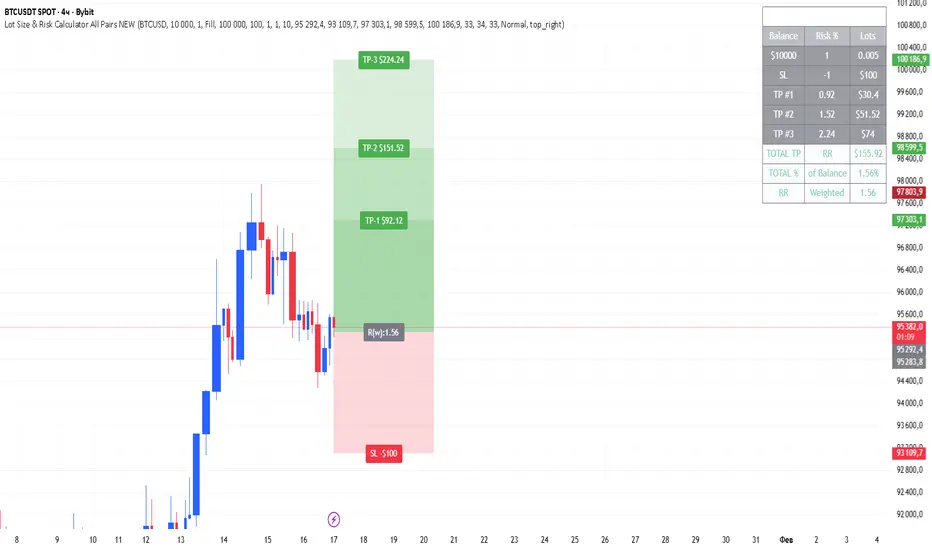
Lot Size & Risk Calculator All Pairs NEW
Description
Professional risk and position size calculator for traders working with various financial instruments.
Main difference from standard indicators:
Standard risk calculators only show basic Risk/Reward for the entire position. But in real trading, we often close positions partially at different take-profit levels, and the final Risk/Reward changes significantly with this approach! This indicator calculates weighted Risk/Reward taking into account position distribution across multiple take-profit levels.
Main features:
- Support for 4 instrument types: Forex, XAUUSD (gold), BTCUSD (bitcoin), US100 (NASDAQ index)
- Automatic position size calculation based on risk and stop-loss distance
- Multiple take-profit levels with customizable closing percentages
- Weighted Risk/Reward calculation considering position distribution
- Ability to adjust position distribution between take-profits to optimize final profit
- Display of total percentage growth of deposit from all take-profit levels
- 2 visualization options: colored fill between levels or lines
- Informative results panel in table format
Settings by groups:
Core Settings
- Currency: select instrument type (Forex, XAUUSD, BTCUSD, US100)
- Account Balance: trading account size in dollars
- Risk %: risk percentage from deposit (0.1-100%)
- Use Custom Contract Sizes: manual contract size configuration
Point Value Settings
- Use automatic point value calculation: automatic point value calculation
- Manual point value: manual point value input (for non-standard contracts)
Levels
- Entry Price: entry price (confirmation required on first use)
- Stop Price: stop-loss price
- Take-Profit Prices: take-profit prices (up to 3 levels)
- TP Close %: percentage of position closed at each take-profit level
Dashboard
- Show Targets Profit: display profit from take-profit levels
- Label Size: text size in the table
- Dashboard Position: table position on the chart
How to use:
Step 1: Initial setup (when first adding)
1. Enter entry price (Entry Price) - confirmation window will appear (click on desired bar)
2. Then enter stop-loss price (Stop Price) (click on desired bar)
3. Add first take-profit (TP1) (click on desired bar)
4. Second and third take-profits are added through checkboxes (click on the settings gear icon to open them)
Step 2: Instrument selection and risk configuration
1. In "Core" group, select your instrument type
2. Set account balance and risk percentage
Step 3: Position distribution configuration
1. Set TP Close % for each take-profit level (e.g.: TP1 - 33%, TP2 - 33%, TP3 - 34%)
2. Experiment with distribution! By changing closing percentages, you can:
- Increase/decrease final Risk/Reward
- Optimize risk/profit ratio
- Find the most comfortable position distribution for you
Step 4: Results analysis
1. Results table will show:
- Calculated position size (lots/contracts)
- Risk in monetary terms
- Risk/Reward for each take-profit level
- Weighted R:R considering position distribution
- Total potential profit from all take-profits
- Percentage growth of deposit - total profit percentage from all take-profit levels
Key features:
Position distribution adjustment
You can easily find optimal position distribution between take-profits:
- Aggressive approach: higher percentage on distant take-profit (higher profit potential)
- Conservative approach: higher percentage on near take-profit (faster profit taking)
- Balanced: even distribution for risk reduction
Weighted Risk/Reward
The indicator calculates not just simple R:R for the entire position, but weighted value that considers:
- Position distribution between take-profits
- Different distances to each take-profit level
- Closing percentage at each level
Results visualization
- Colored fill shows risk and profit zones
- Labels at levels display specific profit/loss values
- Results table contains all key metrics
Creation story
This indicator was created based on the original calculator by Algoryze As a trader, I lacked the ability to see real Risk/Reward when partially closing positions and a convenient tool for selecting optimal position distribution between take-profit levels. I improved the indicator by adding:
- Weighted Risk/Reward calculation
- Ability to adjust closing percentage at each take-profit
- Display of total percentage growth of deposit
- Improved interface and visualization
I hope this tool will be useful to other traders who use strategies with partial position closing!
Important notes:
1. When first adding the indicator, be sure to enter prices in order: Entry → Stop → TP1
2. TP2 and TP3 are added through input fields (no confirmation required)
3. Closing percentages are automatically normalized if the sum is not 100%
4. Experiment with position distribution to find optimal risk/profit ratio
5. For different instruments, add separate copies of the indicator in different tabs
Support
For questions and suggestions, leave comments in the indicator publication on TradingView.
---
Important: All calculations are provided for informational purposes only. Trading involves risks, trade responsibly. The indicator helps with calculations but does not guarantee profit.
Description
Professional risk and position size calculator for traders working with various financial instruments.
Main difference from standard indicators:
Standard risk calculators only show basic Risk/Reward for the entire position. But in real trading, we often close positions partially at different take-profit levels, and the final Risk/Reward changes significantly with this approach! This indicator calculates weighted Risk/Reward taking into account position distribution across multiple take-profit levels.
Main features:
- Support for 4 instrument types: Forex, XAUUSD (gold), BTCUSD (bitcoin), US100 (NASDAQ index)
- Automatic position size calculation based on risk and stop-loss distance
- Multiple take-profit levels with customizable closing percentages
- Weighted Risk/Reward calculation considering position distribution
- Ability to adjust position distribution between take-profits to optimize final profit
- Display of total percentage growth of deposit from all take-profit levels
- 2 visualization options: colored fill between levels or lines
- Informative results panel in table format
Settings by groups:
Core Settings
- Currency: select instrument type (Forex, XAUUSD, BTCUSD, US100)
- Account Balance: trading account size in dollars
- Risk %: risk percentage from deposit (0.1-100%)
- Use Custom Contract Sizes: manual contract size configuration
Point Value Settings
- Use automatic point value calculation: automatic point value calculation
- Manual point value: manual point value input (for non-standard contracts)
Levels
- Entry Price: entry price (confirmation required on first use)
- Stop Price: stop-loss price
- Take-Profit Prices: take-profit prices (up to 3 levels)
- TP Close %: percentage of position closed at each take-profit level
Dashboard
- Show Targets Profit: display profit from take-profit levels
- Label Size: text size in the table
- Dashboard Position: table position on the chart
How to use:
Step 1: Initial setup (when first adding)
1. Enter entry price (Entry Price) - confirmation window will appear (click on desired bar)
2. Then enter stop-loss price (Stop Price) (click on desired bar)
3. Add first take-profit (TP1) (click on desired bar)
4. Second and third take-profits are added through checkboxes (click on the settings gear icon to open them)
Step 2: Instrument selection and risk configuration
1. In "Core" group, select your instrument type
2. Set account balance and risk percentage
Step 3: Position distribution configuration
1. Set TP Close % for each take-profit level (e.g.: TP1 - 33%, TP2 - 33%, TP3 - 34%)
2. Experiment with distribution! By changing closing percentages, you can:
- Increase/decrease final Risk/Reward
- Optimize risk/profit ratio
- Find the most comfortable position distribution for you
Step 4: Results analysis
1. Results table will show:
- Calculated position size (lots/contracts)
- Risk in monetary terms
- Risk/Reward for each take-profit level
- Weighted R:R considering position distribution
- Total potential profit from all take-profits
- Percentage growth of deposit - total profit percentage from all take-profit levels
Key features:
Position distribution adjustment
You can easily find optimal position distribution between take-profits:
- Aggressive approach: higher percentage on distant take-profit (higher profit potential)
- Conservative approach: higher percentage on near take-profit (faster profit taking)
- Balanced: even distribution for risk reduction
Weighted Risk/Reward
The indicator calculates not just simple R:R for the entire position, but weighted value that considers:
- Position distribution between take-profits
- Different distances to each take-profit level
- Closing percentage at each level
Results visualization
- Colored fill shows risk and profit zones
- Labels at levels display specific profit/loss values
- Results table contains all key metrics
Creation story
This indicator was created based on the original calculator by Algoryze As a trader, I lacked the ability to see real Risk/Reward when partially closing positions and a convenient tool for selecting optimal position distribution between take-profit levels. I improved the indicator by adding:
- Weighted Risk/Reward calculation
- Ability to adjust closing percentage at each take-profit
- Display of total percentage growth of deposit
- Improved interface and visualization
I hope this tool will be useful to other traders who use strategies with partial position closing!
Important notes:
1. When first adding the indicator, be sure to enter prices in order: Entry → Stop → TP1
2. TP2 and TP3 are added through input fields (no confirmation required)
3. Closing percentages are automatically normalized if the sum is not 100%
4. Experiment with position distribution to find optimal risk/profit ratio
5. For different instruments, add separate copies of the indicator in different tabs
Support
For questions and suggestions, leave comments in the indicator publication on TradingView.
---
Important: All calculations are provided for informational purposes only. Trading involves risks, trade responsibly. The indicator helps with calculations but does not guarantee profit.
نص برمجي مفتوح المصدر
بروح TradingView الحقيقية، قام مبتكر هذا النص البرمجي بجعله مفتوح المصدر، بحيث يمكن للمتداولين مراجعة وظائفه والتحقق منها. شكرا للمؤلف! بينما يمكنك استخدامه مجانًا، تذكر أن إعادة نشر الكود يخضع لقواعد الموقع الخاصة بنا.

إخلاء المسؤولية
لا يُقصد بالمعلومات والمنشورات أن تكون، أو تشكل، أي نصيحة مالية أو استثمارية أو تجارية أو أنواع أخرى من النصائح أو التوصيات المقدمة أو المعتمدة من TradingView. اقرأ المزيد في شروط الاستخدام.
نص برمجي مفتوح المصدر
بروح TradingView الحقيقية، قام مبتكر هذا النص البرمجي بجعله مفتوح المصدر، بحيث يمكن للمتداولين مراجعة وظائفه والتحقق منها. شكرا للمؤلف! بينما يمكنك استخدامه مجانًا، تذكر أن إعادة نشر الكود يخضع لقواعد الموقع الخاصة بنا.
إخلاء المسؤولية
لا يُقصد بالمعلومات والمنشورات أن تكون، أو تشكل، أي نصيحة مالية أو استثمارية أو تجارية أو أنواع أخرى من النصائح أو التوصيات المقدمة أو المعتمدة من TradingView. اقرأ المزيد في شروط الاستخدام.