
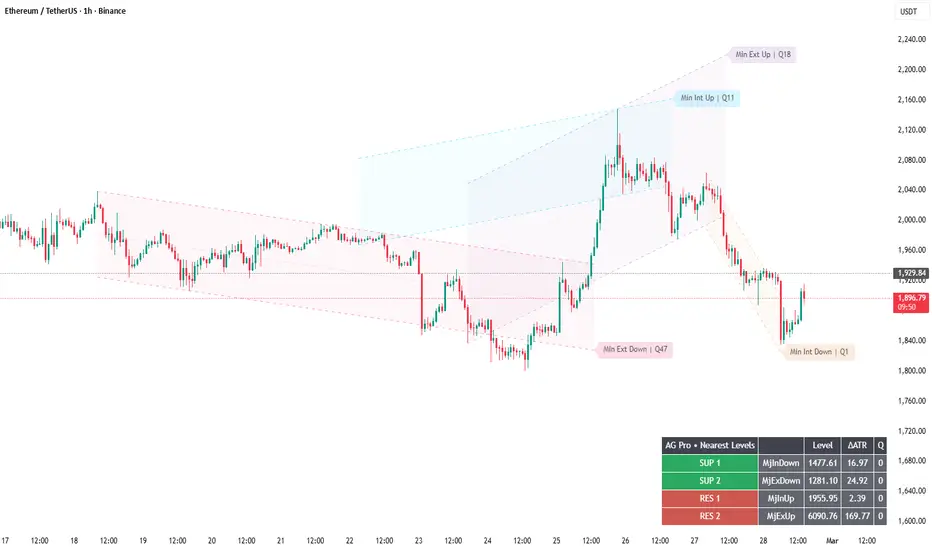
Breakout vs Reaction - Deterministic Alert Semantics for Cleaner Decisions
Most “alert spam” comes from unclear definitions.
If you don’t define what counts as a break, you will overreact to wicks.
AG Pro Dynamic Channels Elite uses deterministic alert semantics centered on the channel BASE line:
- Breakout: a confirmed violation of the base (typically by candle close).
- Reaction: a probe through the base (wick) followed by a close back into structure.
This separation matters:
- Breakout is a “structure invalidation” event → reassess context.
- Reaction is a “structure respect” event → observe continuation vs failure.
Alert hygiene controls (the real upgrade):
1) Confirm Mode
- Auto (follows message frequency)
- Intrabar (faster, noisier)
- Close (cleanest, recommended for most workflows)
2) Trigger Buffer
Off / ATR / Ticks
Buffers reduce micro-wick triggers in choppy regimes.
3) Cooldown (bars)
Prevents repeated alerts from the same channel family in a short window.
This reduces emotional churn and decision fatigue.
4) Payload Mode (Text vs JSON)
Text for human reading; JSON for webhook workflows (clean single-line payload).
Professional tip:
Alerts should automate attention, not execution.
When an alert fires, your job is to open the chart and evaluate risk, regime, and invalidation.
Risk disclosure:
Educational content only. Not financial advice. Breaks and reactions can fail; overshoots are normal in volatility expansion.
Most “alert spam” comes from unclear definitions.
If you don’t define what counts as a break, you will overreact to wicks.
AG Pro Dynamic Channels Elite uses deterministic alert semantics centered on the channel BASE line:
- Breakout: a confirmed violation of the base (typically by candle close).
- Reaction: a probe through the base (wick) followed by a close back into structure.
This separation matters:
- Breakout is a “structure invalidation” event → reassess context.
- Reaction is a “structure respect” event → observe continuation vs failure.
Alert hygiene controls (the real upgrade):
1) Confirm Mode
- Auto (follows message frequency)
- Intrabar (faster, noisier)
- Close (cleanest, recommended for most workflows)
2) Trigger Buffer
Off / ATR / Ticks
Buffers reduce micro-wick triggers in choppy regimes.
3) Cooldown (bars)
Prevents repeated alerts from the same channel family in a short window.
This reduces emotional churn and decision fatigue.
4) Payload Mode (Text vs JSON)
Text for human reading; JSON for webhook workflows (clean single-line payload).
Professional tip:
Alerts should automate attention, not execution.
When an alert fires, your job is to open the chart and evaluate risk, regime, and invalidation.
Risk disclosure:
Educational content only. Not financial advice. Breaks and reactions can fail; overshoots are normal in volatility expansion.

Trading Suite | Flagship Workflow :
tradingview.com/script/XJmX3p98-Trading-Suite-AGPro-Series/
Crypto Setup Planner | Multi-Symbol Analysis :
tradingview.com/script/LgVRo7Ql-Crypto-Setup-Planner-AGPro-Series/
tradingview.com/script/XJmX3p98-Trading-Suite-AGPro-Series/
Crypto Setup Planner | Multi-Symbol Analysis :
tradingview.com/script/LgVRo7Ql-Crypto-Setup-Planner-AGPro-Series/
Aviso legal
As informações e publicações não se destinam a ser, e não constituem, conselhos ou recomendações financeiras, de investimento, comerciais ou de outro tipo fornecidos ou endossados pela TradingView. Leia mais nos Termos de Uso.
Trading Suite | Flagship Workflow :
tradingview.com/script/XJmX3p98-Trading-Suite-AGPro-Series/
Crypto Setup Planner | Multi-Symbol Analysis :
tradingview.com/script/LgVRo7Ql-Crypto-Setup-Planner-AGPro-Series/
tradingview.com/script/XJmX3p98-Trading-Suite-AGPro-Series/
Crypto Setup Planner | Multi-Symbol Analysis :
tradingview.com/script/LgVRo7Ql-Crypto-Setup-Planner-AGPro-Series/
Aviso legal
As informações e publicações não se destinam a ser, e não constituem, conselhos ou recomendações financeiras, de investimento, comerciais ou de outro tipo fornecidos ou endossados pela TradingView. Leia mais nos Termos de Uso.