Albrecht Edge - Position Size Calculator
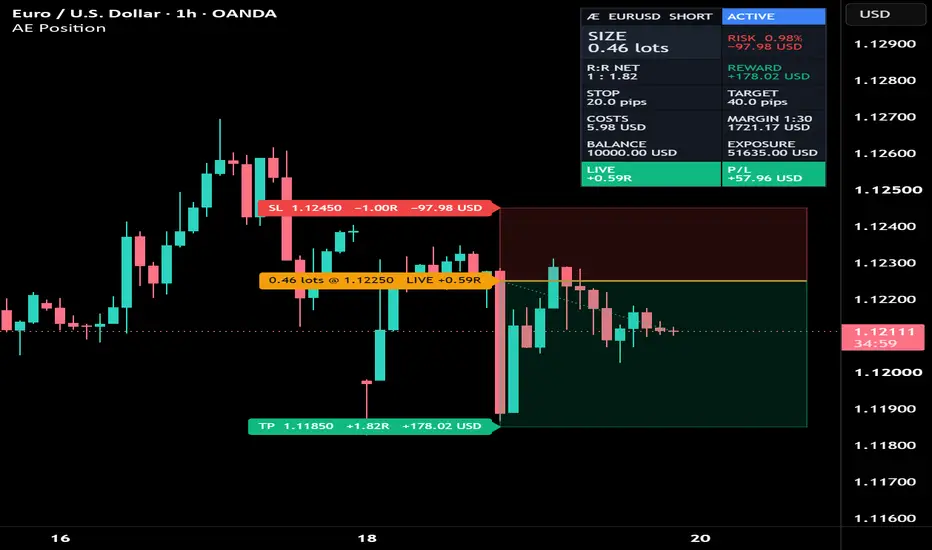
Plan the trade on the chart and see exactly how big it should be – with spread and commission already priced into your risk.
WHAT IT DOES
Set your entry, stop loss and target directly on the chart. The indicator calculates the position size that matches your risk, draws the position as a risk/reward box and follows the trade from the moment you place it: pending → active → target hit or stop hit.
POSITION SIZE
• Risk per trade: 0.5 %, 1 %, 2 %, a custom percentage or a fixed amount
• Size rounded to your broker's lot step – rounded down by default, so the risk stays within your budget
• Minimum and maximum size, with a clear warning when your risk is too small for the minimum size
• Manual mode: type your own size and see the real risk it carries
• Target as a price or as an R multiple
ALL MARKETS
The contract size is detected automatically:
• Forex: 100,000 units per lot, distances in pips
• Gold: 100 oz per lot, silver: 5,000 oz per lot
• Crypto: size in coins (e.g. 0.2440 BTC)
• Stocks: shares
• Futures: the exchange point value (e.g. ES: 50 USD per point)
• Index CFDs: 1 unit per lot
Every value can be adjusted under "Broker & contract" to match your broker.
14 ACCOUNT CURRENCIES
USD, EUR, GBP, CHF, JPY, CAD, AUD, NZD, SGD, HKD, SEK, NOK, PLN, ZAR. Risk and reward are converted into your account currency using live exchange rates where available – also for crosses such as GBPJPY or an index quoted in EUR on a USD account.
COSTS INCLUDED
Enter your spread and commission. Both are added to the risk and taken from the reward, so size, risk and R:R show what the trade really costs. With costs set, the card shows the net R:R (for example 1 : 1.82 instead of 1 : 2.00).
R in this indicator is your real risk including costs: the stop is exactly −1R.
TRADE TRACKING
• The entry is a time and price point – from that bar on, the trade is tracked
• A gap through the entry counts as a fill
• Conservative rule: when stop and target fall within the same bar, the stop counts
• Active trades show the live result in R and in your account currency, plus a dotted path from the fill to the current price
• Closed trades show the final result in R and money
ALERTS
Entry filled, target hit, stop hit – or any of them. The alert message includes the size and the result.
STATUS AT A GLANCE
The status field shows what needs attention: check levels, levels from another symbol, missing exchange rate, below minimum size, size capped, high risk, margin above balance, low R:R.
DISPLAY
• Position box with or without border, or plain lines
• Labels: full, minimal or off – left of the entry or right of the box, four sizes
• Card: compact or full (stop and target distance, costs, margin estimate, balance, exposure), four positions, four sizes
• Colors and zone transparency adjustable
Tip for phones: set the card to "Bottom right" and "Tiny".
HOW TO USE
1. Add the indicator, then click your entry (bar and price), your stop loss and your target.
2. Set account currency, balance and risk under "Risk".
3. Optional: enter spread and commission and check the contract settings for your broker.
4. Select the indicator to drag the levels, or change them in the settings.
GOOD TO KNOW
• Index and crypto CFDs use different contract sizes at different brokers – set "Units per lot" to your broker's specification.
• The margin value is an estimate based on the leverage you enter.
• Alerts fire in real time; on historical bars the indicator shows the trade states.
• The indicator calculates and tracks – it does not place orders.
WHAT IT DOES
Set your entry, stop loss and target directly on the chart. The indicator calculates the position size that matches your risk, draws the position as a risk/reward box and follows the trade from the moment you place it: pending → active → target hit or stop hit.
POSITION SIZE
• Risk per trade: 0.5 %, 1 %, 2 %, a custom percentage or a fixed amount
• Size rounded to your broker's lot step – rounded down by default, so the risk stays within your budget
• Minimum and maximum size, with a clear warning when your risk is too small for the minimum size
• Manual mode: type your own size and see the real risk it carries
• Target as a price or as an R multiple
ALL MARKETS
The contract size is detected automatically:
• Forex: 100,000 units per lot, distances in pips
• Gold: 100 oz per lot, silver: 5,000 oz per lot
• Crypto: size in coins (e.g. 0.2440 BTC)
• Stocks: shares
• Futures: the exchange point value (e.g. ES: 50 USD per point)
• Index CFDs: 1 unit per lot
Every value can be adjusted under "Broker & contract" to match your broker.
14 ACCOUNT CURRENCIES
USD, EUR, GBP, CHF, JPY, CAD, AUD, NZD, SGD, HKD, SEK, NOK, PLN, ZAR. Risk and reward are converted into your account currency using live exchange rates where available – also for crosses such as GBPJPY or an index quoted in EUR on a USD account.
COSTS INCLUDED
Enter your spread and commission. Both are added to the risk and taken from the reward, so size, risk and R:R show what the trade really costs. With costs set, the card shows the net R:R (for example 1 : 1.82 instead of 1 : 2.00).
R in this indicator is your real risk including costs: the stop is exactly −1R.
TRADE TRACKING
• The entry is a time and price point – from that bar on, the trade is tracked
• A gap through the entry counts as a fill
• Conservative rule: when stop and target fall within the same bar, the stop counts
• Active trades show the live result in R and in your account currency, plus a dotted path from the fill to the current price
• Closed trades show the final result in R and money
ALERTS
Entry filled, target hit, stop hit – or any of them. The alert message includes the size and the result.
STATUS AT A GLANCE
The status field shows what needs attention: check levels, levels from another symbol, missing exchange rate, below minimum size, size capped, high risk, margin above balance, low R:R.
DISPLAY
• Position box with or without border, or plain lines
• Labels: full, minimal or off – left of the entry or right of the box, four sizes
• Card: compact or full (stop and target distance, costs, margin estimate, balance, exposure), four positions, four sizes
• Colors and zone transparency adjustable
Tip for phones: set the card to "Bottom right" and "Tiny".
HOW TO USE
1. Add the indicator, then click your entry (bar and price), your stop loss and your target.
2. Set account currency, balance and risk under "Risk".
3. Optional: enter spread and commission and check the contract settings for your broker.
4. Select the indicator to drag the levels, or change them in the settings.
GOOD TO KNOW
• Index and crypto CFDs use different contract sizes at different brokers – set "Units per lot" to your broker's specification.
• The margin value is an estimate based on the leverage you enter.
• Alerts fire in real time; on historical bars the indicator shows the trade states.
• The indicator calculates and tracks – it does not place orders.

Aviso legal
As informações e publicações não se destinam a ser, e não constituem, conselhos ou recomendações financeiras, de investimento, comerciais ou de outro tipo fornecidos ou endossados pela TradingView. Leia mais nos Termos de Uso.
Aviso legal
As informações e publicações não se destinam a ser, e não constituem, conselhos ou recomendações financeiras, de investimento, comerciais ou de outro tipo fornecidos ou endossados pela TradingView. Leia mais nos Termos de Uso.