OPEN-SOURCE SCRIPT
Atualizado Custom Candle Highlighter (NY Time)
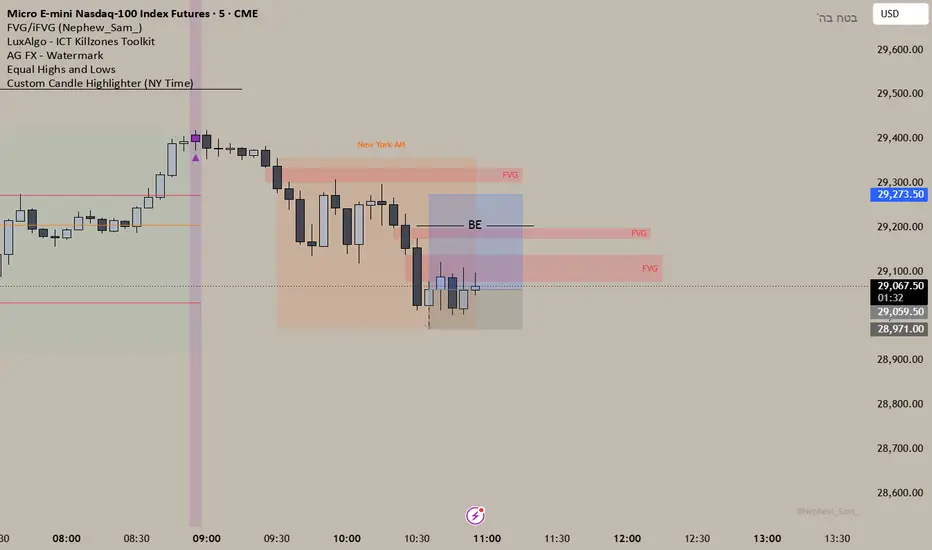
### Overview
This lightweight utility script highlights exactly two specific candles during the trading day based on your custom time inputs. It is designed for traders who track specific key economic releases, market opens, or daily institutional windows.
### Features
* **Precise NY Time Tracking:** The script converts candle times to the New York timezone (`America/New_York`), meaning it automatically adjusts for U.S. Daylight Saving Time (DST). It will remain accurate regardless of your local chart timezone display.
* **Dual Time Inputs:** Easily set two independent times (Hour and Minute) directly from the indicator settings panel without changing the code.
* **Highly Visible Triggers:** When a candle matches your set time, the script highlights it using three visual anchors:
1. Changes the candle body color to Yellow.
2. Applies a soft Yellow background slot behind the candle.
3. Places a tiny green triangle underneath the candle for absolute clarity.
### Important Usage Notes (Best Settings)
* **Timeframe Requirement:** To capture exact minutes (e.g., 08:55 AM), you **must** use this indicator on lower-interval timeframes like the **1-minute (1m)** chart. If you are on a 1-hour chart, individual minute triggers will not paint.
* **Inputs:** Access the settings gear icon to adjust the hours (0-23 format) and minutes (0-59 format) for both the morning and afternoon session targets.
Feel free to leave a comment or drop a like if you find this script useful for your daily routine!
This lightweight utility script highlights exactly two specific candles during the trading day based on your custom time inputs. It is designed for traders who track specific key economic releases, market opens, or daily institutional windows.
### Features
* **Precise NY Time Tracking:** The script converts candle times to the New York timezone (`America/New_York`), meaning it automatically adjusts for U.S. Daylight Saving Time (DST). It will remain accurate regardless of your local chart timezone display.
* **Dual Time Inputs:** Easily set two independent times (Hour and Minute) directly from the indicator settings panel without changing the code.
* **Highly Visible Triggers:** When a candle matches your set time, the script highlights it using three visual anchors:
1. Changes the candle body color to Yellow.
2. Applies a soft Yellow background slot behind the candle.
3. Places a tiny green triangle underneath the candle for absolute clarity.
### Important Usage Notes (Best Settings)
* **Timeframe Requirement:** To capture exact minutes (e.g., 08:55 AM), you **must** use this indicator on lower-interval timeframes like the **1-minute (1m)** chart. If you are on a 1-hour chart, individual minute triggers will not paint.
* **Inputs:** Access the settings gear icon to adjust the hours (0-23 format) and minutes (0-59 format) for both the morning and afternoon session targets.
Feel free to leave a comment or drop a like if you find this script useful for your daily routine!
Notas de Lançamento
Changed the colors to purple, I like it more Script de código aberto
Em verdadeiro espírito do TradingView, o criador deste script o tornou de código aberto, para que os traders possam revisar e verificar sua funcionalidade. Parabéns ao autor! Embora você possa usá-lo gratuitamente, lembre-se de que a republicação do código está sujeita às nossas Regras da Casa.

Aviso legal
As informações e publicações não se destinam a ser, e não constituem, conselhos ou recomendações financeiras, de investimento, comerciais ou de outro tipo fornecidos ou endossados pela TradingView. Leia mais nos Termos de Uso.
Script de código aberto
Em verdadeiro espírito do TradingView, o criador deste script o tornou de código aberto, para que os traders possam revisar e verificar sua funcionalidade. Parabéns ao autor! Embora você possa usá-lo gratuitamente, lembre-se de que a republicação do código está sujeita às nossas Regras da Casa.
Aviso legal
As informações e publicações não se destinam a ser, e não constituem, conselhos ou recomendações financeiras, de investimento, comerciais ou de outro tipo fornecidos ou endossados pela TradingView. Leia mais nos Termos de Uso.