Key Level Confluence & Target Zones [PhenLabs]
🎯 Overview
Key Level Confluence & Target Zones [PhenLabs] is an analytical overlay and trade-planning indicator built on Pine Script v6. Traders who combine daily and weekly high/low levels (`PDH`, `PDL`, `PDC`, `PWH`, `PWL`) with pivot points (`P`, `R1`–`R3`, `S1`–`S3`), swing highs/lows, and institutional round numbers often end up with twenty or more competing horizontal lines on the chart. This script suppresses lone single-source lines, plots a clean shaded zone only where at least one price-structure level and one formula level cluster within an ATR-scaled tolerance, and converts closed-bar reactions at those zones into a full non-repainting trade plan.
🧠 How It Works — Non-Repainting State Machine
Every confluence zone, signal, and trade plan is governed by a deterministic closed-bar state machine (`LEVEL_COLLECTION -> CONFLUENCE_MERGE -> REACTION_CHECK -> IN_TRADE`):
⚙️ Under the Hood — Mathematical Formulation
1. Multi-Source Confluence Scoring & Width Normalization
Each merged cluster is required to hold both a structural price level (`hasS`) and a formula pivot/round level (`hasF`). Zone thickness is floored at `0.12 * ta.atr(14)` for clean chart legibility, and each zone receives a bounded `0–100` confluence score weighted by stack count, weekly structure presence (`wk`), and swing structure presence (`sw`):
Pine Script®
2. All-Plan Activity Normalization & Candle Displacement
To ensure identical functionality across stocks, futures, crypto, and spot forex on all TradingView plans (without relying on plan-gated footprint feeds), relative participation (`actV`) uses 20-bar relative volume when volume is reported and automatically falls back to normalized true range (`(high - low) / ta.atr(14)`) on volume-free feeds:
Pine Script®
3. Multi-Profile UDT Tournament & Honest Auto Ledger
Five independent `Ledger` instances run in parallel on closed bars so that `Auto (Best EV)` maintains its own live trade record rather than copying hindsight numbers from a single fixed profile:
📊 Visual Walkthrough & Telemetry Dashboard
🛠️ Input Guide
Group 1 — Signals
Group 2 — Confluence Zones
Group 3 — Trade Plan
Group 4 — Display
🚀 Built-In Alerts & Pine Screener
The first six `plot()` calls expose `Signal (+1 Buy / -1 Sell)`, `Active Plan Direction`, `Nearest Support Score`, `Nearest Resistance Score`, `Active Zones`, and `Avg R per Trade` directly to the Pine Screener and Data Window. Six `alertcondition()` triggers are included:
Key Level Confluence & Target Zones [PhenLabs] is an analytical overlay and trade-planning indicator built on Pine Script v6. Traders who combine daily and weekly high/low levels (`PDH`, `PDL`, `PDC`, `PWH`, `PWL`) with pivot points (`P`, `R1`–`R3`, `S1`–`S3`), swing highs/lows, and institutional round numbers often end up with twenty or more competing horizontal lines on the chart. This script suppresses lone single-source lines, plots a clean shaded zone only where at least one price-structure level and one formula level cluster within an ATR-scaled tolerance, and converts closed-bar reactions at those zones into a full non-repainting trade plan.
- Multi-Source Confluence Clustering: Collects prior-period daily and weekly highs/lows/closes alongside chart-timeframe swing pivots (`SWING H`, `SWING L`), formula pivot levels (`Traditional`, `Fibonacci`, or `Camarilla`), and institutional round-number steps. A zone is formed only when at least one structure level and one formula level sit within `Merge Tolerance (ATR)` of each other (`default 0.35 ATR`).
- Closed-Bar Hold vs. Breakout Verification: Evaluates price interactions at scored confluence zones on confirmed bar closes (`barstate.isconfirmed`) across two reaction types: `HOLD` reversals (wick rejection inside the zone with a close back outside and relative activity confirmation) and `BREAKOUT` continuations (body displacement closing beyond the far boundary by the configured ATR buffer).
- Automated Entry, Auto-BE Stop & Magnet-Snapped Targets: Projects a closed-bar `ENTRY`, an ATR-clamped `SL` (`0.5` to `3.0 ATR`), and a three-tier `TP1` / `TP2` / `TP3` target ladder with partial scale-out tracking (`50%` at `TP1`, `30%` at `TP2`, `20%` at `TP3`), automatic break-even stop ratcheting after `TP1`, and optional `TP2` magnet snapping to the nearest opposing confluence zone.
🧠 How It Works — Non-Repainting State Machine
Every confluence zone, signal, and trade plan is governed by a deterministic closed-bar state machine (`LEVEL_COLLECTION -> CONFLUENCE_MERGE -> REACTION_CHECK -> IN_TRADE`):
- Stage 1 (`LEVEL_COLLECTION`):
On intraday and daily charts, the script retrieves completed prior-day (`PDH`, `PDL`, `PDC`) and prior-week (`PWH`, `PWL`, `PWC`) structure levels alongside confirmed chart-timeframe swing pivots (`ta.pivothigh()` and `ta.pivotlow()`). It then calculates daily and weekly pivot levels (`P`, `R1`–`R3`, `S1`–`S3`) using the selected `Pivot Formula` (`Traditional`, `Fibonacci`, or `Camarilla`) plus nearby psychological round numbers. - Stage 2 (`CONFLUENCE_MERGE`):
All candidate levels are sorted from lowest to highest and grouped whenever adjacent levels sit within `Merge Tolerance (ATR)` (`0.35 * ta.atr(14)` by default) and the total cluster span remains within `2.0 * Merge Tolerance (ATR)`. A candidate cluster becomes an active Key Level Confluence Zone only if it contains at least `Min Sources per Zone` (`default 2`) AND includes both a price-structure source (`PDH/PDL/PWH/PWL/Swing`) and a formula source (`Pivot/Round`). Lone levels are never drawn. - Stage 3 (`REACTION_CHECK`):
When price interacts with a scored confluence zone on a confirmed bar close, the engine evaluates two reaction modes:
• Hold Reversal (`HOLD`): Price wicks into or slightly through a support or resistance confluence zone (`within 0.5 ATR`), prints a rejection wick ratio exceeding the profile threshold, and closes back outside the zone with relative volume/range activity (`actV`) above threshold.
• Confirmed Breakout (`BREAKOUT`): Price closes beyond the far boundary of the confluence zone by at least the profile's ATR breakout buffer with a strong candle body-to-range ratio (`math.abs(close - open) / math.max(high - low, syminfo.mintick)`).
• Highest-Score Priority: If multiple zones qualify on the same bar, the zone with the highest `0–100` confluence score takes precedence. - Stage 4 (`IN_TRADE` — Full Trade Plan & Lifecycle):
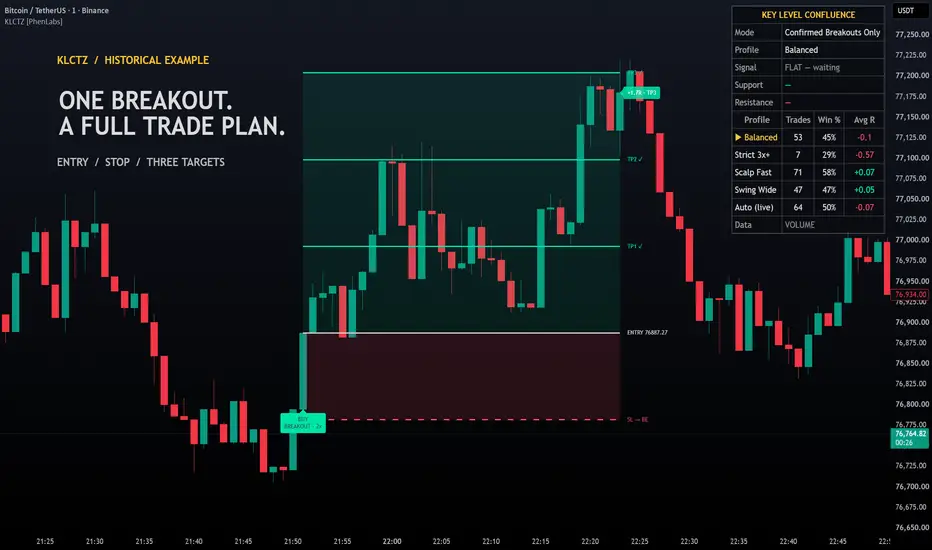
Upon a confirmed signal, the script locks `ENTRY` at the bar's `close`, places `SL` beyond the zone's far boundary and signal wick (`clamped between 0.5 ATR and 3.0 ATR`), and projects `TP1`, `TP2`, and `TP3`. On subsequent confirmed bars, conservative stop-first ordering checks `SL` before `TP1`–`TP3`. Reaching `TP1` books `50%` of the position and moves `SL` to `ENTRY` (`Break-Even`); `TP2` books `30%`; and `TP3`, a stop hit, or `Time Exit (bars)` closes the remaining share.
⚙️ Under the Hood — Mathematical Formulation
1. Multi-Source Confluence Scoring & Width Normalization
Each merged cluster is required to hold both a structural price level (`hasS`) and a formula pivot/round level (`hasF`). Zone thickness is floored at `0.12 * ta.atr(14)` for clean chart legibility, and each zone receives a bounded `0–100` confluence score weighted by stack count, weekly structure presence (`wk`), and swing structure presence (`sw`):
2. All-Plan Activity Normalization & Candle Displacement
To ensure identical functionality across stocks, futures, crypto, and spot forex on all TradingView plans (without relying on plan-gated footprint feeds), relative participation (`actV`) uses 20-bar relative volume when volume is reported and automatically falls back to normalized true range (`(high - low) / ta.atr(14)`) on volume-free feeds:
3. Multi-Profile UDT Tournament & Honest Auto Ledger
Five independent `Ledger` instances run in parallel on closed bars so that `Auto (Best EV)` maintains its own live trade record rather than copying hindsight numbers from a single fixed profile:
- Profile 0 — Balanced: Requires score `>= 36`, wick defense `>= 0.35`, breakout body `>= 0.50`, breakout buffer `0.10 ATR`, relative activity `>= 0.90`, and `1.0x` target/stop scaling.
- Profile 1 — Strict 3x+ Stack: Requires score `>= 54` (`3+` stacked sources), wick defense `>= 0.45`, breakout body `>= 0.60`, breakout buffer `0.15 ATR`, and relative activity `>= 1.10`.
- Profile 2 — Scalp Fast: Uses faster confirmation (`wick >= 0.30`, `body >= 0.45`, `buffer 0.05 ATR`, `activity >= 0.80`) with `0.75x` stop and target scaling.
- Profile 3 — Swing Wide: Uses wider structural confirmation (`wick >= 0.40`, `body >= 0.55`, `buffer 0.20 ATR`, `activity >= 1.00`) with `1.50x` stop and target scaling.
- Profile 4 — Auto (Live Selection): Before each new trade, selects the fixed profile (`0–3`) with the highest realized average R (`sumR / trades`, minimum `3` closed trades, defaulting to `Balanced` during warm-up) and records the resulting trade in its own separate live ledger.
📊 Visual Walkthrough & Telemetry Dashboard
- Key Level Confluence Zones: Displays the nearest `Zones Shown` (`default 4`) around current price. Zones above price tint crimson (`Resistance`), zones below price tint emerald (`Support`), and zones straddling price tint gold, with opacity scaled by the `0–100` confluence score and a right-aligned badge listing every constituent level (for example, `3x CONFLUENCE [PDL + S1 + SWING L] · 60`).
- Trade Plan Projections: Plots the active and most recent `Past Plans Shown` (`default 4`) with shaded risk/reward boxes, `ENTRY`, `SL`, and `TP1`–`TP3` rays, checkmarks (`TP1 ✓`, `TP2 ✓`, `TP3 ✓`) as targets are reached, automatic `SL -> BE` label updates after `TP1`, and a final realized R badge (`+2.00R · TP3`, `+0.50R · BE STOP`, or `-1.00R · STOP`).
- Top-Right Telemetry Table: Reports the active `Trade Mode`, selected `Profile` (including which profile `Auto` is currently routing to), active trade state, nearest Support and Resistance confluence zones, a 5-row performance comparison across `Balanced`, `Strict 3x+`, `Scalp Fast`, `Swing Wide`, and `Auto (live)`, and the active participation feed (`VOLUME` vs `RANGE PROXY`).
🛠️ Input Guide
Group 1 — Signals
- Trade Mode: Select `Both (Hold + Breakout)`, `Hold Reversals Only`, or `Confirmed Breakouts Only` (`default Both (Hold + Breakout)`).
- Profile: Choose `Auto (Best EV)`, `Balanced`, `Strict 3x+ Stack`, `Scalp Fast`, or `Swing Wide` (`default Auto (Best EV)`).
Group 2 — Confluence Zones
- Pivot Formula: Choose `Traditional`, `Fibonacci`, or `Camarilla` pivot calculations (`default Traditional`).
- Merge Tolerance (ATR): Maximum distance in `ta.atr(14)` units for merging adjacent levels into one confluence zone (`default 0.35`).
- Min Sources per Zone: Minimum number of agreeing levels required to plot a zone (`default 2`).
- Swing Length: Left/right bar lookback for confirmed chart-timeframe swing highs and lows (`default 10`).
- Include Round Numbers: Includes institutional round-number steps in the formula level pool (`default true`).
Group 3 — Trade Plan
- Stop Buffer (ATR): Extra ATR cushion added beyond the zone edge and signal wick (`default 0.25`, with total stop distance clamped to `0.5–3.0 ATR`).
- Targets: TP1 / TP2 / TP3 (R): Base R-multiples for the three take-profit levels (`default 1.0 / 2.0 / 3.0`).
- Snap TP2 to Next Opposing Zone: Automatically snaps `TP2` just inside the nearest opposing confluence zone when one sits between `TP1` and `TP3` (`default true`).
- Time Exit (bars): Maximum bars a trade plan can remain open before closing at market (`default 60`).
Group 4 — Display
- Past Plans Shown: Number of historical trade plans retained on the chart (`default 4`).
- Zones Shown: Number of nearest active confluence zones displayed around current price (`default 4`).
- Table Size: Adjusts the top-right dashboard size between `Tiny`, `Small`, and `Normal` (`default Small`).
- Bull / Bear / Zone: Custom colors for bullish elements (`#00E5A8`), bearish elements (`#FF4D6D`), and neutral/header accents (`#F5C542`).
🚀 Built-In Alerts & Pine Screener
The first six `plot()` calls expose `Signal (+1 Buy / -1 Sell)`, `Active Plan Direction`, `Nearest Support Score`, `Nearest Resistance Score`, `Active Zones`, and `Avg R per Trade` directly to the Pine Screener and Data Window. Six `alertcondition()` triggers are included:
- `KLCTZ Bullish Entry`
- `KLCTZ Bearish Entry`
- `KLCTZ Any Entry`
- `KLCTZ TP1 Hit`
- `KLCTZ TP3 Hit`
- `KLCTZ Stop Hit`
⚠️ Risk Disclaimer
This indicator is an analytical decision-support tool designed for educational and informational purposes only. Historical profile win rates and average R-multiples are computed from closed-bar state-machine simulations on the active chart history and do not predict or guarantee future performance. Always validate setups within your own risk management framework.

TradingView Charting w/ Crypto Systems: phenlabs.com
Join our growing community: discord.gg/phen
All content provided by PhenLabs is for informational & educational purposes only. Past performance does not guarantee future results.
Join our growing community: discord.gg/phen
All content provided by PhenLabs is for informational & educational purposes only. Past performance does not guarantee future results.
Aviso legal
As informações e publicações não se destinam a ser, e não constituem, conselhos ou recomendações financeiras, de investimento, comerciais ou de outro tipo fornecidos ou endossados pela TradingView. Leia mais nos Termos de Uso.
TradingView Charting w/ Crypto Systems: phenlabs.com
Join our growing community: discord.gg/phen
All content provided by PhenLabs is for informational & educational purposes only. Past performance does not guarantee future results.
Join our growing community: discord.gg/phen
All content provided by PhenLabs is for informational & educational purposes only. Past performance does not guarantee future results.
Aviso legal
As informações e publicações não se destinam a ser, e não constituem, conselhos ou recomendações financeiras, de investimento, comerciais ou de outro tipo fornecidos ou endossados pela TradingView. Leia mais nos Termos de Uso.