OPEN-SOURCE SCRIPT
Atualizado Customizable Vertical Lines
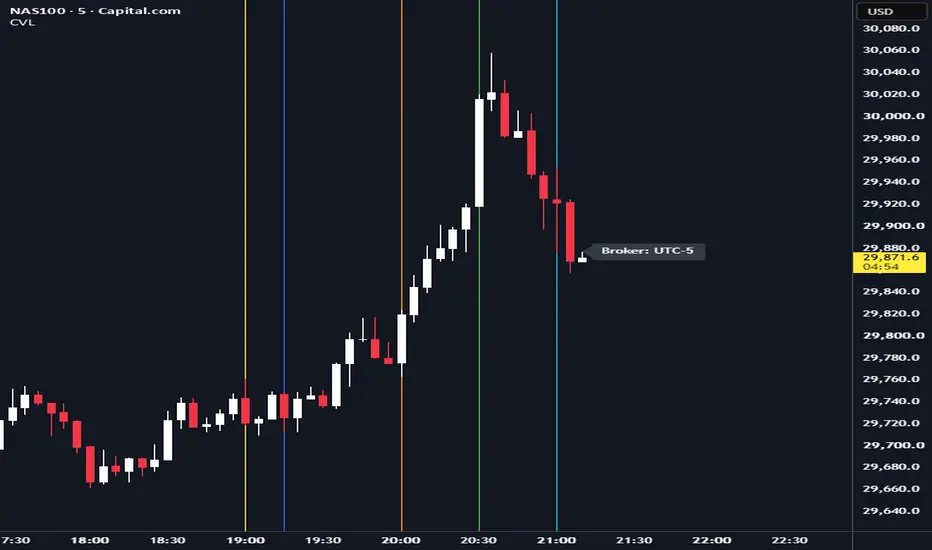
Customizable Vertical Lines (CVL) Indicator
Version 2.0 (November 2023)
Description:
The Customizable Vertical Lines (CVL) indicator is a powerful tool for traders who want to mark specific times on their charts with vertical lines. This indicator allows users to customize the appearance of these lines, including their color, line style, and width, providing a flexible and visually intuitive way to highlight key time points.
Key Features:
User-Friendly Inputs: Easily set up to five distinct times, each associated with a unique color for the vertical lines.
Color Customization: Choose from a wide range of colors for each vertical line, allowing for clear differentiation.
Line Style Options: Tailor the appearance of the lines with three selectable styles: solid, dotted, or dashed.
Adjustable Line Width: Modify the thickness of the lines to suit your preferred visual style.
Timezone Offset: Account for different time zones by adjusting the timezone offset parameter.
How to Use:
Simply input the desired times, colors, and other parameters in the script settings. The CVL indicator will then automatically plot vertical lines at the specified times on the chart with the chosen customization.
Version 2.0 (November 2023)
Description:
The Customizable Vertical Lines (CVL) indicator is a powerful tool for traders who want to mark specific times on their charts with vertical lines. This indicator allows users to customize the appearance of these lines, including their color, line style, and width, providing a flexible and visually intuitive way to highlight key time points.
Key Features:
User-Friendly Inputs: Easily set up to five distinct times, each associated with a unique color for the vertical lines.
Color Customization: Choose from a wide range of colors for each vertical line, allowing for clear differentiation.
Line Style Options: Tailor the appearance of the lines with three selectable styles: solid, dotted, or dashed.
Adjustable Line Width: Modify the thickness of the lines to suit your preferred visual style.
Timezone Offset: Account for different time zones by adjusting the timezone offset parameter.
How to Use:
Simply input the desired times, colors, and other parameters in the script settings. The CVL indicator will then automatically plot vertical lines at the specified times on the chart with the chosen customization.
Notas de Lançamento
Customizable Vertical Lines (CVL) Indicator: Advanced Time MarkingThe Customizable Vertical Lines (CVL) indicator is a powerful tool for marking specific times on your charts, now featuring enhanced labeling to make your time-based analysis permanent and clean.
Notas de Lançamento
Added minutes optionNotas de Lançamento
Added MinutesNotas de Lançamento
Adding setting if there if DST Month since there need to offset the time. Notas de Lançamento
Updated short titleNotas de Lançamento
Added Time 7Notas de Lançamento
Plot vertical time markers locked to your local timezone — no matter which broker or exchange you use. The script auto-detects the broker's timezone and converts your target times correctly.What's New in v6
> Auto-detect broker timezone — no more guessing offset or DST toggles. Set your own GMT and CVL handles the conversion.
> "Show Broker Server Time" toggle — displays the detected exchange offset as a label (Broker: UTC+1) so you always know which timezone your chart is aligned to. Toggle it on/off anytime.
> Clean vertical stems — anchors sit outside the visible price range, so only the vertical line shows — no horizontal dash artifacts cluttering your support/resistance zones.
> Hardened defaults — line style fixed to solid, anchor logic locked. Fewer knobs, cleaner chart.
> Pine Script v6
How to Use
1. Set Target Timezone (GMT) to YOUR local timezone (e.g., 8 for Singapore, -4 for New York).
2. Configure up to 7 time slots with your key hours (session opens, news events, entry windows).
3. Check Show Broker Server Time to verify the detected exchange offset.
4. Lines will fire at those times every day, locked to YOUR clock, on any broker chart.
Use Cases
> Mark session opens (London, New York, Asia) on any instrument
> Highlight news event times (FOMC, NFP, CPI)
> Intraday time-based strategies — entry windows, session close warnings
> Verify chart timezone alignment at a glance
Script de código aberto
Em verdadeiro espírito do TradingView, o criador deste script o tornou de código aberto, para que os traders possam revisar e verificar sua funcionalidade. Parabéns ao autor! Embora você possa usá-lo gratuitamente, lembre-se de que a republicação do código está sujeita às nossas Regras da Casa.

Aviso legal
As informações e publicações não se destinam a ser, e não constituem, conselhos ou recomendações financeiras, de investimento, comerciais ou de outro tipo fornecidos ou endossados pela TradingView. Leia mais nos Termos de Uso.
Script de código aberto
Em verdadeiro espírito do TradingView, o criador deste script o tornou de código aberto, para que os traders possam revisar e verificar sua funcionalidade. Parabéns ao autor! Embora você possa usá-lo gratuitamente, lembre-se de que a republicação do código está sujeita às nossas Regras da Casa.
Aviso legal
As informações e publicações não se destinam a ser, e não constituem, conselhos ou recomendações financeiras, de investimento, comerciais ou de outro tipo fornecidos ou endossados pela TradingView. Leia mais nos Termos de Uso.