OPEN-SOURCE SCRIPT
[WW_AM] UTC Week Day Sessions
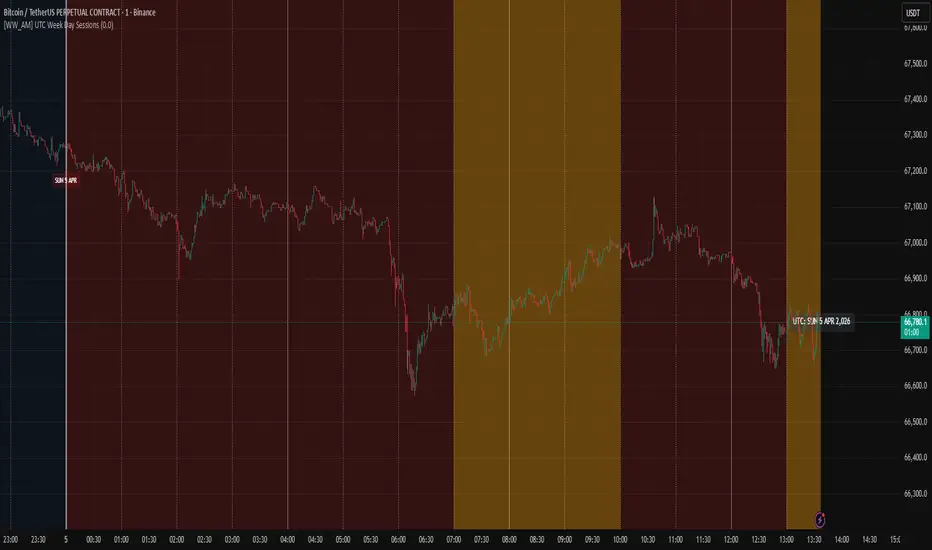
UTC Week Day Sessions – What it does
This indicator helps you understand the market context based on UTC time, regardless of your local timezone or the chart's timezone.
Main features:
Coloured weekdays – Each weekday gets a different background shade (Monday to Saturday). Sunday turns red if you wish. This makes it easy to spot day transitions at a glance.
Active session highlight – London (07:00–10:00 UTC) and NY/Overlap (13:00–17:00 UTC) are highlighted in yellow, so you know when liquidity typically picks up.
Time boundaries – Draws vertical lines at the start of every hour, 4‑hour block, day, and week. You can toggle each level on/off. The line thickness increases with importance (thickest for weekly boundaries).
Date labels – A small label appears below the chart at 00:00 UTC showing the day, date, and month. Hover to see the full weekday and year.
UTC watermark – Displays the current UTC date in the top‑right corner, so you always know the reference time.
Price % calculator – Enter a target price (click the crosshair icon to pick a level from the chart). The script then shows a dashed line at that price and a label with the percentage difference from the current close. Very handy for measuring potential targets or stop distances.
How to use it:
Add the indicator to any intraday chart (it works best on minute or hourly timeframes).
Adjust the toggles in the settings to show/hide backgrounds, lines, labels, and the watermark.
For the price calculator: go to the indicator’s settings → "Price % Calculator" → click the crosshair icon next to "Target Price Level", then click any price on the chart.
The indicator uses UTC exclusively – no need to change your chart’s timezone.
Note: All session times and boundaries are based on UTC, not your broker’s time or local time. This ensures consistency across different platforms and regions.
This indicator helps you understand the market context based on UTC time, regardless of your local timezone or the chart's timezone.
Main features:
Coloured weekdays – Each weekday gets a different background shade (Monday to Saturday). Sunday turns red if you wish. This makes it easy to spot day transitions at a glance.
Active session highlight – London (07:00–10:00 UTC) and NY/Overlap (13:00–17:00 UTC) are highlighted in yellow, so you know when liquidity typically picks up.
Time boundaries – Draws vertical lines at the start of every hour, 4‑hour block, day, and week. You can toggle each level on/off. The line thickness increases with importance (thickest for weekly boundaries).
Date labels – A small label appears below the chart at 00:00 UTC showing the day, date, and month. Hover to see the full weekday and year.
UTC watermark – Displays the current UTC date in the top‑right corner, so you always know the reference time.
Price % calculator – Enter a target price (click the crosshair icon to pick a level from the chart). The script then shows a dashed line at that price and a label with the percentage difference from the current close. Very handy for measuring potential targets or stop distances.
How to use it:
Add the indicator to any intraday chart (it works best on minute or hourly timeframes).
Adjust the toggles in the settings to show/hide backgrounds, lines, labels, and the watermark.
For the price calculator: go to the indicator’s settings → "Price % Calculator" → click the crosshair icon next to "Target Price Level", then click any price on the chart.
The indicator uses UTC exclusively – no need to change your chart’s timezone.
Note: All session times and boundaries are based on UTC, not your broker’s time or local time. This ensures consistency across different platforms and regions.
Script de código aberto
Em verdadeiro espírito do TradingView, o criador deste script o tornou de código aberto, para que os traders possam revisar e verificar sua funcionalidade. Parabéns ao autor! Embora você possa usá-lo gratuitamente, lembre-se de que a republicação do código está sujeita às nossas Regras da Casa.

Aviso legal
As informações e publicações não se destinam a ser, e não constituem, conselhos ou recomendações financeiras, de investimento, comerciais ou de outro tipo fornecidos ou endossados pela TradingView. Leia mais nos Termos de Uso.
Script de código aberto
Em verdadeiro espírito do TradingView, o criador deste script o tornou de código aberto, para que os traders possam revisar e verificar sua funcionalidade. Parabéns ao autor! Embora você possa usá-lo gratuitamente, lembre-se de que a republicação do código está sujeita às nossas Regras da Casa.
Aviso legal
As informações e publicações não se destinam a ser, e não constituem, conselhos ou recomendações financeiras, de investimento, comerciais ou de outro tipo fornecidos ou endossados pela TradingView. Leia mais nos Termos de Uso.