OPEN-SOURCE SCRIPT
Kalman Velocity Trend Filter [Jayadev Rana]
OVERVIEW
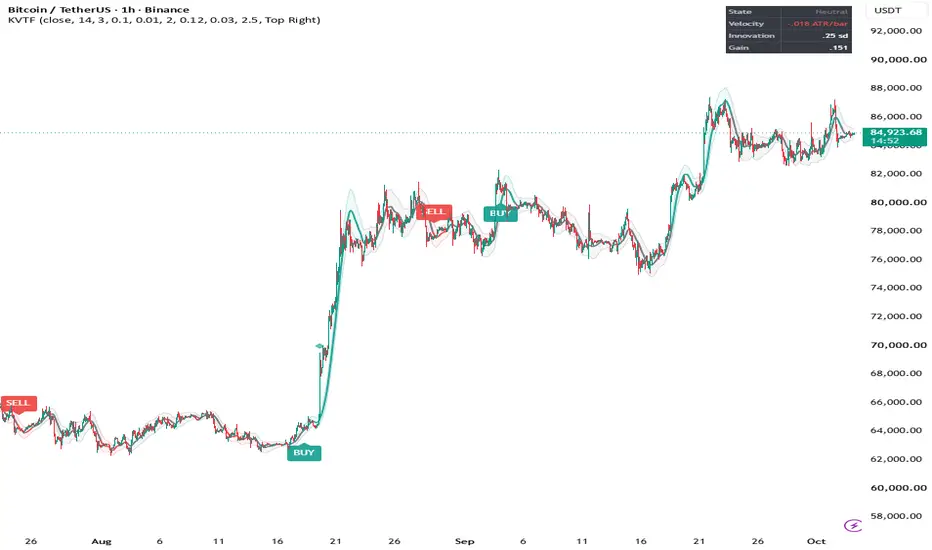
Kalman Velocity Trend Filter is a trend-following overlay that prints alternating BUY and SELL signals from the slope of a two-state Kalman filter. Instead of smoothing price with a moving average and then measuring its slope afterwards, the filter estimates two things at once on every bar: where the underlying price level is, and how fast it is moving (its velocity). The signals come from the velocity estimate, expressed in ATRs per bar so the same thresholds work on any instrument.
HOW IT WORKS
The model assumes that price is a level that advances by a velocity each bar, plus noise. On every bar the script first predicts the next level (previous level plus previous velocity), then compares the prediction with the actual price. The difference is called the innovation. A share of that innovation, set by the Kalman gain, is used to correct both the level and the velocity.
All three noise terms are scaled by ATR:
- Measurement noise: how noisy each new price is assumed to be. Larger values produce a smoother, slower line.
- Position process noise: how far the true level may jump outside the velocity model.
- Velocity process noise: how quickly the velocity itself is allowed to change.
Because the noise terms follow ATR, the filter loosens automatically when volatility expands and tightens when it contracts, without changing any setting.
SIGNALS
- BUY: the velocity rises above the Trend Entry Velocity on a closed bar and the last signal was not a BUY.
- SELL: the velocity falls below the negative Trend Entry Velocity on a closed bar and the last signal was not a SELL.
Signals strictly alternate. A pass through the neutral state does not repeat the previous signal. All signals are evaluated on closed bars and are not changed afterwards.
The line color shows the current state (up, down or neutral). The shaded envelope is the filter's own uncertainty about the level estimate (plus and minus a multiple of its standard deviation). It is not a volatility band and it is not used for signals. Optional shock markers flag bars where price landed unusually far from the filter's forecast, which often marks news bars or the start of a new leg.
DASHBOARD
State, velocity in ATR per bar, the latest innovation in standard deviations, and the current Kalman gain.
SETTINGS
Filter: Source, Noise Unit (ATR Length), Measurement Noise, Position Process Noise, Velocity Process Noise, Envelope Width.
Trend State: Trend Entry Velocity, Neutral Velocity, Allow Neutral State, Shock Threshold, Mark Shocks, Color Bars by State.
Dashboard: visibility and position.
Style: colors.
DEFAULT SETTINGS
The default values were chosen with a parameter search on BTCUSDT on the 1-hour timeframe. The search treated the signals as a stop-and-reverse system with trading costs, split the history into an earlier and a later segment, and kept only settings that held up in both segments. Other symbols and timeframes will usually need different values; treat the defaults as a starting point and not as a recommendation.
ALERTS
Buy Signal, Sell Signal, Price Shock.
LIMITATIONS
- This is a trend-following tool. In sideways markets the velocity crosses the threshold back and forth and signals will be late and often wrong.
- A smoother filter gives fewer false signals and also reacts later to real reversals. No setting removes this trade-off.
- The values of the current bar change until the bar closes. Signals are only printed on bar close.
- The envelope describes model uncertainty under the chosen noise settings; it is not a probability forecast for price.
- Settings tuned on past data can stop working when market behavior changes.
This script is for analysis and education. It does not provide financial advice, and past behavior of any signal does not guarantee future results.
Kalman Velocity Trend Filter is a trend-following overlay that prints alternating BUY and SELL signals from the slope of a two-state Kalman filter. Instead of smoothing price with a moving average and then measuring its slope afterwards, the filter estimates two things at once on every bar: where the underlying price level is, and how fast it is moving (its velocity). The signals come from the velocity estimate, expressed in ATRs per bar so the same thresholds work on any instrument.
HOW IT WORKS
The model assumes that price is a level that advances by a velocity each bar, plus noise. On every bar the script first predicts the next level (previous level plus previous velocity), then compares the prediction with the actual price. The difference is called the innovation. A share of that innovation, set by the Kalman gain, is used to correct both the level and the velocity.
All three noise terms are scaled by ATR:
- Measurement noise: how noisy each new price is assumed to be. Larger values produce a smoother, slower line.
- Position process noise: how far the true level may jump outside the velocity model.
- Velocity process noise: how quickly the velocity itself is allowed to change.
Because the noise terms follow ATR, the filter loosens automatically when volatility expands and tightens when it contracts, without changing any setting.
SIGNALS
- BUY: the velocity rises above the Trend Entry Velocity on a closed bar and the last signal was not a BUY.
- SELL: the velocity falls below the negative Trend Entry Velocity on a closed bar and the last signal was not a SELL.
Signals strictly alternate. A pass through the neutral state does not repeat the previous signal. All signals are evaluated on closed bars and are not changed afterwards.
The line color shows the current state (up, down or neutral). The shaded envelope is the filter's own uncertainty about the level estimate (plus and minus a multiple of its standard deviation). It is not a volatility band and it is not used for signals. Optional shock markers flag bars where price landed unusually far from the filter's forecast, which often marks news bars or the start of a new leg.
DASHBOARD
State, velocity in ATR per bar, the latest innovation in standard deviations, and the current Kalman gain.
SETTINGS
Filter: Source, Noise Unit (ATR Length), Measurement Noise, Position Process Noise, Velocity Process Noise, Envelope Width.
Trend State: Trend Entry Velocity, Neutral Velocity, Allow Neutral State, Shock Threshold, Mark Shocks, Color Bars by State.
Dashboard: visibility and position.
Style: colors.
DEFAULT SETTINGS
The default values were chosen with a parameter search on BTCUSDT on the 1-hour timeframe. The search treated the signals as a stop-and-reverse system with trading costs, split the history into an earlier and a later segment, and kept only settings that held up in both segments. Other symbols and timeframes will usually need different values; treat the defaults as a starting point and not as a recommendation.
ALERTS
Buy Signal, Sell Signal, Price Shock.
LIMITATIONS
- This is a trend-following tool. In sideways markets the velocity crosses the threshold back and forth and signals will be late and often wrong.
- A smoother filter gives fewer false signals and also reacts later to real reversals. No setting removes this trade-off.
- The values of the current bar change until the bar closes. Signals are only printed on bar close.
- The envelope describes model uncertainty under the chosen noise settings; it is not a probability forecast for price.
- Settings tuned on past data can stop working when market behavior changes.
This script is for analysis and education. It does not provide financial advice, and past behavior of any signal does not guarantee future results.
Script de código aberto
Em verdadeiro espírito do TradingView, o criador deste script o tornou de código aberto, para que os traders possam revisar e verificar sua funcionalidade. Parabéns ao autor! Embora você possa usá-lo gratuitamente, lembre-se de que a republicação do código está sujeita às nossas Regras da Casa.

Aviso legal
As informações e publicações não se destinam a ser, e não constituem, conselhos ou recomendações financeiras, de investimento, comerciais ou de outro tipo fornecidos ou endossados pela TradingView. Leia mais nos Termos de Uso.
Script de código aberto
Em verdadeiro espírito do TradingView, o criador deste script o tornou de código aberto, para que os traders possam revisar e verificar sua funcionalidade. Parabéns ao autor! Embora você possa usá-lo gratuitamente, lembre-se de que a republicação do código está sujeita às nossas Regras da Casa.
Aviso legal
As informações e publicações não se destinam a ser, e não constituem, conselhos ou recomendações financeiras, de investimento, comerciais ou de outro tipo fornecidos ou endossados pela TradingView. Leia mais nos Termos de Uso.