Chartman Range Commander
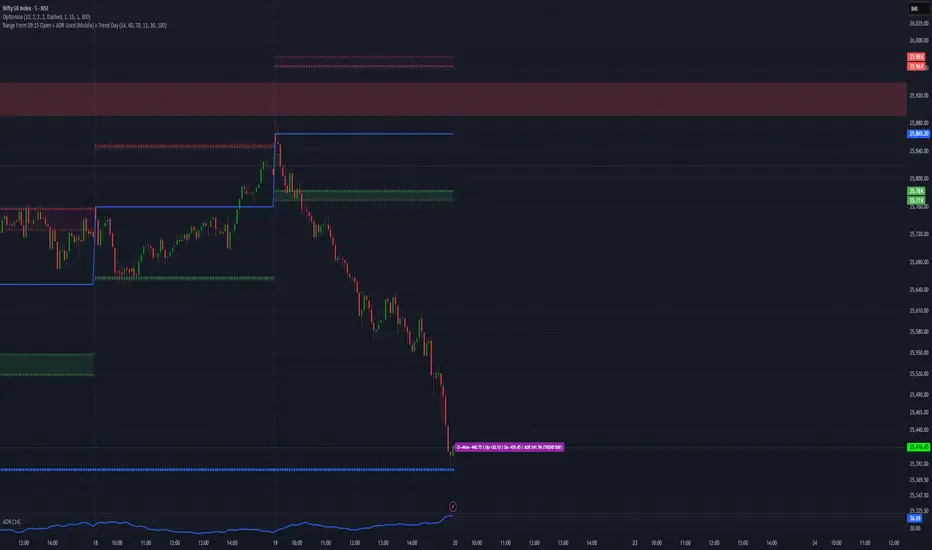
⚔️ Chartman Range Commander
Command the Range. Control the Day.
Chartman Range Commander is a market-state command module designed for serious intraday traders who trade with structure — not emotion.
It delivers real-time control over:
• 09:15 session reference
• Points moved from open
• Upside & downside range dominance
• ADR (Average Daily Range) consumption
• Early ADR Break detection for TREND DAY identification
This is not a signal generator.
This is a market control system.
🔎 What It Commands
📍 09:15 Open Anchor
Establishes the session battlefield from the official market open.
Instantly see:
• Points from open
• Intraday directional strength
• Range expansion from session start
📊 ADR Capacity Meter
Tracks how much of the Average Daily Range has been used.
🟢 LOW – Expansion potential remains
🟠 MID – Controlled engagement zone
🔴 HIGH – Range largely consumed
🟣 TREND DAY – ADR broken early (momentum command mode)
This prevents late-day overtrading and highlights genuine trend sessions.
🚨 TREND DAY Lock
If ADR is broken early in the session, the indicator shifts into Trend Command Mode and remains locked for the rest of the day.
This helps you:
• Hold winners with confidence
• Avoid fading strong directional moves
• Scale into pullbacks
• Stop reacting emotionally to noise
📱 Mobile-Optimized Display
A compact, color-coded label positioned near the current price gives one-glance clarity:
Points from open | Up/Down range | ADR % used | Market state
Built for decision speed.
🎯 Designed For
• NIFTY / BANKNIFTY intraday traders
• Index futures & options traders
• Momentum & expansion-based systems
• Structured discretionary traders
⚔️ Chartman Doctrine
Don’t trade randomly.
Don’t chase exhaustion.
Don’t fade strength blindly.
Command the range — or stand down.
Command the Range. Control the Day.
Chartman Range Commander is a market-state command module designed for serious intraday traders who trade with structure — not emotion.
It delivers real-time control over:
• 09:15 session reference
• Points moved from open
• Upside & downside range dominance
• ADR (Average Daily Range) consumption
• Early ADR Break detection for TREND DAY identification
This is not a signal generator.
This is a market control system.
🔎 What It Commands
📍 09:15 Open Anchor
Establishes the session battlefield from the official market open.
Instantly see:
• Points from open
• Intraday directional strength
• Range expansion from session start
📊 ADR Capacity Meter
Tracks how much of the Average Daily Range has been used.
🟢 LOW – Expansion potential remains
🟠 MID – Controlled engagement zone
🔴 HIGH – Range largely consumed
🟣 TREND DAY – ADR broken early (momentum command mode)
This prevents late-day overtrading and highlights genuine trend sessions.
🚨 TREND DAY Lock
If ADR is broken early in the session, the indicator shifts into Trend Command Mode and remains locked for the rest of the day.
This helps you:
• Hold winners with confidence
• Avoid fading strong directional moves
• Scale into pullbacks
• Stop reacting emotionally to noise
📱 Mobile-Optimized Display
A compact, color-coded label positioned near the current price gives one-glance clarity:
Points from open | Up/Down range | ADR % used | Market state
Built for decision speed.
🎯 Designed For
• NIFTY / BANKNIFTY intraday traders
• Index futures & options traders
• Momentum & expansion-based systems
• Structured discretionary traders
⚔️ Chartman Doctrine
Don’t trade randomly.
Don’t chase exhaustion.
Don’t fade strength blindly.
Command the range — or stand down.

Aviso legal
As informações e publicações não se destinam a ser, e não constituem, conselhos ou recomendações financeiras, de investimento, comerciais ou de outro tipo fornecidos ou endossados pela TradingView. Leia mais nos Termos de Uso.
Aviso legal
As informações e publicações não se destinam a ser, e não constituem, conselhos ou recomendações financeiras, de investimento, comerciais ou de outro tipo fornecidos ou endossados pela TradingView. Leia mais nos Termos de Uso.