Multi-Horizon Momentum Curve [BackQuant]
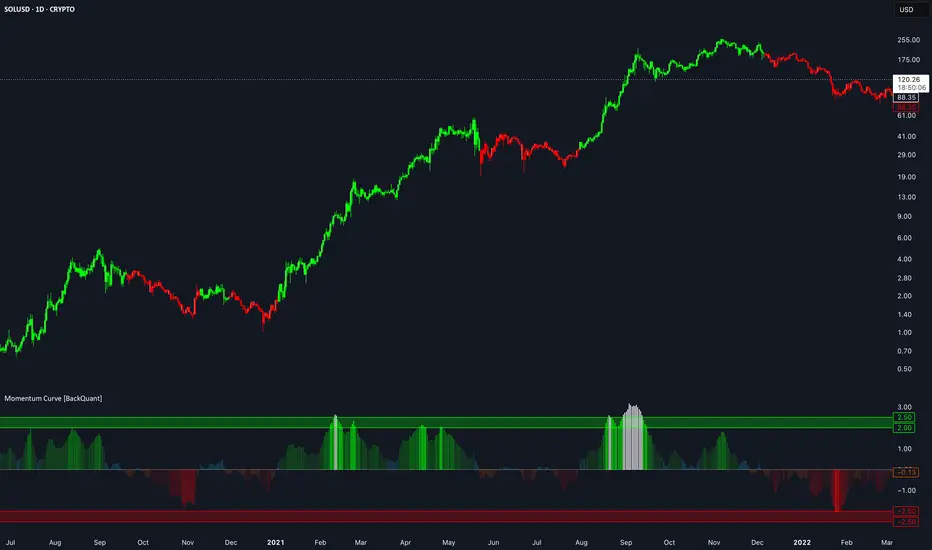
Multi-Horizon Momentum Curve [BackQuant]
Overview
Multi-Horizon Momentum Curve combines momentum measured across four configurable lookback periods into a single volatility-normalized oscillator.
Each horizon measures the log return from the current Source to its value N bars ago. That return is divided by recent one-bar return volatility scaled by the square root of the horizon length.
The four normalized momentum values are then:
The result is a single momentum curve that reflects short-, medium- and longer-horizon price movement at the same time.
One-Bar Return Volatility
The script first calculates the one-bar log return:
Recent return volatility is then estimated using the standard deviation of those one-bar log returns over the selected Volatility Length.
This same volatility estimate is used to normalize all four momentum horizons.
Normalized Horizon Momentum
For each horizon, the script calculates:
The volatility scaling term is:
Momentum is then:
This expresses the size of the horizon return relative to the current one-bar volatility estimate and the length of the horizon.
It is a normalization method for comparing different lookbacks on a similar scale. It should not be interpreted as a probability or formal statistical significance measure.
Momentum Clamp
Each horizon value is capped between:
This prevents a single unusually large normalized move from dominating the combined curve.
For example, with a clamp of 4.0:
Clamping occurs before the four horizons are combined.
Four Momentum Horizons
The indicator calculates four independent normalized momentum values.
Each horizon has:
The default horizons are:
with progressively larger default weights assigned to the longer horizons.
These settings are fully configurable.
Weighted Momentum Composite
The four horizon values are combined using a weighted average:
A larger weight gives that horizon more influence over the final curve.
A weight of zero removes that horizon from the composite.
If all four weights are zero, the raw composite returns zero.
Curve Smoothing
The raw weighted composite can optionally be smoothed with an EMA.
If Curve Smoothing is set to 1:
Higher values:
The unsmoothed and smoothed values are both available in the Data Window.
Horizon Agreement
The indicator also counts how many of the four horizon momentum values share the same sign.
For each horizon:
Agreement is:
This produces values from 50% to 100% when all horizons are non-zero, with higher values indicating greater sign agreement across the four lookbacks.
Examples:
If one or more horizon values are exactly zero, the reported percentage can also fall below 50% because zero values are counted as neither bullish nor bearish.
Agreement is diagnostic only and does not control the trend state.
Trend State
The script uses the smoothed Momentum Curve to maintain a persistent bullish or bearish state.
On initialization:
After initialization, the trend only changes when the curve passes the opposite Trend Threshold.
A bullish transition requires:
A bearish transition requires:
Values between the positive and negative thresholds retain the existing trend state.
Trend Threshold
The Trend Threshold creates a buffer around zero.
For example, with a threshold of 0.20:
This prevents the trend colour from changing every time the oscillator makes a small move around zero.
Higher thresholds create more persistent trend states.
Lower thresholds respond more quickly.
Oscillator Colours
The column colour changes with the magnitude and sign of the Momentum Curve.
Positive values progress through increasingly strong green shades.
Negative values progress through increasingly strong red shades.
Values beyond approximately ±2.5 are displayed in white.
These colour levels are visual references only.
They are not probability bands, confidence intervals or statistical significance thresholds.
Static Zones
Optional reference zones are plotted between:
These provide fixed visual context for relatively large normalized momentum readings.
They do not alter:
They should be treated as user-interface reference levels rather than formal statistical boundaries.
Individual Horizons
Each of the four normalized momentum components can optionally be displayed.
This makes it possible to see whether the composite is being driven by:
For example, the composite can remain positive while one shorter horizon has already turned negative.
Trend Candles
Optional candles on the main chart are coloured from the persistent trend state:
The candle colour represents the current oscillator regime rather than whether the individual candle itself closed higher or lower.
Input Guide
Horizon 1–4
Set the four return lookbacks used in the composite.
Weight 1–4
Control how much influence each horizon has on the final momentum curve.
Volatility Length
Controls the standard-deviation lookback used for one-bar log-return volatility.
Momentum Clamp
Limits the maximum positive or negative contribution from each individual horizon.
Curve Smoothing
EMA smoothing applied after combining the four horizon values.
Trend Threshold
Controls how far the curve must move through zero before the persistent trend state changes.
How to Read It
Positive Curve
The weighted combination of normalized horizon returns is positive.
Negative Curve
The weighted combination is negative.
Large Positive Reading
Several horizons, or heavily weighted horizons, are showing positive returns that are large relative to the current volatility normalization.
Large Negative Reading
The opposite applies for negative momentum.
High Horizon Agreement
Most or all of the four lookbacks currently have the same momentum sign.
Low Horizon Agreement
The horizon signals are more mixed.
How to Use It
The indicator can be used as:
The individual horizon plots and Horizon Agreement value are useful when the composite alone does not show which lookbacks are driving the result.
Limitations
Data Window
The indicator exposes:
Alerts
The script includes:
Summary
Multi-Horizon Momentum Curve calculates log-return momentum across four lookbacks and normalizes each horizon using recent one-bar return volatility scaled by the square root of the horizon length.
The normalized values are clamped, combined using configurable weights and optionally smoothed.
Separate positive and negative thresholds convert the resulting curve into a persistent bullish or bearish state, while Horizon Agreement shows how consistently the individual lookbacks share the same direction.
The indicator is simply a way to combine and compare momentum across several time horizons on a common volatility-adjusted scale.
Overview
Multi-Horizon Momentum Curve combines momentum measured across four configurable lookback periods into a single volatility-normalized oscillator.
Each horizon measures the log return from the current Source to its value N bars ago. That return is divided by recent one-bar return volatility scaled by the square root of the horizon length.
The four normalized momentum values are then:
- Clamped to a configurable maximum magnitude.
- Combined using user-defined weights.
- Optionally smoothed with an EMA.
The result is a single momentum curve that reflects short-, medium- and longer-horizon price movement at the same time.
One-Bar Return Volatility
The script first calculates the one-bar log return:
- Log Return = log(Source / Previous Source)
Recent return volatility is then estimated using the standard deviation of those one-bar log returns over the selected Volatility Length.
This same volatility estimate is used to normalize all four momentum horizons.
Normalized Horizon Momentum
For each horizon, the script calculates:
- Horizon Return = log(Source / Source[N])
The volatility scaling term is:
- Expected Volatility = One-Bar Volatility × √N
Momentum is then:
- Normalized Momentum = Horizon Return / Expected Volatility
This expresses the size of the horizon return relative to the current one-bar volatility estimate and the length of the horizon.
It is a normalization method for comparing different lookbacks on a similar scale. It should not be interpreted as a probability or formal statistical significance measure.
Momentum Clamp
Each horizon value is capped between:
- -Momentum Clamp
- +Momentum Clamp
This prevents a single unusually large normalized move from dominating the combined curve.
For example, with a clamp of 4.0:
- Values above +4 are treated as +4.
- Values below -4 are treated as -4.
Clamping occurs before the four horizons are combined.
Four Momentum Horizons
The indicator calculates four independent normalized momentum values.
Each horizon has:
- Its own lookback length.
- Its own weight in the final composite.
The default horizons are:
- 5 bars.
- 10 bars.
- 20 bars.
- 40 bars.
with progressively larger default weights assigned to the longer horizons.
These settings are fully configurable.
Weighted Momentum Composite
The four horizon values are combined using a weighted average:
- Composite = Σ(Momentum × Weight) / Σ(Weights)
A larger weight gives that horizon more influence over the final curve.
A weight of zero removes that horizon from the composite.
If all four weights are zero, the raw composite returns zero.
Curve Smoothing
The raw weighted composite can optionally be smoothed with an EMA.
If Curve Smoothing is set to 1:
- The raw composite is used directly.
Higher values:
- Reduce short-term changes in the oscillator.
- Introduce additional smoothing.
The unsmoothed and smoothed values are both available in the Data Window.
Horizon Agreement
The indicator also counts how many of the four horizon momentum values share the same sign.
For each horizon:
- Positive momentum contributes to the bullish count.
- Negative momentum contributes to the bearish count.
Agreement is:
- max(Bullish Count, Bearish Count) / 4
This produces values from 50% to 100% when all horizons are non-zero, with higher values indicating greater sign agreement across the four lookbacks.
Examples:
- 4 bullish / 0 bearish = 100% agreement.
- 3 bullish / 1 bearish = 75%.
- 2 bullish / 2 bearish = 50%.
If one or more horizon values are exactly zero, the reported percentage can also fall below 50% because zero values are counted as neither bullish nor bearish.
Agreement is diagnostic only and does not control the trend state.
Trend State
The script uses the smoothed Momentum Curve to maintain a persistent bullish or bearish state.
On initialization:
- Curve >= 0 = bullish.
- Curve < 0 = bearish.
After initialization, the trend only changes when the curve passes the opposite Trend Threshold.
A bullish transition requires:
- Curve > +Trend Threshold
A bearish transition requires:
- Curve < -Trend Threshold
Values between the positive and negative thresholds retain the existing trend state.
Trend Threshold
The Trend Threshold creates a buffer around zero.
For example, with a threshold of 0.20:
- Above +0.20 can establish bullish state.
- Below -0.20 can establish bearish state.
- Between -0.20 and +0.20, the existing state remains unchanged.
This prevents the trend colour from changing every time the oscillator makes a small move around zero.
Higher thresholds create more persistent trend states.
Lower thresholds respond more quickly.
Oscillator Colours
The column colour changes with the magnitude and sign of the Momentum Curve.
Positive values progress through increasingly strong green shades.
Negative values progress through increasingly strong red shades.
Values beyond approximately ±2.5 are displayed in white.
These colour levels are visual references only.
They are not probability bands, confidence intervals or statistical significance thresholds.
Static Zones
Optional reference zones are plotted between:
- +2.0 and +2.5.
- -2.0 and -2.5.
These provide fixed visual context for relatively large normalized momentum readings.
They do not alter:
- The momentum calculation.
- The trend state.
- The alerts.
They should be treated as user-interface reference levels rather than formal statistical boundaries.
Individual Horizons
Each of the four normalized momentum components can optionally be displayed.
This makes it possible to see whether the composite is being driven by:
- Shorter-term momentum.
- Longer-term momentum.
- Broad agreement across all horizons.
For example, the composite can remain positive while one shorter horizon has already turned negative.
Trend Candles
Optional candles on the main chart are coloured from the persistent trend state:
- Bullish = green.
- Bearish = red.
The candle colour represents the current oscillator regime rather than whether the individual candle itself closed higher or lower.
Input Guide
Horizon 1–4
Set the four return lookbacks used in the composite.
Weight 1–4
Control how much influence each horizon has on the final momentum curve.
Volatility Length
Controls the standard-deviation lookback used for one-bar log-return volatility.
Momentum Clamp
Limits the maximum positive or negative contribution from each individual horizon.
Curve Smoothing
EMA smoothing applied after combining the four horizon values.
Trend Threshold
Controls how far the curve must move through zero before the persistent trend state changes.
How to Read It
Positive Curve
The weighted combination of normalized horizon returns is positive.
Negative Curve
The weighted combination is negative.
Large Positive Reading
Several horizons, or heavily weighted horizons, are showing positive returns that are large relative to the current volatility normalization.
Large Negative Reading
The opposite applies for negative momentum.
High Horizon Agreement
Most or all of the four lookbacks currently have the same momentum sign.
Low Horizon Agreement
The horizon signals are more mixed.
How to Use It
The indicator can be used as:
- A multi-horizon momentum oscillator.
- A bullish/bearish trend filter.
- A way to compare momentum across different lookback lengths.
- A way to inspect whether short- and longer-horizon momentum agree.
The individual horizon plots and Horizon Agreement value are useful when the composite alone does not show which lookbacks are driving the result.
Limitations
- The indicator is based entirely on current and historical price data.
- Positive momentum does not imply future positive returns.
- The volatility normalization uses one current rolling volatility estimate for all four horizons.
- The √N scaling is a normalization assumption and does not guarantee that volatility actually scales that way in every market condition.
- Extreme values are deliberately clipped before the horizons are combined.
- The weighting settings can materially change which horizon dominates the composite.
- Longer Curve Smoothing and larger Trend Thresholds increase persistence but can delay regime changes.
- The ±2 and ±2.5 display levels are visual reference levels rather than statistical confidence bands.
Data Window
The indicator exposes:
- Raw Momentum Composite.
- Smoothed Momentum Composite.
- Momentum for each of the four horizons.
- Horizon Agreement.
Alerts
The script includes:
- Momentum Curve Bullish: persistent trend state changes from bearish to bullish.
- Momentum Curve Bearish: persistent trend state changes from bullish to bearish.
Summary
Multi-Horizon Momentum Curve calculates log-return momentum across four lookbacks and normalizes each horizon using recent one-bar return volatility scaled by the square root of the horizon length.
The normalized values are clamped, combined using configurable weights and optionally smoothed.
Separate positive and negative thresholds convert the resulting curve into a persistent bullish or bearish state, while Horizon Agreement shows how consistently the individual lookbacks share the same direction.
The indicator is simply a way to combine and compare momentum across several time horizons on a common volatility-adjusted scale.

Join the Paid Space or get access to my invite only scripts at
backquant.com/
Or join the free discord discord.gg/RmVrJV67yE
backquant.com/
Or join the free discord discord.gg/RmVrJV67yE
Aviso legal
As informações e publicações não se destinam a ser, e não constituem, conselhos ou recomendações financeiras, de investimento, comerciais ou de outro tipo fornecidos ou endossados pela TradingView. Leia mais nos Termos de Uso.
Join the Paid Space or get access to my invite only scripts at
backquant.com/
Or join the free discord discord.gg/RmVrJV67yE
backquant.com/
Or join the free discord discord.gg/RmVrJV67yE
Aviso legal
As informações e publicações não se destinam a ser, e não constituem, conselhos ou recomendações financeiras, de investimento, comerciais ou de outro tipo fornecidos ou endossados pela TradingView. Leia mais nos Termos de Uso.