Elliott Wave Oscillator Divergence | XoRonX
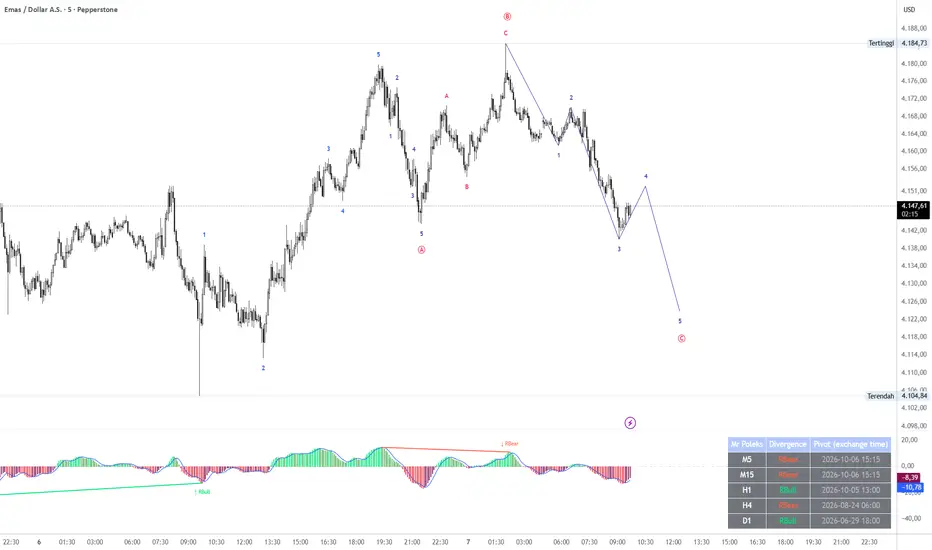
Elliott Wave Oscillator Divergence Divergence identifies regular and hidden divergences using dominant Elliott Wave Oscillator swings and price wick extremes.
The indicator focuses on the main peak or trough of each EWO wave. Smaller fluctuations within the same wave are grouped together to create a cleaner view of momentum divergence.
Key Features
- Regular bullish and bearish divergence.
- Hidden bullish and bearish divergence.
- Dominant EWO anchors that remain valid until a more extreme oscillator swing occurs.
- Price comparisons based on wick highs and lows.
- Optional filtering to retain one largest divergence per anchor and divergence type.
- Divergence lines, arrows, and labels displayed in the oscillator panel.
- Multi-timeframe scanning with a customizable list, such as `M5,M15,H1,H4,D1`.
- Support for up to 10 unique scanning timeframes.
- A scanner table showing the latest detected divergence and pivot time for each timeframe.
- Dynamic alerts containing the symbol, timeframe, divergence type, and pivot time.
Oscillator Settings
The default EWO calculation is:
`SMA(hl2, 5) − SMA(hl2, 35)`
MA periods, price source, calculation method, and oscillator smoothing can be customized.
Signal Confirmation
A divergence is confirmed after its EWO wave reaches or crosses the zero line and the minimum number of candles after the oscillator extreme has closed. The default minimum is five candles.
Once confirmed, the divergence is drawn at its earlier pivot locations. Historical markers therefore show the pivot positions, rather than the moment the signal became available. With the largest-divergence filter enabled, a stronger confirmed pair may replace an earlier displayed line.
Alert Setup
Create a TradingView alert, select this indicator, and choose “Any alert() function call.” Enable “Notify on app” for mobile notifications.
Historical signals do not trigger notifications when the alert starts. Recreate your alert after changing indicator settings or the scanning timeframe list.
The indicator focuses on the main peak or trough of each EWO wave. Smaller fluctuations within the same wave are grouped together to create a cleaner view of momentum divergence.
Key Features
- Regular bullish and bearish divergence.
- Hidden bullish and bearish divergence.
- Dominant EWO anchors that remain valid until a more extreme oscillator swing occurs.
- Price comparisons based on wick highs and lows.
- Optional filtering to retain one largest divergence per anchor and divergence type.
- Divergence lines, arrows, and labels displayed in the oscillator panel.
- Multi-timeframe scanning with a customizable list, such as `M5,M15,H1,H4,D1`.
- Support for up to 10 unique scanning timeframes.
- A scanner table showing the latest detected divergence and pivot time for each timeframe.
- Dynamic alerts containing the symbol, timeframe, divergence type, and pivot time.
Oscillator Settings
The default EWO calculation is:
`SMA(hl2, 5) − SMA(hl2, 35)`
MA periods, price source, calculation method, and oscillator smoothing can be customized.
Signal Confirmation
A divergence is confirmed after its EWO wave reaches or crosses the zero line and the minimum number of candles after the oscillator extreme has closed. The default minimum is five candles.
Once confirmed, the divergence is drawn at its earlier pivot locations. Historical markers therefore show the pivot positions, rather than the moment the signal became available. With the largest-divergence filter enabled, a stronger confirmed pair may replace an earlier displayed line.
Alert Setup
Create a TradingView alert, select this indicator, and choose “Any alert() function call.” Enable “Notify on app” for mobile notifications.
Historical signals do not trigger notifications when the alert starts. Recreate your alert after changing indicator settings or the scanning timeframe list.

Aviso legal
As informações e publicações não se destinam a ser, e não constituem, conselhos ou recomendações financeiras, de investimento, comerciais ou de outro tipo fornecidos ou endossados pela TradingView. Leia mais nos Termos de Uso.
Aviso legal
As informações e publicações não se destinam a ser, e não constituem, conselhos ou recomendações financeiras, de investimento, comerciais ou de outro tipo fornecidos ou endossados pela TradingView. Leia mais nos Termos de Uso.