Atualizado
Kill Zones (lstrihic)
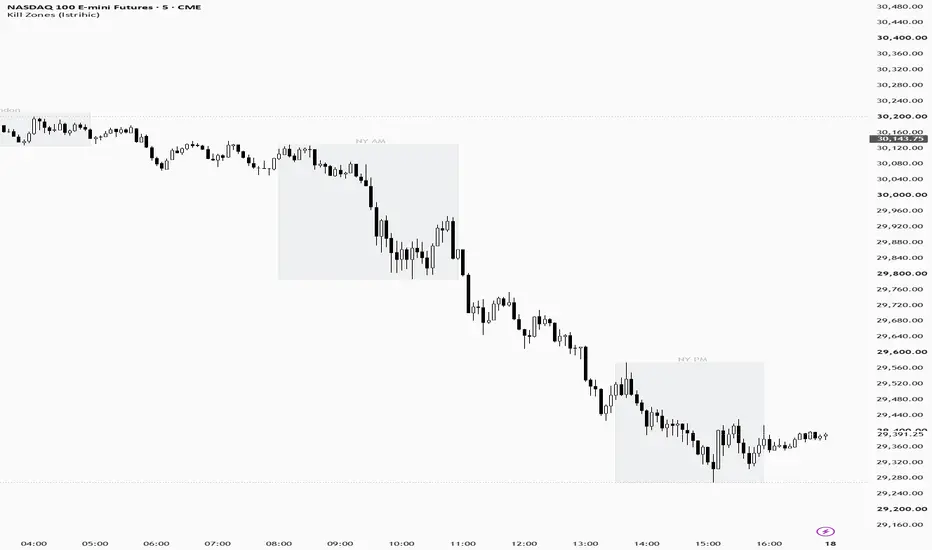
A clean and lightweight ICT-style Kill Zones indicator for TradingView.
It automatically highlights the major trading sessions directly on the chart:
Asian Kill Zone
London Kill Zone
New York AM Kill Zone
New York PM Kill Zone
Daily Open reference line
Each session is displayed as a dynamically expanding box that tracks the session high and low while the session is active.
Features
Fully configurable session times
Selectable timezone
Individual enable/disable controls for each Kill Zone
Optional weekend filtering
Customizable box color, transparency, border style and labels
Automatic pruning of older sessions to keep the chart clean
Configurable Daily Open line
Optional alerts when a Kill Zone opens
Designed for intraday charts up to 15 minutes
Automatically handles timezone and DST changes through TradingView's timezone system
Default Sessions
Using America/New_York:
Asian: 19:00–23:00
London: 02:00–05:00
New York AM: 07:00–10:00
New York PM: 13:30–16:00
All session times can be changed from the indicator settings.
Usage
The indicator is intended to provide simple session context without cluttering the chart. It can be used alongside price action, liquidity concepts, order flow, VWAP, market structure or other trading tools.
Kill Zones should not be treated as standalone trade signals. They identify periods where liquidity and market activity may be more relevant for intraday trading.
It automatically highlights the major trading sessions directly on the chart:
Asian Kill Zone
London Kill Zone
New York AM Kill Zone
New York PM Kill Zone
Daily Open reference line
Each session is displayed as a dynamically expanding box that tracks the session high and low while the session is active.
Features
Fully configurable session times
Selectable timezone
Individual enable/disable controls for each Kill Zone
Optional weekend filtering
Customizable box color, transparency, border style and labels
Automatic pruning of older sessions to keep the chart clean
Configurable Daily Open line
Optional alerts when a Kill Zone opens
Designed for intraday charts up to 15 minutes
Automatically handles timezone and DST changes through TradingView's timezone system
Default Sessions
Using America/New_York:
Asian: 19:00–23:00
London: 02:00–05:00
New York AM: 07:00–10:00
New York PM: 13:30–16:00
All session times can be changed from the indicator settings.
Usage
The indicator is intended to provide simple session context without cluttering the chart. It can be used alongside price action, liquidity concepts, order flow, VWAP, market structure or other trading tools.
Kill Zones should not be treated as standalone trade signals. They identify periods where liquidity and market activity may be more relevant for intraday trading.
Notas de Lançamento
Update chart view
Aviso legal
As informações e publicações não se destinam a ser, e não constituem, conselhos ou recomendações financeiras, de investimento, comerciais ou de outro tipo fornecidos ou endossados pela TradingView. Leia mais nos Termos de Uso.
Aviso legal
As informações e publicações não se destinam a ser, e não constituem, conselhos ou recomendações financeiras, de investimento, comerciais ou de outro tipo fornecidos ou endossados pela TradingView. Leia mais nos Termos de Uso.