Atualizado
Daily ATR 2 and 10 Percent Value
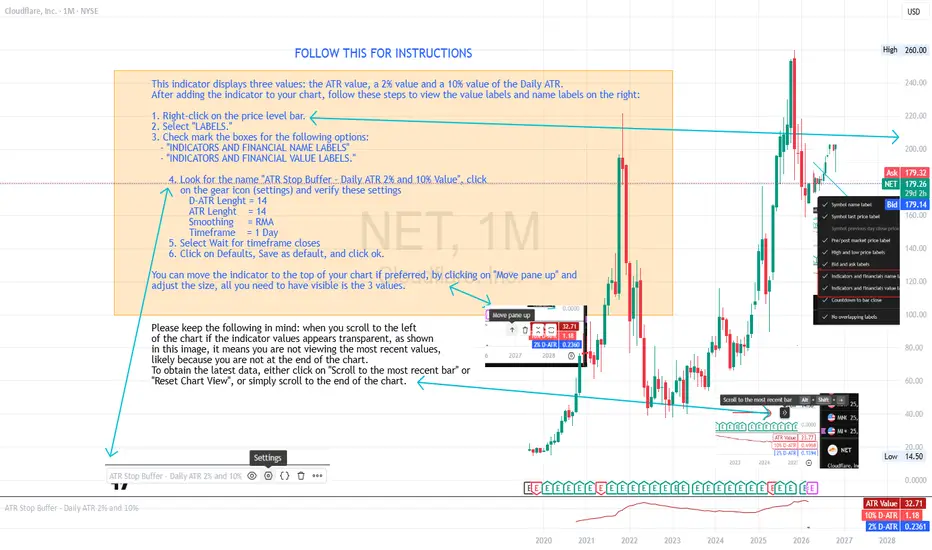
This indicator shows three values: the main ATR value, a 2% value,
and a 10% Value of the Daily ATR.
After you have added the indicator to your chart, follow these steps
to be able to see the values and labels on the right.
1. Right-click on the price level bar or click the gear icon at the bottom
2. Click on LABELS
3. Select with a check mark the following two
INDICATORS AND FINANCIAL NAME LABELS
and INDICATORS AND FINANCIAL VALUE LABELS
4. Look for D-ATR % Value, click on the gear icon and verify these settings
- D-ATR Lenght = 14
- ATR Lenght = 14
- Smoothing = RMA
- Timeframe = 1 Day
5. Select Wait for timeframe closes
6. Click on Defaults, Save as default, and click ok.
You can move the indicator to the top of your chart if preferred, by clicking
on Move pane up.
Slightly modifications from other indicators.
Notas de Lançamento
This indicator displays three values: the ATR value, a 2% value and a 10% value of the Daily ATR. After adding the indicator to your chart, follow these steps to view the value labels and name labels on the right:
1. Right-click on the price level bar.
2. Select "LABELS."
3. Check mark the boxes for the following options:
- "INDICATORS AND FINANCIAL NAME LABELS"
- "INDICATORS AND FINANCIAL VALUE LABELS."
4. Look for the name "ATR Stop Buffer - Daily ATR 2% and 10% Value", click
on the gear icon (settings) and verify these settings
D-ATR Lenght = 14
ATR Lenght = 14
Smoothing = RMA
Timeframe = 1 Day
5. Select Wait for timeframe closes
6. Click on Defaults, Save as default, and click ok.
You can move the indicator to the top of your chart if preferred, by clicking on "Move pane up" and
adjust the size, all you need to have visible is the 3 values.
Notas de Lançamento
Updated to Version 6 of PineScript
Aviso legal
As informações e publicações não se destinam a ser, e não constituem, conselhos ou recomendações financeiras, de investimento, comerciais ou de outro tipo fornecidos ou endossados pela TradingView. Leia mais nos Termos de Uso.
Aviso legal
As informações e publicações não se destinam a ser, e não constituem, conselhos ou recomendações financeiras, de investimento, comerciais ou de outro tipo fornecidos ou endossados pela TradingView. Leia mais nos Termos de Uso.