BoaBias: MTF ALMA SuperTrend & Stats
█ WHAT IT DOES
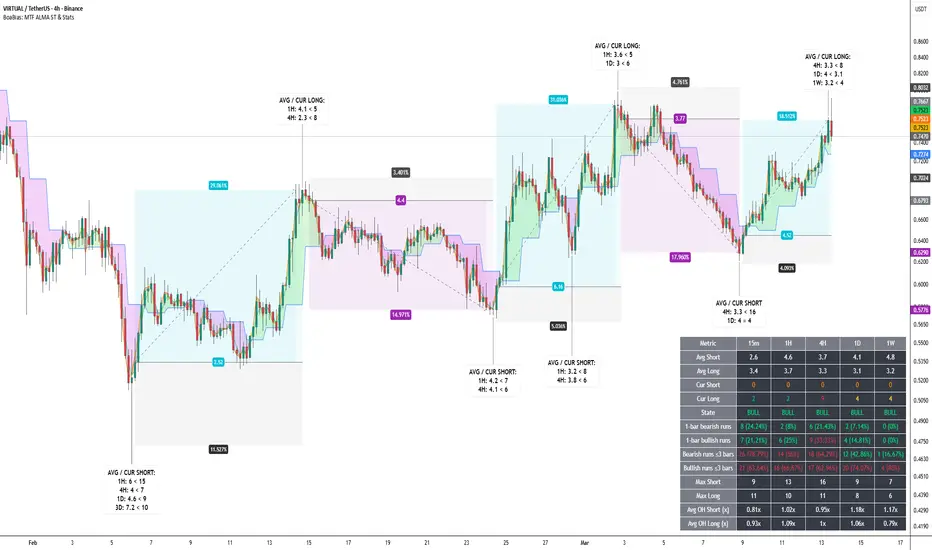
Multi-timeframe ALMA with SuperTrend-style regime logic on 15m, 1H, 4H, 1D, 1W on one chart. Per-TF ALMA lines; separate bar colors for regime; optional filled bands between adjacent TF ALMAs. Optional statistics table: average and current run lengths, State (BULL / BEAR / NEUT), 1-bar and short-run (≤N bars) counts, max runs, and Avg OH stretch columns. OH vs avg (per TF) controls how Cur Short / Cur Long cells highlight vs their rolling averages. MTF overheat labels on history (toggle in settings; on in default preset): ·S (bear run stretch) below the bar, ·L (bull run stretch) above the bar; one timeframe per text line; minimum overheated TF count is separate for bear vs bull; vertical stack spacing limits overlap on consecutive bars. No alert() in Pine — use TradingView’s alert UI if needed.
█ HOW IT WORKS
█ ORIGINALITY
MTF overlay of ALMA-based SD SuperTrend combined with a per-TF run statistics layer, per-TF overheat multipliers, and MTF overheat labels (separate bear/bull gating + stack spacing; toggleable). Pine v6, self-contained. Inspired by public ALMA / SuperTrend discussion; wiring, table, heat logic, and labels are specific to this script.
█ HOW TO USE
█ PERFORMANCE / LOAD TIME
The script runs multiple MTF security calls and statistics on each bar. On first load or a long visible history, TradingView may need several seconds to finish — wait before assuming the table or labels failed. If the chart feels heavy, reduce loaded history, disable the table or overheat labels, or lower window sizes and the Max/OH scan cap.
█ LIMITATIONS
Trend logic lags; ranges whipsaw; MTF adds context, not certainty. Combine with other analysis.
Multi-timeframe ALMA with SuperTrend-style regime logic on 15m, 1H, 4H, 1D, 1W on one chart. Per-TF ALMA lines; separate bar colors for regime; optional filled bands between adjacent TF ALMAs. Optional statistics table: average and current run lengths, State (BULL / BEAR / NEUT), 1-bar and short-run (≤N bars) counts, max runs, and Avg OH stretch columns. OH vs avg (per TF) controls how Cur Short / Cur Long cells highlight vs their rolling averages. MTF overheat labels on history (toggle in settings; on in default preset): ·S (bear run stretch) below the bar, ·L (bull run stretch) above the bar; one timeframe per text line; minimum overheated TF count is separate for bear vs bull; vertical stack spacing limits overlap on consecutive bars. No alert() in Pine — use TradingView’s alert UI if needed.
█ HOW IT WORKS
- ALMA: Arnaud Legoux moving average via ta.alma() (length, sigma, offset).
- SuperTrend-style bands: upper = ALMA + factor × stdev; lower = ALMA − factor × stdev; regime flips on band-cross style logic.
- MTF: request.security with barmerge.gaps_off and barmerge.lookahead_off (no lookahead). Parameters are per timeframe.
- Statistics: Rolling window per TF for completed and current regime runs; chop metrics for very short runs; max run and Avg OH scans use min(window, Max bars for Max/OH scan) internally.
- Labels: Toggle in inputs (on in defaults). Same heat thresholds as table per TF; label fill colors follow bar regime colors (bear / bull) with white text.
█ ORIGINALITY
MTF overlay of ALMA-based SD SuperTrend combined with a per-TF run statistics layer, per-TF overheat multipliers, and MTF overheat labels (separate bear/bull gating + stack spacing; toggleable). Pine v6, self-contained. Inspired by public ALMA / SuperTrend discussion; wiring, table, heat logic, and labels are specific to this script.
█ HOW TO USE
- First use: Wrong scale? Right-click → Pin to scale → Pin to right scale.
- Enable/disable each timeframe; tune Factor, SD length, ALMA length, sigma, offset per TF.
- Statistics: Set window length and Max bars for Max/OH scan (performance vs accuracy).
- OH vs avg (per TF): Adjust each TF’s multiplier — drives red highlight on Cur Short/Long vs average and optional label conditions.
- MTF overheat labels: On in the default preset (you can disable or change which TFs are included). Tune Min TFs per side (·S vs ·L), stack step (× ATR), and max label count (platform cap 500). Optional: only if chart ALMA flips — MTF overheat (min TFs + list) is read from the previous bar; ·S prints on the current bar if that prior bar was MTF·S overheated and the chart closes BEAR→BULL; ·L if prior was MTF·L and chart BULL→BEAR. With the option off, overheat and label stay on the same bar.
- Chop rows: “Runs ≤ N bars” counts short regime lengths for context — not broker “fake” fills.
- Interpretation: Stretched runs vs average are context, not predictions.
- Performance: First attach or long history: full recalculation may take several seconds — wait until processing finishes. To speed up: less chart history, turn off the table or MTF labels, or reduce statistics windows / Max bars for Max/OH scan.
█ PERFORMANCE / LOAD TIME
The script runs multiple MTF security calls and statistics on each bar. On first load or a long visible history, TradingView may need several seconds to finish — wait before assuming the table or labels failed. If the chart feels heavy, reduce loaded history, disable the table or overheat labels, or lower window sizes and the Max/OH scan cap.
█ LIMITATIONS
Trend logic lags; ranges whipsaw; MTF adds context, not certainty. Combine with other analysis.

1,387 trades · WR 58.5% · avg hold 11.2d · avg RR +1.5 · max DD 6.7%
Crypto · stocks · indices · commodities · FX
Market Edge: technical scoring
Research Hub: news & fundamentals. Metrics on my site — link below
Educational only · NFA
Crypto · stocks · indices · commodities · FX
Market Edge: technical scoring
Research Hub: news & fundamentals. Metrics on my site — link below
Educational only · NFA
Aviso legal
As informações e publicações não se destinam a ser, e não constituem, conselhos ou recomendações financeiras, de investimento, comerciais ou de outro tipo fornecidos ou endossados pela TradingView. Leia mais nos Termos de Uso.
1,387 trades · WR 58.5% · avg hold 11.2d · avg RR +1.5 · max DD 6.7%
Crypto · stocks · indices · commodities · FX
Market Edge: technical scoring
Research Hub: news & fundamentals. Metrics on my site — link below
Educational only · NFA
Crypto · stocks · indices · commodities · FX
Market Edge: technical scoring
Research Hub: news & fundamentals. Metrics on my site — link below
Educational only · NFA
Aviso legal
As informações e publicações não se destinam a ser, e não constituem, conselhos ou recomendações financeiras, de investimento, comerciais ou de outro tipo fornecidos ou endossados pela TradingView. Leia mais nos Termos de Uso.