Swing Volume Profile (VPVR) with POC and Value Area
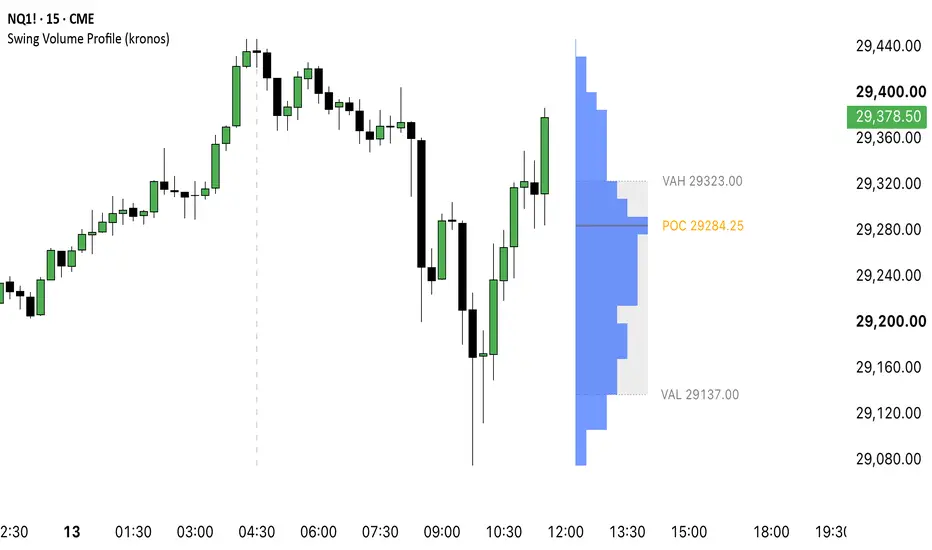
Swing Volume Profile (VPVR) with POC and Value Area
What it does
This indicator builds a volume profile anchored to the last confirmed swing pivot instead of a fixed number of bars. As price makes a new confirmed swing high or low, the profile re-anchors and rebuilds over the range from that pivot to the current bar.
How it works
Swing pivots are detected with a symmetric left/right pivot strength. The price range between the last confirmed pivot and the current bar is divided into rows, and each bar's volume is spread evenly across the rows its high-low range covers.
How to use it
Inputs
Signals and alerts
Repainting
No repainting - measured, not claimed: alert conditions are evaluated only on confirmed bar closes. The profile itself updates live while the current bar is still forming, similar to a moving average or VWAP, but no past drawing is ever redrawn or removed retroactively.
Limitations
One package, one system - module from a shared engine of chart-timeframe-only indicators.
This script is a charting tool for educational purposes. It does not provide financial advice and does not predict future price movement. Trading carries risk; decisions and their outcome remain yours.
What it does
This indicator builds a volume profile anchored to the last confirmed swing pivot instead of a fixed number of bars. As price makes a new confirmed swing high or low, the profile re-anchors and rebuilds over the range from that pivot to the current bar.
How it works
Swing pivots are detected with a symmetric left/right pivot strength. The price range between the last confirmed pivot and the current bar is divided into rows, and each bar's volume is spread evenly across the rows its high-low range covers.
- The row with the most volume becomes the Point of Control (POC).
- Starting from the POC, the script expands outward to the next-highest-volume row on either side until the chosen share of total volume is enclosed - that range is the Value Area, bounded by VAH (Value Area High) and VAL (Value Area Low).
- An optional estimated buy/sell split colors each row by where price closed inside every bar's range (close near the high leans buy, close near the low leans sell). This is a derived estimate from bar data, not tick or order flow data, and is off by default.
- The profile is placed beside price, never on top of it, with an adjustable offset so the most recent candles stay uncovered.
- An optional faded profile of the previous completed swing can be shown alongside the current one for comparison.
How to use it
- Add the script to a chart. The profile appears once the first swing pivot has confirmed.
- Read the widest row as the Point of Control and the shaded band around it as the Value Area.
- Turn on Split Buy/Sell to see an estimated buy/sell lean per row, or Show Previous Swing Profile to compare against the prior swing.
- Watch for price crossing the POC or leaving the Value Area, and use the matching alert instead of watching the chart continuously.
Inputs
- Anchor - Pivot Strength (bars required on both sides of a high/low to confirm a pivot), Anchor Mode (Last Swing High, Last Swing Low, or Last Swing Either), Max Bars In Profile (safety cap while no new pivot has confirmed).
- Profile - Rows, Value Area % (50-95), Split Buy/Sell (estimated), Show Previous Swing Profile.
- Placement - Profile Side (Right of Price or Left Edge of Range), Profile Width %, Offset Bars.
- Style - Profile Color, Buy Color, Sell Color, POC Color, Value Area Color, Profile Opacity, Show POC Line, Show Value Area Box, Extend POC To Right, Show Level Prices, Text Size.
Signals and alerts
- Price crossed POC - fires once per bar close when price closes across the swing-anchored volume profile's POC level.
- Price left Value Area - fires once per bar close when price closes outside the value area after previously trading inside it.
- New swing anchor set - fires once per bar close when a new confirmed swing pivot re-anchors the volume profile.
Repainting
No repainting - measured, not claimed: alert conditions are evaluated only on confirmed bar closes. The profile itself updates live while the current bar is still forming, similar to a moving average or VWAP, but no past drawing is ever redrawn or removed retroactively.
Limitations
- The buy/sell split is an estimate derived from bar close position, not real order flow.
- The profile only appears once a first swing pivot has confirmed on the chart.
- This script works exclusively with bars of the chart's own timeframe. It does not request data from any other timeframe or resolution, so it has no plan-dependent history limit and looks the same on every account tier and every amount of chart history.
One package, one system - module from a shared engine of chart-timeframe-only indicators.
This script is a charting tool for educational purposes. It does not provide financial advice and does not predict future price movement. Trading carries risk; decisions and their outcome remain yours.

Find my advanced premium indicators:
kronosindicators.com
kronosindicators.com
Aviso legal
As informações e publicações não se destinam a ser, e não constituem, conselhos ou recomendações financeiras, de investimento, comerciais ou de outro tipo fornecidos ou endossados pela TradingView. Leia mais nos Termos de Uso.
Find my advanced premium indicators:
kronosindicators.com
kronosindicators.com
Aviso legal
As informações e publicações não se destinam a ser, e não constituem, conselhos ou recomendações financeiras, de investimento, comerciais ou de outro tipo fornecidos ou endossados pela TradingView. Leia mais nos Termos de Uso.