█ OVERVIEW
The Innovation Adaptive Kalman Filter (IAKF) is a modern implementation of the Kalman filter that uses its own prediction errors to detect abnormal measurements and adapt its measurement-noise estimate.
This indicator is an oscillator that adapts recent research in GPS and inertial navigation for autonomous vehicles to the detection of anomalous movements in financial time series. The prediction errors (known in statistical signal processing as “innovations”) help identify unusual observations and adjust their influence on its own filtered estimate.
█ BACKGROUND
Since its introduction in 1960, the Kalman filter has served as a vital engineering tool, from its early role in spacecraft navigation to supporting modern advances in robotics, machine learning, and many other fields [2, 3]. It is also no stranger to financial markets, where it has been used since the 1970s [4].
Traditionally, a Kalman filter balances its predictions and observations using predefined noise assumptions that require careful calibration. More recent research has shown how the filter can use its own prediction errors to detect abnormal measurements and adapt its measurement-noise estimate [1]. In self-driving vehicle navigation, this helps reduce the influence of disturbed GPS measurements and limit positioning errors.
This presents an interesting analogy to financial markets, where regime changes and unexpected world events can cause price to deviate sharply from the filter’s predicted path, potentially producing whipsaws in signals derived from that filtered estimate.

In Figure 1, you can see how, under normal conditions, the filtered estimate comes out to roughly the average of the prediction and the observation. Under anomalous conditions (Figure 2), the gate kicks in and the estimate is safeguarded toward the previous prediction. This helps prevent the filter from overfitting to noise that may not truly represent price action’s trajectory. This protective effect appears as a gray glow around the filter line on the price chart and a deeper dip in the gray Damping meter in the oscillator.
█ KALMAN FILTERING IN THE TRADINGVIEW COMMUNITY
The TradingView community is also no stranger to Kalman filtering. There is already a wide variety of implementations, including price smoothers, trend overlays, oscillators, volume tools, and adaptive bands. In our review of 100 TradingView publications, nine clusters emerged based on similarities in their technical descriptions, as shown in Figure 3. Representative examples include CRYPTIK1’s Algorithmic Kalman Filter, a conventional price smoother with fixed noise settings, and Zeiierman’s Trend Strength Oscillator, which offers optional adjustments based on volume or price range.

Colors distinguish the nine clusters, while larger spheres indicate stronger boost and follower counts at the time of the review. Related groups can overlap, so they are spaced apart to make them easier to see. Sphere size reflects community engagement, rather than trading performance.
Publications by Cluster
Repeated labels identify different neighborhoods within the same broad family, rather than separate, mutually exclusive types.
In terms of the clusters listed above, our IAKF is most closely related to the Price smoothers (#4) and Oscillators (#3) clusters, with an overlay reminiscent of the Trend overlays (#2, #8, and #9). However, rather than trend, its primary role is to identify anomalous conditions and show how the filter responds. Surprise quantifies how unusual recent price movements have become, and Damping shows how strongly the filter is holding back its response, providing an intrinsic source of confluence alongside the direction of the filtered line. The distinguishing feature of this KF implementation is the combination of anomaly detection, adaptive weighting, and internally driven response attenuation.
█ HOW TO USE
1. Read the chart and oscillator together
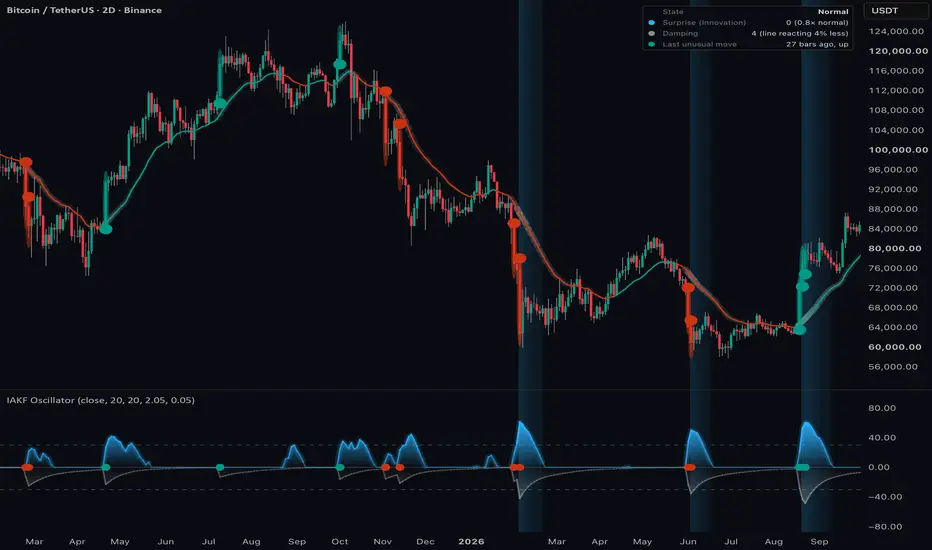
In Figure 4, you can see how the filter responds to individual unusual moves and to several unusual moves occurring close together. The blue wave shows Surprise, while the gray wave below zero shows Damping. Reading them together helps explain when the filtered estimate follows price and when it is being held back. These are the default colors and can be changed in Settings.

Surprise: compares recent forecast errors with their usual level. Zero means that recent errors are not above the normal level. A meter value of 50 corresponds to twice the normal level, and 75 corresponds to four times the normal level. These multiples refer to prediction-error variance, rather than the size of one price move.
Damping: shows how much less the filter line responds than it would without the outlier gate’s added noise. A deeper gray wave means more damping.
Misses below the threshold: The forecast errors increase, but no error is large enough for the filter to flag the bar as an outlier. No dots appear, and damping stays at zero in this example. Only the blue meter value increases. The filter continues to follow the price changes.
Single outlier: In this example, one bar crosses the Unusual-Move Threshold. The filter flags the bar as an outlier and marks its candle. The gray curve moves down as the filter reduces its response to the price change. The blue meter remains relatively low because forecast errors on nearby bars are calm. The filter treats this bar as a single unusual event.
Repeated outliers: In this example, several nearby bars cross the Unusual-Move Threshold. The gray curve moves down sharply as repeated outliers add to the measurement-noise estimate and keep the line held back. The blue meter rises as forecast errors continue to be larger than expected. The filter continues to reduce its response to these price changes. This can indicate a change in market conditions.
Halos and dots: The filter marks unusual candles with a soft halo, teal for a move up and red for a move down. Dots on the oscillator’s zero line identify the same bars. Figure 4 also shows the optional price-chart dots, which sit slightly beyond the wick so the entire candle remains visible. These identify unusual moves; they do not indicate buy or sell signals. Only the most recent 100 halos are retained.
Shift shading: A volatility shift begins when both meters reach 30, marked by the dashed lines at 30 for Surprise and −30 for the downward-drawn Damping meter. Shading appears on the price chart and in the oscillator pane. The lower meter value controls its intensity, so it is strongest when both values are high and fades as either decreases. The shift ends when both meters fall below 10.
2. Check the latest-bar readout
The readout in Figure 4 brings the two meters together to show what the filter is doing on the latest bar.
State describes the current condition: Normal, Noisier than normal, Outlier damped, Volatility shift, or Settling. Hover over the state name for an explanation of what this means for the filtered estimate. During a volatility shift, the state changes to Settling when either meter falls below 20.
Surprise (Innovation) shows how recent prediction errors compare with what the filter normally expects. For example, “50 (2.0× normal)” means the prediction-error variance is running at twice its normal level.
Damping shows how strongly the filter is being held back. “40 (line reacting 40% less)” means the observation receives 40% less weight than it would without the gate’s added noise. A reading of “0 (none)” means no displayed damping.
Last unusual move shows how many bars ago the last unusual move occurred and whether it was up or down. The teal or red dot indicates its direction. “None yet” means no unusual moves have been identified in the loaded history.
Hover details
Hover over the dots for rich contextual information about each unusual move. You can see where price landed relative to the filter’s prediction, how much weight it received, and how far the filtered estimate moved toward it. The tooltip also shows how many unusual moves occurred within Noise Lookback, giving some context for whether the move was isolated or part of a cluster. The inset in Figure 4 shows an example.
3. Adjust the settings
The settings are organized around the filter itself, how it measures Surprise, how strongly it applies Damping, and how those effects are displayed. Figure 6 shows the Kalman Filter and Surprise settings, while Figure 7 shows Damping and Display. Each info icon is connected to its expanded tooltip.


Source - The price the filter tracks. Each bar, the filter compares this price with its previous prediction. The difference is the prediction error used throughout the indicator. Close is the default. HL2 averages the high and low, while OHLC4 averages the open, high, low, and close.
Trend Smoothness - How strongly the filter holds to its previous estimate. Higher values produce a smoother line that takes longer to follow price. Lower values keep the line closer to price but allow more noise through. The scale reads like a moving-average period, rather than a fixed number of bars used in the calculation.
Surprise Meter (color) - The color of the Surprise meter, blue by default. This color is also used for volatility-shift shading on the price chart and oscillator pane.
Noise Lookback - How many bars the filter uses to learn what a normal prediction error looks like. A smaller value adapts to new conditions faster, so Surprise rises and fades more quickly. A larger value gives a steadier baseline, allowing a change in volatility to stand out for longer.
Trend Centering - During a sustained trend, the filter’s lag causes prediction errors to lean in the same direction. This setting removes that average error before testing for unusual moves. Turning it off allows normal trend lag to contribute to Surprise. It is enabled by default.
Damping Meter (color) - The color of the Damping meter, gray by default. This color is also used for the glow around the filtered estimate.
Unusual-Move Threshold - How far an observation must deviate from the prediction before the filter identifies it as unusual. The threshold is measured relative to a typical prediction error. At the default value of 2.05, the error must exceed 2.05 times its typical size.
Damping Strength - How strongly each unusual move is damped, affecting how deeply the gray meter dips and how long that effect takes to fade. It is not a percentage. A larger prediction error receives stronger damping at the same setting. At the default value, the filter adds 0.05 times the squared error to its measurement-noise estimate, after Trend Centering if enabled. The higher noise estimate gives the observation less weight. The trade-off is a slower response when the move represents a lasting change.
Glow Around the Filter Line - Shows the protective effect of damping as a soft band around the filtered estimate. A brighter glow indicates stronger damping.
Filter Line on Price Chart - Displays the filtered estimate, with teal and red indicating its direction. Line Color Hold controls when those colors change. Turning the line off also hides its glow.
Line Color Hold - How far the filtered estimate must pull back from its latest high or low before changing color, measured in typical bar moves. Higher values hold the color through larger pullbacks. At 0, the color changes with each turn of the line. The default is 0.25. This affects the color only, without changing the filtered estimate.
Shift Shading on Price Chart - Shades the price chart and oscillator pane during a volatility shift. Both meters must reach their dashed shift levels for the shading to begin. Its intensity decreases as either meter falls.
Halo on Unusual Moves - Places a translucent halo around unusual candles, teal for an upward move and red for a downward move. The original candle and wick remain intact. Enabled by default, with halos retained for the most recent 100 unusual moves. Hover over the middle of a marked candle for details.
Unusual-Move Dots on Price Chart - Places a solid dot slightly above or below each unusual candle, leaving a small margin beyond its wick. Hover over a dot for contextual information about the move. Disabled by default. The dots and halos can be enabled independently.
Unusual-Move Dots in Pane - Marks the same unusual observations with smaller dots on the oscillator’s center line. Enabled by default. These provide the same hover information and can be enabled independently of the price-chart markers. This changes the display only, without affecting anomaly detection.
Readout - Controls whether the summary table is displayed and where it sits. Hover over the state name for its interpretation, or Last unusual move for details of that observation.
Dots and the invisible labels used for halo hover information share TradingView’s 500-label limit. With the default settings, approximately the most recent 250 unusual moves retain their dots and hover information. Enabling price-chart dots uses an additional label for each unusual move.
4. Set alerts
Alerts let you follow the same conditions shown on the chart: changes in the line’s direction, price crossing the filtered estimate, unusual moves, clusters of unusual moves, volatility shifts, and the release of damping.
Line-turn alerts follow Line Color Hold, so they correspond to the color changes you see. A Major Unusual Move reaches at least twice the Unusual-Move Threshold. Moves Clustering identifies when the count reaches three unusual moves within Noise Lookback, before a volatility shift has started.
Choose “Once Per Bar Close” for an individual condition if you want to wait until the bar is complete. To receive the events together, choose “Any alert() function call”. This sends a combined message at bar close with the events, price, and meter readings. Price crossing the filtered estimate remains available as a separate alert and is excluded from the combined message.
█ WORKS CITED
[1] Sun, B., Zhang, Z., Qiao, D., Mu, X., and Hu, X. (2022). An Improved Innovation Adaptive Kalman Filter for Integrated INS/GPS Navigation. Sustainability, 14(18), 11230.
[2] Humpherys, J., Redd, P., and West, J. (2012). A Fresh Look at the Kalman Filter. SIAM Review, 54(4), 801–823.
[3] Shlezinger et al. AI-Aided Kalman Filters. arXiv:2410.12289.
[4] Gastaldi, M., and Nardecchia, A. (2003). The Kalman Filter Approach for Time-varying β Estimation. Systems Analysis Modelling Simulation, 43(8), 1033–1042.
█ ACKNOWLEDGEMENTS
LeonardoCruzado - For extensive collaboration in the ideation, improvement, testing, and preparation of this indicator.
Zeiierman, CRYPTIK1, and all the other contributors - For developing innovative Kalman filter implementations and sharing them openly with the community.
The Innovation Adaptive Kalman Filter (IAKF) is a modern implementation of the Kalman filter that uses its own prediction errors to detect abnormal measurements and adapt its measurement-noise estimate.
This indicator is an oscillator that adapts recent research in GPS and inertial navigation for autonomous vehicles to the detection of anomalous movements in financial time series. The prediction errors (known in statistical signal processing as “innovations”) help identify unusual observations and adjust their influence on its own filtered estimate.
█ BACKGROUND
Since its introduction in 1960, the Kalman filter has served as a vital engineering tool, from its early role in spacecraft navigation to supporting modern advances in robotics, machine learning, and many other fields [2, 3]. It is also no stranger to financial markets, where it has been used since the 1970s [4].
Traditionally, a Kalman filter balances its predictions and observations using predefined noise assumptions that require careful calibration. More recent research has shown how the filter can use its own prediction errors to detect abnormal measurements and adapt its measurement-noise estimate [1]. In self-driving vehicle navigation, this helps reduce the influence of disturbed GPS measurements and limit positioning errors.
This presents an interesting analogy to financial markets, where regime changes and unexpected world events can cause price to deviate sharply from the filter’s predicted path, potentially producing whipsaws in signals derived from that filtered estimate.
In Figure 1, you can see how, under normal conditions, the filtered estimate comes out to roughly the average of the prediction and the observation. Under anomalous conditions (Figure 2), the gate kicks in and the estimate is safeguarded toward the previous prediction. This helps prevent the filter from overfitting to noise that may not truly represent price action’s trajectory. This protective effect appears as a gray glow around the filter line on the price chart and a deeper dip in the gray Damping meter in the oscillator.
█ KALMAN FILTERING IN THE TRADINGVIEW COMMUNITY
The TradingView community is also no stranger to Kalman filtering. There is already a wide variety of implementations, including price smoothers, trend overlays, oscillators, volume tools, and adaptive bands. In our review of 100 TradingView publications, nine clusters emerged based on similarities in their technical descriptions, as shown in Figure 3. Representative examples include CRYPTIK1’s Algorithmic Kalman Filter, a conventional price smoother with fixed noise settings, and Zeiierman’s Trend Strength Oscillator, which offers optional adjustments based on volume or price range.
Colors distinguish the nine clusters, while larger spheres indicate stronger boost and follower counts at the time of the review. Related groups can overlap, so they are spaced apart to make them easier to see. Sphere size reflects community engagement, rather than trading performance.
Publications by Cluster
- 1. Volume / Flow: 3 publications.
- 2. Trend Overlays: 40 publications.
- 3. Oscillators: 12 publications.
- 4. Price Smoothers: 8 publications.
- 5. VWAP & Bands: 7 publications.
- 6. Oscillators: 7 publications.
- 7. Price Smoothers: 5 publications.
- 8. Trend Overlays: 14 publications.
- 9. Trend Overlays: 4 publications.
Repeated labels identify different neighborhoods within the same broad family, rather than separate, mutually exclusive types.
In terms of the clusters listed above, our IAKF is most closely related to the Price smoothers (#4) and Oscillators (#3) clusters, with an overlay reminiscent of the Trend overlays (#2, #8, and #9). However, rather than trend, its primary role is to identify anomalous conditions and show how the filter responds. Surprise quantifies how unusual recent price movements have become, and Damping shows how strongly the filter is holding back its response, providing an intrinsic source of confluence alongside the direction of the filtered line. The distinguishing feature of this KF implementation is the combination of anomaly detection, adaptive weighting, and internally driven response attenuation.
█ HOW TO USE
1. Read the chart and oscillator together
In Figure 4, you can see how the filter responds to individual unusual moves and to several unusual moves occurring close together. The blue wave shows Surprise, while the gray wave below zero shows Damping. Reading them together helps explain when the filtered estimate follows price and when it is being held back. These are the default colors and can be changed in Settings.
Surprise: compares recent forecast errors with their usual level. Zero means that recent errors are not above the normal level. A meter value of 50 corresponds to twice the normal level, and 75 corresponds to four times the normal level. These multiples refer to prediction-error variance, rather than the size of one price move.
Damping: shows how much less the filter line responds than it would without the outlier gate’s added noise. A deeper gray wave means more damping.
Misses below the threshold: The forecast errors increase, but no error is large enough for the filter to flag the bar as an outlier. No dots appear, and damping stays at zero in this example. Only the blue meter value increases. The filter continues to follow the price changes.
Single outlier: In this example, one bar crosses the Unusual-Move Threshold. The filter flags the bar as an outlier and marks its candle. The gray curve moves down as the filter reduces its response to the price change. The blue meter remains relatively low because forecast errors on nearby bars are calm. The filter treats this bar as a single unusual event.
Repeated outliers: In this example, several nearby bars cross the Unusual-Move Threshold. The gray curve moves down sharply as repeated outliers add to the measurement-noise estimate and keep the line held back. The blue meter rises as forecast errors continue to be larger than expected. The filter continues to reduce its response to these price changes. This can indicate a change in market conditions.
Halos and dots: The filter marks unusual candles with a soft halo, teal for a move up and red for a move down. Dots on the oscillator’s zero line identify the same bars. Figure 4 also shows the optional price-chart dots, which sit slightly beyond the wick so the entire candle remains visible. These identify unusual moves; they do not indicate buy or sell signals. Only the most recent 100 halos are retained.
Shift shading: A volatility shift begins when both meters reach 30, marked by the dashed lines at 30 for Surprise and −30 for the downward-drawn Damping meter. Shading appears on the price chart and in the oscillator pane. The lower meter value controls its intensity, so it is strongest when both values are high and fades as either decreases. The shift ends when both meters fall below 10.
2. Check the latest-bar readout
The readout in Figure 4 brings the two meters together to show what the filter is doing on the latest bar.
State describes the current condition: Normal, Noisier than normal, Outlier damped, Volatility shift, or Settling. Hover over the state name for an explanation of what this means for the filtered estimate. During a volatility shift, the state changes to Settling when either meter falls below 20.
Surprise (Innovation) shows how recent prediction errors compare with what the filter normally expects. For example, “50 (2.0× normal)” means the prediction-error variance is running at twice its normal level.
Damping shows how strongly the filter is being held back. “40 (line reacting 40% less)” means the observation receives 40% less weight than it would without the gate’s added noise. A reading of “0 (none)” means no displayed damping.
Last unusual move shows how many bars ago the last unusual move occurred and whether it was up or down. The teal or red dot indicates its direction. “None yet” means no unusual moves have been identified in the loaded history.
Hover details
Hover over the dots for rich contextual information about each unusual move. You can see where price landed relative to the filter’s prediction, how much weight it received, and how far the filtered estimate moved toward it. The tooltip also shows how many unusual moves occurred within Noise Lookback, giving some context for whether the move was isolated or part of a cluster. The inset in Figure 4 shows an example.
3. Adjust the settings
The settings are organized around the filter itself, how it measures Surprise, how strongly it applies Damping, and how those effects are displayed. Figure 6 shows the Kalman Filter and Surprise settings, while Figure 7 shows Damping and Display. Each info icon is connected to its expanded tooltip.
Source - The price the filter tracks. Each bar, the filter compares this price with its previous prediction. The difference is the prediction error used throughout the indicator. Close is the default. HL2 averages the high and low, while OHLC4 averages the open, high, low, and close.
Trend Smoothness - How strongly the filter holds to its previous estimate. Higher values produce a smoother line that takes longer to follow price. Lower values keep the line closer to price but allow more noise through. The scale reads like a moving-average period, rather than a fixed number of bars used in the calculation.
Surprise Meter (color) - The color of the Surprise meter, blue by default. This color is also used for volatility-shift shading on the price chart and oscillator pane.
Noise Lookback - How many bars the filter uses to learn what a normal prediction error looks like. A smaller value adapts to new conditions faster, so Surprise rises and fades more quickly. A larger value gives a steadier baseline, allowing a change in volatility to stand out for longer.
Trend Centering - During a sustained trend, the filter’s lag causes prediction errors to lean in the same direction. This setting removes that average error before testing for unusual moves. Turning it off allows normal trend lag to contribute to Surprise. It is enabled by default.
Damping Meter (color) - The color of the Damping meter, gray by default. This color is also used for the glow around the filtered estimate.
Unusual-Move Threshold - How far an observation must deviate from the prediction before the filter identifies it as unusual. The threshold is measured relative to a typical prediction error. At the default value of 2.05, the error must exceed 2.05 times its typical size.
Damping Strength - How strongly each unusual move is damped, affecting how deeply the gray meter dips and how long that effect takes to fade. It is not a percentage. A larger prediction error receives stronger damping at the same setting. At the default value, the filter adds 0.05 times the squared error to its measurement-noise estimate, after Trend Centering if enabled. The higher noise estimate gives the observation less weight. The trade-off is a slower response when the move represents a lasting change.
Glow Around the Filter Line - Shows the protective effect of damping as a soft band around the filtered estimate. A brighter glow indicates stronger damping.
Filter Line on Price Chart - Displays the filtered estimate, with teal and red indicating its direction. Line Color Hold controls when those colors change. Turning the line off also hides its glow.
Line Color Hold - How far the filtered estimate must pull back from its latest high or low before changing color, measured in typical bar moves. Higher values hold the color through larger pullbacks. At 0, the color changes with each turn of the line. The default is 0.25. This affects the color only, without changing the filtered estimate.
Shift Shading on Price Chart - Shades the price chart and oscillator pane during a volatility shift. Both meters must reach their dashed shift levels for the shading to begin. Its intensity decreases as either meter falls.
Halo on Unusual Moves - Places a translucent halo around unusual candles, teal for an upward move and red for a downward move. The original candle and wick remain intact. Enabled by default, with halos retained for the most recent 100 unusual moves. Hover over the middle of a marked candle for details.
Unusual-Move Dots on Price Chart - Places a solid dot slightly above or below each unusual candle, leaving a small margin beyond its wick. Hover over a dot for contextual information about the move. Disabled by default. The dots and halos can be enabled independently.
Unusual-Move Dots in Pane - Marks the same unusual observations with smaller dots on the oscillator’s center line. Enabled by default. These provide the same hover information and can be enabled independently of the price-chart markers. This changes the display only, without affecting anomaly detection.
Readout - Controls whether the summary table is displayed and where it sits. Hover over the state name for its interpretation, or Last unusual move for details of that observation.
Dots and the invisible labels used for halo hover information share TradingView’s 500-label limit. With the default settings, approximately the most recent 250 unusual moves retain their dots and hover information. Enabling price-chart dots uses an additional label for each unusual move.
4. Set alerts
Alerts let you follow the same conditions shown on the chart: changes in the line’s direction, price crossing the filtered estimate, unusual moves, clusters of unusual moves, volatility shifts, and the release of damping.
Line-turn alerts follow Line Color Hold, so they correspond to the color changes you see. A Major Unusual Move reaches at least twice the Unusual-Move Threshold. Moves Clustering identifies when the count reaches three unusual moves within Noise Lookback, before a volatility shift has started.
Choose “Once Per Bar Close” for an individual condition if you want to wait until the bar is complete. To receive the events together, choose “Any alert() function call”. This sends a combined message at bar close with the events, price, and meter readings. Price crossing the filtered estimate remains available as a separate alert and is excluded from the combined message.
█ WORKS CITED
[1] Sun, B., Zhang, Z., Qiao, D., Mu, X., and Hu, X. (2022). An Improved Innovation Adaptive Kalman Filter for Integrated INS/GPS Navigation. Sustainability, 14(18), 11230.
[2] Humpherys, J., Redd, P., and West, J. (2012). A Fresh Look at the Kalman Filter. SIAM Review, 54(4), 801–823.
[3] Shlezinger et al. AI-Aided Kalman Filters. arXiv:2410.12289.
[4] Gastaldi, M., and Nardecchia, A. (2003). The Kalman Filter Approach for Time-varying β Estimation. Systems Analysis Modelling Simulation, 43(8), 1033–1042.
█ ACKNOWLEDGEMENTS
LeonardoCruzado - For extensive collaboration in the ideation, improvement, testing, and preparation of this indicator.
Zeiierman, CRYPTIK1, and all the other contributors - For developing innovative Kalman filter implementations and sharing them openly with the community.
版本注释
Minor header fix. No functional change.版本注释
Added figure descriptions. No functional change.开源脚本
秉承TradingView的精神,该脚本的作者将其开源,以便交易者可以查看和验证其功能。向作者致敬!您可以免费使用该脚本,但请记住,重新发布代码须遵守我们的网站规则。

🚀 User Guides: ai-edge.io/
❤️ Premium Indicators: ai-edge.io/pricing
🎥 Tutorials: youtu.be/AdINVvnJfX4
🤖 Discord: discord.com/invite/djXT5sAPfQ
⏩ LinkedIn: linkedin.com/in/justin-dehorty
❤️ Premium Indicators: ai-edge.io/pricing
🎥 Tutorials: youtu.be/AdINVvnJfX4
🤖 Discord: discord.com/invite/djXT5sAPfQ
⏩ LinkedIn: linkedin.com/in/justin-dehorty
免责声明
这些信息和出版物并非旨在提供,也不构成TradingView提供或认可的任何形式的财务、投资、交易或其他类型的建议或推荐。请阅读使用条款了解更多信息。
开源脚本
秉承TradingView的精神,该脚本的作者将其开源,以便交易者可以查看和验证其功能。向作者致敬!您可以免费使用该脚本,但请记住,重新发布代码须遵守我们的网站规则。
🚀 User Guides: ai-edge.io/
❤️ Premium Indicators: ai-edge.io/pricing
🎥 Tutorials: youtu.be/AdINVvnJfX4
🤖 Discord: discord.com/invite/djXT5sAPfQ
⏩ LinkedIn: linkedin.com/in/justin-dehorty
❤️ Premium Indicators: ai-edge.io/pricing
🎥 Tutorials: youtu.be/AdINVvnJfX4
🤖 Discord: discord.com/invite/djXT5sAPfQ
⏩ LinkedIn: linkedin.com/in/justin-dehorty
免责声明
这些信息和出版物并非旨在提供,也不构成TradingView提供或认可的任何形式的财务、投资、交易或其他类型的建议或推荐。请阅读使用条款了解更多信息。