OPEN-SOURCE SCRIPT
已更新 ORB Range Indicator with Fibonacci Targets
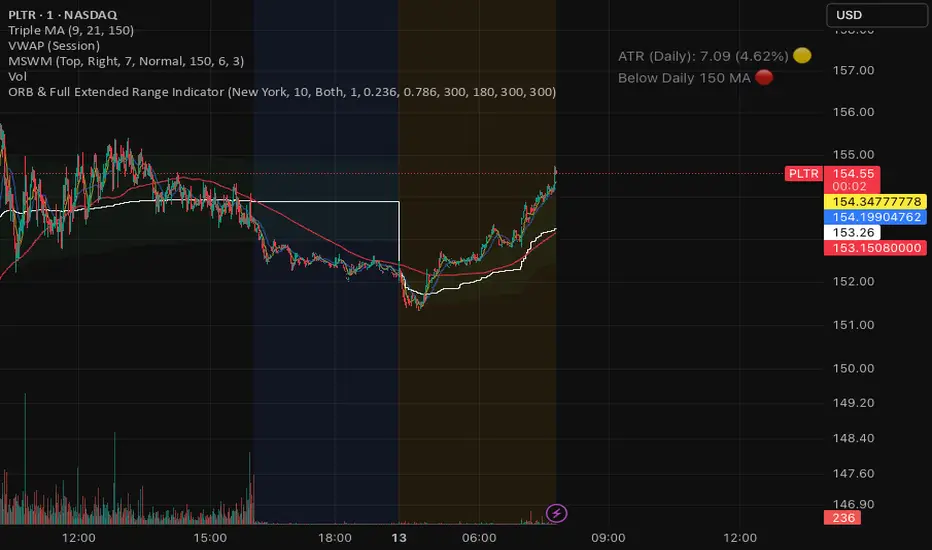
This script plots the Opening Range (ORB) high and low based on a configurable time window (5–45 minutes from the U.S. session open at 9:30 AM EST).
Once the ORB window closes, the indicator draws horizontal lines marking:
ORB High and Low
The size of the range in price and %
Fibonacci-based price targets above and below the range (0.382, 0.618, 1.000, 1.618, 2.000)
You can control:
Which Fibonacci levels to display
Whether to show long targets, short targets, or both
All drawings are automatically cleared at the start of each trading day.
Ideal for breakout traders using ORB and Fibonacci extensions for target planning.
版本注释
ORB Range Indicator with Fibonacci Targets
This script plots the Opening Range (ORB) high and low based on a configurable time window (5–45 minutes from the U.S. session open at 9:30 AM EST).
Once the ORB window closes, the indicator draws horizontal lines marking:
ORB High and Low
The size of the range in price and %
Fibonacci-based price targets above and below the range (0.382, 0.618, 1.000, 1.618, 2.000)
You can control:
Which Fibonacci levels to display
Whether to show long targets, short targets, or both
All drawings are automatically cleared at the start of each trading day.
Ideal for breakout traders using ORB and Fibonacci extensions for target planning.
版本注释
A recent fix was added to improve stability — it ensures that the indicator works correctly even on low-volume or quiet days by safely handling situations where no breakout lines or labels are drawn. This prevents potential runtime errors that occurred in some edge cases.If you run into any issues or bugs, feel free to leave a comment and I’ll take a look.
版本注释
Added Session Selector: A new dropdown input named "Trading Session" (`session_choice`) was added, allowing you to select from "New York", "London", "Tokyo", and "Frankfurt".
Dynamic Time Logic:
The static time settings were replaced with a `switch` statement. This dynamically assigns the correct `session_tz` (timezone), `start_hour`, and `start_minute` based on the session you select.
Updated Reset Logic:
The script will now automatically clear and redraw the ORB lines and targets if you change the selected "Trading Session", in addition to resetting on a new day or when the range duration is changed.
版本注释
Changelog* New Feature: Added Max Distance Tracking logic.
* Mechanism: The script now continuously tracks the highest price (for longs) and lowest price (for shorts) achieved after the breakout level is breached.
* Visuals: Added dynamic labels that update in real-time:
* Green Label: Shows the maximum points gained above the ORB High.
* Red Label: Shows the maximum points gained below the ORB Low.
* Reset: Variables and labels automatically reset at the start of a new session or day.
Quick Usage
1. Open the indicator settings.
2. Enable the checkbox: Show Max Distance from Breakout.
3. Once a breakout occurs, look for the Max label at the extreme price pivot (peak or valley) to see the maximum potential profit generated by the move so far.
版本注释
ChangelogNew Feature: Added Max Distance Tracking logic with percentage calculation.
Mechanism: The script tracks the highest price (for longs) and lowest price (for shorts) achieved post-breakout.
Visuals: Added dynamic labels showing both price difference and percentage gain (e.g., Max: +10.5 (0.5%)).
Reset: Distance variables reset automatically at the start of a new session.
Quick Usage
Open indicator settings.
Ensure Show Max Distance from Breakout is enabled.
Watch for the Max label appearing at the extreme high or low after a breakout occurs to see the trade's potential magnitude in both points and percentage.
版本注释
ChangelogNew Feature: Added Max Distance Tracking logic with percentage calculation.
Mechanism: The script tracks the highest price (for longs) and lowest price (for shorts) achieved post-breakout.
Visuals: Added dynamic labels showing both price difference and percentage gain (e.g., Max: +10.5 (0.5%)).
Reset: Distance variables reset automatically at the start of a new session.
Quick Usage
Open indicator settings.
Ensure Show Max Distance from Breakout is enabled.
Watch for the Max label appearing at the extreme high or low after a breakout occurs to see the trade's potential magnitude in both points and percentage.
版本注释
Update: Enhanced Visuals & Custom FibsNew Features:
Custom Fibonacci Levels: Added 2 new input fields to define your own specific target levels (e.g., 0.236 or 0.786).
Smart Label Positioning: The specific Range labels (High/Low) are now moved inward (default 180 bars) to clear up space, while Target labels remain extended to the far right.
Layout Control: Added a new settings group, "Line & Label Settings", giving you full control over how far the lines extend and where the text labels sit on your chart.
Extended Visibility: Target lines now extend further by default (300 bars) to cover the full trading day.
版本注释
Custom Fibonacci LevelsSmart Label Positioning
Layout Control
Extended Visibility
版本注释
Update: Max Distance, Alerts & VisualsMax Distance Tracking: Added a dynamic label that tracks the maximum potential profit (in points and %) achieved after a breakout.
Visual Breakout Signals: Added triangle markers that appear exactly on the breakout line (Long/Short) to visually confirm the signal.
Standard Alerts: Integrated alertcondition for easy setup of "ORB Long Breakout" and "ORB Short Breakout" via the Create Alert menu.
Custom Fibonacci: Added inputs for 2 user-defined target levels.
Layout Control: Separated settings for line length and label positioning to keep the chart clean.
版本注释
Update: Added Cumulative Breakout VolumeNew Feature: Added real-time tracking of cumulative volume from session start until the breakout moment.
Visuals: Added a "Total Breakout Vol" label at the breakout point in a distinct Fuchsia color.
Alerts: Updated alert messages to include the total volume data.
Optimization: Refactored code for full Pine Script v6 compatibility and fixed syntax issues.
版本注释
Show Total Breakout Volume Label版本注释
Added ORB Volume版本注释
Description of the update: ORB and Pre-Market integrationThis update merges pre-market range tracking into your ORB script. It identifies high and low price levels between 04:00 and 09:30 New York time. The lines are programmed to stop at the start of the regular session to avoid visual clutter. A dedicated volume tracker summarizes all trades during the pre-market period.
版本注释
The update now includes the pre-market range calculation in both price points and percentage. This information is displayed on the pre-market label alongside the volume data. This allows for a quick comparison between the pre-market volatility and the subsequent opening range.版本注释
The indicator integrates overnight range tracking with the ORB scanner. It captures the high, low, and total volume starting from the previous day's close at 16:00 until the current day's open at 09:30. These levels are plotted as static lines that appear only during regular hours to provide context without cluttering the current after-hours session. The overnight label displays the total volume and the price range percentage.版本注释
The Max Distance tracking (peak after breakout) has been fully restored to its original logic. The Extended Hours (Overnight) range is now collected from 16:00 to 09:30 and plotted as static lines only at the market open, preventing them from appearing in the current day's after-hours session.版本注释
Full restoration of the original ORB script features, including target labels, max distance tracking, and adjustable line lengths. The Extended Hours logic has been corrected to capture data from 16:00 to 09:30 without syntax errors. Indentation has been fixed to comply with Pine Script v6 standards, and the "then" keyword has been completely removed.版本注释
bugs fix版本注释
Gap calculation added版本注释
bug fixes开源脚本
秉承TradingView的精神,该脚本的作者将其开源,以便交易者可以查看和验证其功能。向作者致敬!您可以免费使用该脚本,但请记住,重新发布代码须遵守我们的网站规则。

免责声明
这些信息和出版物并非旨在提供,也不构成TradingView提供或认可的任何形式的财务、投资、交易或其他类型的建议或推荐。请阅读使用条款了解更多信息。
开源脚本
秉承TradingView的精神,该脚本的作者将其开源,以便交易者可以查看和验证其功能。向作者致敬!您可以免费使用该脚本,但请记住,重新发布代码须遵守我们的网站规则。
免责声明
这些信息和出版物并非旨在提供,也不构成TradingView提供或认可的任何形式的财务、投资、交易或其他类型的建议或推荐。请阅读使用条款了解更多信息。