Divergence Indicators v1.01 (Pine v6)
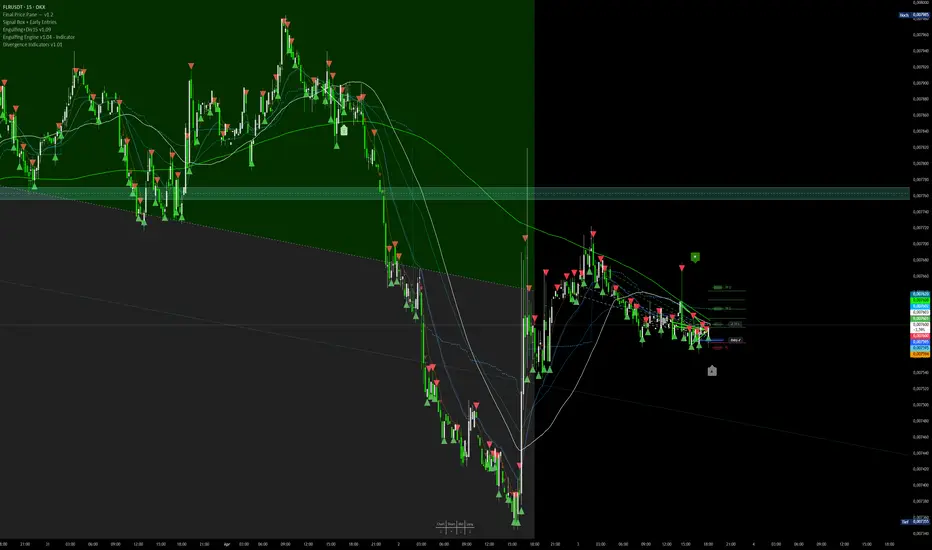
Divergence Indicators v1.01 (Pine v6) is a production‑ready TradingView indicator that automatically detects regular and hidden divergences across 11 widely used indicators (MACD, MACD histogram, RSI, Stochastic, CCI, Momentum, OBV, VW‑MACD, CMF, MFI, plus an optional external series). It’s engineered for crypto traders and optimized for fast intraday use (5‑minute charts) while offering multi‑timeframe confirmation, object throttling to avoid TradingView limits, and two ready‑to‑use presets (Aggressive and Conservative). The indicator draws clear divergence lines, summary labels, and provides alert conditions so you can spot reversal and continuation setups quickly and reliably on BTC, ETH, SOL and co. and perpetual futures.
Key Features
11 indicator checks: MACD, MACD histogram, RSI, Stochastic, CCI, Momentum, OBV, VW‑MACD, CMF, MFI, and an optional external indicator input.
Regular and Hidden divergences: Detects reversal (regular) and continuation (hidden) divergences.
Multi‑timeframe confirmation: Optional confirmation from two higher timeframes (defaults 30m and 60m).
Presets: Aggressive for fast 5m signals; Conservative for fewer false positives and swing setups.
Object throttling: Limits lines and labels to avoid TradingView object limits and keep charts clean.
Pine v6 best practices: All plots and shapes in global scope, typed variables, precomputed request.security calls, robust na checks, and safe OBV/CMF calculations.
Alerts: Built‑in alertconditions for positive/negative and regular/hidden divergences.
Customizable visuals: Colors, line styles, widths, label text options, and pivot source selection.
Performance tuned for crypto: Designed to handle perpetual futures and volatile altcoins with safe arithmetic and array bounds.
User Guide
Installation
Save and Add to Chart. Recommended chart timeframe: 5 minutes for intraday trading.
Open the indicator settings and choose Mode: Aggressive, Conservative, or Custom.
Presets and Key Inputs
Mode
Aggressive: prd = 3, dontconfirm = true, throttle_lines = 4 — faster signals, more frequent.
Conservative: prd = 6, dontconfirm = false, throttle_lines = 8 — stricter signals, fewer false positives.
Custom: manually set all parameters.
Pivot Period (prd): Number of bars used to detect pivot highs/lows. Lower values produce more pivots and more signals; higher values produce fewer, stronger pivots.
Maximum Pivot Points (maxpp) and Maximum Bars to Check (maxbars): Control how far back the script searches for matching pivots. Increase for more historical matching, decrease for performance.
Indicator toggles: Enable or disable each indicator to reduce noise and CPU usage.
Show Only Last Divergence: Keeps the chart uncluttered by removing older labels/lines. Recommended for 5m charts.
Show MAs: Toggle 50 & 200 SMA overlay for trend context.
How to Read Signals
Regular Divergence (reversal)
Positive Regular: Price makes a lower low while indicator makes a higher low → bullish reversal candidate.
Negative Regular: Price makes a higher high while indicator makes a lower high → bearish reversal candidate.
Visuals: Solid lines (configurable color) connect the pivot points; labels list contributing indicators.
Hidden Divergence (continuation)
Positive Hidden: Price makes a higher low while indicator makes a lower low → bullish continuation.
Negative Hidden: Price makes a lower high while indicator makes a higher high → bearish continuation.
Visuals: Dashed/dotted lines (configurable) indicate hidden divergences.
Labels: Show which indicators contributed and a count of divergences found at top/bottom.
Multi‑Timeframe Confirmation
The indicator precomputes higher‑TF indicator values (e.g., 30m, 60m) and requires a configurable number of confirmations (mtf_min_confirm) before drawing lines.
Recommended settings: For 5m scalping, use 30m confirmation = 1. For swing trades, use 4h/12h confirmations and require 2 confirmations.
Alerts
Built‑in alertconditions available: Positive/Negative Regular and Positive/Negative Hidden divergences.
Create TradingView alerts using these conditions and route them to email, app, or webhook for automation.
Example Workflows
Quick scalp (Aggressive): Chart 5m BTC‑Perp, Mode = Aggressive, showlast = true, use_mtf = true with mtf_1 = 30m and mtf_min_confirm = 1. Enter on bullish regular divergence with candle confirmation and tight stop under pivot.
Swing trade (Conservative): Chart 4h BTC, Mode = Conservative, use_mtf = true with mtf_1 = 12h and mtf_2 = 24h, mtf_min_confirm = 2. Use hidden divergences to add to trend positions.
Best Practices and Troubleshooting
Use showlast = true on 5m to avoid clutter and TradingView object limits.
Enable MTF confirmation for perpetual futures to filter noise from funding‑driven spikes. 30m/1h confirmations work well for 5m entries.
Combine with a trend filter: Use 50/200 SMA or a higher‑TF trend check to avoid counter‑trend trades.
Risk management: Divergences are signals, not guarantees. Use stop loss at pivot extremes and size positions for acceptable drawdown.
Performance: If you enable many indicators and multiple MTFs, TradingView may slow down. Disable unused indicators or MTF confirmation to improve performance.

免责声明
这些信息和出版物并非旨在提供,也不构成TradingView提供或认可的任何形式的财务、投资、交易或其他类型的建议或推荐。请阅读使用条款了解更多信息。
免责声明
这些信息和出版物并非旨在提供,也不构成TradingView提供或认可的任何形式的财务、投资、交易或其他类型的建议或推荐。请阅读使用条款了解更多信息。