Moving Range Breakout [Dynamic Box]
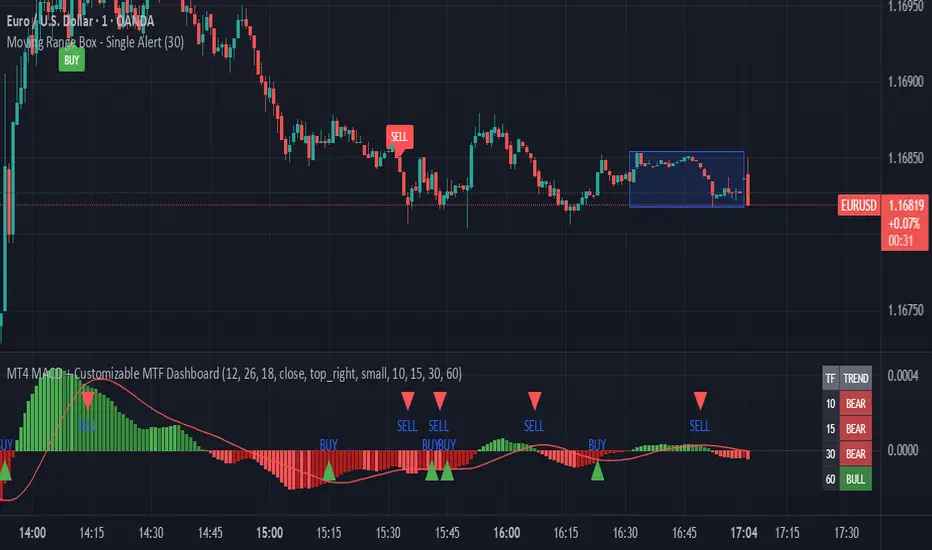
Title: Moving Range Breakout [Dynamic Box]
Description
The Moving Range Breakout is a clean, visual-first momentum indicator designed to identify and highlight price breakouts from a defined lookback period. Unlike traditional "channel" indicators that clutter the chart with historical lines, this script uses a dynamic, self-adjusting box that focuses exclusively on the most recent price action.
This indicator is perfect for traders who utilize Opening Range Breakouts (ORB), Volatility Contraction Patterns (VCP), or simple Box Trading strategies.
How It Works
The script calculates the highest high and lowest low of a user-defined number of previous bars (the "Lookback Period").
The Box: It draws a transparent geometric box encompassing only those lookback bars.
The Offset: The calculation specifically uses [1] (the previous bar) to ensure the box boundaries are fixed while the current "live" bar is forming. This prevents the range from "moving the goalposts" mid-candle.
The Logic:
BUY Signal: Triggered when the current bar closes above the High of the box.
SELL Signal: Triggered when the current bar closes below the Low of the box.
Auto-Cleanup: To maintain a "Zero-Clutter" chart, the script is programmed to only show the most recent Buy and Sell labels. As soon as a new breakout occurs, the previous label is removed.
Key Features
Timeframe Adaptive: Works on any timeframe (1m, 5m, 1h, Daily).
Customizable Lookback: No hard limits; set it to 5 bars for scalping or 50 bars for swing trading.
Persistent Labels: Uses label.set_xy logic to ensure only one signal of each type exists on the chart at any time, keeping your workspace clean.
Unified Alerts: Includes a built-in alertcondition that allows you to monitor both Buy and Sell signals using a single TradingView alert slot.
How to Use
Setting the Range: Use the "Lookback Period" in the settings to define your consolidation zone. (e.g., set to 20 to trade the breakout of the last 20 bars).
Confirming the Breakout: The signal is plotted on Bar Close. Entering a trade before the bar closes may result in a "fakeout" where price wicks out and returns to the box.
Setting Alerts:
Click Create Alert.
Select this script as the Condition.
Select "Any Breakout Alert".
Choose "Once Per Bar Close".
Settings
Lookback Period: Number of bars to include in the high/low calculation.
Box Fill Color: Adjust the transparency of the range highlight.
Border Color: Adjust the color of the range boundaries.
Disclaimer
Breakout trading involves risk, especially in low-volume or sideways markets ("choppy" price action). It is recommended to use this indicator in conjunction with volume analysis or higher-timeframe trend filters.
Description
The Moving Range Breakout is a clean, visual-first momentum indicator designed to identify and highlight price breakouts from a defined lookback period. Unlike traditional "channel" indicators that clutter the chart with historical lines, this script uses a dynamic, self-adjusting box that focuses exclusively on the most recent price action.
This indicator is perfect for traders who utilize Opening Range Breakouts (ORB), Volatility Contraction Patterns (VCP), or simple Box Trading strategies.
How It Works
The script calculates the highest high and lowest low of a user-defined number of previous bars (the "Lookback Period").
The Box: It draws a transparent geometric box encompassing only those lookback bars.
The Offset: The calculation specifically uses [1] (the previous bar) to ensure the box boundaries are fixed while the current "live" bar is forming. This prevents the range from "moving the goalposts" mid-candle.
The Logic:
BUY Signal: Triggered when the current bar closes above the High of the box.
SELL Signal: Triggered when the current bar closes below the Low of the box.
Auto-Cleanup: To maintain a "Zero-Clutter" chart, the script is programmed to only show the most recent Buy and Sell labels. As soon as a new breakout occurs, the previous label is removed.
Key Features
Timeframe Adaptive: Works on any timeframe (1m, 5m, 1h, Daily).
Customizable Lookback: No hard limits; set it to 5 bars for scalping or 50 bars for swing trading.
Persistent Labels: Uses label.set_xy logic to ensure only one signal of each type exists on the chart at any time, keeping your workspace clean.
Unified Alerts: Includes a built-in alertcondition that allows you to monitor both Buy and Sell signals using a single TradingView alert slot.
How to Use
Setting the Range: Use the "Lookback Period" in the settings to define your consolidation zone. (e.g., set to 20 to trade the breakout of the last 20 bars).
Confirming the Breakout: The signal is plotted on Bar Close. Entering a trade before the bar closes may result in a "fakeout" where price wicks out and returns to the box.
Setting Alerts:
Click Create Alert.
Select this script as the Condition.
Select "Any Breakout Alert".
Choose "Once Per Bar Close".
Settings
Lookback Period: Number of bars to include in the high/low calculation.
Box Fill Color: Adjust the transparency of the range highlight.
Border Color: Adjust the color of the range boundaries.
Disclaimer
Breakout trading involves risk, especially in low-volume or sideways markets ("choppy" price action). It is recommended to use this indicator in conjunction with volume analysis or higher-timeframe trend filters.

免责声明
这些信息和出版物并非旨在提供,也不构成TradingView提供或认可的任何形式的财务、投资、交易或其他类型的建议或推荐。请阅读使用条款了解更多信息。
免责声明
这些信息和出版物并非旨在提供,也不构成TradingView提供或认可的任何形式的财务、投资、交易或其他类型的建议或推荐。请阅读使用条款了解更多信息。