OPEN-SOURCE SCRIPT
已更新 Custom Candle Highlighter (NY Time)
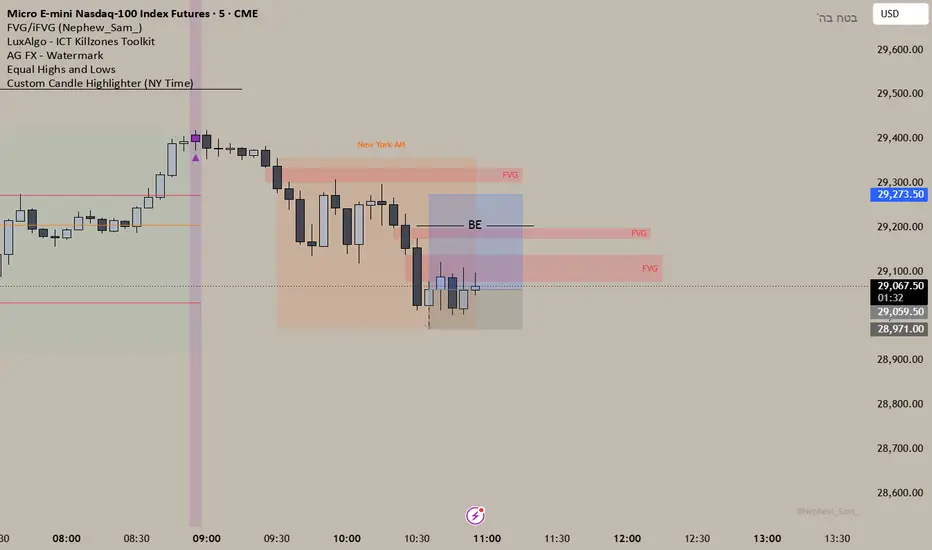
### Overview
This lightweight utility script highlights exactly two specific candles during the trading day based on your custom time inputs. It is designed for traders who track specific key economic releases, market opens, or daily institutional windows.
### Features
* **Precise NY Time Tracking:** The script converts candle times to the New York timezone (`America/New_York`), meaning it automatically adjusts for U.S. Daylight Saving Time (DST). It will remain accurate regardless of your local chart timezone display.
* **Dual Time Inputs:** Easily set two independent times (Hour and Minute) directly from the indicator settings panel without changing the code.
* **Highly Visible Triggers:** When a candle matches your set time, the script highlights it using three visual anchors:
1. Changes the candle body color to Yellow.
2. Applies a soft Yellow background slot behind the candle.
3. Places a tiny green triangle underneath the candle for absolute clarity.
### Important Usage Notes (Best Settings)
* **Timeframe Requirement:** To capture exact minutes (e.g., 08:55 AM), you **must** use this indicator on lower-interval timeframes like the **1-minute (1m)** chart. If you are on a 1-hour chart, individual minute triggers will not paint.
* **Inputs:** Access the settings gear icon to adjust the hours (0-23 format) and minutes (0-59 format) for both the morning and afternoon session targets.
Feel free to leave a comment or drop a like if you find this script useful for your daily routine!
This lightweight utility script highlights exactly two specific candles during the trading day based on your custom time inputs. It is designed for traders who track specific key economic releases, market opens, or daily institutional windows.
### Features
* **Precise NY Time Tracking:** The script converts candle times to the New York timezone (`America/New_York`), meaning it automatically adjusts for U.S. Daylight Saving Time (DST). It will remain accurate regardless of your local chart timezone display.
* **Dual Time Inputs:** Easily set two independent times (Hour and Minute) directly from the indicator settings panel without changing the code.
* **Highly Visible Triggers:** When a candle matches your set time, the script highlights it using three visual anchors:
1. Changes the candle body color to Yellow.
2. Applies a soft Yellow background slot behind the candle.
3. Places a tiny green triangle underneath the candle for absolute clarity.
### Important Usage Notes (Best Settings)
* **Timeframe Requirement:** To capture exact minutes (e.g., 08:55 AM), you **must** use this indicator on lower-interval timeframes like the **1-minute (1m)** chart. If you are on a 1-hour chart, individual minute triggers will not paint.
* **Inputs:** Access the settings gear icon to adjust the hours (0-23 format) and minutes (0-59 format) for both the morning and afternoon session targets.
Feel free to leave a comment or drop a like if you find this script useful for your daily routine!
版本注释
Changed the colors to purple, I like it more 开源脚本
秉承TradingView的精神,该脚本的作者将其开源,以便交易者可以查看和验证其功能。向作者致敬!您可以免费使用该脚本,但请记住,重新发布代码须遵守我们的网站规则。

免责声明
这些信息和出版物并非旨在提供,也不构成TradingView提供或认可的任何形式的财务、投资、交易或其他类型的建议或推荐。请阅读使用条款了解更多信息。
开源脚本
秉承TradingView的精神,该脚本的作者将其开源,以便交易者可以查看和验证其功能。向作者致敬!您可以免费使用该脚本,但请记住,重新发布代码须遵守我们的网站规则。
免责声明
这些信息和出版物并非旨在提供,也不构成TradingView提供或认可的任何形式的财务、投资、交易或其他类型的建议或推荐。请阅读使用条款了解更多信息。