OPEN-SOURCE SCRIPT
已更新 4C Volume w/ Relative Volume at Time
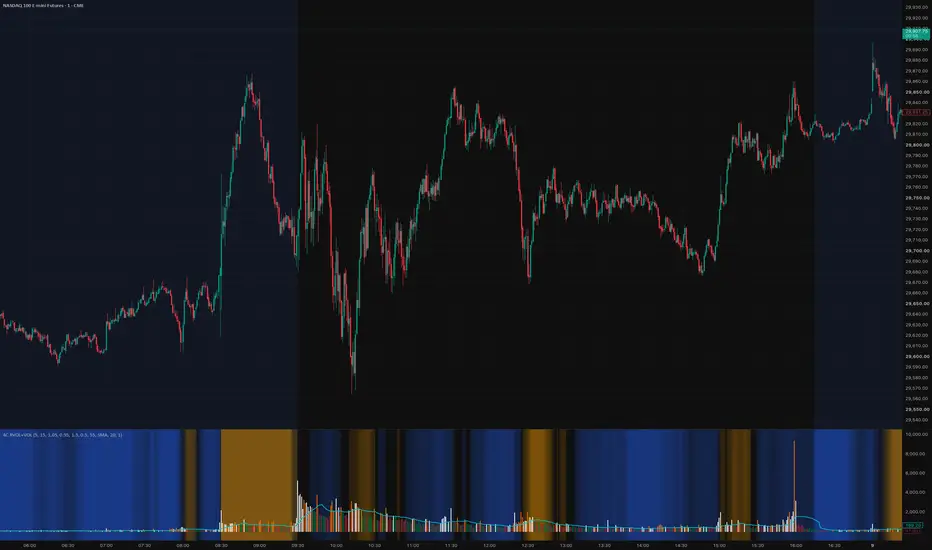
This is a Volume indicator that also shows Relative Volume at Time (RVOL).
The RVOL is easily visible as a background color, that changes between Low and High RVOL colors.
The RVOL portion of the indicator is a modified version of the 'Relative Volume At Time' indicator by Tradingview (which has been the best/most accurate RVOL indicator i have seen yet on Tradingview, and seems to closely match the how the "Zanger Volume" indicator works).
Elevated RVOL can be a very important criteria for trading , especially on lower time frames.
This indicator can be used as a simple filter when looking at charts to determine whether it should be traded or not, based on the RVOL.
Higher volume/participation relative to previous time periods can lead to better follow through of moves and price action, and can lead to trending conditions.
Lower RVOL can lead to choppy market conditions, with lower participation and follow through on chart patterns.
The RVOL portion of the indicator draws from the Tradingview 'Relative Volume At Time' indicator developed by authors @e2e4mfck and LucF , for TradingView.
This indicator takes the Past Volume mark and changes it into a background color.
High RVOL = When the day's cumulative volume is greater than the Past Volume levels, then the background is painted Blue by default
Low RVOL = When the day's cumulative volume is lower than the Past Volume levels, then the background is painted Purple by default
See annotated examples in the chart Below, which compares/contrasts this new indicator with the RVOL indicator by Tradingview:

Portions of the 'Relative Volume At Time' indictor code have been removed to clean up the script.
Plans in the future are to remove more code were possible, to further refine the script and speed up the processing times for the indicator.
If anyone is able to strip out more and keep it functioning the same, please let me know.
Enjoy.
Credit also goes to author LazyBear . Portions of the Volume indicator is adapted from - HawkEye Volume Indicator [LazyBear]
The RVOL is easily visible as a background color, that changes between Low and High RVOL colors.
The RVOL portion of the indicator is a modified version of the 'Relative Volume At Time' indicator by Tradingview (which has been the best/most accurate RVOL indicator i have seen yet on Tradingview, and seems to closely match the how the "Zanger Volume" indicator works).
Elevated RVOL can be a very important criteria for trading , especially on lower time frames.
This indicator can be used as a simple filter when looking at charts to determine whether it should be traded or not, based on the RVOL.
Higher volume/participation relative to previous time periods can lead to better follow through of moves and price action, and can lead to trending conditions.
Lower RVOL can lead to choppy market conditions, with lower participation and follow through on chart patterns.
The RVOL portion of the indicator draws from the Tradingview 'Relative Volume At Time' indicator developed by authors @e2e4mfck and LucF , for TradingView.
This indicator takes the Past Volume mark and changes it into a background color.
High RVOL = When the day's cumulative volume is greater than the Past Volume levels, then the background is painted Blue by default
Low RVOL = When the day's cumulative volume is lower than the Past Volume levels, then the background is painted Purple by default
See annotated examples in the chart Below, which compares/contrasts this new indicator with the RVOL indicator by Tradingview:
Portions of the 'Relative Volume At Time' indictor code have been removed to clean up the script.
Plans in the future are to remove more code were possible, to further refine the script and speed up the processing times for the indicator.
If anyone is able to strip out more and keep it functioning the same, please let me know.
Enjoy.
Credit also goes to author LazyBear . Portions of the Volume indicator is adapted from - HawkEye Volume Indicator [LazyBear]
版本注释
Update 04/26/22*Reorganized and renamed some of the the settings inputs. Setting inputs had artifacts left over from the original 'Relative Volume At Time' that did not align with this newer adapted version.
*Cleaned up and removed portions of the code that were not needed, to refine and hopefully speed up the indicator processing
*Reworded pinscript author credits
版本注释
MAJOR UPDATE — PINE SCRIPT V6 REWRITEThis release completely rebuilds 4C RVOL by Time + Volume in Pine Script v6. The indicator keeps its original purpose—showing current volume against the volume normally seen at the same intraday time—but replaces the old calculation framework and visualization with a much leaner implementation.
ORIGINAL CREDIT
The concept and original Relative Volume at Time work remain credited in the source:
Author=e2e4mfck and LucF, for TradingView
Relative Volume at Time
v1.1 2021.01.24 08:42
WHAT CHANGED
- Migrated from Pine Script v5 to v6.
- Rewritten around TradingView's RelativeValue/4 library.
- Reduced the customized source from approximately 467 lines to 52 lines.
- Removed the old manual historical scans, 5,000-bar loops, timestamp searches, offset tracking, legacy display modes, filters, HMA/channel calculations, markers, labels, and alert code.
- Simplified the settings to the controls used by the current display.
SAME-TIME RVOL CALCULATION
Each chart bar is compared with the corresponding intraday bar from prior daily sessions. With the default five-session lookback, a 09:42 one-minute bar is evaluated against the expected volume at 09:42 from the prior five sessions.
The final RVOL value uses a rolling ratio of sums:
sum of current volume over the rolling window / sum of expected same-time volume over that window
The default rolling window is 15 chart bars. On a one-minute chart this represents a rolling 15-minute window; it is not a fixed clock-aligned 15-minute bin. Both the prior-session lookback and rolling-window length are configurable.
RVOL HEATMAP
- Gold backgrounds identify above-normal same-time volume.
- Blue backgrounds identify below-normal same-time volume.
- The 0.95–1.05 area is neutral by default to reduce background flicker around normal volume.
- Color intensity increases as RVOL moves farther from normal, reaching full mapped intensity at the default 1.50 high cap or 0.50 low cap.
VOLUME HISTOGRAM
The columns continue to plot actual raw volume rather than RVOL. Direction and unusual absolute volume are shown separately:
- Muted green: ordinary bullish volume.
- Muted red: ordinary bearish volume.
- White: bullish volume above its moving-average threshold.
- Orange: bearish volume above its moving-average threshold.
The volume average can use SMA or EMA. Its length defaults to 20 bars, and the highlight threshold is configurable as a multiple of that average. This makes unusually large absolute-volume bars immediately visible without changing the RVOL heatmap calculation.
The optional aqua moving-average line remains available. RVOL, expected same-time volume, and the volume-versus-average ratio are also available in the Data Window without adding visual clutter.
IMPORTANT NOTES
- Results depend on the chart timeframe, session template, available history, and symbol's volume data.
- Real-time values continue to develop while the current bar is open.
- Because the historical alignment now uses TradingView's library, values may not match the legacy custom-loop version bar for bar.
- Heatmap color describes volume relative to the same time in prior sessions; histogram color describes price-bar direction and whether raw volume exceeds its moving-average threshold. Neither is a directional trade signal by itself.
开源脚本
秉承TradingView的精神,该脚本的作者将其开源,以便交易者可以查看和验证其功能。向作者致敬!您可以免费使用该脚本,但请记住,重新发布代码须遵守我们的网站规则。

免责声明
这些信息和出版物并非旨在提供,也不构成TradingView提供或认可的任何形式的财务、投资、交易或其他类型的建议或推荐。请阅读使用条款了解更多信息。
免责声明
这些信息和出版物并非旨在提供,也不构成TradingView提供或认可的任何形式的财务、投资、交易或其他类型的建议或推荐。请阅读使用条款了解更多信息。