EMA 9/21 Cross -> Touch -> Breakout(BOT) -> Enter System
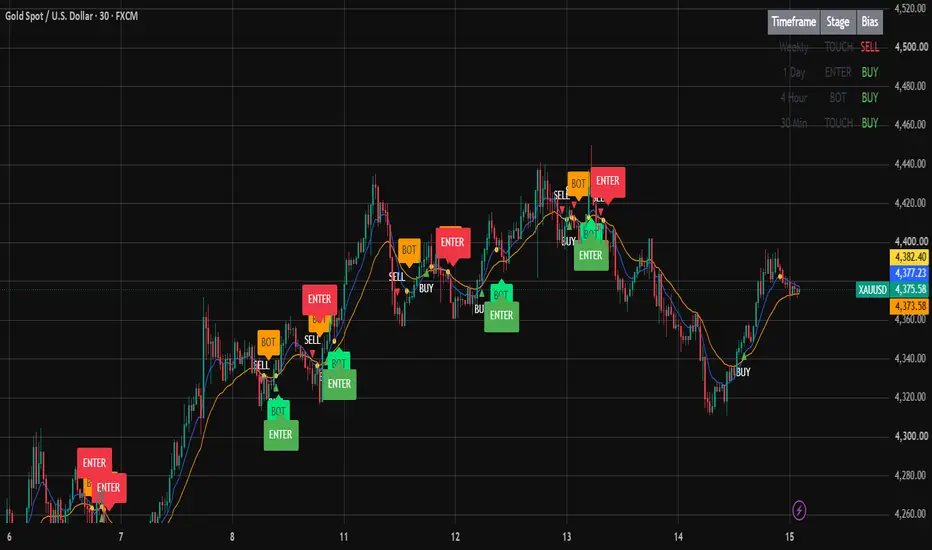
1. EMA setup
The script uses two EMAs:
9 EMA = fast EMA
21 EMA = slow EMA
BUY direction
When:
9 EMA crosses above 21 EMA
the script creates a BUY setup.
SELL direction
When:
9 EMA crosses below 21 EMA
the script creates a SELL setup.
The crossover itself is only the beginning of the setup. It is not the final entry.
2. CROSS → Start of a new setup
The script has four stages:
Stage Meaning
0 No active setup
1 CROSS happened → waiting for TOUCH
2 TOUCH happened → waiting for BOT
3 BOT happened → waiting for ENTER
4 ENTER happened → setup completed
For example, after a bullish crossover:
9 EMA
↗
/
/ crosses above
──────── 21 EMA
↓
BUY setup
The script then waits for price to come back and touch the 9 EMA.
3. TOUCH — Price returns to EMA 9
The next requirement is that a candle must touch the 9 EMA.
The condition is:
low <= EMA 9
AND
high >= EMA 9
In simple terms:
The 9 EMA must be inside the candle's high-low range.
Example:
Candle
┌─────────┐
│ │
│ EMA 9 ─────
│ │
└─────────┘
That candle becomes the Touch Candle.
The script records:
Touch candle high
Touch candle low
These levels are then used for the BOT.
4. BOT — Breakout of the Touch Candle
After TOUCH, the script does not immediately enter.
It waits for the touch candle itself to be broken.
BUY setup
The high of the touch candle must be broken.
Touch candle high
──────────────────
↑
│ Break
│
Price
Condition:
high > touchHigh
When this happens:
BOT BUY
SELL setup
The low of the touch candle must be broken.
Price
│
↓ Break
──────────────────
Touch candle low
Condition:
low < touchLow
When this happens:
BOT SELL
5. ENTER — Final confirmation
BOT is not the final entry.
After BOT, the script waits for the previously identified swing level to break.
This is the final confirmation.
BUY
The candle must CLOSE above the swing high.
Previous Swing High
────────────────────────
█
█
█
█ ← CLOSE above
Condition:
close > swingLevel
Then:
ENTER BUY
SELL
The candle must CLOSE below the swing low.
Previous Swing Low
────────────────────────
█
█
█
█
↓ CLOSE below
Condition:
close < swingLevel
Then:
ENTER SELL
6. Very important: ENTER uses candle CLOSE
This is one of the most important parts of your script.
It does not consider a simple wick break enough.
For BUY:
high > swingLevel
is not enough.
It requires:
close > swingLevel
For SELL:
low < swingLevel
is not enough.
It requires:
close < swingLevel
So the final ENTER is a body/close confirmation.
7. Where does the swing level come from?
This part of the code is:
swingHighVal = ta.highest(high, swingLookback)[1]
swingLowVal = ta.lowest(low, swingLookback)[1]
The default:
Swing Lookback = 10 bars
When the EMA crossover occurs:
BUY
The script stores the highest high of the previous 10 bars.
That becomes:
BUY swingLevel
SELL
The script stores the lowest low of the previous 10 bars.
That becomes:
SELL swingLevel
And importantly, that level is stored when the crossover occurs.
It does not continuously update during the setup.
8. Complete BUY example
Suppose XAUUSD does this:
STEP 1
9 EMA crosses ABOVE 21 EMA
↓
BUY bias
↓
STEP 2
Price pulls back
↓
Price touches EMA 9
↓
TOUCH
↓
STEP 3
Touch candle high breaks
↓
BOT
↓
STEP 4
Price continues upward
↓
Candle CLOSES above
previous swing high
↓
ENTER BUY
So the trade signal is:
CROSS → TOUCH → BOT → ENTER
9. Complete SELL example
STEP 1
9 EMA crosses BELOW 21 EMA
↓
SELL bias
↓
STEP 2
Price pulls back
↓
Price touches EMA 9
↓
TOUCH
↓
STEP 3
Touch candle low breaks
↓
BOT
↓
STEP 4
Price continues downward
↓
Candle CLOSES below
previous swing low
↓
ENTER SELL
10. What happens if another EMA cross occurs?
A new crossover starts a completely new setup.
For example:
BUY CROSS
↓
TOUCH
↓
BOT
↓
SELL CROSS
The BUY setup is effectively replaced by the new SELL setup.
The script resets:
Direction
Stage
Touch high
Touch low
Swing level
and starts again from:
Stage 1 = CROSS
11. After ENTER
Once ENTER occurs:
stage = 4
The setup is considered complete.
It will not generate another ENTER from the same crossover.
It waits for another fresh EMA 9/21 crossover to start a new setup.
Therefore, one crossover can produce at most:
1 final ENTER
12. What you see on the chart
The script displays:
Blue line
EMA 9
Orange line
EMA 21
BUY triangle
9 EMA crossed above 21 EMA.
SELL triangle
9 EMA crossed below 21 EMA.
Yellow circle
Price touched EMA 9.
BOT
Touch candle's high/low was broken.
ENTER
Final trading signal.
13. Alerts
The script provides six alert conditions:
Cross - BUY
Cross - SELL
Touch
BOT
ENTER BUY
ENTER SELL
If your purpose is actual trade execution, the most important alerts are:
ENTER BUY
and
ENTER SELL
You don't necessarily need alerts for CROSS, TOUCH, or BOT unless you want to monitor the setup's progress.
14. Multi-Timeframe Table
The script also runs the same signal engine independently on:
Weekly
1 Day
4 Hour
30 Minute
It displays:
┌───────────┬────────┬──────┐
│ Timeframe │ Stage │ Bias │
├───────────┼────────┼──────┤
│ Weekly │ ENTER │ BUY │
│ 1 Day │ BOT │ BUY │
│ 4 Hour │ TOUCH │ BUY │
│ 30 Min │ CROSS │ BUY │
└───────────┴────────┴──────┘
This lets you see where each timeframe currently is in the setup.
For example:
Weekly = BUY / ENTER
means the Weekly system has completed its setup.
30M = BUY / TOUCH
means the 30-minute system has a BUY setup and is currently waiting for the touch candle to break.
15. The most important distinction
There are four different events, and they should not be confused:
CROSS
Direction identified
TOUCH
Pullback to EMA 9 confirmed
BOT
Touch candle breakout confirmed
ENTER
Previous swing structure breakout confirmed
So the strategy is essentially trying to confirm:
The script uses two EMAs:
9 EMA = fast EMA
21 EMA = slow EMA
BUY direction
When:
9 EMA crosses above 21 EMA
the script creates a BUY setup.
SELL direction
When:
9 EMA crosses below 21 EMA
the script creates a SELL setup.
The crossover itself is only the beginning of the setup. It is not the final entry.
2. CROSS → Start of a new setup
The script has four stages:
Stage Meaning
0 No active setup
1 CROSS happened → waiting for TOUCH
2 TOUCH happened → waiting for BOT
3 BOT happened → waiting for ENTER
4 ENTER happened → setup completed
For example, after a bullish crossover:
9 EMA
↗
/
/ crosses above
──────── 21 EMA
↓
BUY setup
The script then waits for price to come back and touch the 9 EMA.
3. TOUCH — Price returns to EMA 9
The next requirement is that a candle must touch the 9 EMA.
The condition is:
low <= EMA 9
AND
high >= EMA 9
In simple terms:
The 9 EMA must be inside the candle's high-low range.
Example:
Candle
┌─────────┐
│ │
│ EMA 9 ─────
│ │
└─────────┘
That candle becomes the Touch Candle.
The script records:
Touch candle high
Touch candle low
These levels are then used for the BOT.
4. BOT — Breakout of the Touch Candle
After TOUCH, the script does not immediately enter.
It waits for the touch candle itself to be broken.
BUY setup
The high of the touch candle must be broken.
Touch candle high
──────────────────
↑
│ Break
│
Price
Condition:
high > touchHigh
When this happens:
BOT BUY
SELL setup
The low of the touch candle must be broken.
Price
│
↓ Break
──────────────────
Touch candle low
Condition:
low < touchLow
When this happens:
BOT SELL
5. ENTER — Final confirmation
BOT is not the final entry.
After BOT, the script waits for the previously identified swing level to break.
This is the final confirmation.
BUY
The candle must CLOSE above the swing high.
Previous Swing High
────────────────────────
█
█
█
█ ← CLOSE above
Condition:
close > swingLevel
Then:
ENTER BUY
SELL
The candle must CLOSE below the swing low.
Previous Swing Low
────────────────────────
█
█
█
█
↓ CLOSE below
Condition:
close < swingLevel
Then:
ENTER SELL
6. Very important: ENTER uses candle CLOSE
This is one of the most important parts of your script.
It does not consider a simple wick break enough.
For BUY:
high > swingLevel
is not enough.
It requires:
close > swingLevel
For SELL:
low < swingLevel
is not enough.
It requires:
close < swingLevel
So the final ENTER is a body/close confirmation.
7. Where does the swing level come from?
This part of the code is:
swingHighVal = ta.highest(high, swingLookback)[1]
swingLowVal = ta.lowest(low, swingLookback)[1]
The default:
Swing Lookback = 10 bars
When the EMA crossover occurs:
BUY
The script stores the highest high of the previous 10 bars.
That becomes:
BUY swingLevel
SELL
The script stores the lowest low of the previous 10 bars.
That becomes:
SELL swingLevel
And importantly, that level is stored when the crossover occurs.
It does not continuously update during the setup.
8. Complete BUY example
Suppose XAUUSD does this:
STEP 1
9 EMA crosses ABOVE 21 EMA
↓
BUY bias
↓
STEP 2
Price pulls back
↓
Price touches EMA 9
↓
TOUCH
↓
STEP 3
Touch candle high breaks
↓
BOT
↓
STEP 4
Price continues upward
↓
Candle CLOSES above
previous swing high
↓
ENTER BUY
So the trade signal is:
CROSS → TOUCH → BOT → ENTER
9. Complete SELL example
STEP 1
9 EMA crosses BELOW 21 EMA
↓
SELL bias
↓
STEP 2
Price pulls back
↓
Price touches EMA 9
↓
TOUCH
↓
STEP 3
Touch candle low breaks
↓
BOT
↓
STEP 4
Price continues downward
↓
Candle CLOSES below
previous swing low
↓
ENTER SELL
10. What happens if another EMA cross occurs?
A new crossover starts a completely new setup.
For example:
BUY CROSS
↓
TOUCH
↓
BOT
↓
SELL CROSS
The BUY setup is effectively replaced by the new SELL setup.
The script resets:
Direction
Stage
Touch high
Touch low
Swing level
and starts again from:
Stage 1 = CROSS
11. After ENTER
Once ENTER occurs:
stage = 4
The setup is considered complete.
It will not generate another ENTER from the same crossover.
It waits for another fresh EMA 9/21 crossover to start a new setup.
Therefore, one crossover can produce at most:
1 final ENTER
12. What you see on the chart
The script displays:
Blue line
EMA 9
Orange line
EMA 21
BUY triangle
9 EMA crossed above 21 EMA.
SELL triangle
9 EMA crossed below 21 EMA.
Yellow circle
Price touched EMA 9.
BOT
Touch candle's high/low was broken.
ENTER
Final trading signal.
13. Alerts
The script provides six alert conditions:
Cross - BUY
Cross - SELL
Touch
BOT
ENTER BUY
ENTER SELL
If your purpose is actual trade execution, the most important alerts are:
ENTER BUY
and
ENTER SELL
You don't necessarily need alerts for CROSS, TOUCH, or BOT unless you want to monitor the setup's progress.
14. Multi-Timeframe Table
The script also runs the same signal engine independently on:
Weekly
1 Day
4 Hour
30 Minute
It displays:
┌───────────┬────────┬──────┐
│ Timeframe │ Stage │ Bias │
├───────────┼────────┼──────┤
│ Weekly │ ENTER │ BUY │
│ 1 Day │ BOT │ BUY │
│ 4 Hour │ TOUCH │ BUY │
│ 30 Min │ CROSS │ BUY │
└───────────┴────────┴──────┘
This lets you see where each timeframe currently is in the setup.
For example:
Weekly = BUY / ENTER
means the Weekly system has completed its setup.
30M = BUY / TOUCH
means the 30-minute system has a BUY setup and is currently waiting for the touch candle to break.
15. The most important distinction
There are four different events, and they should not be confused:
CROSS
Direction identified
TOUCH
Pullback to EMA 9 confirmed
BOT
Touch candle breakout confirmed
ENTER
Previous swing structure breakout confirmed
So the strategy is essentially trying to confirm:

免责声明
这些信息和出版物并非旨在提供,也不构成TradingView提供或认可的任何形式的财务、投资、交易或其他类型的建议或推荐。请阅读使用条款了解更多信息。
免责声明
这些信息和出版物并非旨在提供,也不构成TradingView提供或认可的任何形式的财务、投资、交易或其他类型的建议或推荐。请阅读使用条款了解更多信息。