OPEN-SOURCE SCRIPT
已更新 Daily Vertical Lines
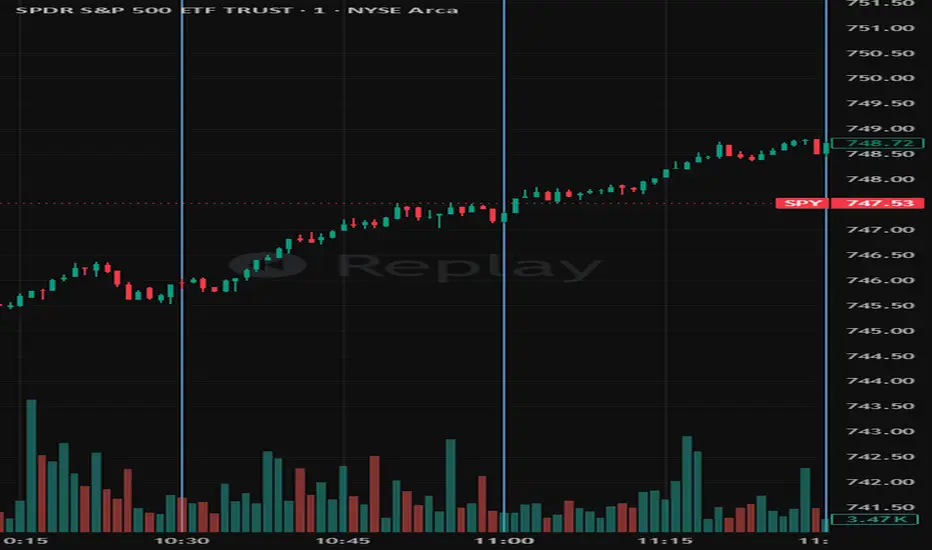
Here's a clean, publish-ready description:
Daily Vertical Lines (ET) — Session Time Markers
Mark key intraday times directly on your chart with up to 10 fully configurable vertical lines, all anchored to Eastern Time (America/New_York) with automatic DST handling.
Purpose
Designed for traders who work off fixed intraday time levels — open auctions, macro releases, session midpoints, settlement windows, or any recurring time-based setup. Each line fires once per trading day at its configured ET time and is automatically cleared and redrawn fresh every day at 4:00 AM ET.
Features
10 independent vertical lines, each fully configurable
Per-line controls: enable/disable line, enable/disable label, time (hour + minute in ET), color, label text, line style (Solid / Dashed / Dotted), and line width
Lines and labels are independently toggleable — run clean lines with no text, or labels only, or both
Full-height vertical lines that extend across the entire chart regardless of price scale or zoom level
Automatic daily reset at 4:00 AM ET — previous day's objects are deleted and a fresh set is drawn for the current day
Duplicate prevention — each line can only fire once per day regardless of bar replays or real-time ticks
DST-aware via Pine's native America/New_York timezone — no manual offset adjustments needed
Default Times
9:50 · 10:00 · 10:30 · 11:00 · 12:00 · 12:30 · 1:00 · 1:30 · 2:00 · 3:48
Compatibility
Works on any intraday timeframe. For best results use a resolution fine enough that each configured time has a matching candle (e.g. a 1-minute or 5-minute chart). Not designed for daily or higher timeframes.
Notes
All times are Eastern Time. The script handles EST/EDT transitions automatically.
The 4:00 AM reset means lines from a prior session are always removed before the pre-market open.
Label text is fully editable — rename any line to match your own session labels, news events, or strategy terminology.
Daily Vertical Lines (ET) — Session Time Markers
Mark key intraday times directly on your chart with up to 10 fully configurable vertical lines, all anchored to Eastern Time (America/New_York) with automatic DST handling.
Purpose
Designed for traders who work off fixed intraday time levels — open auctions, macro releases, session midpoints, settlement windows, or any recurring time-based setup. Each line fires once per trading day at its configured ET time and is automatically cleared and redrawn fresh every day at 4:00 AM ET.
Features
10 independent vertical lines, each fully configurable
Per-line controls: enable/disable line, enable/disable label, time (hour + minute in ET), color, label text, line style (Solid / Dashed / Dotted), and line width
Lines and labels are independently toggleable — run clean lines with no text, or labels only, or both
Full-height vertical lines that extend across the entire chart regardless of price scale or zoom level
Automatic daily reset at 4:00 AM ET — previous day's objects are deleted and a fresh set is drawn for the current day
Duplicate prevention — each line can only fire once per day regardless of bar replays or real-time ticks
DST-aware via Pine's native America/New_York timezone — no manual offset adjustments needed
Default Times
9:50 · 10:00 · 10:30 · 11:00 · 12:00 · 12:30 · 1:00 · 1:30 · 2:00 · 3:48
Compatibility
Works on any intraday timeframe. For best results use a resolution fine enough that each configured time has a matching candle (e.g. a 1-minute or 5-minute chart). Not designed for daily or higher timeframes.
Notes
All times are Eastern Time. The script handles EST/EDT transitions automatically.
The 4:00 AM reset means lines from a prior session are always removed before the pre-market open.
Label text is fully editable — rename any line to match your own session labels, news events, or strategy terminology.
版本注释
Single build block replaces per-bar checks版本注释
Daily Vertical Lines (ET) — Session Time MarkersMark key intraday times directly on your chart with up to 10 fully configurable vertical lines, all anchored to Eastern Time (America/New_York) with automatic DST handling.
Purpose
Designed for traders who work off fixed intraday time levels — open auctions, macro releases, session midpoints, settlement windows, or any recurring time-based setup. Each line fires once per trading day at its configured ET time and is automatically cleared and redrawn fresh every day at 4:00 AM ET.
Features
10 independent vertical lines, each fully configurable
Per-line controls: enable/disable line, enable/disable label, time (hour + minute in ET), color, label text, line style (Solid / Dashed / Dotted), and line width
Lines and labels are independently toggleable — run clean lines with no text, or labels only, or both
Full-height vertical lines that extend across the entire chart regardless of price scale or zoom level
Automatic daily reset at 4:00 AM ET — previous day's objects are deleted and a fresh set is drawn for the current day
Duplicate prevention — each line can only fire once per day regardless of bar replays or real-time ticks
DST-aware via Pine's native America/New_York timezone — no manual offset adjustments needed
Default Times
9:50 · 10:00 · 10:30 · 11:00 · 12:00 · 12:30 · 1:00 · 1:30 · 2:00 · 3:48
Compatibility
Works on any intraday timeframe. For best results use a resolution fine enough that each configured time has a matching candle (e.g. a 1-minute or 5-minute chart). Not designed for daily or higher timeframes.
Notes
All times are Eastern Time. The script handles EST/EDT transitions automatically.
The 4:00 AM reset means lines from a prior session are always removed before the pre-market open.
Label text is fully editable — rename any line to match your own session labels, news events, or strategy terminology.
开源脚本
秉承TradingView的精神,该脚本的作者将其开源,以便交易者可以查看和验证其功能。向作者致敬!您可以免费使用该脚本,但请记住,重新发布代码须遵守我们的网站规则。

免责声明
这些信息和出版物并非旨在提供,也不构成TradingView提供或认可的任何形式的财务、投资、交易或其他类型的建议或推荐。请阅读使用条款了解更多信息。
免责声明
这些信息和出版物并非旨在提供,也不构成TradingView提供或认可的任何形式的财务、投资、交易或其他类型的建议或推荐。请阅读使用条款了解更多信息。