OPEN-SOURCE SCRIPT
Trading Checklist with Score
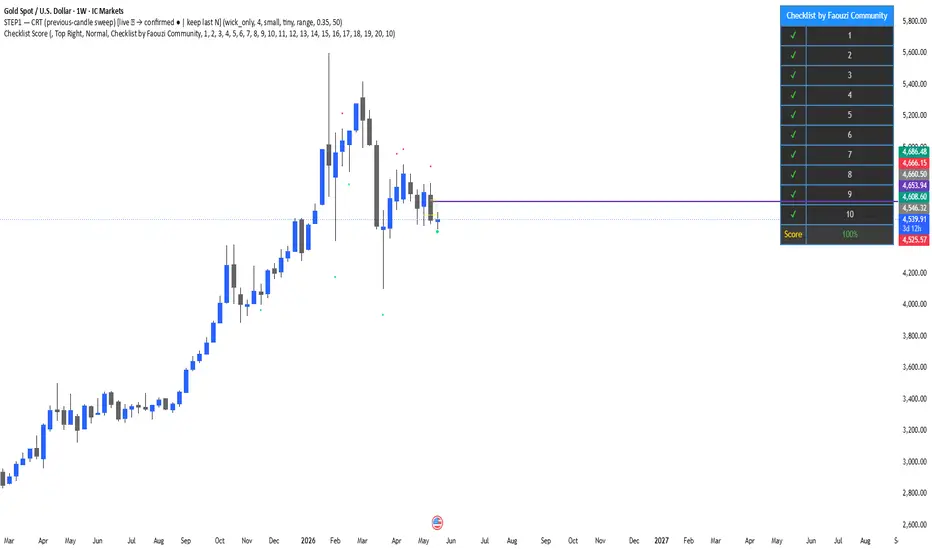
This indicator displays a customizable trading checklist directly on the chart.
It is designed to help discretionary traders organize their trade validation process before entering a position. The script does not generate buy or sell signals, does not automate trading decisions, and does not make any performance claims.
Main features:
• Up to 20 checklist rows
• 10 rows displayed by default
• Adjustable number of visible rows from 1 to 20
• Optional trade score based only on the visible checklist rows
• Custom text for each checklist item
• Custom table position, colors, text size, and header
• Optional symbol pinning, so the checklist can be linked to one chart symbol
How to use:
1. Add the indicator to the chart.
2. Open the indicator settings.
3. Edit each checklist row with your own trading criteria.
4. Select the number of visible rows.
5. Check or uncheck each row depending on your trade plan.
6. Use the score as an organizational aid, not as a trading signal.
This script is intended for education, journaling, and discretionary trade preparation. It does not predict market direction and should not be used as a standalone trading system.
Credits:
This version was customized and published by Faouzi Community. If this script is based on or inspired by another open-source checklist script, credit to the original author must be preserved according to TradingView’s open-source reuse rules.
It is designed to help discretionary traders organize their trade validation process before entering a position. The script does not generate buy or sell signals, does not automate trading decisions, and does not make any performance claims.
Main features:
• Up to 20 checklist rows
• 10 rows displayed by default
• Adjustable number of visible rows from 1 to 20
• Optional trade score based only on the visible checklist rows
• Custom text for each checklist item
• Custom table position, colors, text size, and header
• Optional symbol pinning, so the checklist can be linked to one chart symbol
How to use:
1. Add the indicator to the chart.
2. Open the indicator settings.
3. Edit each checklist row with your own trading criteria.
4. Select the number of visible rows.
5. Check or uncheck each row depending on your trade plan.
6. Use the score as an organizational aid, not as a trading signal.
This script is intended for education, journaling, and discretionary trade preparation. It does not predict market direction and should not be used as a standalone trading system.
Credits:
This version was customized and published by Faouzi Community. If this script is based on or inspired by another open-source checklist script, credit to the original author must be preserved according to TradingView’s open-source reuse rules.
开源脚本
秉承TradingView的精神,该脚本的作者将其开源,以便交易者可以查看和验证其功能。向作者致敬!您可以免费使用该脚本,但请记住,重新发布代码须遵守我们的网站规则。

免责声明
这些信息和出版物并非旨在提供,也不构成TradingView提供或认可的任何形式的财务、投资、交易或其他类型的建议或推荐。请阅读使用条款了解更多信息。
开源脚本
秉承TradingView的精神,该脚本的作者将其开源,以便交易者可以查看和验证其功能。向作者致敬!您可以免费使用该脚本,但请记住,重新发布代码须遵守我们的网站规则。
免责声明
这些信息和出版物并非旨在提供,也不构成TradingView提供或认可的任何形式的财务、投资、交易或其他类型的建议或推荐。请阅读使用条款了解更多信息。