Scaled position calculator
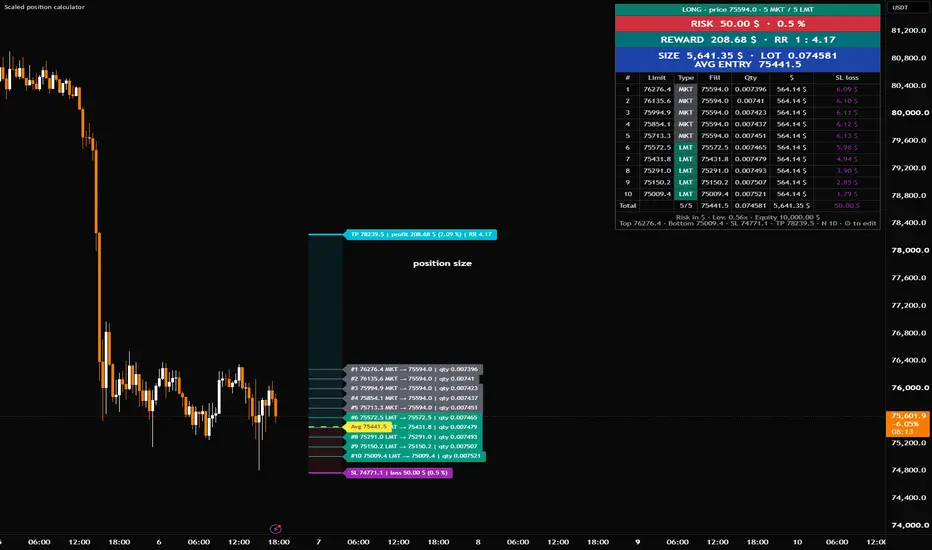
Plan a position that you enter with several limit orders instead of one. Draw your entry zone, stop loss and take profit on the chart. The script shows how much you risk, how much you can make and how big your position should be.
It works like TradingView's Long/Short Position tool, but for split entries.
WHY USE IT
Say you want to buy with 10 orders between two prices, and the price is already inside that zone. The orders above the current price don't wait: they fill right away at the current price. Most calculators miss this, so they show the wrong average entry and the wrong loss at your stop. This script takes it into account, so you see the real numbers.
HOW TO USE
1. Add the script to the chart. TradingView asks you to click 4 times: top of your entry zone, bottom of your entry zone, stop loss and take profit.
2. You can drag these 4 lines on the chart at any time. The numbers update when you let go.
3. Long or short is detected for you: a stop below the zone means long, and a stop above the zone means short.
4. Open the settings and choose how many orders you want.
5. Choose how to size the position (tick only one):
• Total size ($): you choose how much money goes into the trade.
• Risk (% of equity): you choose how much of your account you are willing to lose, for example 1%.
• Risk ($): you choose how many dollars you are willing to lose, for example $50.
With the two risk options, the script works out the position size for you.
6. Enter your account size, so the risk can also be shown as a % of your account.
WHAT YOU SEE
• One line for each order. MKT means it fills now at the current price, and LMT means it waits for the price.
• A red zone for the risk and a blue zone for the reward, like in the Long/Short tool.
• A stop loss line with what you lose, a take profit line with what you gain, and a dashed line at your average entry price.
• A table with the important numbers at the top: risk, reward, risk/reward, position size and average entry. Below them is the detail for each order.
You can change the colours, line sizes, text size and table position in the settings. If you don't use a take profit, untick "Use take profit".
GOOD TO KNOW
• The reward assumes all your orders get filled.
• Fees and slippage are not included.
• This is a planning tool, not financial advice.
It works like TradingView's Long/Short Position tool, but for split entries.
WHY USE IT
Say you want to buy with 10 orders between two prices, and the price is already inside that zone. The orders above the current price don't wait: they fill right away at the current price. Most calculators miss this, so they show the wrong average entry and the wrong loss at your stop. This script takes it into account, so you see the real numbers.
HOW TO USE
1. Add the script to the chart. TradingView asks you to click 4 times: top of your entry zone, bottom of your entry zone, stop loss and take profit.
2. You can drag these 4 lines on the chart at any time. The numbers update when you let go.
3. Long or short is detected for you: a stop below the zone means long, and a stop above the zone means short.
4. Open the settings and choose how many orders you want.
5. Choose how to size the position (tick only one):
• Total size ($): you choose how much money goes into the trade.
• Risk (% of equity): you choose how much of your account you are willing to lose, for example 1%.
• Risk ($): you choose how many dollars you are willing to lose, for example $50.
With the two risk options, the script works out the position size for you.
6. Enter your account size, so the risk can also be shown as a % of your account.
WHAT YOU SEE
• One line for each order. MKT means it fills now at the current price, and LMT means it waits for the price.
• A red zone for the risk and a blue zone for the reward, like in the Long/Short tool.
• A stop loss line with what you lose, a take profit line with what you gain, and a dashed line at your average entry price.
• A table with the important numbers at the top: risk, reward, risk/reward, position size and average entry. Below them is the detail for each order.
You can change the colours, line sizes, text size and table position in the settings. If you don't use a take profit, untick "Use take profit".
GOOD TO KNOW
• The reward assumes all your orders get filled.
• Fees and slippage are not included.
• This is a planning tool, not financial advice.

免责声明
这些信息和出版物并非旨在提供,也不构成TradingView提供或认可的任何形式的财务、投资、交易或其他类型的建议或推荐。请阅读使用条款了解更多信息。