OPEN-SOURCE SCRIPT
已更新 Session KillZones [7Bridges]
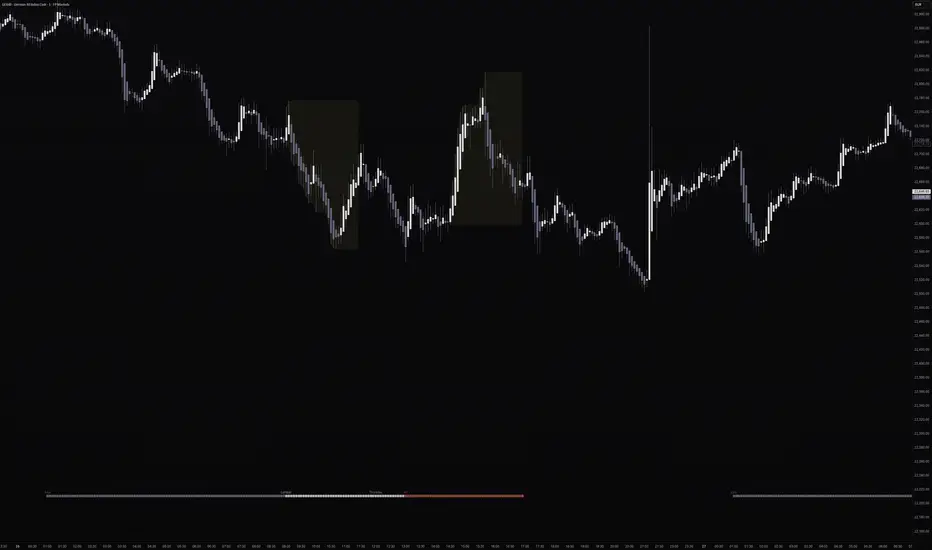
Session Killzones by 7Bridges indicator display the killzones of asian, LND and NY sessions. There is also a custom session of your choice.
The times of each killzone are GMT time and you can adjust it in the settings.
You have also the beginning of the day, GMT and EST timezones.
By default the killzones are set like that on the GMT/UTC timezone :
-> Asia : 00:00 - 06:00
-> Pre London : 06:00 - 07:00
-> London : 07:00 - 10:00
-> New York : 12:00 - 15:00
-> Custom session : choose your own time
What makes the indicator very different is that the session is not overlapping the price but you have bars below and above the price.
Settings:
-> you can chose to display the Killzones (Asia, pre LND, LND and NY)
-> you can manages the time of the sessions
-> you can chose to display the start of the day (GMT/UTC and EST )
The indicator is displayed by default only for all the timeframes below 60min.
The times of each killzone are GMT time and you can adjust it in the settings.
You have also the beginning of the day, GMT and EST timezones.
By default the killzones are set like that on the GMT/UTC timezone :
-> Asia : 00:00 - 06:00
-> Pre London : 06:00 - 07:00
-> London : 07:00 - 10:00
-> New York : 12:00 - 15:00
-> Custom session : choose your own time
What makes the indicator very different is that the session is not overlapping the price but you have bars below and above the price.
Settings:
-> you can chose to display the Killzones (Asia, pre LND, LND and NY)
-> you can manages the time of the sessions
-> you can chose to display the start of the day (GMT/UTC and EST )
The indicator is displayed by default only for all the timeframes below 60min.
版本注释
Code cleaning版本注释
Major update :- Possibility to choose the colors, shape and position of the Killzones Session
- Customisable 2 sessions (to monitor your own trading session)
- The 2 sessions are displayed by shapes at the top or bottom (and by a rectangle on the price for the EOD markup)
版本注释
Session KillZones [7Bridges] is a TradingView indicator that visually maps the major trading sessions and kill zones directly on your chart.At the bottom of the chart, a color-coded strip shows you at a glance which session is currently active — Asia, Pre-London, London Kill Zone, or New York Kill Zone — with the session name displayed at the open. The full day of the week is also shown in the strip at a configurable time, so you always know where you are in the trading week without needing a separate indicator.
Two fully customizable personal sessions (My Session 1 & 2) can be configured to match your own trading hours. When enabled, they display both a strip marker and a live price range box that expands in real time with the session high and low, then freezes at the close — giving you a clear visual reference of the range built during your session.
All sessions are timezone-aware with automatic DST handling, and every setting includes a tooltip explaining what it does.
UPDATES
Timezone & DST support
Each session now has its own timezone selector (9 options including Exchange). Named timezones like Europe/London and America/New_York handle Daylight Saving Time automatically — no manual adjustment needed when clocks change.
Smarter session defaults
Asia: 09:00–17:00 Tokyo time
Pre-London: 07:00–08:00 London time (off by default)
London KZ: 08:00–12:00 London time
NY KZ: 08:00–12:00 New York time
Live price range boxes (My Session 1 & 2)
The session boxes now follow price in real time — they expand with each new high/low during the session and freeze cleanly when it closes. Fill only, no border. Both default to #fff176 at 5% opacity. My Session 1 defaults to 08:00–10:30 London, My Session 2 to 09:30–12:00 New York.
Day of week label
The full day name (Monday, Tuesday…) now appears directly in the bottom strip on every historical bar. Display time is configurable (default 06:00 GMT) to avoid overlapping with session labels.
Cleaner settings panel
All inputs have clear, descriptive labels and tooltip icons explaining exactly what each setting does. The panel is logically ordered: main sessions → custom sessions → Day of Week → Day Start markers at the very bottom.
版本注释
Release Note:Update default values
开源脚本
秉承TradingView的精神,该脚本的作者将其开源,以便交易者可以查看和验证其功能。向作者致敬!您可以免费使用该脚本,但请记住,重新发布代码须遵守我们的网站规则。

免责声明
这些信息和出版物并非旨在提供,也不构成TradingView提供或认可的任何形式的财务、投资、交易或其他类型的建议或推荐。请阅读使用条款了解更多信息。
免责声明
这些信息和出版物并非旨在提供,也不构成TradingView提供或认可的任何形式的财务、投资、交易或其他类型的建议或推荐。请阅读使用条款了解更多信息。