OPEN-SOURCE SCRIPT
Highest Volume Candle @MaxMaserati
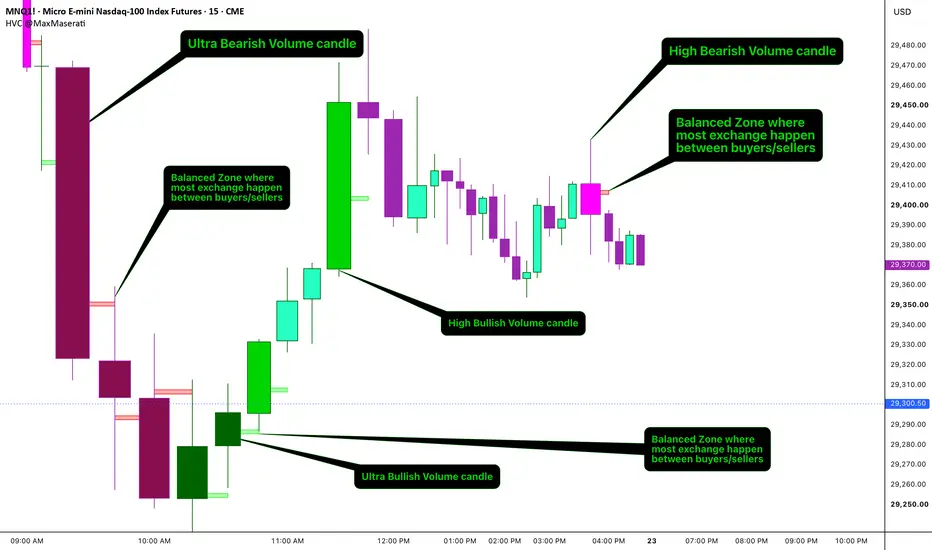
Highest Volume Candle
Colors candlesticks whenever relative volume spikes against a rolling
average, then draws a footprint-derived Point of Control box on those
bars to show exactly where within the range volume concentrated. An
optional filter requires price to close beyond the footprint's POC and
Value Area before a candle is flagged, and a sequential signal mode
marks only the first valid volume spike after a trend flip.
─── WHY THESE COMPONENTS TOGETHER ───
Relative volume alone tells you a bar was busy, not where inside that
bar's range trading actually clustered. Footprint POC/VAH/VAL data
alone shows where volume concentrated on every bar, but doesn't tell
you which bars are volume-significant enough to matter. Combining the
two means the POC box only appears on candles that already cleared a
volume threshold — the output is a shortlist of statistically
significant bars with their internal volume structure visible, rather
than either a wall of footprint boxes or an undifferentiated string of
colored candles.

─── VOLUME INTENSITY COLORING ───
rVol = volume / SMA(volume, length). A bullish candle (close >= open)
is colored Ultra when rVol >= ultraThresh, or High when rVol >=
highThresh and below the Ultra threshold. The same logic applies to
bearish candles with separate colors. Both thresholds and the lookback
length are user-adjustable.
─── POC BOX ───
On any valid High/Ultra candle, the script pulls the bar's footprint
POC upper/lower bounds, finds the midpoint, and plots a box double the
height of the raw POC range, centered on that midpoint. This gives a
readable visual anchor for where the heaviest trading sat inside a
volume-significant bar.
─── POC AND VALUE AREA FILTER ───
Optional. When enabled, a bullish Ultra/High candle must close above
both the POC midpoint and the VAH; a bearish candle must close below
both the POC midpoint and the VAL. This narrows signals to volume
spikes that also broke through the bar's own value structure.
─── SEQUENTIAL SIGNAL MARKERS ───
When Sequential Stars is on, a triangle only plots on the first valid
bullish signal following a bearish one (or vice versa), suppressing
repeated signals within the same directional run.
─── HOW TO USE ───
1. Watch for a candle to print in one of the four intensity colors —
this marks a statistically significant relative-volume bar.
2. Check the POC box on that candle to see where volume clustered
within the range, not just that volume was high.
3. If the POC/VA filter is enabled, treat a colored candle as
confirmation only when it also closed beyond the POC and VAH/VAL —
this is the stronger signal.
4. Use the triangle markers under Sequential Stars mode to catch the
first spike after a directional flip, rather than reacting to every
qualifying bar in a run.
5. Footprint data requires a Premium or Ultimate TradingView plan;
works on any instrument and timeframe with footprint support, though
it is most legible on intraday charts.
─── SETTINGS ───
Display Toggles — turn Ultra/High colors, the POC box, and the
POC/VA close filter on or off.
Signal Settings — enable markers, restrict to sequential (flip-only)
signals, set marker size.
Volume Thresholds — SMA lookback length and the High/Ultra relative
volume multipliers.
Footprint Settings — ticks per footprint row, Value Area percentage,
and how many bars back to compute footprint data for.
Candle Colors — colors for Ultra/High bullish and bearish candles.
POC Box Colors — fill and border colors for bullish and bearish POC
boxes.
─── NOTES ───
All footprint calculations run only on confirmed bars (barstate.isconfirmed)
and are gated by the Max Bars for Footprint setting; no repainting of
historical bars occurs once a bar closes. Footprint data requires a
Premium or Ultimate TradingView subscription. Built primarily for
intraday use on liquid futures and equity index symbols.
Colors candlesticks whenever relative volume spikes against a rolling
average, then draws a footprint-derived Point of Control box on those
bars to show exactly where within the range volume concentrated. An
optional filter requires price to close beyond the footprint's POC and
Value Area before a candle is flagged, and a sequential signal mode
marks only the first valid volume spike after a trend flip.
─── WHY THESE COMPONENTS TOGETHER ───
Relative volume alone tells you a bar was busy, not where inside that
bar's range trading actually clustered. Footprint POC/VAH/VAL data
alone shows where volume concentrated on every bar, but doesn't tell
you which bars are volume-significant enough to matter. Combining the
two means the POC box only appears on candles that already cleared a
volume threshold — the output is a shortlist of statistically
significant bars with their internal volume structure visible, rather
than either a wall of footprint boxes or an undifferentiated string of
colored candles.
─── VOLUME INTENSITY COLORING ───
rVol = volume / SMA(volume, length). A bullish candle (close >= open)
is colored Ultra when rVol >= ultraThresh, or High when rVol >=
highThresh and below the Ultra threshold. The same logic applies to
bearish candles with separate colors. Both thresholds and the lookback
length are user-adjustable.
─── POC BOX ───
On any valid High/Ultra candle, the script pulls the bar's footprint
POC upper/lower bounds, finds the midpoint, and plots a box double the
height of the raw POC range, centered on that midpoint. This gives a
readable visual anchor for where the heaviest trading sat inside a
volume-significant bar.
─── POC AND VALUE AREA FILTER ───
Optional. When enabled, a bullish Ultra/High candle must close above
both the POC midpoint and the VAH; a bearish candle must close below
both the POC midpoint and the VAL. This narrows signals to volume
spikes that also broke through the bar's own value structure.
─── SEQUENTIAL SIGNAL MARKERS ───
When Sequential Stars is on, a triangle only plots on the first valid
bullish signal following a bearish one (or vice versa), suppressing
repeated signals within the same directional run.
─── HOW TO USE ───
1. Watch for a candle to print in one of the four intensity colors —
this marks a statistically significant relative-volume bar.
2. Check the POC box on that candle to see where volume clustered
within the range, not just that volume was high.
3. If the POC/VA filter is enabled, treat a colored candle as
confirmation only when it also closed beyond the POC and VAH/VAL —
this is the stronger signal.
4. Use the triangle markers under Sequential Stars mode to catch the
first spike after a directional flip, rather than reacting to every
qualifying bar in a run.
5. Footprint data requires a Premium or Ultimate TradingView plan;
works on any instrument and timeframe with footprint support, though
it is most legible on intraday charts.
─── SETTINGS ───
Display Toggles — turn Ultra/High colors, the POC box, and the
POC/VA close filter on or off.
Signal Settings — enable markers, restrict to sequential (flip-only)
signals, set marker size.
Volume Thresholds — SMA lookback length and the High/Ultra relative
volume multipliers.
Footprint Settings — ticks per footprint row, Value Area percentage,
and how many bars back to compute footprint data for.
Candle Colors — colors for Ultra/High bullish and bearish candles.
POC Box Colors — fill and border colors for bullish and bearish POC
boxes.
─── NOTES ───
All footprint calculations run only on confirmed bars (barstate.isconfirmed)
and are gated by the Max Bars for Footprint setting; no repainting of
historical bars occurs once a bar closes. Footprint data requires a
Premium or Ultimate TradingView subscription. Built primarily for
intraday use on liquid futures and equity index symbols.
开源脚本
秉承TradingView的精神,该脚本的作者将其开源,以便交易者可以查看和验证其功能。向作者致敬!您可以免费使用该脚本,但请记住,重新发布代码须遵守我们的网站规则。

MMM : No body close (PO4), No Trade.
maxmaserati.com/
maxmaserati.com/
免责声明
这些信息和出版物并非旨在提供,也不构成TradingView提供或认可的任何形式的财务、投资、交易或其他类型的建议或推荐。请阅读使用条款了解更多信息。
开源脚本
秉承TradingView的精神,该脚本的作者将其开源,以便交易者可以查看和验证其功能。向作者致敬!您可以免费使用该脚本,但请记住,重新发布代码须遵守我们的网站规则。
MMM : No body close (PO4), No Trade.
maxmaserati.com/
maxmaserati.com/
免责声明
这些信息和出版物并非旨在提供,也不构成TradingView提供或认可的任何形式的财务、投资、交易或其他类型的建议或推荐。请阅读使用条款了解更多信息。