OPEN-SOURCE SCRIPT
RSI Suite (Foundation)
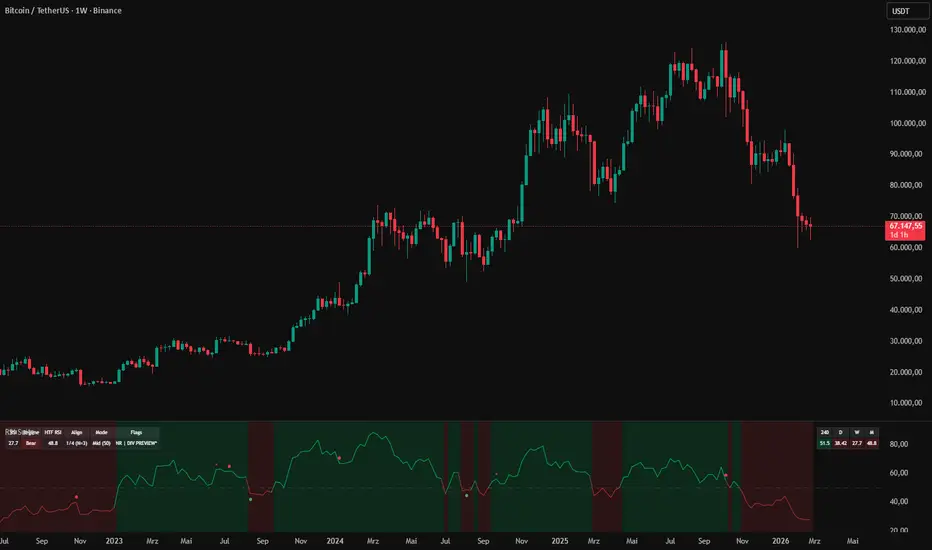
**RSI Suite (Foundation)**
RSI Suite (Foundation) is a RSI-based context toolkit. It combines a clean RSI pane with **regime detection**, optional **CTF/HTF regime background**, **MTF RSI alignment**, **pivot-based divergence (preview + confirmed)**, and optional **RSI signal engines** (mid-cross, pivot break, pivot trendline break).
The focus is on **structured market context, confluence, and decision support** — **not** on a “magic signal” system.
## Concept
Many traders use RSI as more than an overbought/oversold oscillator.
When used with clear thresholds, multi-timeframe context, and pivot structure, RSI becomes a compact framework for:
- Reading **bull/bear/neutral regimes**
- Spotting **momentum shifts** and **structure breaks** inside the oscillator
- Identifying **divergence setups** with confirmation logic
- Checking **alignment across timeframes** before acting
This script is designed to keep the RSI pane **clean** while adding **advanced context layers** you can enable only when needed.
## Core Modules
### 1) RSI Regime Engine (Bull / Bear / Neutral)
A configurable regime model that classifies RSI behavior into structured states.
**Regime modes:**
- **Mid (50)** → bullish above mid, bearish below
- **Range (40/60)** → neutral zone between 40–60
- **Trend (20/80)** → wide thresholds for strong momentum phases
- **Custom (low/high)** → user-defined thresholds
**Optional visualization:**
- **RSI plot color** changes by regime
- **Background regime shading** in the RSI pane (**CTF** or **HTF**)
### 2) Confirmed Values Mode (Non-Repainting)
A dedicated mode for users who want stable, confirmed values.
- **ON (recommended)** → uses confirmed bar values only (no intrabar updates)
- Helps avoid “visual repaint” effects while candles are still open
- HTF values still update on HTF candle close by design
### 3) RSI Divergence Suite (Pivot-Based)
A structured divergence engine based on pivots.
**Supported divergence types:**
- **Classic** (trend exhaustion style)
- **Hidden** (trend continuation style)
- **Both**
**Two detection layers:**
- **Preview** → early candidates (can invalidate)
- **Confirmed** → only after pivot confirmation (right-bars)
**Quality filters included:**
- Min/Max bars between pivots (distance constraints)
- Cooldown bars (reduces repetitive signals)
- Minimum RSI delta (filters micro-divergences)
- Minimum price delta % (filters tiny price differences)
- Context filters (mid/OB/OS/range regime gating)
- Selectable price source (High/Low, Close, HLC3)
### 4) MTF RSI Context Table + Alignment Score
A compact multi-timeframe table shows RSI values across up to 4 user-defined timeframes.
- Cell background reflects regime state per timeframe
- Alignment score counts how many TFs are in bullish regime (optionally includes CTF)
- Designed for **confluence checking** before acting on triggers
**Optional alerts:**
- **MTF Alignment Cross Up >= N**
- **MTF Alignment Cross Down < N**
(These alerts trigger on threshold **crosses**, not on persistent state.)
### 5) Status Header (Decision Navigator)
A compact header table to read the indicator state at a glance:
- Current RSI value
- Current regime (Bull/Bear/Neutral)
- Optional HTF RSI
- Alignment score + effective threshold N
- Mode flags (NR/RT, divergence preview status)
### 6) Optional RSI Signal Engines
If you want visual triggers in addition to context, you can enable one signal engine:
- **RSI Mid Cross** → clean regime/momentum flips around mid
- **RSI Pivot Break** → break of confirmed RSI pivot levels
- **RSI Pivot Trendline Break** → pivot-based RSI trendlines + break detection
**Additional controls:**
- Once-per-pivot firing (reduces duplicates)
- **Contrarian Regime Filter (MR)** → mean-reversion context filter:
- Longs only in Bear/Neutral
- Shorts only in Bull/Neutral
## How To Use (Ambitious Beginners)
### A) Start with Regime + Mid
- Use **Mid (50)** regime for a simple bullish/bearish read
- Watch how RSI behaves around mid during trends vs ranges
- Enable CTF background if you want quick visual guidance
### B) Learn with Confirmed Mode (NR)
- Enable **Confirmed Values** for stable readings
- This helps avoid confusing intrabar moves while learning
### C) Add MTF Table for Context
- Choose a logical TF progression (example: 4H / D / W / M)
- Use alignment score as a “do I have support?” check
- Avoid trading purely against higher timeframe alignment early on
### D) Use Divergence as a Setup, not an Entry
- Preview divergence = early hint (can vanish)
- Confirmed divergence = better quality
- Wait for your own trigger (price action / level / structure) before acting
**Beginner workflow suggestion:**
Regime + Confirmed Mode + MTF Table → only then add divergence/signal engine.
## How To Use (Advanced Traders)
### 1) Regime + MTF Alignment as a Bias Framework
- Use regime mode that matches market behavior:
- **Range (40/60)** for mean-reversion environments
- **Trend (20/80)** for strong directional phases
- Use alignment score to define “permission” for trades
- Track transitions: alignment improvement often matters more than absolute RSI
### 2) Divergence Quality Filtering
- Tighten filters (min deltas, distance constraints) for higher signal quality
- Use context filter:
- Bull only in OS or below mid
- Bear only in OB or above mid
- By Range Regime for mean-reversion systems
- Use confirmed divergence as **setup** + trigger via RSI pivot/TL breaks or price structure
### 3) Oscillator Structure Trading (Pivot Break / TL Break)
- Pivot break = momentum structure shift inside RSI
- Trendline break = early regime/momentum transition tool
- Once-per-pivot firing reduces noise in choppy conditions
### 4) Clean Monitoring Setup
- Status header on small size for continuous monitoring
- MTF table tiny/small for quick alignment scanning
- NR mode for stable alerting and post-close evaluation
## Alerts Included
- RSI mid cross up/down
- Bull/Bear divergence (classic/hidden/any) — confirmed
- Bull/Bear divergence — preview (optional)
- Signal long/short (from selected signal engine)
- Regime change (CTF and HTF)
- MTF alignment threshold cross up/down
## Notes / Important
- This indicator is a **context and analysis tool** — not a complete trading system.
- Divergence can fail, especially in strong trends. Treat it as a setup and use confirmation.
- RSI behavior varies by market and timeframe; use regime modes and filters to match the instrument.
- Always apply sound risk management. No indicator can replace execution discipline.
## Best Suited For
- Ambitious beginners who want structured RSI-based chart reading
- Discretionary traders who value context before entry
- Traders who combine oscillator structure + divergence + MTF confluence
- Users who prefer a clean RSI pane with optional advanced modules
RSI Suite (Foundation) is a RSI-based context toolkit. It combines a clean RSI pane with **regime detection**, optional **CTF/HTF regime background**, **MTF RSI alignment**, **pivot-based divergence (preview + confirmed)**, and optional **RSI signal engines** (mid-cross, pivot break, pivot trendline break).
The focus is on **structured market context, confluence, and decision support** — **not** on a “magic signal” system.
## Concept
Many traders use RSI as more than an overbought/oversold oscillator.
When used with clear thresholds, multi-timeframe context, and pivot structure, RSI becomes a compact framework for:
- Reading **bull/bear/neutral regimes**
- Spotting **momentum shifts** and **structure breaks** inside the oscillator
- Identifying **divergence setups** with confirmation logic
- Checking **alignment across timeframes** before acting
This script is designed to keep the RSI pane **clean** while adding **advanced context layers** you can enable only when needed.
## Core Modules
### 1) RSI Regime Engine (Bull / Bear / Neutral)
A configurable regime model that classifies RSI behavior into structured states.
**Regime modes:**
- **Mid (50)** → bullish above mid, bearish below
- **Range (40/60)** → neutral zone between 40–60
- **Trend (20/80)** → wide thresholds for strong momentum phases
- **Custom (low/high)** → user-defined thresholds
**Optional visualization:**
- **RSI plot color** changes by regime
- **Background regime shading** in the RSI pane (**CTF** or **HTF**)
### 2) Confirmed Values Mode (Non-Repainting)
A dedicated mode for users who want stable, confirmed values.
- **ON (recommended)** → uses confirmed bar values only (no intrabar updates)
- Helps avoid “visual repaint” effects while candles are still open
- HTF values still update on HTF candle close by design
### 3) RSI Divergence Suite (Pivot-Based)
A structured divergence engine based on pivots.
**Supported divergence types:**
- **Classic** (trend exhaustion style)
- **Hidden** (trend continuation style)
- **Both**
**Two detection layers:**
- **Preview** → early candidates (can invalidate)
- **Confirmed** → only after pivot confirmation (right-bars)
**Quality filters included:**
- Min/Max bars between pivots (distance constraints)
- Cooldown bars (reduces repetitive signals)
- Minimum RSI delta (filters micro-divergences)
- Minimum price delta % (filters tiny price differences)
- Context filters (mid/OB/OS/range regime gating)
- Selectable price source (High/Low, Close, HLC3)
### 4) MTF RSI Context Table + Alignment Score
A compact multi-timeframe table shows RSI values across up to 4 user-defined timeframes.
- Cell background reflects regime state per timeframe
- Alignment score counts how many TFs are in bullish regime (optionally includes CTF)
- Designed for **confluence checking** before acting on triggers
**Optional alerts:**
- **MTF Alignment Cross Up >= N**
- **MTF Alignment Cross Down < N**
(These alerts trigger on threshold **crosses**, not on persistent state.)
### 5) Status Header (Decision Navigator)
A compact header table to read the indicator state at a glance:
- Current RSI value
- Current regime (Bull/Bear/Neutral)
- Optional HTF RSI
- Alignment score + effective threshold N
- Mode flags (NR/RT, divergence preview status)
### 6) Optional RSI Signal Engines
If you want visual triggers in addition to context, you can enable one signal engine:
- **RSI Mid Cross** → clean regime/momentum flips around mid
- **RSI Pivot Break** → break of confirmed RSI pivot levels
- **RSI Pivot Trendline Break** → pivot-based RSI trendlines + break detection
**Additional controls:**
- Once-per-pivot firing (reduces duplicates)
- **Contrarian Regime Filter (MR)** → mean-reversion context filter:
- Longs only in Bear/Neutral
- Shorts only in Bull/Neutral
## How To Use (Ambitious Beginners)
### A) Start with Regime + Mid
- Use **Mid (50)** regime for a simple bullish/bearish read
- Watch how RSI behaves around mid during trends vs ranges
- Enable CTF background if you want quick visual guidance
### B) Learn with Confirmed Mode (NR)
- Enable **Confirmed Values** for stable readings
- This helps avoid confusing intrabar moves while learning
### C) Add MTF Table for Context
- Choose a logical TF progression (example: 4H / D / W / M)
- Use alignment score as a “do I have support?” check
- Avoid trading purely against higher timeframe alignment early on
### D) Use Divergence as a Setup, not an Entry
- Preview divergence = early hint (can vanish)
- Confirmed divergence = better quality
- Wait for your own trigger (price action / level / structure) before acting
**Beginner workflow suggestion:**
Regime + Confirmed Mode + MTF Table → only then add divergence/signal engine.
## How To Use (Advanced Traders)
### 1) Regime + MTF Alignment as a Bias Framework
- Use regime mode that matches market behavior:
- **Range (40/60)** for mean-reversion environments
- **Trend (20/80)** for strong directional phases
- Use alignment score to define “permission” for trades
- Track transitions: alignment improvement often matters more than absolute RSI
### 2) Divergence Quality Filtering
- Tighten filters (min deltas, distance constraints) for higher signal quality
- Use context filter:
- Bull only in OS or below mid
- Bear only in OB or above mid
- By Range Regime for mean-reversion systems
- Use confirmed divergence as **setup** + trigger via RSI pivot/TL breaks or price structure
### 3) Oscillator Structure Trading (Pivot Break / TL Break)
- Pivot break = momentum structure shift inside RSI
- Trendline break = early regime/momentum transition tool
- Once-per-pivot firing reduces noise in choppy conditions
### 4) Clean Monitoring Setup
- Status header on small size for continuous monitoring
- MTF table tiny/small for quick alignment scanning
- NR mode for stable alerting and post-close evaluation
## Alerts Included
- RSI mid cross up/down
- Bull/Bear divergence (classic/hidden/any) — confirmed
- Bull/Bear divergence — preview (optional)
- Signal long/short (from selected signal engine)
- Regime change (CTF and HTF)
- MTF alignment threshold cross up/down
## Notes / Important
- This indicator is a **context and analysis tool** — not a complete trading system.
- Divergence can fail, especially in strong trends. Treat it as a setup and use confirmation.
- RSI behavior varies by market and timeframe; use regime modes and filters to match the instrument.
- Always apply sound risk management. No indicator can replace execution discipline.
## Best Suited For
- Ambitious beginners who want structured RSI-based chart reading
- Discretionary traders who value context before entry
- Traders who combine oscillator structure + divergence + MTF confluence
- Users who prefer a clean RSI pane with optional advanced modules
开源脚本
秉承TradingView的精神,该脚本的作者将其开源,以便交易者可以查看和验证其功能。向作者致敬!您可以免费使用该脚本,但请记住,重新发布代码须遵守我们的网站规则。

免责声明
这些信息和出版物并非旨在提供,也不构成TradingView提供或认可的任何形式的财务、投资、交易或其他类型的建议或推荐。请阅读使用条款了解更多信息。
开源脚本
秉承TradingView的精神,该脚本的作者将其开源,以便交易者可以查看和验证其功能。向作者致敬!您可以免费使用该脚本,但请记住,重新发布代码须遵守我们的网站规则。
免责声明
这些信息和出版物并非旨在提供,也不构成TradingView提供或认可的任何形式的财务、投资、交易或其他类型的建议或推荐。请阅读使用条款了解更多信息。