NQ Breakout + MAGS Confirmation
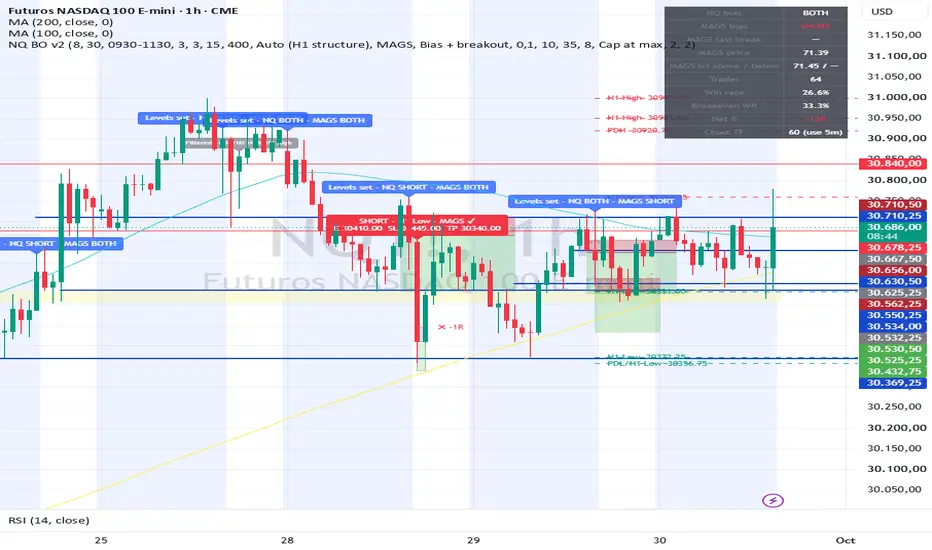
Here's a description of your NQ Breakout + MAGS Confirmation (v2) indicator. You can also use it as the description if you save or publish it on TradingView.
Purpose
It automates your Nasdaq futures breakout strategy on the 5-minute chart. It marks your key levels before the New York session, decides the day's direction, and flags breakout entries with a fixed 1:2 risk-reward. MAGS (the Magnificent Seven ETF) acts as a confirmation filter.
1. Level markup (08:30 ET, 1 hour before the NY open)
It draws the key levels of the day:
Previous week high and low (thicker lines)
Previous day high and low
The last 3 H1 swing highs and lows, which are your price reaction points
Levels closer than 15 points are merged into one. Red lines are resistance above price, and teal lines are support below.
2. Daily bias
It reads H1 market structure. Higher highs plus higher lows means longs only, lower highs plus lower lows means shorts only, and mixed structure allows both. You can also set the direction manually.
3. MAGS confirmation
It does the same structure reading on MAGS and maps MAGS's own levels (previous day H/L and H1 swings). Depending on the setting, a trade on NQ only fires if MAGS structure agrees, if MAGS has broken one of its levels in the same direction, or both. When NQ breaks a level but MAGS disagrees, the chart shows a gray "Filtered" tag.
4. Entry
A 5-minute candle must close more than 10 points beyond a marked level. Signals only trigger in the trading window (09:30–11:30 ET by default), with a maximum of 2 trades per day and one trade at a time.
5. Risk management
The stop goes beyond the breakout candle, capped at 35 points (or the trade is skipped, depending on the setting). The target is 2× the risk.
6. Visuals and alerts
Red and green boxes show the stop and target, and ✔ / ✖ marks show each result.
A stats table shows NQ and MAGS bias, the last MAGS break, trades taken, win rate, the 33% breakeven win rate, and net R.
Webhook-ready JSON alerts fire when levels are marked and on every entry and exit, for email or broker automation.
Main settings you can adjust
Markup time, trading window, breakout points, max stop, reward:risk, max trades per day, the MAGS filter mode, and which levels to include.
Purpose
It automates your Nasdaq futures breakout strategy on the 5-minute chart. It marks your key levels before the New York session, decides the day's direction, and flags breakout entries with a fixed 1:2 risk-reward. MAGS (the Magnificent Seven ETF) acts as a confirmation filter.
1. Level markup (08:30 ET, 1 hour before the NY open)
It draws the key levels of the day:
Previous week high and low (thicker lines)
Previous day high and low
The last 3 H1 swing highs and lows, which are your price reaction points
Levels closer than 15 points are merged into one. Red lines are resistance above price, and teal lines are support below.
2. Daily bias
It reads H1 market structure. Higher highs plus higher lows means longs only, lower highs plus lower lows means shorts only, and mixed structure allows both. You can also set the direction manually.
3. MAGS confirmation
It does the same structure reading on MAGS and maps MAGS's own levels (previous day H/L and H1 swings). Depending on the setting, a trade on NQ only fires if MAGS structure agrees, if MAGS has broken one of its levels in the same direction, or both. When NQ breaks a level but MAGS disagrees, the chart shows a gray "Filtered" tag.
4. Entry
A 5-minute candle must close more than 10 points beyond a marked level. Signals only trigger in the trading window (09:30–11:30 ET by default), with a maximum of 2 trades per day and one trade at a time.
5. Risk management
The stop goes beyond the breakout candle, capped at 35 points (or the trade is skipped, depending on the setting). The target is 2× the risk.
6. Visuals and alerts
Red and green boxes show the stop and target, and ✔ / ✖ marks show each result.
A stats table shows NQ and MAGS bias, the last MAGS break, trades taken, win rate, the 33% breakeven win rate, and net R.
Webhook-ready JSON alerts fire when levels are marked and on every entry and exit, for email or broker automation.
Main settings you can adjust
Markup time, trading window, breakout points, max stop, reward:risk, max trades per day, the MAGS filter mode, and which levels to include.

免责声明
这些信息和出版物并非旨在提供,也不构成TradingView提供或认可的任何形式的财务、投资、交易或其他类型的建议或推荐。请阅读使用条款了解更多信息。
免责声明
这些信息和出版物并非旨在提供,也不构成TradingView提供或认可的任何形式的财务、投资、交易或其他类型的建议或推荐。请阅读使用条款了解更多信息。