OPEN-SOURCE SCRIPT
已更新 Open Legacy Bot
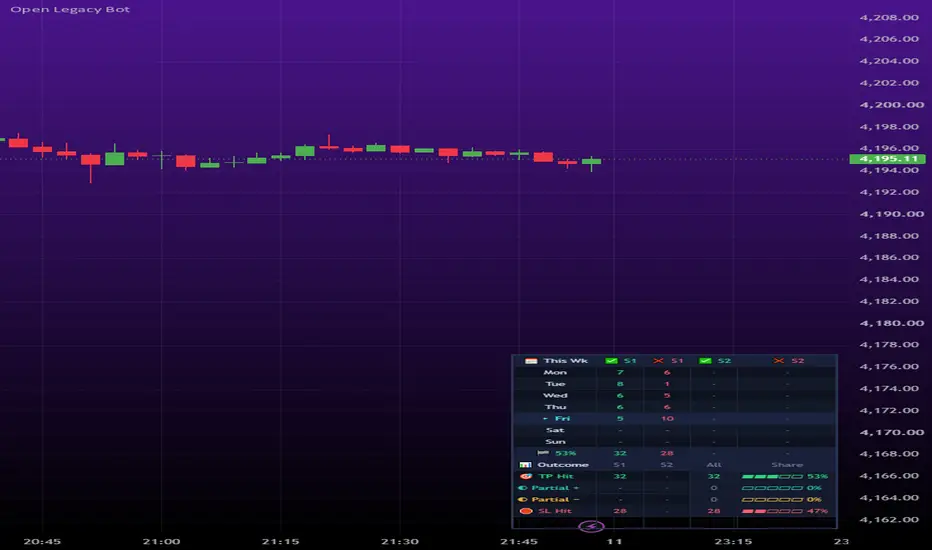
OPEN LEGACY BOT
An all-in-one automated trading strategy. It places trades on MetaTrader 5 through PineConnector, sends a clean phone notification for every trade it takes, and keeps a weekly TP / SL scoreboard on your chart. Everything runs from one script with one set of settings, so nothing can drift out of sync.
━━━━━━━━━━━━━━━━━━━━
FEATURES
━━━━━━━━━━━━━━━━━━━━
ENTRY METHODS (choose one)
• UT Bot – ATR trailing-stop crossover, enters as a move begins
• FVG Pullback – waits for a fair value gap, enters when price returns and resumes
• Trend – fast/slow EMA and RSI aligned, fires once per trend leg
• Grid – ATR-spaced mean reversion, buys dips and sells rallies
• Signal Sensitivity: Conservative, Balanced or Aggressive
• Wait For Candle Close – trades only fire on confirmed candles, no repainting fakeouts
• Timeframe Lock – only trades on your chosen timeframe
SESSIONS
• Two independent trading windows, each with its own day-of-week checkboxes
• Session timezone setting (IANA, e.g. Europe/London)
• Optional close of all trades at session end
• Auto pause/resume of the PineConnector EA with your session
• Start and end markers on the chart
NEWS BLACKOUTS
• Up to three dates and times you enter in advance
• No new trades within your chosen minutes either side
• Open positions close a set number of minutes before
SCALE-IN LAYERS (off by default)
• Add extra positions (Trade 2+) on confirmed continuations
• Each layer needs a structure break, an intact pullback and trend-slope confirmation
• Max layers and strictness (Loose, Balanced, Strict) are adjustable
CORRELATION FILTER
• Confirms layers against an inverse benchmark (DXY, VIX, currency indices), detected automatically for the symbol you chart
• Crypto is exempt
POSITION CONTROL
• One Position At A Time
• One Trade 1 Per Direction
• Optional close on any opposite signal
PINECONNECTOR BRIDGE
• License ID, MT5 symbol override, lot size, stop loss and take profit in pips
• TP/SL are held on your broker's server from the moment the trade opens
• Optional backtest exits, so the Strategy Tester can resolve TP/SL
PHONE NOTIFICATIONS
• Every entry is labelled BUY, SELL, BUY 2, SELL 2 and so on
• Notifications read e.g. "XAUUSD SELL 2" and only fire on trades actually filled
SCOREBOARD (bottom-right HUD)
• Weekly tally of trades hitting TP vs SL, split by day and session
• Win percentage and the last 8 weeks of history
• Ties (one candle reaching both levels) resolved with 1-minute data
• Optional markers for counted entries and settled outcomes
━━━━━━━━━━━━━━━━━━━━
BACKTEST SETTINGS
━━━━━━━━━━━━━━━━━━━━
Before relying on any backtest, set Commission and Slippage in Properties to match your own broker. Check your broker's website or account details for the commission and typical spread/slippage that apply to your account type and the pair you're trading, since these vary between brokers, account types and instruments.
Important notes:
• The Strategy Tester is a simulation. Live results also depend on your broker's spread, execution speed and the lot size you set in the bridge.
• The tester's "1 unit" position size is internal bookkeeping only. Your real trade size is the Lot Size setting sent to MT5.
• Turn "Apply TP/SL Inside Backtest" ON for backtesting so exits are included, and OFF when trading live.
• Results vary by symbol, timeframe, session and settings. Backtest your own pair before trading it.
━━━━━━━━━━━━━━━━━━━━
WHAT YOU NEED
━━━━━━━━━━━━━━━━━━━━
• A TradingView plan that supports webhook alerts
• A PineConnector account and License ID (paid subscription, free trial available)
• MetaTrader 5 with the PineConnector EA installed and algorithmic trading enabled
• A VPS (recommended) so MT5 stays online 24/7
━━━━━━━━━━━━━━━━━━━━
SETUP
━━━━━━━━━━━━━━━━━━━━
1. Add Open Legacy Bot to your chart.
2. Under Broker Bridge, enter your PineConnector License ID, your exact MT5 symbol name (if your broker adds a suffix, e.g. XAUUSD.s), lot size, and TP/SL in pips.
3. Set your sessions, timezone, entry method and any blackouts.
4. In Properties, set Pyramiding equal to or higher than Max Trade Layers, and set Commission and Slippage to match your broker. For high-priced instruments (e.g. BTC), raise Initial Capital so entries aren't rejected.
5. Create TWO alerts on the bot:
ALERT 1 – ORDERS
Condition: Order fills and alert() function calls
Message: {{strategy.order.alert_message}}
Webhook URL: your PineConnector webhook URL
Push notifications: OFF
ALERT 2 – PHONE
Condition: Order fills only
Message: {{ticker}} {{strategy.order.comment}}
Push notifications: ON
Webhook: OFF
The two alerts must stay separate. PineConnector needs its exact command text, so a readable message would break your orders. Never set Alert 2 to include alert() function calls, or your phone will receive raw broker commands.
6. Turn "Apply TP/SL Inside Backtest" OFF when trading live. Your real TP/SL are held by the broker.
7. Test on a demo account for at least one full session before trading live.
━━━━━━━━━━━━━━━━━━━━
HANDLING IT DAY TO DAY
━━━━━━━━━━━━━━━━━━━━
• Each pair needs its own chart and its own two alerts.
• Check MT5 is connected and the EA is active.
• Update news blackout dates weekly.
• Read the Scoreboard weekly to judge signal quality.
• To pause trading, switch off Alert 1. Alert 2 can stay on.
• After editing the script, recreate both alerts. Existing alerts keep running the old version.
━━━━━━━━━━━━━━━━━━━━
DISCLAIMER
━━━━━━━━━━━━━━━━━━━━
For educational purposes only. This is not financial advice. Trading involves substantial risk of loss. Past performance and backtests do not guarantee future results. Always test on a demo account first and trade only with money you can afford to lose.
An all-in-one automated trading strategy. It places trades on MetaTrader 5 through PineConnector, sends a clean phone notification for every trade it takes, and keeps a weekly TP / SL scoreboard on your chart. Everything runs from one script with one set of settings, so nothing can drift out of sync.
━━━━━━━━━━━━━━━━━━━━
FEATURES
━━━━━━━━━━━━━━━━━━━━
ENTRY METHODS (choose one)
• UT Bot – ATR trailing-stop crossover, enters as a move begins
• FVG Pullback – waits for a fair value gap, enters when price returns and resumes
• Trend – fast/slow EMA and RSI aligned, fires once per trend leg
• Grid – ATR-spaced mean reversion, buys dips and sells rallies
• Signal Sensitivity: Conservative, Balanced or Aggressive
• Wait For Candle Close – trades only fire on confirmed candles, no repainting fakeouts
• Timeframe Lock – only trades on your chosen timeframe
SESSIONS
• Two independent trading windows, each with its own day-of-week checkboxes
• Session timezone setting (IANA, e.g. Europe/London)
• Optional close of all trades at session end
• Auto pause/resume of the PineConnector EA with your session
• Start and end markers on the chart
NEWS BLACKOUTS
• Up to three dates and times you enter in advance
• No new trades within your chosen minutes either side
• Open positions close a set number of minutes before
SCALE-IN LAYERS (off by default)
• Add extra positions (Trade 2+) on confirmed continuations
• Each layer needs a structure break, an intact pullback and trend-slope confirmation
• Max layers and strictness (Loose, Balanced, Strict) are adjustable
CORRELATION FILTER
• Confirms layers against an inverse benchmark (DXY, VIX, currency indices), detected automatically for the symbol you chart
• Crypto is exempt
POSITION CONTROL
• One Position At A Time
• One Trade 1 Per Direction
• Optional close on any opposite signal
PINECONNECTOR BRIDGE
• License ID, MT5 symbol override, lot size, stop loss and take profit in pips
• TP/SL are held on your broker's server from the moment the trade opens
• Optional backtest exits, so the Strategy Tester can resolve TP/SL
PHONE NOTIFICATIONS
• Every entry is labelled BUY, SELL, BUY 2, SELL 2 and so on
• Notifications read e.g. "XAUUSD SELL 2" and only fire on trades actually filled
SCOREBOARD (bottom-right HUD)
• Weekly tally of trades hitting TP vs SL, split by day and session
• Win percentage and the last 8 weeks of history
• Ties (one candle reaching both levels) resolved with 1-minute data
• Optional markers for counted entries and settled outcomes
━━━━━━━━━━━━━━━━━━━━
BACKTEST SETTINGS
━━━━━━━━━━━━━━━━━━━━
Before relying on any backtest, set Commission and Slippage in Properties to match your own broker. Check your broker's website or account details for the commission and typical spread/slippage that apply to your account type and the pair you're trading, since these vary between brokers, account types and instruments.
Important notes:
• The Strategy Tester is a simulation. Live results also depend on your broker's spread, execution speed and the lot size you set in the bridge.
• The tester's "1 unit" position size is internal bookkeeping only. Your real trade size is the Lot Size setting sent to MT5.
• Turn "Apply TP/SL Inside Backtest" ON for backtesting so exits are included, and OFF when trading live.
• Results vary by symbol, timeframe, session and settings. Backtest your own pair before trading it.
━━━━━━━━━━━━━━━━━━━━
WHAT YOU NEED
━━━━━━━━━━━━━━━━━━━━
• A TradingView plan that supports webhook alerts
• A PineConnector account and License ID (paid subscription, free trial available)
• MetaTrader 5 with the PineConnector EA installed and algorithmic trading enabled
• A VPS (recommended) so MT5 stays online 24/7
━━━━━━━━━━━━━━━━━━━━
SETUP
━━━━━━━━━━━━━━━━━━━━
1. Add Open Legacy Bot to your chart.
2. Under Broker Bridge, enter your PineConnector License ID, your exact MT5 symbol name (if your broker adds a suffix, e.g. XAUUSD.s), lot size, and TP/SL in pips.
3. Set your sessions, timezone, entry method and any blackouts.
4. In Properties, set Pyramiding equal to or higher than Max Trade Layers, and set Commission and Slippage to match your broker. For high-priced instruments (e.g. BTC), raise Initial Capital so entries aren't rejected.
5. Create TWO alerts on the bot:
ALERT 1 – ORDERS
Condition: Order fills and alert() function calls
Message: {{strategy.order.alert_message}}
Webhook URL: your PineConnector webhook URL
Push notifications: OFF
ALERT 2 – PHONE
Condition: Order fills only
Message: {{ticker}} {{strategy.order.comment}}
Push notifications: ON
Webhook: OFF
The two alerts must stay separate. PineConnector needs its exact command text, so a readable message would break your orders. Never set Alert 2 to include alert() function calls, or your phone will receive raw broker commands.
6. Turn "Apply TP/SL Inside Backtest" OFF when trading live. Your real TP/SL are held by the broker.
7. Test on a demo account for at least one full session before trading live.
━━━━━━━━━━━━━━━━━━━━
HANDLING IT DAY TO DAY
━━━━━━━━━━━━━━━━━━━━
• Each pair needs its own chart and its own two alerts.
• Check MT5 is connected and the EA is active.
• Update news blackout dates weekly.
• Read the Scoreboard weekly to judge signal quality.
• To pause trading, switch off Alert 1. Alert 2 can stay on.
• After editing the script, recreate both alerts. Existing alerts keep running the old version.
━━━━━━━━━━━━━━━━━━━━
DISCLAIMER
━━━━━━━━━━━━━━━━━━━━
For educational purposes only. This is not financial advice. Trading involves substantial risk of loss. Past performance and backtests do not guarantee future results. Always test on a demo account first and trade only with money you can afford to lose.
版本注释
Updated:OPEN LEGACY BOT
All-in-one automated strategy: places trades on MT5 through PineConnector, sends a clean phone notification for every trade it takes, and keeps a weekly TP/SL scoreboard on your chart. One script, one set of settings.
━━━━━━━━━━━━━━━━━━━━
FEATURES
━━━━━━━━━━━━━━━━━━━━
• 4 Entry Methods: UT Bot (ATR trailing-stop crossover), FVG Pullback (enters on a return into a fair value gap), Trend (EMA + RSI aligned, once per leg), Grid (ATR-spaced mean reversion)
• Signal Sensitivity: Conservative, Balanced, Aggressive
• Wait For Candle Close (no repainting) and Timeframe Lock
• Two session windows with day checkboxes, timezone, close at session end, auto EA pause/resume
• News Blackouts: 3 dates/times, no new trades around them, positions closed beforehand
• Scale-in layers (off by default) with structure, pullback and trend-slope checks
• Correlation filter for layers (DXY/VIX/currency indices, auto-detected)
• One Position At A Time and One Trade 1 Per Direction
• Bridge: License ID, MT5 symbol, lot size, TP/SL in pips (held on the broker's server)
• Phone alerts like "XAUUSD SELL 2", only on real fills
• Scoreboard HUD: weekly TP vs SL by day and session, win %, 8 weeks of history
━━━━━━━━━━━━━━━━━━━━
WHAT YOU NEED
━━━━━━━━━━━━━━━━━━━━
• TradingView plan with webhook alerts
• PineConnector account and License ID
• MT5 with the PineConnector EA, algo trading enabled
• A VPS (recommended)
━━━━━━━━━━━━━━━━━━━━
SETUP
━━━━━━━━━━━━━━━━━━━━
1. Add the bot to your chart on the timeframe you'll trade. Use ONE timeframe per pair: bots on the same pair share one EA and close each other's trades.
2. Broker Bridge: License ID, exact MT5 symbol (e.g. XAUUSD.s), lot size, TP/SL pips.
3. Set sessions, timezone, entry method and blackouts. Keep "Close On Any Opposite Signal" off.
4. Properties: Pyramiding ≥ Max Trade Layers. Commission and Slippage to match your broker (check its site for your account type and pair). Raise Initial Capital for high-priced pairs like BTC.
5. Create TWO alerts, with the chart on your trading timeframe:
ALERT 1 – ORDERS
Condition: "Order fills and alert() function calls" (default)
Message: {{strategy.order.alert_message}}
Webhook: ON, your PineConnector URL. Push: OFF
ALERT 2 – PHONE
Condition: change to "Order fills only"
Message: {{ticker}} {{strategy.order.comment}}
Push: ON. Webhook: OFF
Only Alert 1 gets the webhook. If Alert 2 isn't on "Order fills only", your phone gets raw broker commands.
6. In each alert's Notifications, set the schedule to cover your session hours from the bot's settings, ending a few candles after your last session ends so the closes go through.
7. Keep "Apply TP/SL Inside Backtest" OFF when live (ON only for backtesting).
8. Test on demo for a full session first.
━━━━━━━━━━━━━━━━━━━━
DAY TO DAY
━━━━━━━━━━━━━━━━━━━━
• Check MT5 and the EA are running, and alerts show Active, not Stopped (TradingView stops alerts that fire too often).
• Update blackout dates weekly. Read the Scoreboard weekly.
• To pause trading, switch off Alert 1.
• After changing the script or settings, recreate both alerts.
━━━━━━━━━━━━━━━━━━━━
DISCLAIMER
━━━━━━━━━━━━━━━━━━━━
Educational purposes only, not financial advice. Trading carries substantial risk of loss, and backtests don't guarantee future results. Test on demo first.
版本注释
Outdated, utilise newest version...开源脚本
秉承TradingView的精神,该脚本的作者将其开源,以便交易者可以查看和验证其功能。向作者致敬!您可以免费使用该脚本,但请记住,重新发布代码须遵守我们的网站规则。

免责声明
这些信息和出版物并非旨在提供,也不构成TradingView提供或认可的任何形式的财务、投资、交易或其他类型的建议或推荐。请阅读使用条款了解更多信息。
开源脚本
秉承TradingView的精神,该脚本的作者将其开源,以便交易者可以查看和验证其功能。向作者致敬!您可以免费使用该脚本,但请记住,重新发布代码须遵守我们的网站规则。
免责声明
这些信息和出版物并非旨在提供,也不构成TradingView提供或认可的任何形式的财务、投资、交易或其他类型的建议或推荐。请阅读使用条款了解更多信息。