已更新
LibraryTimeframeHelper
More exclusive indicators from SimpleCryptoLife
Subscribe to Beyond Market Structure Pro Suite for $18.00/month to get exclusive indicators by this author. You pay right on TradingView and can use them on your charts straight away.
Explore Beyond Market Structure Pro SuiteLibrary "LibraryTimeframeHelper"
Helper functions to work with timeframes: to get the next higher TF, and to make the string pretty for use in labels. Perhaps I'll add more later.
f_getHigherTF(_TF)
f_getHigherTF(): Converts the input timeframe into the next one up in the list of commonly used timeframes. NOTE: You can NOT use a TF from this function as input to a request.security() call if called from this library because it gets converted to a series (since there's nothing special about this function, I expect this probably goes for any library). However, you CAN copy the code and use it directly in your script, in which case the output is only a simple variable and thus suitable for the timeframe of a request.security() call.
Parameters:
_TF (string) - The timeframe to convert.
Returns: : A string in standard timeframe format.
f_prettifyTF(_TF)
f_prettifyTF(): Converts the input timeframe from standard timeframe format to the format shown by TradingView on a chart. The output is not suitable for use as an input timeframe of a request.security() call.
Parameters:
_TF (string) - The timeframe to convert.
Returns: : A string in prettified timeframe format.
Helper functions to work with timeframes: to get the next higher TF, and to make the string pretty for use in labels. Perhaps I'll add more later.
f_getHigherTF(_TF)
f_getHigherTF(): Converts the input timeframe into the next one up in the list of commonly used timeframes. NOTE: You can NOT use a TF from this function as input to a request.security() call if called from this library because it gets converted to a series (since there's nothing special about this function, I expect this probably goes for any library). However, you CAN copy the code and use it directly in your script, in which case the output is only a simple variable and thus suitable for the timeframe of a request.security() call.
Parameters:
_TF (string) - The timeframe to convert.
Returns: : A string in standard timeframe format.
f_prettifyTF(_TF)
f_prettifyTF(): Converts the input timeframe from standard timeframe format to the format shown by TradingView on a chart. The output is not suitable for use as an input timeframe of a request.security() call.
Parameters:
_TF (string) - The timeframe to convert.
Returns: : A string in prettified timeframe format.
版本注释
v2Updated to v6
Minor change because "D" in v5 is now "1D" in v6, and so on.
版本注释
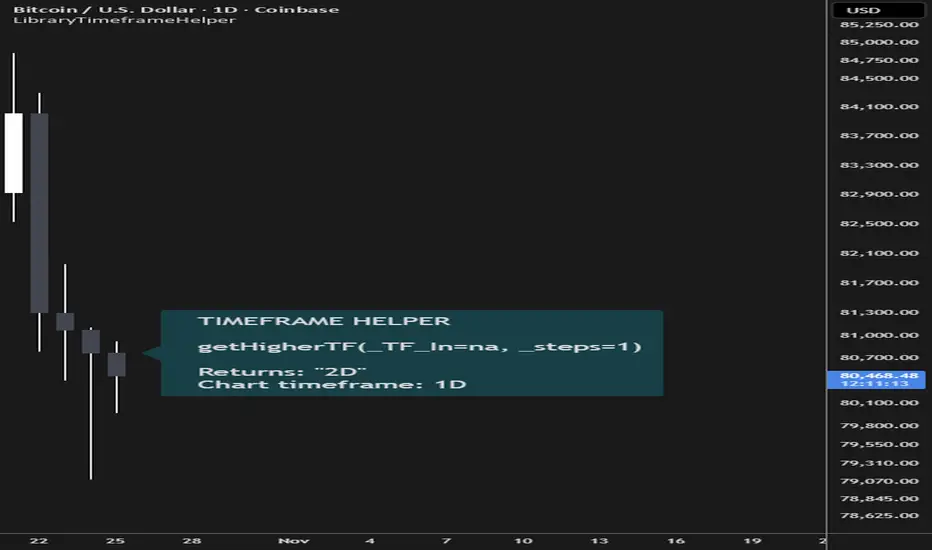
Version 3 — Timeframe selection and Pine Screener supportThe higher-timeframe function now takes a positive step count, so you can select a timeframe two, three or more places up the existing ladder in one call.
- `getHigherTF()` replaces `f_getHigherTF()`. Its starting timeframe, `_TF_In`, defaults to `na`, which resolves to `timeframe.period`. The optional `_steps` argument defaults to one.
- `getHigherScreenerTF()` counts the same steps, then rounds the final destination upwards to a supported Pine Screener interval. For example, six steps above 5 minutes gives 3 hours normally and 4 hours with screener adjustment.
- `isScreenerSupported()` independently checks whether a timeframe is supported by Pine Screener.
- `f_prettifyTF()` is unchanged.
- A single chart demonstration lets you choose any of the four functions, a timeframe and a step count. A label shows the function call, the arguments passed, and the returned result. The step count applies only to the two higher-timeframe functions.
If you omit the starting timeframe, it takes the chart timeframe. An empty string or an unrecognised resolved timeframe returns `na`, as do missing or non-positive step counts and destinations above monthly. The resolved timeframe must itself be on the ladder. The support check still requires an explicit timeframe and returns `false` for missing or unsupported values. The demonstration passes `na` to the selectors for its chart selection and displays the actual argument passed.
Supported timeframe ladder
Both selectors use this exact ladder, in ascending order. Each step moves one place along it:
1, 2, 3, 5, 10, 15 and 30 minutes → 1, 2, 3, 4, 8 and 12 hours → 1, 2 and 3 days → 1 and 2 weeks → 1 month.
Exact Pine timeframe strings:
`"1"`, `"2"`, `"3"`, `"5"`, `"10"`, `"15"`, `"30"`, `"60"`, `"120"`, `"180"`, `"240"`, `"480"`, `"720"`, `"1D"`, `"2D"`, `"3D"`, `"1W"`, `"2W"`, `"1M"`.
The aliases `"D"`, `"W"` and `"M"` are also accepted. Other starting timeframes return `na`, even if TradingView supports them.
This is because this library is based on my own udnerstanding of the Fibonacci sequence applied to timeframes. One month is recognised but has no higher destination, so a positive step count from it returns `na`. The screener selector counts steps on this full ladder before adjusting the final destination to a supported Pine Screener interval.
Neither `getHigherTF()` nor `getHigherScreenerTF()` supports seconds-based starting timeframes, such as `"1S"`, `"15S"` or `"30S"` - again, this is just my personal choice because I think it's a little loopy to try and trade on these timeframes. This library is open source so if you want you can extend it to seconds 🤷
The ladder starts at one minute. Both functions return `na` for seconds-based inputs; the screener selector does not round them up to one minute. This also applies when passing `timeframe.period` from a seconds-based chart.
Pine Screener timeframes and rounding
Pine Screener supports 1, 5, 15 and 30 minutes; 1, 2 and 4 hours; 1 day; 1 week; and 1 month. Their Pine strings are:
`"1"`, `"5"`, `"15"`, `"30"`, `"60"`, `"120"`, `"240"`, `"1D"`, `"1W"`, `"1M"`.
After counting the requested steps on the full ladder, `getHigherScreenerTF()` rounds the resulting destination upwards as follows:
- 2 or 3 minutes → 5 minutes (`"2"` or `"3"` → `"5"`).
- 10 minutes → 15 minutes (`"10"` → `"15"`).
- 3 hours → 4 hours (`"180"` → `"240"`).
- 8 or 12 hours → 1 day (`"480"` or `"720"` → `"1D"`).
- 2 or 3 days → 1 week (`"2D"` or `"3D"` → `"1W"`).
- 2 weeks → 1 month (`"2W"` → `"1M"`).
Destinations already supported by Pine Screener stay unchanged. This adjustment applies only to the final destination, not the starting timeframe or each intermediate step. An invalid destination stays `na`.
Updating an existing script
Change the library import from version 2 to version 3 and rename calls to `f_getHigherTF()` to `getHigherTF()`. For named arguments to `getHigherTF()`, change `_TF=` to `_TF_In=`. The screener selector uses `_TF=` because it forwards the input without transforming it locally. Positional arguments also work. Omitting `_steps` selects the next interval, as before. Calls to `f_prettifyTF()` need no change.
The selectors accept `series string` timeframes and `series int` step counts, including values read from arrays or chosen from changing conditions. Fixed values and inputs remain valid. The selectors return `series string` results, even when called with fixed arguments. `isScreenerSupported()` also accepts a `series string` and returns a `series bool`.
To use a selector's result as the timeframe in `request.security()`, the calling script must allow dynamic requests. Pine v6 enables these by default; do not set `dynamic_requests=false` in that caller. This qualifies the older description's warning about using library results in requests: these results work with dynamic requests, but not with non-dynamic requests. When varying requested timeframes, request every required context during historical execution before using it on realtime bars.
TradingView recognises both `D` and `1D`, both `W` and `1W`, and both `M` and `1M` as valid forms of the same respective timeframes. V3 accepts both forms as inputs, but returns the more correct and explicit `1D`, `1W` and `1M` forms. Update any literal string comparisons against `D`, `W` or `M`: the strings differ even though TradingView interprets them as the same timeframes.
For multiple destinations, call the screener selector from the original starting timeframe with each desired step count. Chaining its adjusted results follows a different sequence. Different destinations may also round to the same supported interval.

🔥 Beyond Market Structure Paid Space is now live! is.gd/beyondMS
🆓 All my free scripts: is.gd/simplefree
🆓 All my free scripts: is.gd/simplefree
免责声明
这些信息和出版物并非旨在提供,也不构成TradingView提供或认可的任何形式的财务、投资、交易或其他类型的建议或推荐。请阅读使用条款了解更多信息。
🔥 Beyond Market Structure Paid Space is now live! is.gd/beyondMS
🆓 All my free scripts: is.gd/simplefree
🆓 All my free scripts: is.gd/simplefree
免责声明
这些信息和出版物并非旨在提供,也不构成TradingView提供或认可的任何形式的财务、投资、交易或其他类型的建议或推荐。请阅读使用条款了解更多信息。