OPEN-SOURCE SCRIPT
Sniper Entry 2.1
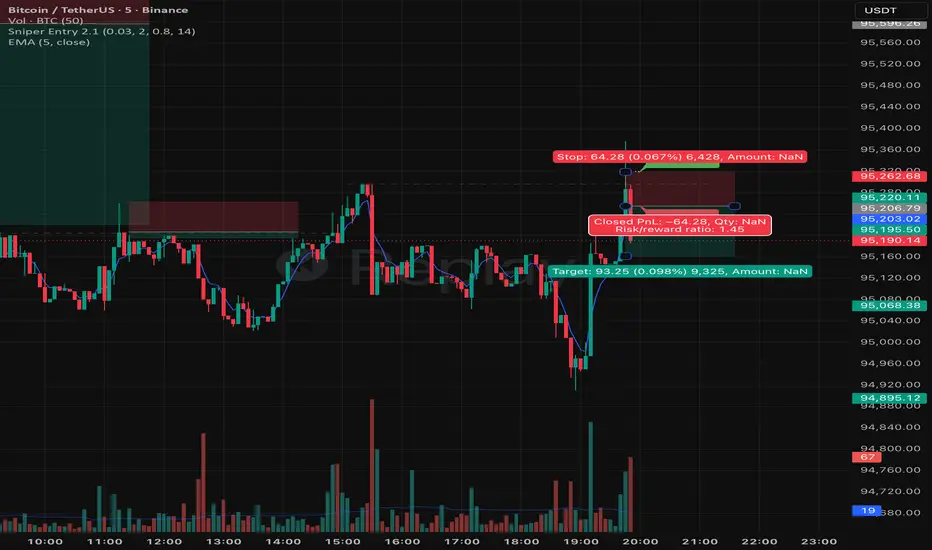
📌 Overview
This script is designed to calculate precise entry levels for long and short trades based on a combination of percentage offsets from the open price and ATR-based volatility filters. It dynamically adjusts stop-loss width and snaps levels to logical increments, then plots them on the chart with labels and dotted lines.
⚙️ Key Components
Inputs
Offset % from Open: Defines how far above/below the open price to set levels.
Label Offset: Controls how many bars forward labels/lines are drawn.
ATR Multiplier & ATR Length: Used to calculate volatility-adjusted stop-loss width.
Base Calculations
Computes upper and lower bounds around the open price using both percentage offset and ATR.
Chooses the larger of the two (percent vs ATR) to ensure realistic stop-loss sizing.
Builds symmetric levels around the open.
Dynamic Step Size
Adjusts snapping increments based on the raw stop-loss width.
Example: Small ranges snap to 0.01 or 0.05, larger ranges snap to 1, 5, 10, etc.
This prevents clutter and ensures levels align with meaningful price ticks.
Snapped Levels
longEntry: Rounded up to the nearest step above the open.
shortEntry: Rounded down to the nearest step below the open.
finalSL: The effective stop-loss width between these two levels.
Chart Drawing
Deletes old labels/lines to keep the chart clean.
Plots dotted horizontal lines for long and short entries.
Labels them with price values (green for long, red for short).
🎯 Purpose
This script helps traders quickly identify balanced entry levels that adapt to volatility. By combining percentage offsets with ATR, it avoids overly tight or unrealistic stops. The snapping logic ensures levels are practical for execution.
This script is designed to calculate precise entry levels for long and short trades based on a combination of percentage offsets from the open price and ATR-based volatility filters. It dynamically adjusts stop-loss width and snaps levels to logical increments, then plots them on the chart with labels and dotted lines.
⚙️ Key Components
Inputs
Offset % from Open: Defines how far above/below the open price to set levels.
Label Offset: Controls how many bars forward labels/lines are drawn.
ATR Multiplier & ATR Length: Used to calculate volatility-adjusted stop-loss width.
Base Calculations
Computes upper and lower bounds around the open price using both percentage offset and ATR.
Chooses the larger of the two (percent vs ATR) to ensure realistic stop-loss sizing.
Builds symmetric levels around the open.
Dynamic Step Size
Adjusts snapping increments based on the raw stop-loss width.
Example: Small ranges snap to 0.01 or 0.05, larger ranges snap to 1, 5, 10, etc.
This prevents clutter and ensures levels align with meaningful price ticks.
Snapped Levels
longEntry: Rounded up to the nearest step above the open.
shortEntry: Rounded down to the nearest step below the open.
finalSL: The effective stop-loss width between these two levels.
Chart Drawing
Deletes old labels/lines to keep the chart clean.
Plots dotted horizontal lines for long and short entries.
Labels them with price values (green for long, red for short).
🎯 Purpose
This script helps traders quickly identify balanced entry levels that adapt to volatility. By combining percentage offsets with ATR, it avoids overly tight or unrealistic stops. The snapping logic ensures levels are practical for execution.
开源脚本
秉承TradingView的精神,该脚本的作者将其开源,以便交易者可以查看和验证其功能。向作者致敬!您可以免费使用该脚本,但请记住,重新发布代码须遵守我们的网站规则。

免责声明
这些信息和出版物并非旨在提供,也不构成TradingView提供或认可的任何形式的财务、投资、交易或其他类型的建议或推荐。请阅读使用条款了解更多信息。
开源脚本
秉承TradingView的精神,该脚本的作者将其开源,以便交易者可以查看和验证其功能。向作者致敬!您可以免费使用该脚本,但请记住,重新发布代码须遵守我们的网站规则。
免责声明
这些信息和出版物并非旨在提供,也不构成TradingView提供或认可的任何形式的财务、投资、交易或其他类型的建议或推荐。请阅读使用条款了解更多信息。