OPEN-SOURCE SCRIPT
ZigZag_KB_Fib_Dual_Trade
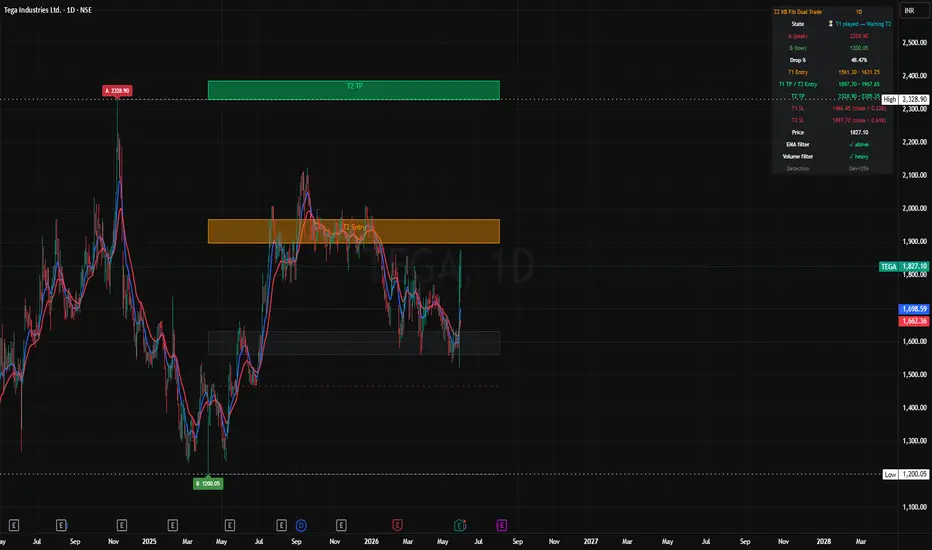
What this indicator does
ZigZag KB Fib Dual Trade automates a Fibonacci-based trading strategy that extracts two sequential trade opportunities from a single A→B down-swing on any chart. Instead of one entry and one exit, you get a layered structure: when Trade 1 hits its take-profit, the same fib levels reframe into a Trade 2 setup automatically.
The indicator handles detection, zone calculation, state tracking, and signal generation. You watch the chart.
How it works
The script uses TradingView's official ZigZag library to identify confirmed price swings, then filters for A→B down-swings only (high → low). On the most recent confirmed down-swing, it projects:
0.236 — Trade 1 stop loss line
0.32–0.382 — Trade 1 Entry Zone
0.618–0.68 — Trade 1 TP Zone (also Trade 2 Entry Zone)
1.0–1.05 — Trade 2 TP Zone
Trade 1
Entry: Close > 0.382 with EMA 9 / EMA 21 confirmation and volume > 1.2× 20-bar average
Take Profit: High reaches 0.618 zone
Stop Loss: Close < 0.236
Trade 2
Sequential entry: After Trade 1 TP fires, close > 0.68 with EMA + volume confirmation
Jump-in entry: If price gaps past Trade 1 entirely and closes above 0.68, Trade 2 activates directly
Take Profit: High reaches 1.0 zone
Stop Loss: Close < 0.618
Visual state machine
The indicator tracks six states and updates zone colors live:
StateVisualWaiting T1 entryEntry Zone lit + T1 TP zone lit + T2 TP dimmedIn Trade 1Same with entry arrow on trigger barT1 played → Waiting T2Entry Zone dims, 0.618-0.68 band turns to T2 Entry color, T2 TP lights upIn Trade 2Same with T2 entry arrowFully playedAll zones dimmed
A Macro swing layer (A_highest paired with B_lowest-since-A) draws in the background as dimmed gray when it differs from the active swing, giving you the bigger context behind the current setup.
Setup invalidation rules
Pre-activation: If price closes below B, the indicator anchors B to the new lower low automatically and recalculates zones — the macro A→B is preserved.
After SL hit: Setup returns to "waiting" state and can re-trigger if entry conditions are met again.
After Trade 2 TP: Setup is fully played until a new A→B forms.
Filters
EMA filter (default ON): require close > EMA 9 AND close > EMA 21 at entry
Volume filter (default ON): require volume > 1.2× 20-bar SMA at entry
Both filters are toggleable. The strategy was developed assuming both ON.
Info table
Top-right info table shows live state, A and B prices, drop %, all zone ranges, both SL levels, current price, EMA filter status, volume filter status, and macro swing context (when present).
Alerts (six conditions)
T1 Entry / T1 TP / T1 SL
T2 Entry / T2 TP / T2 SL
Settings
Pivot detection: ZigZag deviation % (default 35, tunable), minimum bars between pivots
Fibonacci levels: all six levels editable
Moving averages: EMA 9 and EMA 21 colors and widths
Zone styling: entry/TP/dimmed colors, border width, fill transparency, SL line color and width
Display: zone extension bars, info table toggle, A/B label toggle, ZigZag debug line
Recommended use
Built for the daily timeframe on NSE Indian equities, but works on 4H, 1H, and 15-minute charts as well. Tune the deviation percentage based on timeframe — higher deviation for daily (major swings), lower for intraday.
The indicator is intended to surface and structure trades for manual review, not as a fully automated trading bot. It removes the decision fatigue of calculating fib levels by hand, watching for EMA + volume confluence, and tracking trade state across two sequential setups.
Notes
Not financial advice. Test on your own market and timeframe before risking capital.
Past performance of the strategy does not guarantee future results.
The script handles state correctly on confirmed bars; intra-bar transitions may flicker until the bar closes.
ZigZag KB Fib Dual Trade automates a Fibonacci-based trading strategy that extracts two sequential trade opportunities from a single A→B down-swing on any chart. Instead of one entry and one exit, you get a layered structure: when Trade 1 hits its take-profit, the same fib levels reframe into a Trade 2 setup automatically.
The indicator handles detection, zone calculation, state tracking, and signal generation. You watch the chart.
How it works
The script uses TradingView's official ZigZag library to identify confirmed price swings, then filters for A→B down-swings only (high → low). On the most recent confirmed down-swing, it projects:
0.236 — Trade 1 stop loss line
0.32–0.382 — Trade 1 Entry Zone
0.618–0.68 — Trade 1 TP Zone (also Trade 2 Entry Zone)
1.0–1.05 — Trade 2 TP Zone
Trade 1
Entry: Close > 0.382 with EMA 9 / EMA 21 confirmation and volume > 1.2× 20-bar average
Take Profit: High reaches 0.618 zone
Stop Loss: Close < 0.236
Trade 2
Sequential entry: After Trade 1 TP fires, close > 0.68 with EMA + volume confirmation
Jump-in entry: If price gaps past Trade 1 entirely and closes above 0.68, Trade 2 activates directly
Take Profit: High reaches 1.0 zone
Stop Loss: Close < 0.618
Visual state machine
The indicator tracks six states and updates zone colors live:
StateVisualWaiting T1 entryEntry Zone lit + T1 TP zone lit + T2 TP dimmedIn Trade 1Same with entry arrow on trigger barT1 played → Waiting T2Entry Zone dims, 0.618-0.68 band turns to T2 Entry color, T2 TP lights upIn Trade 2Same with T2 entry arrowFully playedAll zones dimmed
A Macro swing layer (A_highest paired with B_lowest-since-A) draws in the background as dimmed gray when it differs from the active swing, giving you the bigger context behind the current setup.
Setup invalidation rules
Pre-activation: If price closes below B, the indicator anchors B to the new lower low automatically and recalculates zones — the macro A→B is preserved.
After SL hit: Setup returns to "waiting" state and can re-trigger if entry conditions are met again.
After Trade 2 TP: Setup is fully played until a new A→B forms.
Filters
EMA filter (default ON): require close > EMA 9 AND close > EMA 21 at entry
Volume filter (default ON): require volume > 1.2× 20-bar SMA at entry
Both filters are toggleable. The strategy was developed assuming both ON.
Info table
Top-right info table shows live state, A and B prices, drop %, all zone ranges, both SL levels, current price, EMA filter status, volume filter status, and macro swing context (when present).
Alerts (six conditions)
T1 Entry / T1 TP / T1 SL
T2 Entry / T2 TP / T2 SL
Settings
Pivot detection: ZigZag deviation % (default 35, tunable), minimum bars between pivots
Fibonacci levels: all six levels editable
Moving averages: EMA 9 and EMA 21 colors and widths
Zone styling: entry/TP/dimmed colors, border width, fill transparency, SL line color and width
Display: zone extension bars, info table toggle, A/B label toggle, ZigZag debug line
Recommended use
Built for the daily timeframe on NSE Indian equities, but works on 4H, 1H, and 15-minute charts as well. Tune the deviation percentage based on timeframe — higher deviation for daily (major swings), lower for intraday.
The indicator is intended to surface and structure trades for manual review, not as a fully automated trading bot. It removes the decision fatigue of calculating fib levels by hand, watching for EMA + volume confluence, and tracking trade state across two sequential setups.
Notes
Not financial advice. Test on your own market and timeframe before risking capital.
Past performance of the strategy does not guarantee future results.
The script handles state correctly on confirmed bars; intra-bar transitions may flicker until the bar closes.
开源脚本
秉承TradingView的精神,该脚本的作者将其开源,以便交易者可以查看和验证其功能。向作者致敬!您可以免费使用该脚本,但请记住,重新发布代码须遵守我们的网站规则。

免责声明
这些信息和出版物并非旨在提供,也不构成TradingView提供或认可的任何形式的财务、投资、交易或其他类型的建议或推荐。请阅读使用条款了解更多信息。
开源脚本
秉承TradingView的精神,该脚本的作者将其开源,以便交易者可以查看和验证其功能。向作者致敬!您可以免费使用该脚本,但请记住,重新发布代码须遵守我们的网站规则。
免责声明
这些信息和出版物并非旨在提供,也不构成TradingView提供或认可的任何形式的财务、投资、交易或其他类型的建议或推荐。请阅读使用条款了解更多信息。