OPEN-SOURCE SCRIPT
已更新 PSP SHALOM BNS - Global Pro Default OFF
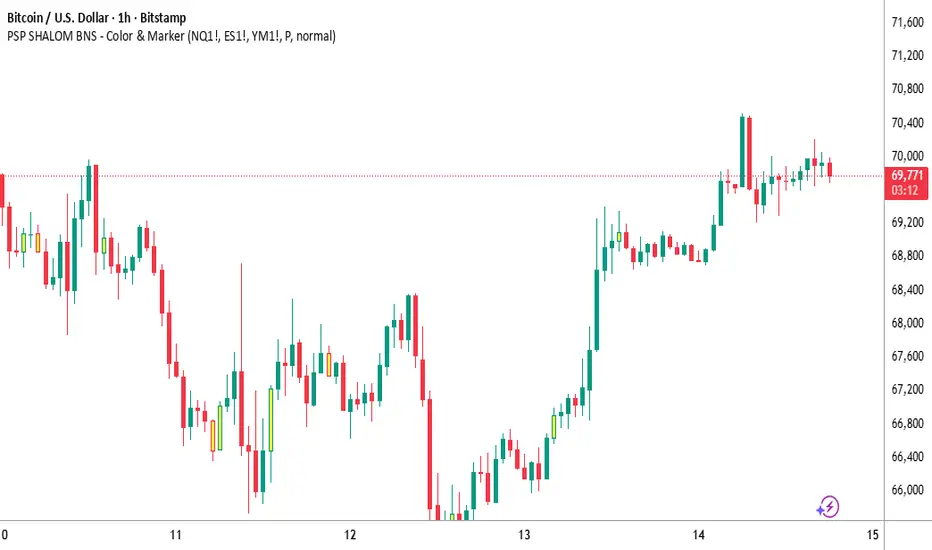
PSP Professional Asset Correlation Marker
This indicator identifies "Mixed Candles" (Divergence) between major indices like NASDAQ, S&P 500, and Dow Jones. Its primary goal is to spot moments where one asset is moving in the opposite direction of the others, signaling potential market shifts or "fake-outs".
Main Features:
Visual Correlation: Automatically compares the color (Red/Green) of the candle across selected assets.
PSP Marker: Displays a "P" (or your chosen shape) above the candle when a divergence is detected.
Integrated Alerts: Supports built-in alerts for real-time notification upon candle close.
Settings (Inputs):
Assets Selection (NASDAQ / S&P 500 / DAO): Choose the specific symbols you want to compare.
Include DAO: A toggle to include/exclude the Dow Jones from calculations (Default is OFF).
Sensitivity %: Define a minimum movement percentage to filter out market "noise" and Doji candles.
Marker Shape: Select your preferred visual icon (P, Star, Arrow, etc.).
Marker Size: Adjust the size of the icon on your chart (Small, Normal, Large).
Marker Color: Fully customize the color of the signal.
How to Enable Alerts (for the "Instructions" or "Description" field)
To receive real-time notifications (sound, pop-up, or mobile), follow these steps:
Open Alert Panel: Click the Clock icon on the right sidebar.
Create Alert: Click the + (Create Alert) button.
Condition: In the first dropdown, select "PSP SHALOM BNS - Global Pro".
Trigger: In the second dropdown, you must select "Any alert() function call".
Options: It is recommended to select "Once Per Bar Close" to avoid false signals during live candle movements.
Notification: Choose your preferred notification method (Notify in App, Pop-up, etc.).
Create: Click the Create button. You are all set!
גרסה בעברית
סיכום אינדיקטור: PSP Professional – זיהוי חריגות בין מדדים
אינדיקטור זה מזהה "נרות מעורבים" (Divergence) בין המדדים המרכזיים: נאסד"ק, S&P 500 ודאו ג'ונס. מטרתו העיקרית היא לאתר רגעים שבהם נכס אחד נע בכיוון הפוך מהשאר, מה שעשוי להעיד על שינוי במגמה או על פריצות שווא בשוק.
+1
תכונות עיקריות:
מתאם ויזואלי: השוואה אוטומטית של צבע הנר (אדום/ירוק) בין הנכסים שנבחרו.
סימון PSP: מציג את האות "P" (או כל צורה שתבחרו) מעל הנר ברגע שמתגלה חריגה.
התראות מובנות: תמיכה מלאה בהתראות בזמן אמת עם סגירת הנר.
הגדרות (Inputs):
בחירת נכסים (NASDAQ/S&P 500/DAO): בחירת הסימבולים הספציפיים להשוואה.
הכללת דאו ג'ונס (Include DAO): אפשרות להפעיל או לכבות את חישוב הדאו ג'ונס (ברירת מחדל: כבוי).
סף רגישות (Sensitivity %): קביעת אחוז תנועה מינימלי כדי לסנן "רעשי שוק" ונרות ללא גוף משמעותי.
צורת סימון (Marker Shape): בחירת האייקון שיופיע על הגרף (P, כוכב, חץ וכו').
גודל סימון (Marker Size): שליטה על גודל האייקון (קטן, רגיל, גדול).
צבע סימון (Marker Color): התאמה אישית של צבע הסיגנל.
הוראות להפעלת התראות
כדי לקבל התראות בזמן אמת (צליל, הודעה קופצת או התראה לנייד), יש לעקוב אחר השלבים הבאים:
פתיחת לוח ההתראות: לחצו על אייקון השעון בסרגל הכלים הימני.
יצירת התראה: לחצו על כפתור ה- + (Create Alert).
תנאי (Condition): בתיבה הראשונה, בחרו את האינדיקטור: "PSP SHALOM BNS - Global Pro".
טריגר: בתיבה השנייה, חובה לבחור באפשרות "Any alert() function call".
אפשרויות: מומלץ לבחור ב-"Once Per Bar Close" (פעם אחת בסגירת נר) כדי למנוע התראות שווא בזמן שהנר עדיין זז.
סיום: לחצו על Create. מעכשיו המערכת תתריע לכם על כל סיגנל!
This indicator identifies "Mixed Candles" (Divergence) between major indices like NASDAQ, S&P 500, and Dow Jones. Its primary goal is to spot moments where one asset is moving in the opposite direction of the others, signaling potential market shifts or "fake-outs".
Main Features:
Visual Correlation: Automatically compares the color (Red/Green) of the candle across selected assets.
PSP Marker: Displays a "P" (or your chosen shape) above the candle when a divergence is detected.
Integrated Alerts: Supports built-in alerts for real-time notification upon candle close.
Settings (Inputs):
Assets Selection (NASDAQ / S&P 500 / DAO): Choose the specific symbols you want to compare.
Include DAO: A toggle to include/exclude the Dow Jones from calculations (Default is OFF).
Sensitivity %: Define a minimum movement percentage to filter out market "noise" and Doji candles.
Marker Shape: Select your preferred visual icon (P, Star, Arrow, etc.).
Marker Size: Adjust the size of the icon on your chart (Small, Normal, Large).
Marker Color: Fully customize the color of the signal.
How to Enable Alerts (for the "Instructions" or "Description" field)
To receive real-time notifications (sound, pop-up, or mobile), follow these steps:
Open Alert Panel: Click the Clock icon on the right sidebar.
Create Alert: Click the + (Create Alert) button.
Condition: In the first dropdown, select "PSP SHALOM BNS - Global Pro".
Trigger: In the second dropdown, you must select "Any alert() function call".
Options: It is recommended to select "Once Per Bar Close" to avoid false signals during live candle movements.
Notification: Choose your preferred notification method (Notify in App, Pop-up, etc.).
Create: Click the Create button. You are all set!
גרסה בעברית
סיכום אינדיקטור: PSP Professional – זיהוי חריגות בין מדדים
אינדיקטור זה מזהה "נרות מעורבים" (Divergence) בין המדדים המרכזיים: נאסד"ק, S&P 500 ודאו ג'ונס. מטרתו העיקרית היא לאתר רגעים שבהם נכס אחד נע בכיוון הפוך מהשאר, מה שעשוי להעיד על שינוי במגמה או על פריצות שווא בשוק.
+1
תכונות עיקריות:
מתאם ויזואלי: השוואה אוטומטית של צבע הנר (אדום/ירוק) בין הנכסים שנבחרו.
סימון PSP: מציג את האות "P" (או כל צורה שתבחרו) מעל הנר ברגע שמתגלה חריגה.
התראות מובנות: תמיכה מלאה בהתראות בזמן אמת עם סגירת הנר.
הגדרות (Inputs):
בחירת נכסים (NASDAQ/S&P 500/DAO): בחירת הסימבולים הספציפיים להשוואה.
הכללת דאו ג'ונס (Include DAO): אפשרות להפעיל או לכבות את חישוב הדאו ג'ונס (ברירת מחדל: כבוי).
סף רגישות (Sensitivity %): קביעת אחוז תנועה מינימלי כדי לסנן "רעשי שוק" ונרות ללא גוף משמעותי.
צורת סימון (Marker Shape): בחירת האייקון שיופיע על הגרף (P, כוכב, חץ וכו').
גודל סימון (Marker Size): שליטה על גודל האייקון (קטן, רגיל, גדול).
צבע סימון (Marker Color): התאמה אישית של צבע הסיגנל.
הוראות להפעלת התראות
כדי לקבל התראות בזמן אמת (צליל, הודעה קופצת או התראה לנייד), יש לעקוב אחר השלבים הבאים:
פתיחת לוח ההתראות: לחצו על אייקון השעון בסרגל הכלים הימני.
יצירת התראה: לחצו על כפתור ה- + (Create Alert).
תנאי (Condition): בתיבה הראשונה, בחרו את האינדיקטור: "PSP SHALOM BNS - Global Pro".
טריגר: בתיבה השנייה, חובה לבחור באפשרות "Any alert() function call".
אפשרויות: מומלץ לבחור ב-"Once Per Bar Close" (פעם אחת בסגירת נר) כדי למנוע התראות שווא בזמן שהנר עדיין זז.
סיום: לחצו על Create. מעכשיו המערכת תתריע לכם על כל סיגנל!
版本注释
Update: Version 2.0 – Enhanced Visualization & Visual PurityIn this update, I’ve added more flexibility to how the signals are displayed and simplified the core logic for better performance.
What’s New:
Candle Body Painting: You can now choose to highlight the entire candle body with a custom color (e.g., Yellow) when a divergence is detected. This makes signals much easier to spot at a glance.
Toggleable Markers: You now have the option to enable/disable the "P" shape marker and the bar coloring independently via the settings menu.
Simplified Logic: Removed the sensitivity/percentage threshold to return to the pure color-correlation logic (Red vs. Green), ensuring no signals are missed due to "noise" filtering.
Customizable UI: Added clear English/Hebrew tooltips within the settings to help you navigate the asset selection and alert setup effortlessly.
עידכון גירסה
מה התחדש בקוד:
Paint Candle Body: הוספתי אפשרות showBarColor. אם היא מסומנת ב-V, הנר ייצבע בצבע שתבחר (ברירת מחדל צהוב).
Show Shape Marker: הוספתי אפשרות showMarker. תוכל לכבות את האות P אם תרצה לראות רק את הנר הצבוע, או להשאיר את שניהם.
הסרת האחוזים: ניקיתי את הקוד מכל נושא ה-Sensitivity. עכשיו הוא עובד "נקי" – אם יש הבדל בצבע, הוא מסמן.
ברירת מחדל: הדאו ג'ונס נשאר כבוי כברירת מחדל
开源脚本
秉承TradingView的精神,该脚本的作者将其开源,以便交易者可以查看和验证其功能。向作者致敬!您可以免费使用该脚本,但请记住,重新发布代码须遵守我们的网站规则。

免责声明
这些信息和出版物并非旨在提供,也不构成TradingView提供或认可的任何形式的财务、投资、交易或其他类型的建议或推荐。请阅读使用条款了解更多信息。
免责声明
这些信息和出版物并非旨在提供,也不构成TradingView提供或认可的任何形式的财务、投资、交易或其他类型的建议或推荐。请阅读使用条款了解更多信息。