OPEN-SOURCE SCRIPT
GEX Levels from a Level String, with OI Age Check
WHAT IT DOES
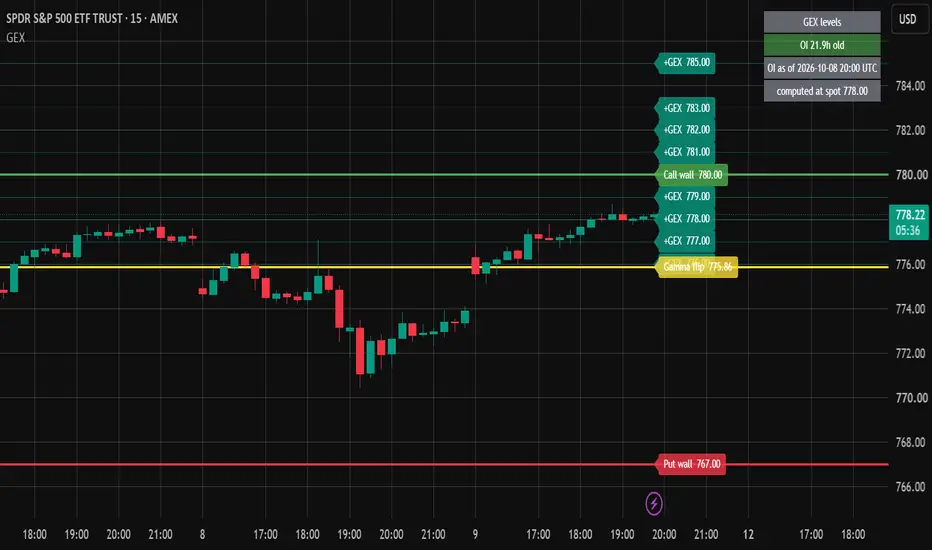
Draws options gamma-exposure (GEX) levels on the chart from one line of text that you paste: the gamma flip, the call wall, the put wall, and up to 20 more strikes ranked by absolute GEX. A table in the top-right corner shows how old the open-interest snapshot behind those levels is, and turns red once it is older than the threshold you set.
WHY THE AGE CHECK
For US-listed options, open interest is reported once per day. Without a timestamp, levels computed from last night's open interest look the same at the open, at the close and after a weekend. This script shows the age of the snapshot on the chart, so old positioning is not read as current.
HOW TO READ THE LEVELS
Under the usual dealer-positioning convention, positive GEX is read as hedging that dampens moves and negative GEX as hedging that amplifies them. The gamma flip is where cumulative GEX changes sign. The call wall and the put wall are the strikes with the largest positive and the most negative GEX. These readings rest on an assumption about who holds the options; see Limitations.
HOW THE LEVELS ARE COMPUTED
The script does not compute GEX. It draws levels computed outside TradingView, because Pine Script cannot call an external API at runtime. You can produce them with your own code from any option chain:
- Per contract line: GEX = gamma x open interest x spot^2 x 0.01 x 100, with Black-Scholes gamma. Calls count positive, puts negative.
- By strike: sum the signed GEX of all rights and expiries at that strike.
- Gamma flip: where cumulative GEX over ascending strikes crosses zero, interpolated linearly between the two bracketing strikes. Count a crossing only after the cumulative has reached 0.5% of the total absolute GEX, so near-zero noise in the far wing is ignored. With several crossings, use the one nearest to spot. With none, write na.
- Call wall: strike with the largest positive GEX. Put wall: strike with the most negative GEX.
- Extra levels: the top strikes by absolute GEX, in descending order.
LEVEL STRING FORMAT (v1)
One line, no spaces, fields separated by semicolons:
v1;asof=20260904T2000Z;spot=5400.00;FLIP=5387.5;CW=5450;PW=5300;L=5425:1.2e9,5375:-8.01e8
- v1: format version, always first
- asof: open-interest snapshot time in UTC, yyyyMMddTHHmmZ
- spot: underlying price used for the computation
- FLIP: gamma flip, or na when there is no valid crossing
- CW: call wall
- PW: put wall
- L: top strikes as strike:gex pairs separated by commas, in descending order of absolute GEX, with signed gex such as 1.2e9 or -8.01e8
Unknown fields are ignored. A string that does not start with v1 shows "No level string".
HOW TO USE
1. Build the string from an option chain as described above and copy it.
2. Paste it into the "Level string" input as a single line, with no spaces or line breaks.
3. Set the age threshold in hours. The default is 24.
4. Choose how many entries of L to draw (0 to 20, default 10). Strikes equal to a wall are not drawn twice.
5. For alerts, use Create Alert and pick one of the three GEX conditions: price crossing the gamma flip, the call wall or the put wall.
HOW IT WORKS
The script parses the string on the last bar, then deletes and redraws its lines and labels there. Lines extend across the whole chart. The live count stays at 3 + N lines and 3 + N labels, well under TradingView's limits.
LIMITATIONS
- The levels are only as good as the option chain and the open interest they came from.
- The sign convention assumes dealers are long the calls customers sell and short the puts customers buy. That is an assumption of the method, not an observed fact, and getting it wrong moves the flip to the other side of spot.
- The string has to be pasted again for every refresh. There is no automatic feed.
- The age comes from the asof field. A string without asof is shown as stale.
- The levels are context for your own analysis, not trade signals.
The chart shows SPY on the 15-minute timeframe with levels from open interest dated 2026-10-08.
Draws options gamma-exposure (GEX) levels on the chart from one line of text that you paste: the gamma flip, the call wall, the put wall, and up to 20 more strikes ranked by absolute GEX. A table in the top-right corner shows how old the open-interest snapshot behind those levels is, and turns red once it is older than the threshold you set.
WHY THE AGE CHECK
For US-listed options, open interest is reported once per day. Without a timestamp, levels computed from last night's open interest look the same at the open, at the close and after a weekend. This script shows the age of the snapshot on the chart, so old positioning is not read as current.
HOW TO READ THE LEVELS
Under the usual dealer-positioning convention, positive GEX is read as hedging that dampens moves and negative GEX as hedging that amplifies them. The gamma flip is where cumulative GEX changes sign. The call wall and the put wall are the strikes with the largest positive and the most negative GEX. These readings rest on an assumption about who holds the options; see Limitations.
HOW THE LEVELS ARE COMPUTED
The script does not compute GEX. It draws levels computed outside TradingView, because Pine Script cannot call an external API at runtime. You can produce them with your own code from any option chain:
- Per contract line: GEX = gamma x open interest x spot^2 x 0.01 x 100, with Black-Scholes gamma. Calls count positive, puts negative.
- By strike: sum the signed GEX of all rights and expiries at that strike.
- Gamma flip: where cumulative GEX over ascending strikes crosses zero, interpolated linearly between the two bracketing strikes. Count a crossing only after the cumulative has reached 0.5% of the total absolute GEX, so near-zero noise in the far wing is ignored. With several crossings, use the one nearest to spot. With none, write na.
- Call wall: strike with the largest positive GEX. Put wall: strike with the most negative GEX.
- Extra levels: the top strikes by absolute GEX, in descending order.
LEVEL STRING FORMAT (v1)
One line, no spaces, fields separated by semicolons:
v1;asof=20260904T2000Z;spot=5400.00;FLIP=5387.5;CW=5450;PW=5300;L=5425:1.2e9,5375:-8.01e8
- v1: format version, always first
- asof: open-interest snapshot time in UTC, yyyyMMddTHHmmZ
- spot: underlying price used for the computation
- FLIP: gamma flip, or na when there is no valid crossing
- CW: call wall
- PW: put wall
- L: top strikes as strike:gex pairs separated by commas, in descending order of absolute GEX, with signed gex such as 1.2e9 or -8.01e8
Unknown fields are ignored. A string that does not start with v1 shows "No level string".
HOW TO USE
1. Build the string from an option chain as described above and copy it.
2. Paste it into the "Level string" input as a single line, with no spaces or line breaks.
3. Set the age threshold in hours. The default is 24.
4. Choose how many entries of L to draw (0 to 20, default 10). Strikes equal to a wall are not drawn twice.
5. For alerts, use Create Alert and pick one of the three GEX conditions: price crossing the gamma flip, the call wall or the put wall.
HOW IT WORKS
The script parses the string on the last bar, then deletes and redraws its lines and labels there. Lines extend across the whole chart. The live count stays at 3 + N lines and 3 + N labels, well under TradingView's limits.
LIMITATIONS
- The levels are only as good as the option chain and the open interest they came from.
- The sign convention assumes dealers are long the calls customers sell and short the puts customers buy. That is an assumption of the method, not an observed fact, and getting it wrong moves the flip to the other side of spot.
- The string has to be pasted again for every refresh. There is no automatic feed.
- The age comes from the asof field. A string without asof is shown as stale.
- The levels are context for your own analysis, not trade signals.
The chart shows SPY on the 15-minute timeframe with levels from open interest dated 2026-10-08.
开源脚本
秉承TradingView的精神,该脚本的作者将其开源,以便交易者可以查看和验证其功能。向作者致敬!您可以免费使用该脚本,但请记住,重新发布代码须遵守我们的网站规则。

Custom Pine Script v6: indicators, strategies, alerts, with look-ahead and repaint checks. Backtest audits in Python.
Hire me on Upwork: upwork.com/freelancers/~01fa3c5136b53674c8
Proofs on GitHub: github.com/guillemustafa-ux
Hire me on Upwork: upwork.com/freelancers/~01fa3c5136b53674c8
Proofs on GitHub: github.com/guillemustafa-ux
免责声明
这些信息和出版物并非旨在提供,也不构成TradingView提供或认可的任何形式的财务、投资、交易或其他类型的建议或推荐。请阅读使用条款了解更多信息。
开源脚本
秉承TradingView的精神,该脚本的作者将其开源,以便交易者可以查看和验证其功能。向作者致敬!您可以免费使用该脚本,但请记住,重新发布代码须遵守我们的网站规则。
Custom Pine Script v6: indicators, strategies, alerts, with look-ahead and repaint checks. Backtest audits in Python.
Hire me on Upwork: upwork.com/freelancers/~01fa3c5136b53674c8
Proofs on GitHub: github.com/guillemustafa-ux
Hire me on Upwork: upwork.com/freelancers/~01fa3c5136b53674c8
Proofs on GitHub: github.com/guillemustafa-ux
免责声明
这些信息和出版物并非旨在提供,也不构成TradingView提供或认可的任何形式的财务、投资、交易或其他类型的建议或推荐。请阅读使用条款了解更多信息。