MarketMaulers IFVG (Open Source)
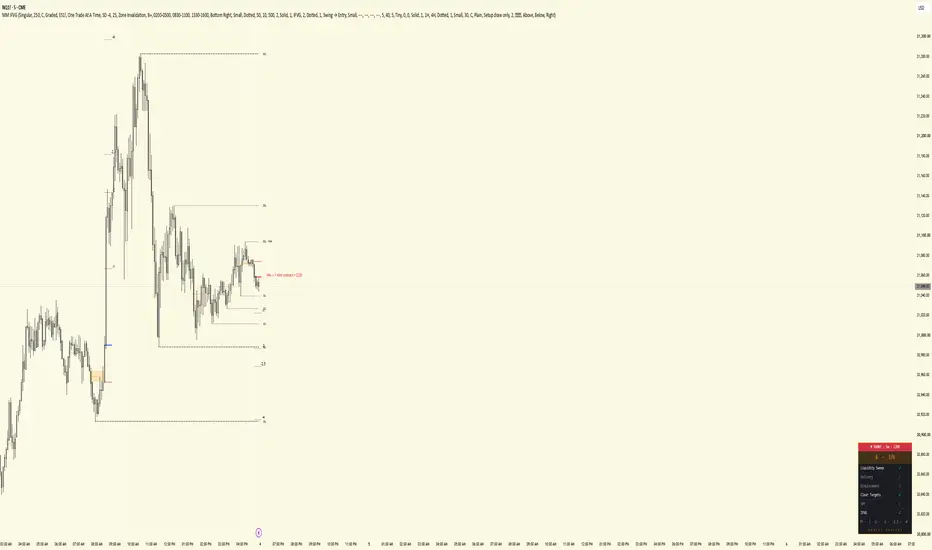
MarketMaulers IFVG finds the fair value gaps that fail, grades each one against a six-point checklist, and hands you the whole trade the moment it prints: entry, stop, position size from your dollar risk, and a standard-deviation target ladder. A setup panel then holds that setup and tracks it through its targets until the next one prints.
THE IDEA, FROM ZERO
A fair value gap is a three-candle imbalance: the middle candle moves so fast that the wicks of the candles either side of it never overlap, leaving a gap in price. Price usually respects these gaps. A bullish gap acts as support, a bearish gap as resistance.
An inverse fair value gap (IFVG) is what happens when that respect breaks. Price closes straight through the far side of the gap instead of bouncing off it. The support has failed and now acts as resistance, or the reverse. That failure is information: the side that built the gap got run over, and the gap marks the level where it happened.
Wicks are noise and closes are intent. A wick through a gap counts for nothing here. Only a confirmed candle close through the far side inverts it, and it has to happen within 30 bars of the gap forming.
WHAT MAKES A SETUP
Every inversion is scored against six checks, one point each:
• Liquidity Sweep · a swing, data, session (Asia, London, NY), previous day, week or month high or low was raided and price closed back inside within three bars. The credit stays fresh for a set window and dies if price trades back past the raid's extreme
• Delivery · price tapped a live higher-timeframe fair value gap in the setup's direction. Each of 15m, 1H, 4H and daily that sits above your chart timeframe is scanned
• Displacement · a candle body of at least 1.2 times ATR within the last five bars
• Clear Targets · unswept liquidity on the profit side, at least 1.5 ATR away
• SMT · at the sweep, the correlated index held its own level while this chart raided it (NQ and ES map to each other automatically)
• IFVG · the inversion close itself
The grade is the count: C = 1, B- = 2, B = 3, B+ = 4, A = 5, A+ = 6. Every setup needs the inversion plus at least one more check, so the lowest grade that prints is B-. Min Setup Grade decides the lowest grade that draws, and Alert Min Grade decides the lowest grade that can alert.
Sweep Requirement sets how strict the sweep is. Graded (default) counts the sweep toward the grade. Required means no raid, no setup: every zone needs a matching sweep behind it, and the gap has to form soon after that sweep.
Detection picks what prints. Singular (default) shows standalone gaps. Series fuses two or more same-direction gaps from one leg into one zone that only inverts when price closes through the whole run, which surfaces setups Singular never sees. Both shows the two together.
ONE TRADE AT A TIME
Once a setup prints, it holds its direction until it delivers. No second entry prints in the same direction while the first is still working down its target ladder. You choose where the trade counts as done with Trade Is Done At: SD -1, SD -2, SD -2.5, SD -4 or TP or Stop. A setup that stalls releases its direction after Stall Release, a count of bars without a new SD level, and a stopped setup releases it immediately.
The opposite direction has to pass Reversal Proof. On Zone Invalidation (default) the turn has to close through the live zone, the same close that stops that trade out, so a pullback that retests the zone cannot pose as a reversal. It also has to meet Reversal Min Grade (B+ by default) and, by default, show displacement. Structure Shift adds a break of the recent swing. Never blocks counter-direction prints while a setup is live.
Set Entry Economy to All Entries to switch the lane rule off. With the default Graded sweep setting, a second setup in the same direction still waits until the first reaches TP or is stopped, and never prints within five bars of it.
A higher-graded setup off the same raid replaces the one it beats, and the earlier zone fades out.
THE TRADE PLAN
Each printed setup draws its trade:
• Entry · a line at the inversion close
• Stop · SL Placement puts it past the far side of the zone (IFVG) or beyond the extreme of the leg that built it (Swing), plus the SL Buffer in ticks
• Size · the largest contract count whose total risk fits your Risk Budget. When one mini would risk more than the budget, it sizes in micros and says so
• Targets · a ladder at SD -1, -2, -2.5 and -4. SD Measured From sets the unit: the manipulation leg, the gap itself, the full displacement leg, or your own risk so the rungs read as R
• Break even · the entry label adds BE the moment SD -1 is tagged, your cue to move the stop
A setup reads STOPPED when a candle closes through the far side of the zone, the same close that fails the gap. A wick to the stop line does not stop it, and once a setup has reached TP it can no longer be stopped. With SL Placement on Swing, the drawn stop sits further out than that close.
Hover the MM label on the latest setup for its full card: grade, every check, entry, stop and size.
THE SETUP PANEL
The panel shows the last setup that printed and holds it until a new one confirms. It never switches to a zone that has not printed, and it does not drop the trade you are in while the move plays out.
• Top line · direction, timeframe and status: LIVE, RETESTED, COMPLETE or STOPPED
• Grade · the letter and the checklist count, with the frame in the grade's colour
• Checklist · all six checks as they stood when the setup printed
• Target Progress · TP and each SD level. SD levels tick the moment price touches them, TP ticks on a close beyond it
COMPLETE lands on the same level set in Trade Is Done At, so the panel and the entry rule never disagree about whether a trade is finished. A setup stopped after tagging a level says so, for example STOPPED · after SD -1. If you moved your stop to break even at the BE cue, that is a scratch and not a full loss.
CONTEXT LAYERS
• Nearby liquidity · the nearest major pool on each side, up to five minor pools between price and it, removed the moment price trades through. A pool sitting on the previous day, week or month high or low is labelled as one, for example SSL · PDL
• Equal highs and lows · off by default
• Higher-timeframe FVGs · two overlay slots, off by default, with the higher timeframe owning the level where they overlap
• Key levels · previous day, week and month highs and lows, off by default, with a mark on any level already taken
• LRLR · a staircase of four or more unswept swing extremes. By default it only shows alongside an open setup, on the side that setup is reaching for
• CE line · the midline of each zone
• Killzone filter · off by default. When on, setups only print inside London, NY AM and NY PM, with each window editable. An inversion outside every window is consumed and never prints
ALERTS
Alerts are off by default. Turn on Enable alerts in the Alerts group first, then create one TradingView alert on this indicator with the condition set to "Any alert() function call". That single alert carries every type you have ticked:
New Setup · Retest · SD Hits · TP Hit · Stopped
New Setup messages carry the grade, entry, stop, target and position size. Alert Min Grade filters every type by quality. A Discord webhook format wraps the same text for posting straight into a channel. An identical message repeated within ten minutes is dropped, so one event sends one message.
Recreate the alert after changing settings. TradingView snapshots the settings at the moment the alert is created.
REPAINTING, STATED PLAINLY
A gap is recorded only after its third candle closes, and it inverts only on a confirmed close through its far side, so a setup never appears on a candle that is still forming. The drawn higher-timeframe FVGs read closed higher-timeframe candles. STOPPED is judged on closes. Target hits update live on purpose: an SD level ticks the moment price touches it, because a target is a price, not a close.
One known difference between history and live: on historical bars the Delivery check can see a higher-timeframe gap before that candle has closed. A reloaded chart can therefore grade a past setup differently from how it printed live, and a borderline setup can appear or drop out. Live prints and live alerts are not affected. Judge it on what prints live, not on a reloaded history.
MADE TO FIT YOUR CHART
Zones, trade-plan lines, labels, the panel, liquidity, equal highs and lows, key levels and LRLR all take your own colours, and most also have their own switch, style and size. The defaults are set for a light NQ chart. On a dark theme, switch the black line and label colours to white or grey.
HOW TRADERS USE IT
Let the grade do the filtering. Set Min Setup Grade to what you trade and ignore the rest. When a setup prints, the entry, stop and size are already on the chart, so the only decision left is whether you take it. Manage it off the panel: SD -1 is your break-even cue, the Target Progress row shows what is left, and COMPLETE tells you the plan has been delivered. If it reads STOPPED, stand down and wait for the next one. Run it beside Maulers Raid to Delivery to see the higher-timeframe setup and the entry on one chart.
WHY IT IS ONE TOOL
Every layer feeds the grade or the trade. Liquidity supplies the sweeps and the targets, higher-timeframe gaps supply Delivery, key levels and sessions supply sweep sources, and the panel and alerts carry the result. Nothing is included for decoration.
ORIGINAL WORK
Inverse fair value gaps are a common community concept, and many tools draw them. This is an independent build: the inversion and series detection, the six-check grading, the one-trade-at-a-time lane rule, the trade plan and the setup panel were written in-house.
Works on any market and any timeframe. SMT auto-maps NQ and ES; other markets use the SMT Correlate symbol you enter.
Display only. This grades inverse fair value gaps and draws their trade plan. It does not fire buy/sell signals. Educational tool, not financial advice.
Published open-source. This is the same indicator as MarketMaulers IFVG, published here with the source readable. The inversion and series detection engine, the six-check grading model, the one-trade-at-a-time lane and reversal-proof rules, the trade plan with micro fallback sizing, and the setup panel latch are all in the code. Everything above explains what it does and how it decides; the code is there so you can check that the description is accurate rather than take it on faith. Read it, fork it, argue with the constants.
THE IDEA, FROM ZERO
A fair value gap is a three-candle imbalance: the middle candle moves so fast that the wicks of the candles either side of it never overlap, leaving a gap in price. Price usually respects these gaps. A bullish gap acts as support, a bearish gap as resistance.
An inverse fair value gap (IFVG) is what happens when that respect breaks. Price closes straight through the far side of the gap instead of bouncing off it. The support has failed and now acts as resistance, or the reverse. That failure is information: the side that built the gap got run over, and the gap marks the level where it happened.
Wicks are noise and closes are intent. A wick through a gap counts for nothing here. Only a confirmed candle close through the far side inverts it, and it has to happen within 30 bars of the gap forming.
WHAT MAKES A SETUP
Every inversion is scored against six checks, one point each:
• Liquidity Sweep · a swing, data, session (Asia, London, NY), previous day, week or month high or low was raided and price closed back inside within three bars. The credit stays fresh for a set window and dies if price trades back past the raid's extreme
• Delivery · price tapped a live higher-timeframe fair value gap in the setup's direction. Each of 15m, 1H, 4H and daily that sits above your chart timeframe is scanned
• Displacement · a candle body of at least 1.2 times ATR within the last five bars
• Clear Targets · unswept liquidity on the profit side, at least 1.5 ATR away
• SMT · at the sweep, the correlated index held its own level while this chart raided it (NQ and ES map to each other automatically)
• IFVG · the inversion close itself
The grade is the count: C = 1, B- = 2, B = 3, B+ = 4, A = 5, A+ = 6. Every setup needs the inversion plus at least one more check, so the lowest grade that prints is B-. Min Setup Grade decides the lowest grade that draws, and Alert Min Grade decides the lowest grade that can alert.
Sweep Requirement sets how strict the sweep is. Graded (default) counts the sweep toward the grade. Required means no raid, no setup: every zone needs a matching sweep behind it, and the gap has to form soon after that sweep.
Detection picks what prints. Singular (default) shows standalone gaps. Series fuses two or more same-direction gaps from one leg into one zone that only inverts when price closes through the whole run, which surfaces setups Singular never sees. Both shows the two together.
ONE TRADE AT A TIME
Once a setup prints, it holds its direction until it delivers. No second entry prints in the same direction while the first is still working down its target ladder. You choose where the trade counts as done with Trade Is Done At: SD -1, SD -2, SD -2.5, SD -4 or TP or Stop. A setup that stalls releases its direction after Stall Release, a count of bars without a new SD level, and a stopped setup releases it immediately.
The opposite direction has to pass Reversal Proof. On Zone Invalidation (default) the turn has to close through the live zone, the same close that stops that trade out, so a pullback that retests the zone cannot pose as a reversal. It also has to meet Reversal Min Grade (B+ by default) and, by default, show displacement. Structure Shift adds a break of the recent swing. Never blocks counter-direction prints while a setup is live.
Set Entry Economy to All Entries to switch the lane rule off. With the default Graded sweep setting, a second setup in the same direction still waits until the first reaches TP or is stopped, and never prints within five bars of it.
A higher-graded setup off the same raid replaces the one it beats, and the earlier zone fades out.
THE TRADE PLAN
Each printed setup draws its trade:
• Entry · a line at the inversion close
• Stop · SL Placement puts it past the far side of the zone (IFVG) or beyond the extreme of the leg that built it (Swing), plus the SL Buffer in ticks
• Size · the largest contract count whose total risk fits your Risk Budget. When one mini would risk more than the budget, it sizes in micros and says so
• Targets · a ladder at SD -1, -2, -2.5 and -4. SD Measured From sets the unit: the manipulation leg, the gap itself, the full displacement leg, or your own risk so the rungs read as R
• Break even · the entry label adds BE the moment SD -1 is tagged, your cue to move the stop
A setup reads STOPPED when a candle closes through the far side of the zone, the same close that fails the gap. A wick to the stop line does not stop it, and once a setup has reached TP it can no longer be stopped. With SL Placement on Swing, the drawn stop sits further out than that close.
Hover the MM label on the latest setup for its full card: grade, every check, entry, stop and size.
THE SETUP PANEL
The panel shows the last setup that printed and holds it until a new one confirms. It never switches to a zone that has not printed, and it does not drop the trade you are in while the move plays out.
• Top line · direction, timeframe and status: LIVE, RETESTED, COMPLETE or STOPPED
• Grade · the letter and the checklist count, with the frame in the grade's colour
• Checklist · all six checks as they stood when the setup printed
• Target Progress · TP and each SD level. SD levels tick the moment price touches them, TP ticks on a close beyond it
COMPLETE lands on the same level set in Trade Is Done At, so the panel and the entry rule never disagree about whether a trade is finished. A setup stopped after tagging a level says so, for example STOPPED · after SD -1. If you moved your stop to break even at the BE cue, that is a scratch and not a full loss.
CONTEXT LAYERS
• Nearby liquidity · the nearest major pool on each side, up to five minor pools between price and it, removed the moment price trades through. A pool sitting on the previous day, week or month high or low is labelled as one, for example SSL · PDL
• Equal highs and lows · off by default
• Higher-timeframe FVGs · two overlay slots, off by default, with the higher timeframe owning the level where they overlap
• Key levels · previous day, week and month highs and lows, off by default, with a mark on any level already taken
• LRLR · a staircase of four or more unswept swing extremes. By default it only shows alongside an open setup, on the side that setup is reaching for
• CE line · the midline of each zone
• Killzone filter · off by default. When on, setups only print inside London, NY AM and NY PM, with each window editable. An inversion outside every window is consumed and never prints
ALERTS
Alerts are off by default. Turn on Enable alerts in the Alerts group first, then create one TradingView alert on this indicator with the condition set to "Any alert() function call". That single alert carries every type you have ticked:
New Setup · Retest · SD Hits · TP Hit · Stopped
New Setup messages carry the grade, entry, stop, target and position size. Alert Min Grade filters every type by quality. A Discord webhook format wraps the same text for posting straight into a channel. An identical message repeated within ten minutes is dropped, so one event sends one message.
Recreate the alert after changing settings. TradingView snapshots the settings at the moment the alert is created.
REPAINTING, STATED PLAINLY
A gap is recorded only after its third candle closes, and it inverts only on a confirmed close through its far side, so a setup never appears on a candle that is still forming. The drawn higher-timeframe FVGs read closed higher-timeframe candles. STOPPED is judged on closes. Target hits update live on purpose: an SD level ticks the moment price touches it, because a target is a price, not a close.
One known difference between history and live: on historical bars the Delivery check can see a higher-timeframe gap before that candle has closed. A reloaded chart can therefore grade a past setup differently from how it printed live, and a borderline setup can appear or drop out. Live prints and live alerts are not affected. Judge it on what prints live, not on a reloaded history.
MADE TO FIT YOUR CHART
Zones, trade-plan lines, labels, the panel, liquidity, equal highs and lows, key levels and LRLR all take your own colours, and most also have their own switch, style and size. The defaults are set for a light NQ chart. On a dark theme, switch the black line and label colours to white or grey.
HOW TRADERS USE IT
Let the grade do the filtering. Set Min Setup Grade to what you trade and ignore the rest. When a setup prints, the entry, stop and size are already on the chart, so the only decision left is whether you take it. Manage it off the panel: SD -1 is your break-even cue, the Target Progress row shows what is left, and COMPLETE tells you the plan has been delivered. If it reads STOPPED, stand down and wait for the next one. Run it beside Maulers Raid to Delivery to see the higher-timeframe setup and the entry on one chart.
WHY IT IS ONE TOOL
Every layer feeds the grade or the trade. Liquidity supplies the sweeps and the targets, higher-timeframe gaps supply Delivery, key levels and sessions supply sweep sources, and the panel and alerts carry the result. Nothing is included for decoration.
ORIGINAL WORK
Inverse fair value gaps are a common community concept, and many tools draw them. This is an independent build: the inversion and series detection, the six-check grading, the one-trade-at-a-time lane rule, the trade plan and the setup panel were written in-house.
Works on any market and any timeframe. SMT auto-maps NQ and ES; other markets use the SMT Correlate symbol you enter.
Display only. This grades inverse fair value gaps and draws their trade plan. It does not fire buy/sell signals. Educational tool, not financial advice.
Published open-source. This is the same indicator as MarketMaulers IFVG, published here with the source readable. The inversion and series detection engine, the six-check grading model, the one-trade-at-a-time lane and reversal-proof rules, the trade plan with micro fallback sizing, and the setup panel latch are all in the code. Everything above explains what it does and how it decides; the code is there so you can check that the description is accurate rather than take it on faith. Read it, fork it, argue with the constants.

Haftungsausschluss
Die Informationen und Veröffentlichungen sind nicht als Finanz-, Anlage-, Handels- oder andere Arten von Ratschlägen oder Empfehlungen gedacht, die von TradingView bereitgestellt oder gebilligt werden, und stellen diese nicht dar. Lesen Sie mehr in den Nutzungsbedingungen.
Haftungsausschluss
Die Informationen und Veröffentlichungen sind nicht als Finanz-, Anlage-, Handels- oder andere Arten von Ratschlägen oder Empfehlungen gedacht, die von TradingView bereitgestellt oder gebilligt werden, und stellen diese nicht dar. Lesen Sie mehr in den Nutzungsbedingungen.