OPEN-SOURCE SCRIPT
TrendBreaker Pro | Auto Trendline Break Strategy with Momentum
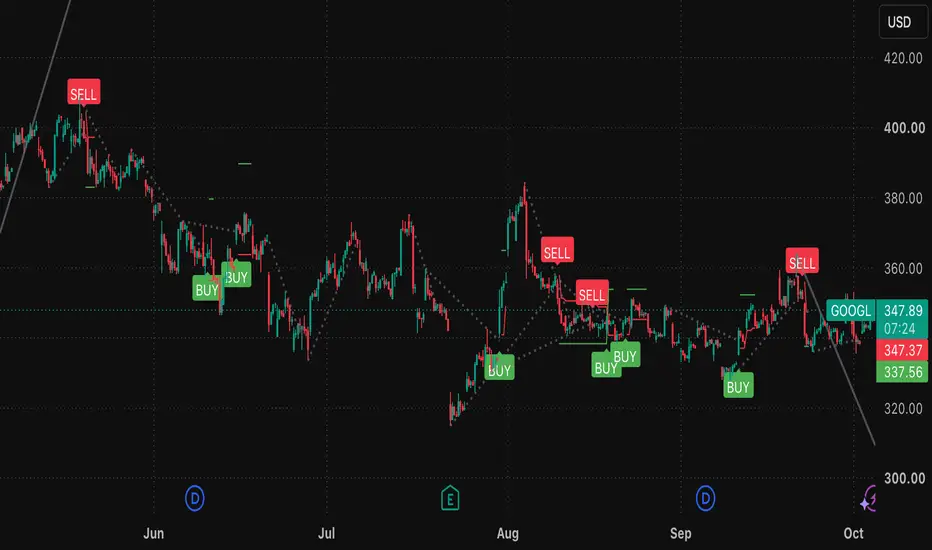
TrendBreaker Pro automatically draws diagonal trendlines from swing pivots and trades the moment price closes through one.
How the lines are built
How trades trigger
How trades are managed
Features
Tips
Warnings
How the lines are built
- Resistance (downtrend) line: drawn through two consecutive lower pivot highs.
- Support (uptrend) line: drawn through two consecutive higher pivot lows.
- Pivots are confirmed only after N bars on each side, so the lines and signals don't repaint.
- A line is skipped if price had already pierced it while its pivot was still being confirmed.
How trades trigger
- Long: a bar closes above the resistance line by a small ATR buffer.
- Short: a bar closes below the support line by the same buffer.
- Each line can only break once, even if the filters reject that break, so it can't fire again later.
- Lines expire after a set number of bars so stale levels don't trigger signals.
How trades are managed
- The stop is either ATR-based or placed beyond the recent swing.
- All targets are expressed in R multiples (R = your initial risk distance).
- Take profit can be full or partial.
- The stop moves to break-even at a chosen R, then trails by ATR once price reaches a second R level.
- There is an optional time exit and optional reversal on an opposite signal.
Features
- Automatic trendlines: pivot-based, with broken lines faded and shortened for a clean chart.
- ATR break buffer: ignores marginal wick-style breaks.
- Four optional confirmation filters:
- smoothed Awesome Oscillator momentum turn (on by default)
- EMA trend direction
- ADX strength
- volume vs. its 20-bar average
- Two stop modes: ATR multiple or swing high/low with ATR padding.
- R-based exits: take profit, break-even trigger and trail start are all set in R.
- Partial take profit: the remainder runs on the trailing stop.
- Long/short toggles and a reverse on opposite signal option.
- Live stop and TP lines plotted while in a trade.
- Dashboard: current resistance and support levels, momentum, ADX and position.
- Realistic defaults: 0.04% commission, 2 ticks slippage, 5% equity per trade, no pyramiding.
Tips
- Start with filters off. Look at the raw breaks first, then enable one filter at a time and see whether results actually improve.
- Match pivot length to timeframe. 5 works for intraday; try 8–10 on 4H and daily. Larger values give fewer, more meaningful lines.
- Raise Min Bars Between Pivots if you see steep, noisy lines.
- Use the EMA filter for trend-following. Trendline breaks are often counter-trend, so the EMA filter makes this a "break in the direction of the bigger trend" system.
- Try Swing stop mode on instruments with clean structure, and ATR mode on choppier ones.
- Don't chase tight settings. A large R target with a trail suits trending markets; a smaller R target suits ranges.
- Test broadly. Run several symbols, timeframes and date ranges, and check that results hold across them.
- Check trade count. A strong result from very few trades isn't meaningful.
Warnings
- Not financial advice. This is an educational tool. Past backtest results don't guarantee future performance.
- Not compiled or tested by me. Add it to a chart and fix any compiler messages before relying on it.
- Entries fill on the next bar's open. Signals are confirmed on bar close, so fills can differ from the signal price, especially in fast markets.
- Stops, targets and the trailing stop are simulated on bar data. Intrabar order of events (stop vs. target on the same bar) is estimated by TradingView, so real fills may differ.
- Lines are drawn retroactively. Pivots are anchored in the past once confirmed. That's normal for trendlines, but it means the chart looks "perfect" in hindsight. Only the signals are non-repainting.
- Pivot lag. Lines only appear N bars after the pivot, so very fast reversals may be missed.
- False breakouts happen. Ranging and low-volatility markets can produce whipsaws, so consider the ADX and volume filters there.
- Partial TP quirk. With take-profit quantity under 100%, two exit orders manage one position. Verify the behavior in the List of Trades before trusting those results.
- Overfitting risk. Tuning many parameters to one chart can produce results that won't carry forward.
- Costs matter. Commission and slippage on your broker may differ from the defaults, and leverage amplifies losses.
Open-source Skript
Ganz im Sinne von TradingView hat dieser Autor sein/ihr Script als Open-Source veröffentlicht. Auf diese Weise können nun auch andere Trader das Script rezensieren und die Funktionalität überprüfen. Vielen Dank an den Autor! Sie können das Script kostenlos verwenden, aber eine Wiederveröffentlichung des Codes unterliegt unseren Hausregeln.

Haftungsausschluss
Die Informationen und Veröffentlichungen sind nicht als Finanz-, Anlage-, Handels- oder andere Arten von Ratschlägen oder Empfehlungen gedacht, die von TradingView bereitgestellt oder gebilligt werden, und stellen diese nicht dar. Lesen Sie mehr in den Nutzungsbedingungen.
Open-source Skript
Ganz im Sinne von TradingView hat dieser Autor sein/ihr Script als Open-Source veröffentlicht. Auf diese Weise können nun auch andere Trader das Script rezensieren und die Funktionalität überprüfen. Vielen Dank an den Autor! Sie können das Script kostenlos verwenden, aber eine Wiederveröffentlichung des Codes unterliegt unseren Hausregeln.
Haftungsausschluss
Die Informationen und Veröffentlichungen sind nicht als Finanz-, Anlage-, Handels- oder andere Arten von Ratschlägen oder Empfehlungen gedacht, die von TradingView bereitgestellt oder gebilligt werden, und stellen diese nicht dar. Lesen Sie mehr in den Nutzungsbedingungen.