OPEN-SOURCE SCRIPT
Aktualisiert COD - Time-Exit Framework (Shareable)
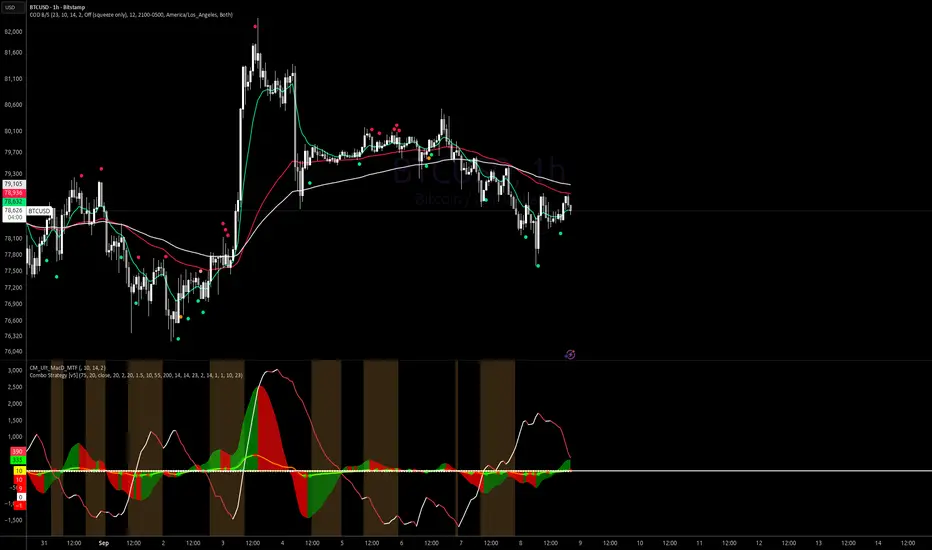
COD - Time-Exit Framework (Shareable) is a multi-timeframe trade-management overlay built for traders who manage exits by both time and momentum.
It combines a structured 10-23 bar decision window, EMA context (10/55/100), and Squeeze Momentum + ADX behavior to help you avoid overholding and only re-enter when confirmation returns.
What it does
Time-based framework
Tracks bars from your entry anchor
Highlights the active management window (minBars to maxBars)
Flags thesis decay after the max-bar threshold
Trend context with EMAs
Plots EMA 10, EMA 55, and EMA 100
Supports target logic around EMA pullback zones
Momentum/strength confirmation
Squeeze Momentum turning-point dots
Green dot logic filtered to negative-to-positive momentum transitions
ADX slope checks to detect strengthening vs weakening trend pressure
Exit and re-entry workflow
Optional post-exit No Buy Mode
Re-entry gate requires confirmation (with optional strict 2-bar mode)
BUY OK marker appears only when reconfirmation criteria are met
Target zone engine
Three modes:
Manual (fixed user-defined zone)
Dynamic EMA (Snapshot on Exit) (captures EMA55/EMA100 at trigger)
Dynamic EMA (Live) (zone updates with moving EMAs)
Configurable zone duration in bars
Visual start/end labels for expected move window
Chart clarity controls
Minimal Mode: EMAs + SM dots only
Full mode: adds timing markers, zone overlays, and diagnostic states
Best use case
Designed for swing/intraday management where entries are confirmed by your system, and exits are controlled by:
elapsed bars,
momentum rollover, and
trend-strength behavior.
Notes
This is a decision-support tool, not automated financial advice.
Works on 4H, D, W, M, and other chart intervals.
Tune lengths/thresholds per market and volatility regime.
It combines a structured 10-23 bar decision window, EMA context (10/55/100), and Squeeze Momentum + ADX behavior to help you avoid overholding and only re-enter when confirmation returns.
What it does
Time-based framework
Tracks bars from your entry anchor
Highlights the active management window (minBars to maxBars)
Flags thesis decay after the max-bar threshold
Trend context with EMAs
Plots EMA 10, EMA 55, and EMA 100
Supports target logic around EMA pullback zones
Momentum/strength confirmation
Squeeze Momentum turning-point dots
Green dot logic filtered to negative-to-positive momentum transitions
ADX slope checks to detect strengthening vs weakening trend pressure
Exit and re-entry workflow
Optional post-exit No Buy Mode
Re-entry gate requires confirmation (with optional strict 2-bar mode)
BUY OK marker appears only when reconfirmation criteria are met
Target zone engine
Three modes:
Manual (fixed user-defined zone)
Dynamic EMA (Snapshot on Exit) (captures EMA55/EMA100 at trigger)
Dynamic EMA (Live) (zone updates with moving EMAs)
Configurable zone duration in bars
Visual start/end labels for expected move window
Chart clarity controls
Minimal Mode: EMAs + SM dots only
Full mode: adds timing markers, zone overlays, and diagnostic states
Best use case
Designed for swing/intraday management where entries are confirmed by your system, and exits are controlled by:
elapsed bars,
momentum rollover, and
trend-strength behavior.
Notes
This is a decision-support tool, not automated financial advice.
Works on 4H, D, W, M, and other chart intervals.
Tune lengths/thresholds per market and volatility regime.
Versionshinweise
COD Exit — v1.2 "Trade Mode"Theme: turn the 4H low-ADX SM reversion swing into a single-scenario, on-chart trade plan that auto-arms every new cycle.
What's new
1. Trade Mode panel (new group) Toggle Trade Mode ON and the script draws a full live trade plan anchored to the current cycle's T0 (latest SM green dot):
ENTRY (white line) — body top of the last swing-low bar by default. Switchable via Entry Source: Swing Low Body High · T0 Close · Manual.
STOP LOSS (magenta dashed) — min(Entry × (1 − SL %), EMA100 − 1 tick) when Cap SL under EMA 100 is on. Defaults: 2.0 % and cap enabled.
ADD ZONE (blue box) — from the last swing low up to T0 body high (or candle high / manual). Visualises Phase-2 pullback buys.
TOLERANCE (red line) — swing low − 0.25 × ATR(14). Closes below this break the thesis.
TARGET (green line) — last swing high over Last Top Lookback bars (default 50), or manual.
All five elements live-update on the last bar, so panning/zoom doesn't desync them.
2. Cycle-aware reset Every fresh SM green dot hard-resets the plan and its flags (Phase-2 hit, Thesis broken, Target hit, SM red since T0). The 10–23 exit window, thesis-decay shading, and post-exit window all re-arm from the new T0 automatically.
3. New alertconditions (ready to arm)
COD New Cycle (SM Green Dot) — cycle reset, 10–23 window armed
COD Buy Reconfirmation — SM green + ADX rising + +DI > −DI
COD ADX > Threshold — real trend taking hold
COD Phase-2 Add Zone — price tagged add zone with no SM red since T0
COD Thesis Broken — SM red OR close below tolerance line
COD Target Hit — take profit / trail per plan
4. Chart UX
Dark-BG theme by default; Light-BG and Custom options.
Show History Cycles toggle — off = only current cycle's markers (less clutter).
Minimal Mode — EMAs + SM dots only.
Green-dot condition diagnostics toggle for debugging why BUY OK did/didn't fire.
EMA 10 / 55 / 100 ribbon, swing-low reference line, dynamic 60-bar target zone (Manual · Dyn EMA snapshot · Dyn EMA live).
5. Engineering fixes
Replaced Unicode characters (↑ ↓ · −) with ASCII in string literals — fixed server-side "Can't parse pine".
Clamped all history offsets with math.max(n, 0) to prevent negative-index parse errors on early bars.
Guarded str.tostring against na inputs.
Consolidated Data Window diagnostics into a bitmap-encoded plot to stay under Pine's 64-plot limit.
Raised max_labels_count = 500, added max_boxes_count = 100 for multi-cycle history.
Default plan snapshot (current BTCUSD 4H test)
Entry: 74,667.90 (body top of 04/19/26 17:00 swing-low bar)
Stop Loss: 73,103.93 (2 % rule, capped by EMA 100)
Target: last swing high (~78,400)
Add Zone: last swing low → T0 body high
Tolerance: swing low − 0.25 × ATR(14)
How to use
Add to a BTCUSD 4H chart (works on any instrument, tune ADX Strength Threshold per TF).
Leave Auto-Detect Cycle on so T0 tracks the latest SM green dot.
Arm the six alertconditions once per chart. Once per bar close is recommended.
Take entries only in the 10–23 window with ADX rising or +DI > −DI; exit by SM red, not by price.
Known constraints
Must stay on the timeframe where the setup was qualified (4H tested).
Dynamic EMA (Live) target zone grows with price — leave on unless backtesting.
Mutating inputs post-deploy via the MCP indicator set CLI currently breaks the study; change inputs in the UI or redeploy via pine raw-compile.
Versionshinweise
COD Exit Update Notes (for TradingView Publish)Release focus: full multi-timeframe trade framework with independent behavior for 4H, 1D, 1W, and 1M.
Major upgrades
Added auto timeframe profiles so each chart keeps its own logic:
4H, 1D, 1W, 1M can run different windows, ADX behavior, and risk controls.
Prevents one timeframe setup from overwriting another.
Added profile mode:
Auto by chart timeframe (recommended)
Manual (advanced override)
Trade Mode improvements
Entry, SL, and target now support stronger structure-based logic:
Entry source options include swing-low body variants.
SL is enforced below swing low when using swing-low base.
Target supports Last Top Before T0 context.
Added timeframe-specific entry gap controls:
4H Max Entry Gap %
1D Max Entry Gap %
1W Max Entry Gap %
1M Max Entry Gap %
Added SM red-dot risk control:
SM Red Dots To Exit (1-3)
New alert cue for chosen red-dot threshold.
1M (Monthly) specific enhancements
Monthly profile now supports a 10-23 bar resolution window.
Added optional 1M manual SL price (can disable by setting 0).
Extended pre-T0 target context to better match long-cycle structure.
Visual and context updates
Restored explicit cycle timing markers in Trade Mode:
Blue dotted T0 vertical line
MIN / MAX dotted vertical time-range lines
Added Day context helpers for cycle-finished / caution / exhaustion bias states.
Data Window now includes extra diagnostics (red-dot count, context state, red-dot exit setting).
Alerts
Added/expanded alert logic for:
Phase-2 add zone
Thesis break
Target hit
Red-dot exit cue (user-selected threshold)
Existing cycle/reset and trend-context alerts remain supported.
Versionshinweise
COD – Time-Exit Framework (Shareable) — update (v1.19)What’s new
Buy / sell confirmations (live chart) — With History mode off, you get clear markers: Buy confirmation (yellow triangle) when the full re-entry / BUY OK gate fires (confirmed squeeze green + ADX rising + +DI vs −DI). Sell confirmation (red triangle) when strict SM− fires (the same logic used for red-dot counts and thesis when strict mode is on). These triangles stay off in History mode so they don’t clutter the historical SM read.
MACD-aware squeeze cues — Buy conf (MACD) (amber dot) = weak SM+ (MACD bull cross while line and signal are still below zero). Sell conf (MACD) (orange dot) = squeeze red while the MACD line is still above the zero line; red SM− dot only when the MACD line is at or below zero. Strict SM− for counts/alerts still uses ADX + recent bear cross + MACD under zero and filters the “bear cross above zero” bar.
History vs live — History mode on still shows the classic green SM+ and red SM− circles (when Amber SM dots only is off) for scanning past cycles. History off hides those green/red circles so day-to-day trading leans on MACD cue dots + Buy/Sell confirmation triangles.
Amber SM dots only — Optional: in History mode, hide green/red SM and keep only the amber/orange MACD-tied dots.
Under the hood — Tuned for TradingView’s plot limit (single bundled alert, leaner history drawing, no extra plotchar block). Auto cycle (SM green resets) input restored for manual vs auto cycle.
How to use
Leave History mode off for normal trading; turn it on when you want the full green/red SM overlay on old cycles.
Use Style to show or hide Buy conf (MACD), Sell conf (MACD), Buy confirmation, Sell confirmation, or the history-only SM+ ok / SM- ok series.
Versionshinweise
rename the indicator and also made it easier to read. Versionshinweise
COD - Buy and Sell (COD B/S)Overlay: EMA10 / EMA55 / EMA100 + buy/sell dots from live MACD (default 10/14/2), squeeze, and ADX 23. No fibs, no SL/TP lines, no auto-trades. Use one timeframe at a time.
Setup
Add this script.
Add CM Ult (or equivalent) at 10 / 14 / 2 so the pane matches the dots.
Keep a squeeze + ADX pane; read ADX vs 23 (strength only, not direction).
EMAs — Last 10/55 cross is the trend. Bounce 10 first in an uptrend; 55 is the deeper bounce. When 10 and 55 meet, expect chop then breakout — confirm with squeeze / MACD / ADX.
Dots
Green — buy (squeeze + MACD below zero, or MACD zero-line cross drawn 2 bars early)
Orange — buy lead (MACD > signal, still under zero, squeeze not green yet)
Red / light red / adjust — sells, trims, or weak-ADX adjust
Defaults: closed bar only, hide developed buys, reds = higher wick (cleaner, less flicker).
Combo idea — Prefer buys when squeeze is still compressed (not already expanded) + MACD lead/cross + ADX strength. After a buy: 10/55 widening = working; tag 55 = exit look.
Alerts (BTC 1H & 4H)
Built-in BUY/SELL alerts fire on BTCUSD / BTCUSDC, 1H or 4H, outside quiet hours (default 9 PM–5 AM Pacific).
Best practice — create two alerts per TF (not “Any alert()”):
COD — BUY green / zero (1H 4H)
COD — SELL red (1H 4H)
Trigger: Once per bar close. Enable Notify on app.
Example: COD BUY 1H BTCUSD @ 78800 / COD SELL 4H BTCUSDC @ 78800
While long, use Alert side = Sell only if you only want exit pings. Desktop does not need to stay open.
Not financial advice — education and charting only.
Open-source Skript
Ganz im Sinne von TradingView hat dieser Autor sein/ihr Script als Open-Source veröffentlicht. Auf diese Weise können nun auch andere Trader das Script rezensieren und die Funktionalität überprüfen. Vielen Dank an den Autor! Sie können das Script kostenlos verwenden, aber eine Wiederveröffentlichung des Codes unterliegt unseren Hausregeln.

Haftungsausschluss
Die Informationen und Veröffentlichungen sind nicht als Finanz-, Anlage-, Handels- oder andere Arten von Ratschlägen oder Empfehlungen gedacht, die von TradingView bereitgestellt oder gebilligt werden, und stellen diese nicht dar. Lesen Sie mehr in den Nutzungsbedingungen.
Open-source Skript
Ganz im Sinne von TradingView hat dieser Autor sein/ihr Script als Open-Source veröffentlicht. Auf diese Weise können nun auch andere Trader das Script rezensieren und die Funktionalität überprüfen. Vielen Dank an den Autor! Sie können das Script kostenlos verwenden, aber eine Wiederveröffentlichung des Codes unterliegt unseren Hausregeln.
Haftungsausschluss
Die Informationen und Veröffentlichungen sind nicht als Finanz-, Anlage-, Handels- oder andere Arten von Ratschlägen oder Empfehlungen gedacht, die von TradingView bereitgestellt oder gebilligt werden, und stellen diese nicht dar. Lesen Sie mehr in den Nutzungsbedingungen.