OPEN-SOURCE SCRIPT
Aktualisiert ORB Trading Dashboard
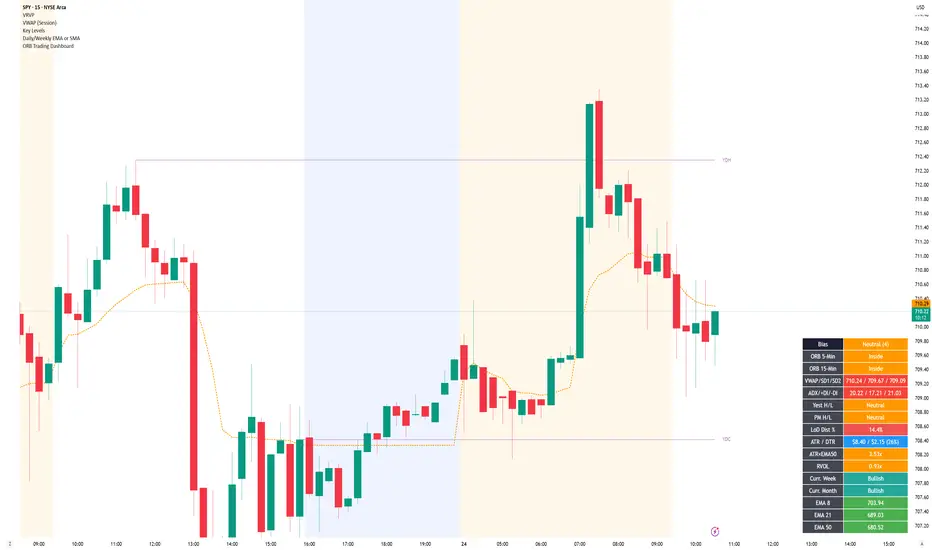
ORB Trading Dashboard is a multi-factor intraday decision-support indicator built for fast market context.
It combines opening range behavior, trend structure, momentum, volume, and key levels into a single table with a weighted directional bias.
Features
Multi-timeframe ORB Status (5m / 15m / 30m)
Weighted Bias Model (max +/-21)
EMA Trend Structure
VWAP Context with Volatility Bands
Key Level Context
Higher Timeframe Directional Filter
Momentum & Participation
Extension Awareness
Practical Dashboard Metrics
Settings
Display Options
Alert Options
Indicator Inputs
How to Use
Optional: How to Read the Table
Disclaimer
It combines opening range behavior, trend structure, momentum, volume, and key levels into a single table with a weighted directional bias.
Features
Multi-timeframe ORB Status (5m / 15m / 30m)
- Location-based ORB logic after each window completes
- Bullish above ORB high
- Bearish below ORB low
- Inside = price within range
- Time gates:
- 5m after 9:35 ET
- 15m after 9:45 ET
- 30m after 10:00 ET
Weighted Bias Model (max +/-21)
- Converts multiple market factors into a single directional score
- Bias states:
- Strong Bull
- Bullish
- Lean Bull
- Neutral
- Lean Bear
- Bearish
- Strong Bear
EMA Trend Structure
- Price vs Daily EMA 8 / 21 / 50 / 100 / 200
- EMA stacking used to grade trend quality
VWAP Context with Volatility Bands
- Session VWAP with SD1 / SD2 levels
- Bias adjusts based on price relative to VWAP and SD1
Key Level Context
- Yesterday high/low behavior
- Premarket high/low behavior
- Session position (top / mid / bottom of intraday range)
Higher Timeframe Directional Filter
- Current week open status
- Current month open status
Momentum & Participation
- DMI / ADX direction and trend strength
- Relative Volume (RVOL) confirmation or low-conviction penalty
Extension Awareness
- ATR multiples from Daily EMA50 to identify trend health vs overextension
Practical Dashboard Metrics
- LoD distance %
- ATR / DTR %
- RVOL
- Weekly / monthly status
- Optional EMA and key level plots
Settings
Display Options
- Table position
- Text size
- Toggle rows:
- ORB 5-Min
- ORB 30-Min
- Session High/Low
- Toggle chart plots:
- Daily EMA 8 / 21 / 50 / 100 / 200
- Yesterday High/Low
- Premarket High/Low
Alert Options
- Enable 5-Min ORB alerts
- Enable 15-Min ORB alerts
- Enable 30-Min ORB alerts
Indicator Inputs
- DMI/ADX length
- ADX smoothing
How to Use
Use the bias score as a structured context layer, not as a standalone signal.
Combine it with your own entries, risk management, and session awareness.
Optional: How to Read the Table
- Bias: composite directional score
- ORB 5/15/30: opening range state (Bullish / Bearish / Inside)
- VWAP / SD1 / SD2: mean and volatility context
- ADX / DI: trend strength and direction
- Key levels: yesterday, premarket, session positioning
- Metrics: LoD %, ATR/DTR, ATR vs EMA50, RVOL
Disclaimer
This indicator is for educational and informational purposes only.
Always perform your own analysis and manage risk appropriately.
Versionshinweise
- Upgraded the dashboard into separate Bias and optional Setup scoring.
- Hid Setup, score breakdowns, EMA rows, HTF rows, and ATR×EMA50 row by default.
- Made 30m ORB visible by default.
- Added richer ORB state tracking: breakout, retest, confirmed, failed.
- Added failed ORB penalties into Bias.
- Added market regime scoring using benchmark VWAP and benchmark day change.
- Added stronger SPY-relative strength weighting.
- Added stronger VWAP weighting: above/near VWAP bullish, below bearish.
- Added nearby resistance/support room scoring.
- Added session phase adjustment for early vs late ORB signals.
- Added Bias confidence text, e.g. Bullish (14, High).
- Added optional Bias Flip alerts.
- Replaced RVOL with Swing Data-style RVol / PVol using projected full-day volume.
- Added configurable average volume length.
- Changed HTF request.security calls to lookahead_off.
- Switched time logic to America/New_York.
- Kept EMA plots, yesterday levels, and premarket levels optional.
Versionshinweise
- Added the ability to show ORB lines
Open-source Skript
Ganz im Sinne von TradingView hat dieser Autor sein/ihr Script als Open-Source veröffentlicht. Auf diese Weise können nun auch andere Trader das Script rezensieren und die Funktionalität überprüfen. Vielen Dank an den Autor! Sie können das Script kostenlos verwenden, aber eine Wiederveröffentlichung des Codes unterliegt unseren Hausregeln.

Haftungsausschluss
Die Informationen und Veröffentlichungen sind nicht als Finanz-, Anlage-, Handels- oder andere Arten von Ratschlägen oder Empfehlungen gedacht, die von TradingView bereitgestellt oder gebilligt werden, und stellen diese nicht dar. Lesen Sie mehr in den Nutzungsbedingungen.
Open-source Skript
Ganz im Sinne von TradingView hat dieser Autor sein/ihr Script als Open-Source veröffentlicht. Auf diese Weise können nun auch andere Trader das Script rezensieren und die Funktionalität überprüfen. Vielen Dank an den Autor! Sie können das Script kostenlos verwenden, aber eine Wiederveröffentlichung des Codes unterliegt unseren Hausregeln.
Haftungsausschluss
Die Informationen und Veröffentlichungen sind nicht als Finanz-, Anlage-, Handels- oder andere Arten von Ratschlägen oder Empfehlungen gedacht, die von TradingView bereitgestellt oder gebilligt werden, und stellen diese nicht dar. Lesen Sie mehr in den Nutzungsbedingungen.