VWAP Master [SimpleAlgo]
⭐ OVERVIEW
Most VWAP tools give you the line, a couple of deviation bands, and leave the rest to you. We wanted the chart to do the reading: is price above value or below it, how far has it stretched, and has it started coming back.
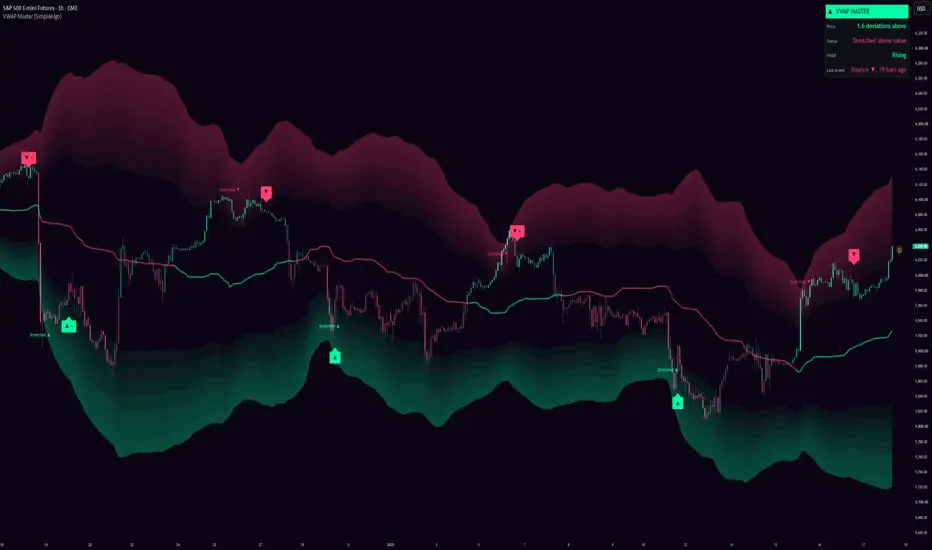
So VWAP Master draws the line, puts a wide gradient band on each side for the stretched zone, colours the candles by where price is, and prints two things only. A small "Stretched" tag when price is deep enough into a band to matter, and an arrow when it turns. The panel in the corner says the same thing in words.
⚙️ HOW IT WORKS
Tags and arrows are decided on closed bars and never move afterwards. The line, bands and candle colours update on the live bar like any moving average does. The panel reads the last closed bar so it never gets ahead of the chart.
🎯 HOW TO USE IT
Start with the line and the candles. Up colour, price is holding above value. Down colour, below. Dim candles right on the line mean it's at value and nobody has the edge yet.
The bands are the stretched zone. Price lives between them most of the time, and when it reaches into one it's a long way from value and tends to come back.
The tag is the heads-up, the arrow is the turn. The + means it went all the way to the outer edge before turning, which is the kind we pay the most attention to.
Before you act on an arrow, look at the VWAP row in the panel. A bounce up toward a rising VWAP is a pullback in an uptrend. A bounce up toward a falling one is a fade against the trend, and those need more care. If you only want the first kind, turn on "Skip bounces against the trend".
On the anchor: Rolling gives you the smooth read on any timeframe. Session is the intraday VWAP that institutions actually reference. Week or Month suit swing trading.
None of this predicts where price goes next, and an arrow isn't a buy or sell recommendation. In a strong trend price can sit inside a band for a long time. Use it alongside your own analysis and manage your risk.
💡 WHAT MAKES IT DIFFERENT
The rolling anchor keeps the picture continuous instead of restarting every session. The bands are drawn so you can see how stretched price is without reading a number. And the signal logic treats a visit to the band as one event instead of firing on every dip in and out, which is usually what makes band tools too noisy to keep on the chart.
🔔 ALERTS
🛠️ SETTINGS
📝 NOTES
Most VWAP tools give you the line, a couple of deviation bands, and leave the rest to you. We wanted the chart to do the reading: is price above value or below it, how far has it stretched, and has it started coming back.
So VWAP Master draws the line, puts a wide gradient band on each side for the stretched zone, colours the candles by where price is, and prints two things only. A small "Stretched" tag when price is deep enough into a band to matter, and an arrow when it turns. The panel in the corner says the same thing in words.
⚙️ HOW IT WORKS
- VWAP. By default it's a rolling VWAP: the volume-weighted average of typical price over the last 100 bars. It never resets, which is why the line and bands stay smooth. If you want the classic version, switch the anchor to Session, Week, Month or Year. Those restart at the start of each period, and you'll see a small break in the line where they do.
- Deviation. The volume-weighted standard deviation around VWAP over the same window. In rolling mode it's smoothed a little so the bands breathe instead of stepping. It also can't go below a third of an ATR, otherwise the first few bars after a reset would all look stretched.
- Bands. Each one runs from 1.5 to 3.25 deviations, built from seven layers a quarter deviation each, faint on the inside and brightest at the outer edge. The top band is in the down colour and the bottom one in the up colour, because that's the way a bounce off each of them goes.
- Side. The line turns the up colour once price has closed at least 0.3 deviations above VWAP and stayed there for 3 bars, and the down colour when it does the same below. Nothing prints for this. The line and the panel just change.
- Stretched. A visit to a band starts when a bar closes 1.5 deviations or more from VWAP. The first time that visit gets to 2 deviations you get a small Stretched tag, with an arrow for the direction a bounce would go. One per visit.
- Bounce. Once a visit has reached 2 deviations, the first bar that closes back inside the 1.5 line on a candle pointing at VWAP gets an arrow. The turn has to happen within 3 bars of the last close inside the band, so a slow drift back doesn't count. If the visit reached the outer edge of the band first, the arrow gets a +.
- One per visit. This is the part that keeps the chart clean. A visit isn't over until price is back within half a deviation of VWAP, no matter how many times it pokes in and out of the band on the way. You only get a second arrow on the same visit if price went at least half a deviation deeper than it had at the first one, and there are never fewer than 10 bars between two arrows on the same side.
- Trend. The panel tells you if VWAP is rising, falling or flat over the last 20 bars, and there's an option to skip any bounce that goes against that.
Tags and arrows are decided on closed bars and never move afterwards. The line, bands and candle colours update on the live bar like any moving average does. The panel reads the last closed bar so it never gets ahead of the chart.
🎯 HOW TO USE IT
Start with the line and the candles. Up colour, price is holding above value. Down colour, below. Dim candles right on the line mean it's at value and nobody has the edge yet.
The bands are the stretched zone. Price lives between them most of the time, and when it reaches into one it's a long way from value and tends to come back.
The tag is the heads-up, the arrow is the turn. The + means it went all the way to the outer edge before turning, which is the kind we pay the most attention to.
Before you act on an arrow, look at the VWAP row in the panel. A bounce up toward a rising VWAP is a pullback in an uptrend. A bounce up toward a falling one is a fade against the trend, and those need more care. If you only want the first kind, turn on "Skip bounces against the trend".
On the anchor: Rolling gives you the smooth read on any timeframe. Session is the intraday VWAP that institutions actually reference. Week or Month suit swing trading.
None of this predicts where price goes next, and an arrow isn't a buy or sell recommendation. In a strong trend price can sit inside a band for a long time. Use it alongside your own analysis and manage your risk.
💡 WHAT MAKES IT DIFFERENT
The rolling anchor keeps the picture continuous instead of restarting every session. The bands are drawn so you can see how stretched price is without reading a number. And the signal logic treats a visit to the band as one event instead of firing on every dip in and out, which is usually what makes band tools too noisy to keep on the chart.
🔔 ALERTS
- Stretched above value, Stretched below value.
- Bounce down, Bounce up. The message says if it was a + bounce.
🛠️ SETTINGS
- VWAP: anchor (Rolling, Session, Week, Month, Year), rolling length, show bands, where the band starts, band smoothing.
- Signals: bounce signals, stretched tags, skip bounces against the trend.
- Candles and panel: candle colouring, panel and position.
- Look: themes (Neon, Classic, Aurora, Ice, Custom), glow on the VWAP line, signal label distance.
📝 NOTES
- The rolling anchor is a volume-weighted moving average. It isn't the session VWAP that intraday traders usually mean by the word. Switch to Session if that's what you're after.
- Volume is whatever your data feed gives you. On forex and CFDs that's usually tick volume.
- On symbols with no volume at all it falls back to a time-weighted version, and the panel header says "no volume".
- In the anchored modes the bands are narrow right after a reset and widen as the period builds.
- Mean reversion to value works best in ranges. In a strong trend price can hold inside a band for ages. That's why the VWAP direction is in the panel and why the trend filter exists.

Access our exclusive invite-only scripts: simplealgo.io
Join our discord: discord.gg/simplealgo
Join our discord: discord.gg/simplealgo
Haftungsausschluss
Die Informationen und Veröffentlichungen sind nicht als Finanz-, Anlage-, Handels- oder andere Arten von Ratschlägen oder Empfehlungen gedacht, die von TradingView bereitgestellt oder gebilligt werden, und stellen diese nicht dar. Lesen Sie mehr in den Nutzungsbedingungen.
Access our exclusive invite-only scripts: simplealgo.io
Join our discord: discord.gg/simplealgo
Join our discord: discord.gg/simplealgo
Haftungsausschluss
Die Informationen und Veröffentlichungen sind nicht als Finanz-, Anlage-, Handels- oder andere Arten von Ratschlägen oder Empfehlungen gedacht, die von TradingView bereitgestellt oder gebilligt werden, und stellen diese nicht dar. Lesen Sie mehr in den Nutzungsbedingungen.